USPS Shipping Plugin for WooCommerce with Print Label by PluginHive

What Is the PH USPS Shipping Plugin for WooCommerce with Print Label & What Does It Do?

The WooCommerce USPS Shipping Plugin by PluginHive is a powerful shipping integration that connects your WooCommerce store with the USPS using API integration. It allows store owners to access official USPS shipping rates & services directly from the WooCommerce dashboard. Built for eCommerce businesses, the plugin simplifies both domestic & international USPS shipping. It centralizes USPS shipping within WooCommerce for easy workflow.

The plugin displays live USPS shipping rates at checkout & enables merchants to print USPS shipping labels from within their store. It automatically adds USPS tracking numbers to orders & customer emails for better transparency. The system supports Priority Mail, Flat Rate & international shipping with customs documentation. Automating rate calculation, label printing, and tracking updates, it improves shipping accuracy and operational efficiency.

Key Features of PH USPS Shipping Plugin for WooCommerce with Print Label

Real-Time USPS Rates

Fetches up-to-date USPS shipping prices based on product weight and dimensions.

USPS Label Printing

Allows printing single or bulk USPS shipping labels directly from WooCommerce orders.

Shipment Tracking Management

Attaches USPS tracking numbers to orders and keeps them updated in WooCommerce.

Shipment Tracking Visibility

Controls whether USPS tracking details are visible to customers in emails and accounts.

Domestic & Global Services

Supports USPS domestic and international shipping options within WooCommerce.

Multi-Package Support

Handles orders that require more than one package or box for shipment.

Estimated Delivery Dates

Displays USPS delivery time estimates and transit information at checkout.

Fallback Rate Option

Provides a backup shipping rate when live USPS rates cannot be retrieved.

Handling & Price Adjustments

Lets store owners add handling fees or adjust USPS shipping costs.

Custom Packaging Rules

Defines how products are packed for accurate rate calculation and shipping.

Product Dimension Settings

Uses product weight and size data for precise USPS shipping calculations.

USPS Flat-Rate Boxes

Supports USPS flat-rate boxes and envelopes for fixed-cost shipping.

Shipping Label Formats

Offers multiple label formats including PDF, PNG, and ZPL for printers.

Customer Reference Numbers

Adds custom order or invoice numbers to USPS shipping labels.

International Customs Forms

Prints required CN22/CN23 customs documentation for global shipments.

Special USPS Services

Supports USPS insurance, certified mail, delivery signature & restricted delivery.

Supported USPS Shipping Services

USPS Domestic Shipping Services

  • USPS Ground Advantage
  • USPS Priority Mail
  • USPS Priority Mail Express
  • USPS Media Mail
  • USPS Library Mail
  • Bound Printed Matter

USPS International Shipping Services

  • USPS Priority Mail International
  • USPS Priority Mail Express International
  • First Class Package International Service

Supported USPS Flat Rate Packages

  • Flat Rate Envelope
  • Flat Rate Legal Envelope
  • Flat Rate Padded Envelope
  • Flat Rate Boxes
  • USPS Flat Rate Envelope
  • USPS Flat Rate Legal Envelope
why woocommerce store need usps

Why WooCommerce Stores Need USPS Integration?

WooCommerce stores need USPS Shipping integration. 

  • To Display Accurate Live Shipping Rates: Automatically calculates USPS rates by country, weight, and zone, preventing overcharging or undercharging and reducing cart abandonment.
  • To Reduce Shipping Costs Effectively: USPS often provides lower domestic and small international package rates compared to UPS or FedEx, helping store owners save money.

  • To Streamline Label Printing: Print single or bulk USPS shipping labels directly from WooCommerce, eliminating manual entry, portal logins, and repetitive tasks.

  • To Automate Order tracking and notifications: Send real-time USPS tracking updates to customers via email, reducing support inquiries and improving the post-purchase experience.

  • To Simplify Domestic & International Shipping: Handles USPS First-Class, Priority, Priority Mail Express, and international services with automated customs forms for global shipping.

  • To Minimize Manual Shipping Errors: Ensures accurate shipping based on product weight, dimensions, and USPS service rules, minimizing mislabeling and delivery delays.

  • To Optimize WooCommerce Shipping Workflows: Streamlines order fulfillment by automating USPS rate calculation, label printing, tracking, and notifications, saving time and labor costs.

  • To Expand Business Worldwide: Enables stores to sell confidently across the U.S. and internationally by integrating reliable USPS shipping services.

  • To Access USPS Specialty Services: Offers options like flat-rate shipping, delivery confirmation, insurance, certified mail, and restricted delivery for added flexibility.

Who Should Use USPS Shipping in WooCommerce?

  • U.S.-based WooCommerce stores ship domestically: Ideal for businesses that need real-time USPS rates, automated label printing, and shipment tracking directly inside the WooCommerce dashboard for smooth daily fulfillment.

  • WooCommerce stores expanding from the U.S. to international markets: USPS delivers to 180+ countries, making it suitable for businesses shipping to Canada, the UK, Europe, Asia, Australia, and other global destinations without managing multiple carriers.

  • Stores selling lightweight and small parcel products: Best suited for apparel, books, cosmetics, accessories, supplements, and small electronics. USPS services like First-Class Package, Ground Advantage, and Priority Mail are cost-effective for parcels typically under 1–5 lbs.

  • Businesses shipping documents, samples, or compact packages: USPS offers envelope-based and flat-rate shipping options that simplify packaging and reduce costs for low-weight shipments.

  • WooCommerce brands serving U.S. territories and military addresses (APO/FPO/DPO): USPS is often the required and most reliable carrier for delivering to these regions.

  • Small to mid-sized eCommerce businesses automating fulfillment: Suitable for stores that want bulk label generation, automated tracking updates, and USPS API integration to reduce manual processing and shipping errors.

  • Growing WooCommerce stores aiming to reduce cart abandonment:
    Accurate USPS shipping rates at checkout based on weight, dimensions, and destination help improve pricing transparency for both domestic and international orders.

who should use usps plugin
technical compatibility

Technical Compatibility & Integrations of PH USPS Shipping Plugin for WooCommerce with Print Label

  • Compatible with WordPress, ensuring smooth performance within the WordPress ecosystem and adherence to the latest coding standards.

  • Fully integrated with WooCommerce, allowing real-time USPS shipping rates, label generation, and tracking directly from the WooCommerce admin dashboard.

  • Official USPS REST API integration, enabling accurate live shipping rates, service selection, and shipment processing for both domestic and international orders.

  • Supports USPS contract-based discounted rates, allowing businesses to use their negotiated USPS pricing for accurate cost calculation at checkout.

  • Multilingual compatibility with WPML, making it suitable for WooCommerce stores operating in multiple languages and serving international customers.

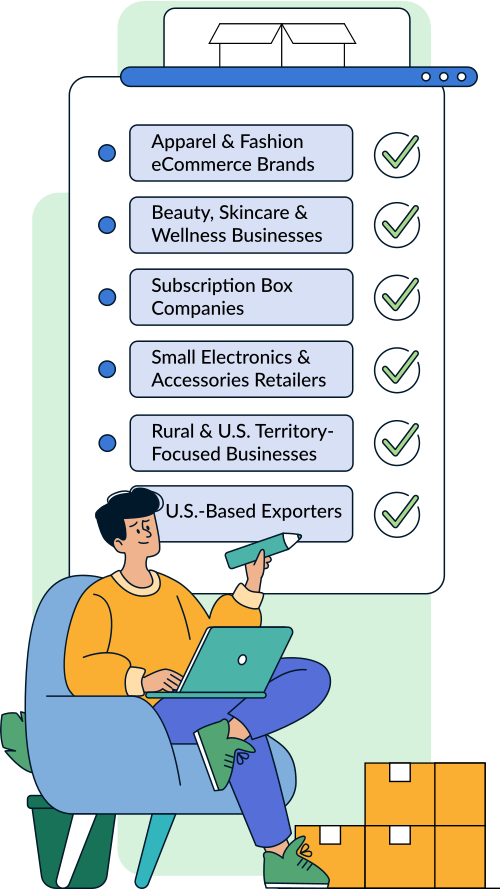
Common Business Use Cases

  • Apparel & Fashion eCommerce Brands: Clothing and accessory stores ship lightweight parcels daily and use USPS First-Class Package and Priority Mail for affordable U.S. delivery, plus Priority Mail International for global customers.
  • Beauty, Skincare & Wellness Businesses: Cosmetic and supplement brands rely on USPS Ground Advantage for economical domestic shipping and First-Class Package International for lightweight global expansion.
  • Bookstores & Educational Publishers: Sellers of books and printed materials prefer USPS, especially Media Mail and lightweight services, to reduce shipping costs while ensuring nationwide coverage.
  • Print-on-Demand & Custom Merchandise Sellers: T-shirt, mug, and personalized product businesses choose USPS for predictable small-parcel rates, automated labels, and built-in tracking within WooCommerce.
  • Subscription Box Companies: Monthly snack, hobby, and beauty box brands use USPS Ground Advantage and Priority Mail Flat-Rate services to manage recurring shipments with controlled costs.
  • Small Electronics & Accessories Retailers: Sellers of phone cases and compact gadgets prefer USPS lightweight services for competitive pricing and use Priority Mail when faster delivery is needed.
  • Military, Rural & U.S. Territory-Focused Businesses: Stores shipping to APO/FPO/DPO addresses, Puerto Rico, Guam, and rural areas depend on USPS for reliable delivery without residential surcharges.
  • U.S.-Based Exporters & Growing Global Brands: WooCommerce businesses expanding internationally use USPS services to ship to 180+ countries without managing multiple carrier integrations.
common usps business cases

Alternatives to the PH USPS Shipping Plugin for WooCommerce

If you are evaluating USPS shipping solutions for WooCommerce, several plugins provide USPS rate calculation and related functionality. Most alternatives primarily focus on displaying shipping rates at checkout or configuring rule-based shipping methods.

  • WooCommerce USPS Shipping Method (Official Extension): Displays real-time USPS shipping rates at checkout. Primarily focused on rate calculation without built-in shipment creation or label printing.
  • ELEX WooCommerce USPS Shipping Plugin with Print Label: Supports live USPS rates and shipping label generation. Advanced configurations and workflow controls may depend on premium tiers.

How PluginHive’s USPS Shipping Plugin Differs

PH USPS Shipping Plugin for WooCommerce with Print Label is structured as a full USPS shipping automation solution rather than only a rate display tool. It supports the complete WooCommerce shipping workflow within a single system. It includes:

  • Real-time USPS shipping rates at cart and checkout using USPS REST API
  • Shipping label creation and printing directly from WooCommerce orders
  • Automatic tracking number assignment with customer email notifications
  • Support for both domestic and international USPS services
  • Integration with USPS contract-based discounted rates
  • Multi-package handling with weight and dimension-based packing logic
  • Centralized shipment management within the WooCommerce dashboard

In conclusion, the choice depends on your store’s shipping needs. If you only require USPS rate display at checkout, basic extensions may be sufficient. If you need end-to-end USPS shipping management, including label generation, tracking updates, and packaging logic within WooCommerce, a more comprehensive solution may be more suitable.

Why Businesses Trust PluginHive

Powering 120000+ WooCommerce Stores

Earned 4500+ Authentic Five-Star Ratings

98% Satisfaction Rate From Real Users

Risk-Free 30-Day Money-Back Guarantee

Guaranteed 8-Hour Issue Resolution

24×5 Dedicated Customer Support

reviews and ratings for shipment tracking

Frequently Asked Questions (FAQs)

1. How do I add USPS live shipping rates to my WooCommerce checkout?

You need a USPS shipping plugin that connects WooCommerce to the USPS REST API. After entering your USPS API credentials, the plugin retrieves real-time rates based on product weight, dimensions, origin, and destination. The PluginHive WooCommerce USPS Shipping Plugin supports live rate display at both cart and checkout.

2. Do I need a USPS account or API credentials to use USPS shipping in WooCommerce?

Yes. USPS API credentials are required to fetch live rates and create shipments. You must register with USPS to obtain API access before configuring it in WooCommerce.

3. Why are USPS shipping rates not showing at checkout?

Common causes include missing product weights, incorrect unit settings, disabled USPS services, invalid API credentials, or unsupported destination addresses. Reviewing these settings typically resolves the issue.

4. Which USPS services can I display in WooCommerce?

You can display services such as First-Class Package, Ground Advantage, Priority Mail, Priority Mail Express, Media Mail, and international services like First-Class Package International and Priority Mail International, depending on your plugin configuration.

5. Can I print USPS shipping labels directly from WooCommerce orders?

Not all USPS plugins support label printing. Some only provide rate calculation. Solutions like the PluginHive WooCommerce USPS Shipping Plugin allow you to generate and download USPS shipping labels directly from the WooCommerce order page.

6. How do I automatically add USPS tracking numbers to WooCommerce orders?

When shipment creation is supported, tracking numbers are generated automatically and attached to the order. The PluginHive WooCommerce USPS Shipping Plugin adds tracking details to the order and includes them in customer email notifications.

7. Does USPS shipping in WooCommerce support international delivery?

Yes. USPS delivers to more than 180 countries worldwide. A compatible WooCommerce USPS plugin allows you to display international services and generate international shipping labels.

8. Can I use USPS contract or commercial discounted rates in WooCommerce?

If you have negotiated USPS rates, certain plugins allow you to enable contract-based pricing instead of retail rates. The PluginHive WooCommerce USPS Shipping Plugin supports commercial and contract rate usage when properly configured.

9. How are USPS shipping rates calculated in WooCommerce?

Rates are calculated based on origin ZIP code, destination address, package weight, dimensions, and the selected USPS service. Dimensional weight rules may apply for larger packages.

10. Can I split a single WooCommerce order into multiple USPS packages automatically?

Basic rate plugins may not support multi-package handling. Advanced solutions, including the PluginHive WooCommerce USPS Shipping Plugin, support automatic order splitting based on weight and dimension-based packing rules.

11. How do I enable or disable specific USPS services at checkout?

Most USPS shipping plugins allow you to select which USPS services to display at checkout, giving you control over available shipping options.

12. Does USPS support shipping to APO/FPO/DPO military addresses and U.S. territories?

Yes. USPS is the primary carrier for military addresses and U.S. territories, and supported WooCommerce plugins allow these destinations during checkout.

13. Why does WooCommerce show “No shipping methods available” for USPS?

This usually occurs due to missing product weight or dimensions, disabled shipping zones, API authentication errors, or unsupported services. Checking configuration settings generally resolves the issue.

14. Can I configure fallback shipping rates if the USPS API fails?

Some USPS shipping plugins allow fallback or flat-rate configuration when live rates are unavailable. The PluginHive WooCommerce USPS Shipping Plugin includes fallback rate options to prevent checkout disruptions.

15. Why is the USPS shipping cost different from the USPS website?

Differences can occur due to retail versus commercial rates, dimensional weight calculations, packaging rules, or selected service options. Ensuring correct packaging and rate configuration improves pricing accuracy.

You are protected by our 30-day money-back guarantee