


Managing a vacation rental business means balancing guest trust with financial security, and deposits are right at the heart of that balance. Whether you’re listing a beachside cottage or an urban apartment, collecting a vacation rental deposit upfront protects your property, confirms guest intent, and keeps your cash flow predictable. For property owners running their bookings through WooCommerce, this process doesn’t have to be complicated or manual.
The PH Deposits for WooCommerce plugin gives you a clean, flexible way to collect partial payments or security deposits for rentals directly from your product pages. Instead of chasing guests for payments or relying on third-party booking platforms that eat into your margins, you can set up deposit rules on your WooCommerce rental products and let the system do the work. This guide walks you through exactly how to do it – from setup to best practices.
Table of Contents
- Why Vacation Rental Deposits Matter for Property Owners
- How to Accept Vacation Rental Deposits in WooCommerce
- Real-World Example: How Rental Deposits Help Property Owners Secure Bookings
- Best Practices for Collecting Vacation Rental Deposits in WooCommerce
- Conclusion
- FAQs
Why Vacation Rental Deposits Matter for Property Owners
For any property owner, a booking without a deposit is little more than a promise. Deposits create a financial commitment that separates serious guests from casual browsers, and they protect you when things go sideways.
Here’s why deposits are essential for rental properties:
- Reduce no-shows and cancellations: guests with money on the line are far less likely to back out.
- Cover potential damages: a security deposit gives you a financial buffer if a guest leaves the property in poor condition.
- Improve cash flow: partial payments upfront mean you’re not waiting until check-in to see revenue.
- Protect peak season revenue: deposits secure your highest-demand dates from guests who never show.
Without a structured deposit system, even a well-run WooCommerce property store leaves money on the table. Automating this process doesn’t just save time; it adds professionalism that guests genuinely respect.
How to Accept Vacation Rental Deposits in WooCommerce
Accepting deposits for your vacation rental in WooCommerce is simpler than you might think. The PH Deposits for WooCommerce plugin gives you full control over how and when your guests pay.
- Set Up Your Deposit Rules: Head over to WooCommerce Deposits -> Deposit Settings. Enable the Deposits option, and then decide how you want guests to pay. You can make deposits mandatory, so guests must pay partially to confirm or keep it optional and let guests choose between a deposit or full payment. For vacation rentals, mandatory deposits are the smarter move as they filter out guests who aren’t serious.
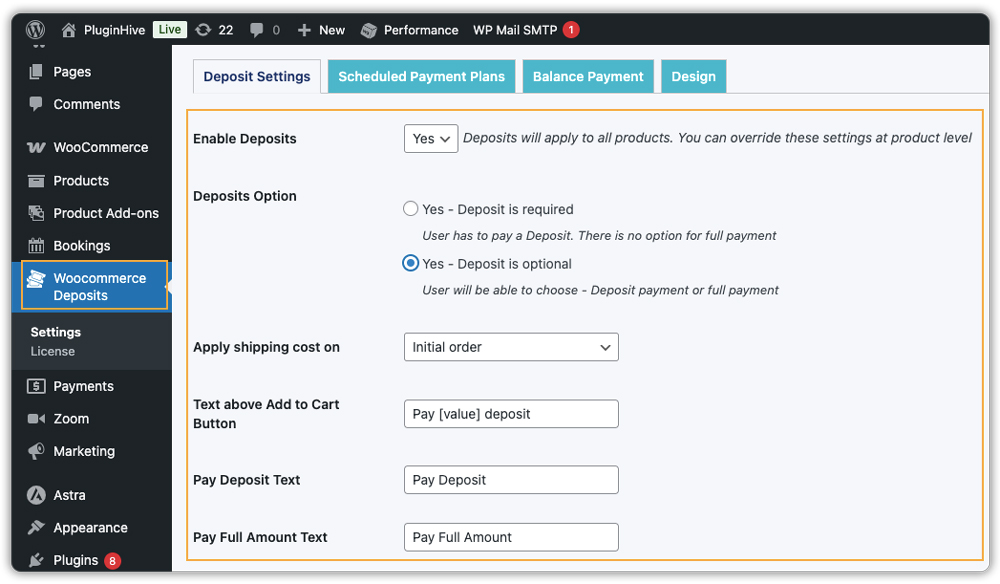
You can also customize the messages and buttons on product pages so it’s clear how much they need to pay upfront.
- Choose Your Deposit Type: The plugin offers three options. A percentage deposit collects a portion of the total, for example, 30% upfront, with the rest due before check-in. A fixed deposit means guests always pay a set flat amount regardless of the booking price. For longer stays or high-value properties, a scheduled payment plan splits the total into weekly or monthly installments. For most rental owners, a percentage deposit of 20–30% works best.

- Customize It Per Property: The plugin lets you override global settings at the product level. A higher deposit on your luxury cabin, a smaller one on your budget studio, all configured directly on each product page under the Deposits tab.

For example, let’s say you have an Ocean View Apartment listed in your WooCommerce store for $700 per night stay. Instead of asking guests to pay the full amount upfront, you can set a 30% deposit. The guest pays $210 per night now to confirm the booking and completes the remaining balance later. This makes higher-value stays feel more accessible for travellers while giving you a secure reservation without waiting for the full payment.

- Manage the Remaining Balance Once a deposit is paid, the plugin tracks the remaining balance automatically and can generate a separate payment order when needed. Built-in email reminders notify guests before the balance is due; no manual follow-up required.

For the full setup walkthrough, refer to the plugin setup guide, which covers every setting in detail.
Which WooCommerce Deposit Option Works Best for Your Vacation Rentals?
Not all rental properties are the same, and neither are their deposit needs. Here’s a comparison to help you pick the right deposit structure.
| Deposit Type | How It Works | Best For |
|---|---|---|
| Percentage Deposit | The guest pays a set % of the total booking price upfront | Standard vacation rentals with varying nightly rates |
| Fixed Deposit | The guest pays a flat amount regardless of the booking total | Short stays or budget-friendly rental properties |
| Scheduled Payment Plan | Total is split into weekly or monthly installments | Long stays or high-value luxury properties |
| Required Deposit | The guest has no choice; partial payment is mandatory to confirm | High-demand or peak-season bookings |
| Optional Deposit | The guest chooses between a deposit and full payment at checkout | Properties targeting flexible or repeat guests |
One thing worth noting, the PH Deposits for WooCommerce plugin lets you mix and match these options across different properties. So you’re never locked into one approach for your entire store. Each WooCommerce rental product can have its own deposit rule, giving you the flexibility to protect your highest-value properties differently from your entry-level ones.
Real-World Example: How Rental Deposits Help Property Owners Secure Bookings
Let’s say you own a vacation rental listed on your WooCommerce store. It gets solid demand during peak seasons, and every confirmed booking matters. A last-minute cancellation doesn’t just hurt your revenue; it leaves you with no time to rebook.
The Challenges You Will Face
- Guests reserve dates with no financial commitment, leading to no-shows and last-minute cancellations.
- Held peak-season dates go empty when guests back out, costing you your highest-earning opportunities.
- No security deposit means no protection if a guest damages your property.
- Tracking balance payments across multiple bookings manually becomes messy fast.
How It Can Be Solved
With the PH Deposits for WooCommerce plugin, you can fix this with a simple, automated setup:
- Require a deposit at checkout so every booking carries a real financial commitment.
- Collect a security deposit before check-in to cover any potential property damage.
- Use scheduled payment plans for longer stays to make balance payments easier for guests.
- Let the plugin send automatic payment reminders; no manual follow-ups needed.
As a result, your calendar stays protected, revenue becomes predictable, and managing bookings feels effortless.
Best Practices for Collecting Vacation Rental Deposits in WooCommerce
A good deposit setup does more than just collect payments; it builds trust, prevents confusion, and keeps your booking workflow smooth from start to finish. Here are the practices that help vacation rental owners create a reliable and professional payment experience.
- Show Clear Deposit Messaging: Add simple, direct text like “Reserve now, pay the balance later” on your rental pages so guests understand the payment structure before reaching checkout.
- Pair Deposits With a Booking Calendar: Use the Bookings and Appointments for WooCommerce plugin by PluginHive so guests can select check-in and check-out dates first and then pay the deposit in one seamless booking flow.
- Add a Terms and Conditions Checkbox at Checkout: Include a mandatory agreement field using the PH Product Add-Ons for WooCommerce plugin to ensure guests accept cancellation rules, house policies, and liability terms before confirming the reservation.
- Adjust Deposits Based on the Season: Use higher deposits during busy seasons to secure bookings and lower deposits during slower periods to encourage more reservations.
- Set Up Automated Balance Payment Reminders: Enable email reminders within the Deposits plugin so guests receive notifications before the remaining payment is due, reducing manual follow-ups.
When these practices work together, clear payment terms, structured booking tools, agreed policies, and automated reminders – your WooCommerce vacation rental setup feels organized, professional, and easy for guests to trust.
If you’re specifically offering weekly stays, this guide on Offer weekly home rentals with WooCommerce Bookings shows you exactly how to structure it.
Conclusion
Running a vacation rental business on WooCommerce gives you full control over how you manage bookings, and deposits play a big role in making that work smoothly. By collecting deposits automatically, you can secure income, reduce cancellations, and offer guests a more confident booking experience. The PH Deposits for WooCommerce plugin fits easily into your existing store, whether you manage one property or multiple rental listings.
Getting started is simple when you follow a clear deposit strategy that matches your rental style. Once set up, the plugin works quietly in the background, handling payments and reminders so you can focus on managing your properties. If you need help setting up this in your WooCommerce store, the PluginHive support team is ready to assist you with configuration and guidance.
FAQs
- Can WooCommerce accept vacation rental deposits by default?
No. WooCommerce doesn’t include built-in deposit features. You’ll need the PH Deposits for WooCommerce plugin to collect partial payments upfront and manage the balance later. - What deposit types can I use for WooCommerce vacation rentals?
You can offer percentage-based deposits, fixed upfront amounts, or scheduled payment plans — each suited to different rental types and booking values. - Can WooCommerce bookings and deposits work together?
Yes. Combining the Bookings and Appointments plugin with the Deposits plugin lets guests select dates and pay a deposit in one seamless checkout flow. - Is the security deposit for my vacation rental refundable through the plugin?
The plugin handles the collection of security deposits. Refunds are processed manually through WooCommerce’s standard refund system, giving you full control over when and how much is returned after the guest checks out.
