


Shipping plays a crucial role in the success of any WooCommerce store, especially when serving both domestic and international customers. Offering reliable shipping options at checkout builds trust. UPS is one of the world’s leading courier companies, providing a wide range of domestic and international delivery services designed for businesses of all sizes.
In this guide, you’ll learn how to add UPS domestic and international shipping services to your WooCommerce store and streamline your shipping operations for smoother global deliveries.
On This Page
- Why Use UPS for WooCommerce Shipping?
- Prerequisites Before You Begin
- How to Add UPS Shipping Services in WooCommerce
- Real-World Use Case
- Conclusion
- FAQs
Why Use UPS for WooCommerce Shipping?
Integrating UPS with your WooCommerce store provides reliable, flexible, and scalable shipping solutions for both domestic and international orders. Here’s why UPS is a strong choice for eCommerce businesses:
1. Extensive Domestic and Global Coverage
UPS operates in more than 220 countries and territories, allowing you to serve customers locally and worldwide. Whether you’re shipping within your country or expanding internationally, UPS offers dependable delivery networks to support your growth.
2. Multiple Delivery Speed Options
UPS provides a variety of services, including cost-effective ground shipping and time-definite express delivery. This flexibility allows customers to choose shipping options based on urgency and budget, helping reduce cart abandonment.
3. Real-Time Rate Accuracy
By integrating UPS with WooCommerce, you can display live shipping rates at checkout. Rates are calculated based on package weight, dimensions, and destination, ensuring transparency and preventing undercharging or overcharging.
4. Business Discounts and Cost Efficiency
With a UPS business account, merchants can access negotiated shipping rates and volume-based discounts. As order volume increases, shipping costs can be optimized to maintain healthy profit margins.
5. Reliable Tracking and Customer Confidence
UPS offers detailed tracking updates for both domestic and international shipments. Providing tracking information automatically enhances customer trust and improves post-purchase communication.
6. International Shipping Support
For cross-border shipments, UPS supports customs documentation, commercial invoices, and duties handling. This makes international order fulfillment smoother and more compliant.
By integrating UPS shipping services into WooCommerce, you can create a streamlined fulfillment process while offering customers reliable delivery options.
Prerequisites Before You Begin
Before adding UPS shipping services to your WooCommerce store, make sure you have the necessary accounts and tools ready to ensure a smooth integration.
1. UPS Account
You need an active UPS business account with API credentials (account number, key, and password). This allows your WooCommerce store to fetch live shipping rates, generate labels, and manage both domestic and international shipments reliably.
2. Plugins to Integrate UPS
To connect WooCommerce with UPS, you’ll need a shipping plugin such as:
- WooCommerce UPS Shipping Plugin with Print Label – A dedicated plugin to display live UPS rates, generate shipping labels, and manage tracking directly from WooCommerce.
- Multi-Carrier Shipping Plugin for WooCommerce – lets you offer UPS alongside other carriers such as FedEx, USPS, DHL, and Stamps.com, providing real-time rates and multiple shipping options in one place.
- WooCommerce Shipping Services – An all-in-one solution to handle multiple carriers, automate label printing, and send tracking updates without leaving WooCommerce.
3. Product Details
Ensure all your WooCommerce products have accurate weight and dimensions, as UPS requires these details for precise shipping rate calculations.
With these prerequisites in place, your store will be ready to start adding UPS domestic and international shipping services efficiently.
How to Add UPS Shipping Services in WooCommerce
In this section, we’ll focus on how to add and configure UPS shipping services using the WooCommerce UPS Shipping Plugin with Print Label. This plugin allows you to integrate UPS directly into your WooCommerce store, display live shipping rates, generate labels, and manage both domestic and international shipments from a single dashboard.
For step-by-step instructions on setting up UPS shipping, visit the PluginHive WooCommerce UPS Shipping Guide .
Adding UPS Domestic Shipping Services
To add and offer UPS domestic shipping:
In the plugin settings, navigate to the Rates & Services section and enable the domestic UPS services you want to offer, such as UPS Ground, UPS 3 Day Select, UPS 2nd Day Air, and UPS Next Day Air.
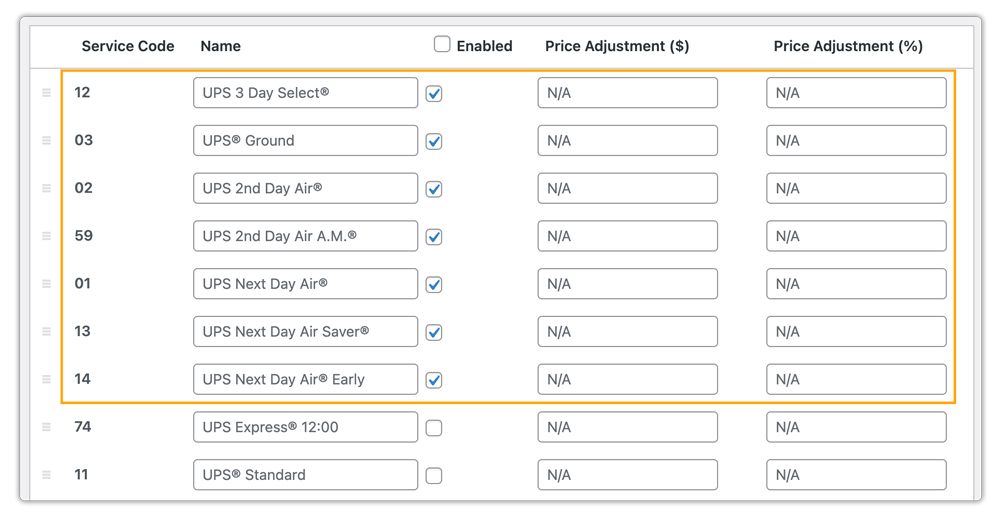
The plugin fetches real-time shipping rates accordingly, directly from your UPS account based on product weight, dimensions, and destination. This ensures customers see accurate shipping costs at checkout.

You can generate UPS shipping labels instantly from the WooCommerce order page. All shipment details are automatically pulled from the order, reducing manual entry and fulfillment errors.

Adding UPS International Shipping Services
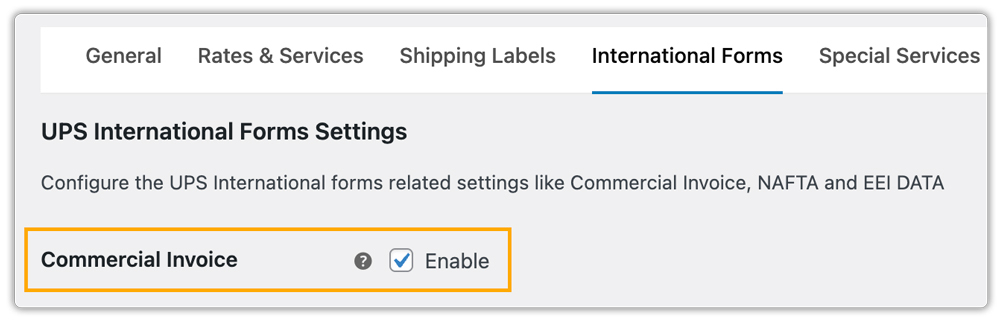
The plugin also allows you to configure UPS international shipping services easily. You can enable the Commercial Invoice option in the plugin settings, which will enable your you to print the UPS commercial invoice from your store itself.
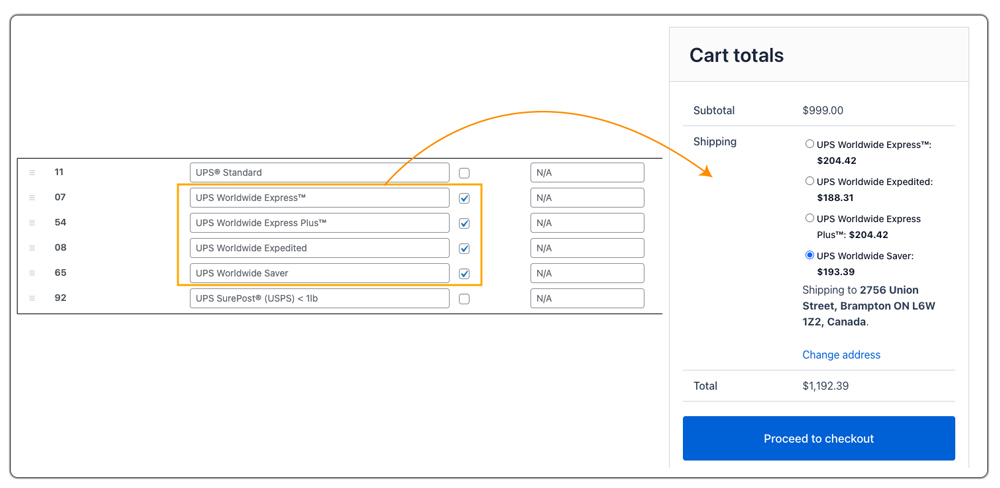
Then, enable the international UPS services you wish to offer, such as UPS Worldwide Expedited, UPS Worldwide Saver, or UPS Worldwide Express. Live international rates will automatically appear at checkout based on the customer’s destination.
You can generate and print UPS international shipping labels, along with commercial invoices and required customs documents, directly from WooCommerce.
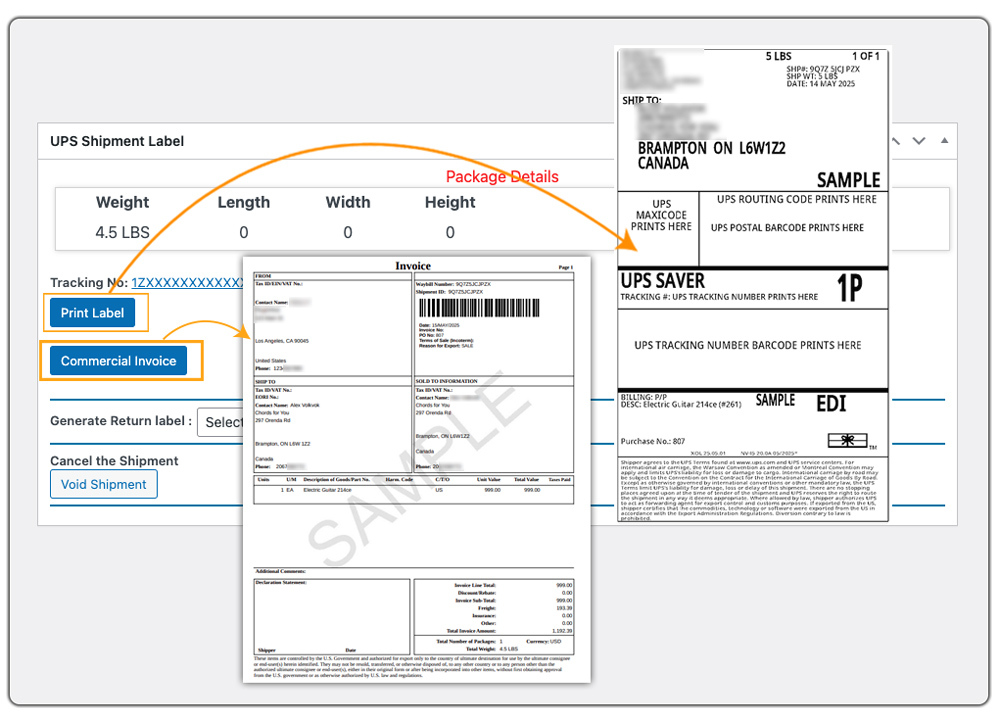
By configuring both domestic and international UPS services, you can offer flexible delivery options while keeping your entire shipping workflow centralized inside WooCommerce.
Real-World Use Case: A U.S. Store Expanding Globally with UPS
A U.S.-based WooCommerce store initially managed all UPS shipments manually through the UPS online portal. For a small number of domestic orders, this process worked. The store owner would log in to UPS, enter shipment details, generate labels, and then manually update tracking information in WooCommerce.
As the business grew, order volume increased significantly. The store also began receiving international orders and wanted to expand into global markets. Managing everything manually through the UPS portal became time-consuming and inefficient. Entering shipment details twice slowed down fulfillment and increased the risk of errors.
To scale operations, the store integrated UPS directly into WooCommerce using the WooCommerce UPS Shipping Plugin with Print Label.
After integration:
- Live UPS domestic and international rates were displayed automatically at checkout.
- Customers could choose delivery options based on cost and speed.
- Shipping labels were generated directly from WooCommerce orders.
- Commercial invoices and customs documents were created for international shipments.
- Tracking details were automatically synced with customer orders.
- UPS pickups could be scheduled without leaving the WooCommerce dashboard.
By centralizing everything inside WooCommerce, the store streamlined fulfillment and successfully expanded its business to international markets without adding operational complexity.
Conclusion
Adding UPS domestic and international services to your WooCommerce store helps you create a more professional and scalable shipping setup. With the right configuration, you can simplify fulfillment, offer flexible delivery choices, and confidently serve customers across borders.
If you need help with setup, customization, or troubleshooting, you can reach out to PluginHive support here: PluginHive Support
FAQs
Q. Can I hide certain UPS shipping methods based on package size or weight?
Yes. You can hide slower or unsuitable shipping methods for specific package conditions. The PH Hide WooCommerce Shipping Methods & Rate Adjustment Plugin can help you manage this effectively.
Q. Can I set different UPS shipping rates based on cart weight, quantity, or product type?
Absolutely. Using the WooCommerce Table Rate Shipping Pro Plugin, you can define flexible UPS shipping rules based on weight, quantity, destination, or product category.
Q. Can I provide advanced shipment tracking and delivery notifications for UPS orders?
Yes. You can track orders with the UPS plugin. Still, for advanced tracking features, you can use the WooCommerce Shipment Tracking Pro Plugin, which helps keep customers informed throughout the delivery process.
Q. Can I show estimated delivery dates along with live UPS rates?
Yes. The UPS plugin supports estimated delivery dates. For more advanced options, such as configuring holidays, working days, and custom delivery rules, you can use the Estimated Delivery Date Plugin for WooCommerce.
