




Running a farm is hard work, and running farm experiences like tours, workshops, or seasonal activities adds a whole new level of coordination. From managing group visits and weekend workshops to handling seasonal availability and add-ons like lunches or souvenir kits, agritourism businesses need more than just a contact form to stay organized.
In this article, we’ll show you how to manage and sell your farm experiences online using the WooCommerce Bookings and Appointments plugin by PluginHive. Whether you offer guided farm tours, tractor rides, or cheese-making sessions, this solution helps you simplify scheduling, reduce manual effort, and offer a smooth booking experience to your customers.
Table of Contents
- Common Booking Challenges for Agritourism Businesses
- Automate Your Farm Bookings with WooCommerce
- Real-World Example
- Final Thoughts
- FAQs
Common Booking Challenges for Agritourism Businesses
Running agritourism experiences means wearing many hats, from farmer to host to coordinator. But when it comes to booking management, things can quickly get overwhelming without the right system in place.
Here are some of the common challenges farm-based service businesses often face:
- Seasonal Availability: Many farm activities are tied to specific seasons, like berry picking in summer or pumpkin patches in fall. Managing this manually can lead to bookings when the activity isn’t even available.
- Group Bookings & Capacity Limits: Families, school groups, or tourists often book together. Without participant limits or group settings, it’s easy to overbook or create a poor experience due to overcrowding.
- Varying Schedules for Different Activities: A cheese-making workshop might run once a week, while tractor rides are available daily. Handling different availability rules for each offering isn’t easy without flexible booking tools.
- Manual Coordination of Resources: Whether it’s a guide, a tractor, or a space like a barn, assigning and tracking resources manually can lead to scheduling conflicts.
- Add-ons and Extras: Visitors may want to add a farm-fresh lunch or buy a produce basket during booking. Without built-in upsell options, these extras are often missed or handled separately.
- Cancellations and Reschedules: Weather, emergencies, or travel delays mean visitors may need to cancel or change their bookings. Managing this manually eats up time and can affect your schedule.
These challenges can slow you down and create friction for your customers. That’s why having a reliable booking system tailored for agritourism is key to running things smoothly.
Farm Booking Automation Made Easy with WooCommerce
Manually handling farm visit schedules, tour groups, and seasonal activities can quickly become chaotic. With WooCommerce and the WooCommerce Bookings and Appointments, you can automate the entire booking process, saving time, avoiding errors, and giving your visitors a smooth experience.
Note: To get started, make sure the PluginHive Bookings plugin is installed, activated, and configured. Follow this quick setup guide.
Here’s how the plugin solves key booking challenges for agritourism businesses:
- Control Availability with Ease
Only want bookings during weekends or harvest months? You can define availability based on time, day, or season- no manual coordination is required.

Need help setting up booking availability? Check this guide.
- Set Duration for Each Activity
Whether your farm tour runs for 60 minutes, your cheese-making workshop takes 2 hours, or your fruit-picking event is a 90-minute session, you can set exact durations for each booking.

You can even add buffer time between sessions for cleaning, setup, or rest.
Learn how to set buffer time between sessions
- Manage Cancellations & Rescheduling
Define flexible cancellation windows, like allowing changes up to 24 hours before the visit. This keeps things fair for your customers while protecting your schedule.
Set up booking cancellation rules.
- Set Participant Limits
You can define how many people can book per session, whether it’s a 10-person tour or a private cheese-making class. It helps keep group sizes manageable and experiences personalized. Flexible Pricing for Adults, Kids, and Groups
Set different prices based on age or group size, ideal for family bookings, school tours, or senior groups.

See how to manage participants.
Add Optional Extras Like Lunch or Produce Baskets
Let visitors add a farm-fresh lunch, souvenir kit, or fruit basket during booking. Use Booking Resources or PH WooCommerce Product Add-Ons to upsell experiences easily.
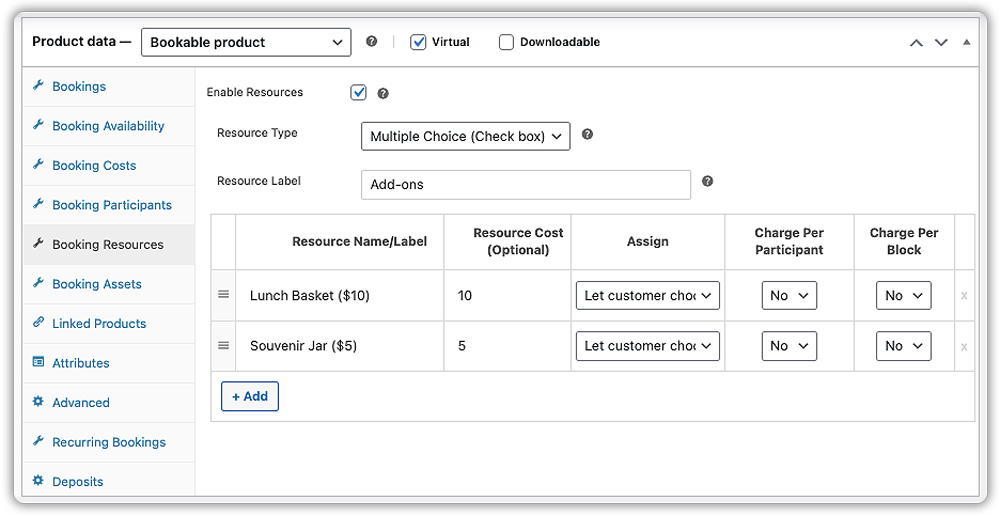
Learn how to set up product add-ons or booking resources.
This is exactly how the farm booking experience will look on your website’s frontend:

- Send Automatic Email Confirmations & Reminders
Customers receive instant confirmation emails and reminders before their visit, helping reduce no-shows and confusion.

Learn how to enable notifications.
- Sync Farm Bookings with Calendar
Easily sync all bookings with your Calendar(Google, iCal, or Outlook). Customers can also add them to their calendars directly from the confirmation page.

Sync bookings with Google Calendar

Sync bookings with Microsoft Outlook

Export bookings to iCalendar

With these features in place, your WooCommerce store is fully equipped to manage farm experiences professionally, helping you focus on creating memorable visits while the system handles the rest.
Real-World Example: Simplifying Farm Tour Bookings with WooCommerce
Let’s say you run a WooCommerce-based agritourism business offering seasonal farm experiences, such as reindeer walks in winter, pick-your-own flower days in spring, or goat petting and picnic sessions on weekends.
The Challenges You’ll Face
- Visitors often call or message to ask about availability, making it difficult to keep track of bookings and avoid overbookings, especially on weekends.
- You offer small-group experiences (like 5–6 families per tour), but there’s no system in place to automatically limit the number of participants or close full slots.
- Add-ons like animal feed kits, picnic baskets, or tractor rides are offered verbally or on-site, leading to missed upsell opportunities.
- Booking confirmations, weather updates, and tour directions are all handled manually, which becomes overwhelming during busy seasons.
- Seasonal scheduling is tricky. You only want bookings for certain activities open during specific months, but doing this manually takes constant effort.
How to Solve This with WooCommerce Bookings by PluginHive
With the WooCommerce Bookings and Appointments plugin by PluginHive, you can automate the entire experience from your website:
- Each farm activity is set up as a bookable product with its real-time availability calendar. Customers can instantly choose their date, time, and group size.
- You can define participant limits per slot, ensuring that intimate experiences don’t get overcrowded, and no more manual headcounts.
- Offer optional add-ons like picnic baskets, petting animals, or VIP hayrides directly at checkout using PH WooCommerce Product Add-Ons or Booking Resources.
- Customers receive automatic confirmation emails with booking details, directions, cancellation links, and reminders before their visit.
- You can set seasonal availability, like only offering reindeer walks between December 1–24, or flower-picking events during spring weekends.
You save time, avoid booking conflicts, and create a professional, self-service booking flow while your customers enjoy a smooth and memorable farm visit.
Final Thoughts
Running a successful agritourism business means balancing hospitality with logistics, managing visitor schedules, group sizes, seasonal timing, and more. With the WooCommerce Bookings and Appointments plugin, you can automate the entire booking process, reduce manual work, and ensure every guest gets a seamless experience from start to finish.
Whether you offer farm tours, pick-your-own experiences, or seasonal workshops, this solution helps you stay organized, avoid overbookings, and deliver better customer service all from your WooCommerce store. Need help setting it up? Reach out to PluginHive Support for expert guidance tailored to your business needs.
FAQs
1. What if I want to block bookings during bad weather or staff unavailability?
You can manually block out specific days or time slots in the booking calendar if you anticipate rain, events, or unavailable staff. For regular patterns (e.g., closed every Monday), use the plugin’s availability rules.
2. Do I need a developer to set all this up, or can I do it myself?
If you’re comfortable using WordPress and WooCommerce, PluginHive provides a simple interface with documentation to help you do it yourself. However, for advanced customizations or if you’re short on time, you can reach out to PluginHive Support for tailored assistance.
3. Can I add buffer time between farm sessions for setup or cleanup?
Yes. PluginHive’s booking plugin lets you define buffer time before and after each session, ensuring staff have time for setup, cleaning, or travel between tours. For instance, after a 60-minute goat yoga session, you can automatically block 15 minutes before the next group.
4. Can I manage different farm services (like tours and workshops) with separate calendars?
Yes. You can create multiple services or products with different durations and availability. Booking rules and calendars can operate independently or share resources as needed.
5. How do I prevent double bookings across multiple farm experiences?
By assigning shared resources like your barn, tractor, or guide to each bookable product, the plugin ensures slots don’t overlap. Once booked in one, it’s blocked across all assigned services.
