


Aramex is one of the most recognized courier networks across the Middle East, North Africa, and South Asia, founded in Dubai in 1982 and now running more than 600 offices across 65+ countries. For WooCommerce stores selling into or within these regions, that regional density often makes Aramex a more practical fit than carriers built primarily around Western markets.
This guide explains how Aramex shipping works for WooCommerce, how its service levels and delivery times are structured, and how to connect it to your store.
On This Page
- Why Aramex Matters for WooCommerce Sellers in the Middle East and South Asia
- How Aramex Shipping Services and Delivery Times Work
- Aramex vs Other International Couriers for WooCommerce Stores
- How to Set Up Aramex Shipping in WooCommerce
- Real-World WooCommerce Use Case
- Conclusion
- FAQs
Why Aramex Matters for WooCommerce Sellers in the Middle East and South Asia
Aramex’s biggest advantage for ecommerce sellers is regional depth rather than pure global reach. Its network is especially dense across the GCC, wider Middle East, North Africa, and South Asia, with same-day or next-day domestic delivery available in key markets like the UAE and Saudi Arabia.
Cash on Delivery remains a dominant checkout preference across much of the Middle East and South Asia, and Aramex supports it natively as one of its special services, a practical advantage for merchants whose customers may not default to card or online payment. Aramex’s eight International Express service tiers also give merchants a genuine choice between speed and cost on cross-border orders, rather than a single one-size-fits-all international rate.
How Aramex Shipping Services and Delivery Times Work
Aramex organizes its services by both speed and distance, so delivery times vary meaningfully depending on whether a shipment is domestic, regional, or long-haul international.
| Service | Typical Transit Time | Best For |
|---|---|---|
| Domestic Express (Same-Day/Next-Day) | Same day to next day in key markets like the UAE and Saudi Arabia | Urgent local deliveries |
| Deferred Document/Parcel Express (DDX/DPX) | 3-5 business days | Cost-sensitive domestic or regional orders |
| International Priority Express (PPX/PDX) | 1-3 days within the Middle East; 3-7 days to Europe, the US, or Canada | Time-sensitive cross-border orders |
| Economy Parcel Express (EPX) | 5-12 business days | Cost-sensitive international orders |
Actual transit times depend on origin, destination, and customs processing for international shipments, so treat these as general ranges. The Aramex tracking portal shows an estimated delivery time for each specific shipment.
Aramex vs Other International Couriers for WooCommerce Stores
Global carriers like UPS, FedEx, and DHL generally offer faster international transit times and denser networks in North America and Europe. Aramex’s strength sits elsewhere: in the Middle East, Africa, and parts of Asia, its last-mile network and domestic rates are often more competitive, and features like native Cash on Delivery support are built around how ecommerce actually gets paid for in those markets.
For many WooCommerce stores, the practical approach isn’t choosing one carrier over the other; it’s using Aramex for the regions where its network and pricing work best, while keeping a global carrier for destinations outside its core strength.
How to Set Up Aramex Shipping in WooCommerce
The PH Aramex Shipping Plugin for WooCommerce with Print Label connects your WooCommerce store with Aramex and automates shipping tasks.
Install and activate the plugin, then follow the Set Up Aramex Shipping for WooCommerce guide to configure the plugin.
Once configured, with this plugin you can:
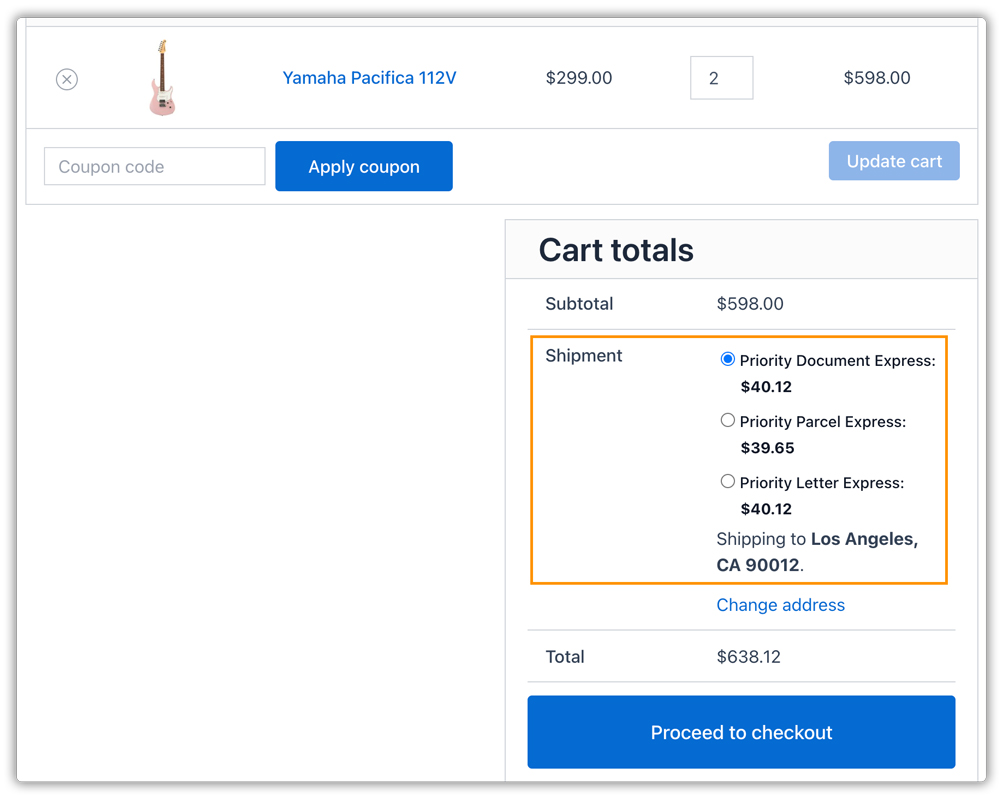
- Display live Aramex rates at checkout that reflect your own account pricing, with a fixed handling fee or percentage adjustment available per service.
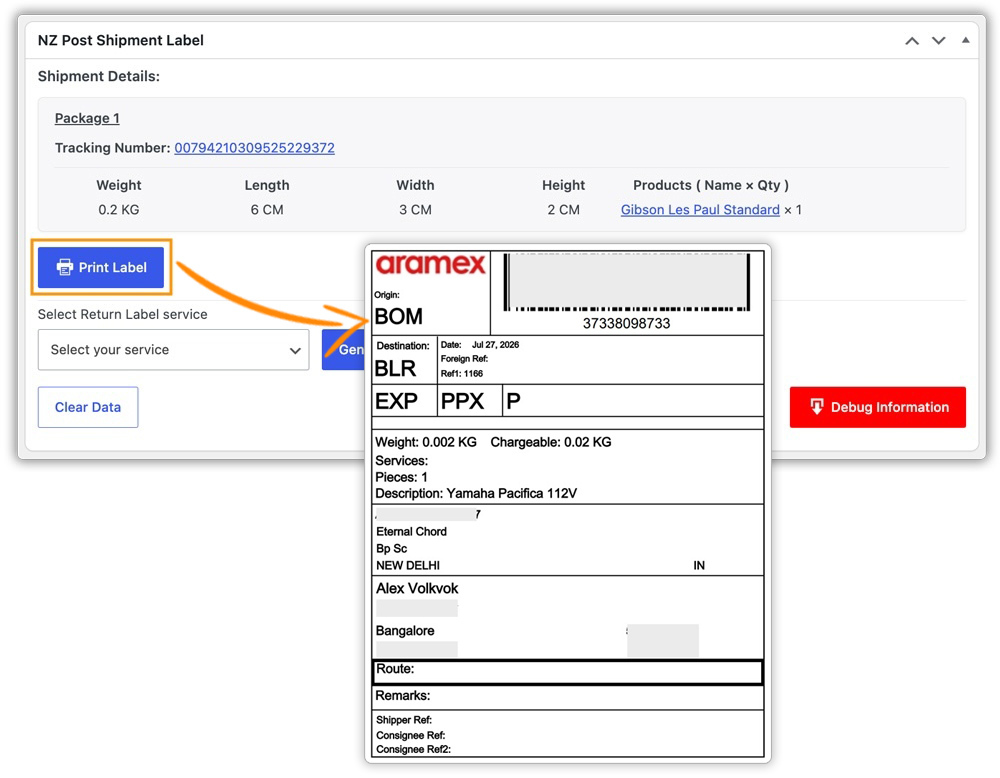
- Print Aramex labels directly from the WooCommerce order page, individually or in bulk, with automatic label generation on order placement, payment, or processing status.
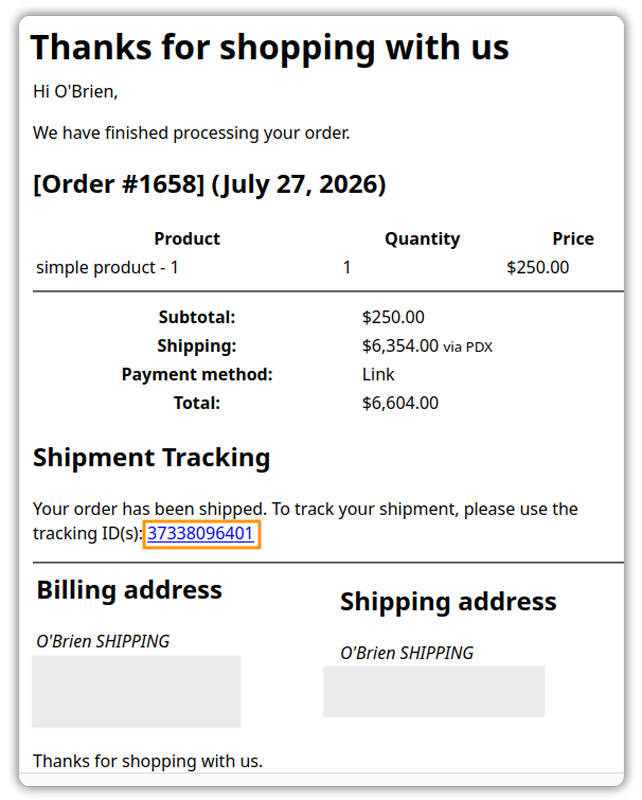
- Send customers their Aramex tracking number automatically through the order completion email, with a direct link to the Aramex tracking portal.
Real-World WooCommerce Use Case
A WooCommerce store selling electronics accessories across the GCC and South Asia relied on a single global carrier for every destination. Rates to high-volume markets like Saudi Arabia, Pakistan, and Bangladesh were comparatively high, and the carrier offered little support for Cash on Delivery, still a major checkout preference in several of the store’s biggest markets.
How the Plugin Helped
The store connected its Aramex account through the PH Aramex Shipping Plugin and enabled live Aramex rates for its GCC and South Asia shipping zones, alongside the Cash on Delivery special service for destinations where it mattered most.
The Result
- Aramex became the primary carrier for GCC and South Asia destinations, while the existing carrier continued serving other regions.
- Cash on Delivery became available at checkout for customers who previously couldn’t order that way.
- Labels and tracking numbers were generated directly inside WooCommerce, without a separate login to the Aramex portal.
- The merchant could compare shipping costs by destination and route orders to whichever carrier made sense.
Conclusion
Aramex is a practical shipping option for WooCommerce stores serving the Middle East, North Africa, and South Asia. Its strong regional network and range of domestic and international services make it suitable for both local and cross-border orders. Choosing the right Aramex service based on destination, delivery speed, and shipping cost can help merchants provide reliable delivery while keeping shipping expenses under control.
For help with Aramex shipping or WooCommerce integration, contact PluginHive support.
FAQs
Q. Does Aramex support Cash on Delivery for WooCommerce orders?
Yes. The plugin lets you enable Aramex’s Cash on Delivery special service with a configurable USD conversion rate for the COD amount collected on delivery.
Q. Can I insure high-value Aramex shipments?
Yes. The Aramex Shipping Plugin adds an insurance value field to the WooCommerce product edit screen, and the declared value is submitted to Aramex automatically when the shipment is created.
Q. How can I create custom shipping rates alongside Aramex?
If your store needs rules beyond Aramex’s own rates, the PH Table Rate Shipping Pro Plugin for WooCommerce lets you build custom rates based on weight, destination, quantity, price, and shipping class.
Q. What if I don’t want Aramex to appear for certain orders?
The PH Hide Shipping Methods & Rate Adjustment for WooCommerce plugin lets you conditionally hide Aramex or other shipping methods based on products, categories, destinations, cart value, and other conditions.
Q. How can I show customers when their Aramex order is expected to arrive?
The Estimated Delivery Date Plugin for WooCommerce lets you display estimated delivery dates on product pages, the cart, and checkout, giving customers a timeframe before they place an order.
