



Aramex shipping costs vary by service, package weight, dimensions, and destination. A single flat rate may overcharge some customers and leave your store covering the difference on other orders. Displaying live Aramex rates in WooCommerce helps customers see the shipping cost for their order before checkout. It also helps you collect the appropriate shipping amount based on your connected Aramex account.
This guide explains how Aramex shipping rates work, what you need before setting them up, and how to display them using the PH Aramex Shipping Plugin for WooCommerce with Print Label.
On This Page
- Why Display Live Aramex Shipping Rates in WooCommerce?
- How Aramex Shipping Rates Are Calculated
- Which Aramex Shipping Services Can You Offer?
- What You Need Before Displaying Aramex Rates
- How to Display Aramex Shipping Rates in WooCommerce
- Real-World WooCommerce Use Case
- Conclusion
- FAQs
Why Display Live Aramex Shipping Rates in WooCommerce?
Shipping costs vary between orders, even when you use the same carrier. A lightweight package going to a nearby destination may cost less to ship than a heavier package travelling farther.
A flat shipping rate cannot account for these differences. You may charge customers more than necessary for some orders and absorb additional shipping costs on others.
Live Aramex rates help address this problem by fetching shipping prices from your connected Aramex account. Customers can see the available rates at checkout instead of relying on a fixed amount.
With the right configuration, you can also:
- Offer selected Aramex shipping services for different destinations.
- Customize the names customers see at checkout.
- Add a fixed handling fee or percentage adjustment to shipping rates.
- Configure a fallback rate if Aramex does not return a rate.
- Choose how products are packed to calculate shipping costs.
How Aramex Shipping Rates Are Calculated
Aramex calculates shipping rates based on shipment details and the services available for the route.
The main factors that affect shipping rates include:
- Origin and destination: The shipment’s starting point and delivery address affect the available services and prices.
- Package weight and dimensions: Aramex uses shipment details to calculate the applicable shipping charges.
- Shipping service: Different services may have different delivery options and prices.
- Aramex account pricing: The returned rates reflect the pricing available through your connected account.
- Rate adjustments: Any configured handling fees, markups, or discounts affect the final amount displayed to customers.
Which Aramex Shipping Services Can You Offer?
Aramex offers several services that can be used for cross-border and same-country express shipments, subject to availability for your account and route.
| Service | Description |
|---|---|
| Priority Document Express (PDX) | Priority delivery for eligible documents |
| Priority Parcel Express (PPX) | Priority delivery for eligible parcels |
| Priority Letter Express (PLX) | Priority delivery for eligible letters |
| Deferred Document Express (DDX) | Deferred delivery for eligible documents |
| Deferred Parcel Express (DPX) | Deferred delivery for eligible parcels |
| Ground Document Express (GDX) | Ground-based delivery for eligible documents |
| Ground Parcel Express (GPX) | Ground-based delivery for eligible parcels |
| Economy Parcel Express (EPX) | Economy delivery for eligible parcels |
What You Need Before Displaying Aramex Rates
Before displaying live Aramex shipping rates in WooCommerce, make sure you have the following:
- A WooCommerce store: Configure shipping zones for the countries and regions you serve.
- An Aramex account: Ensure your account has the required API access to retrieve shipping rates. Keep your Account Number, Username, Password, and PIN ready to configure the plugin.
- An Aramex shipping plugin: Install the PH Aramex Shipping Plugin for WooCommerce with Print Label to connect your Aramex account and display live rates at checkout.
- Product weight and dimensions: Enter accurate shipping details for each product that requires shipping.
Having these requirements ready makes it easier to connect your Aramex account, configure the plugin, and display appropriate shipping rates at checkout.
How to Display Aramex Shipping Rates in WooCommerce
Install the Aramex Shipping Plugin. Then, follow the Aramex Shipping Plugin setup guide to connect your Aramex account and configure the plugin.
Once the setup is complete, configure the following settings:
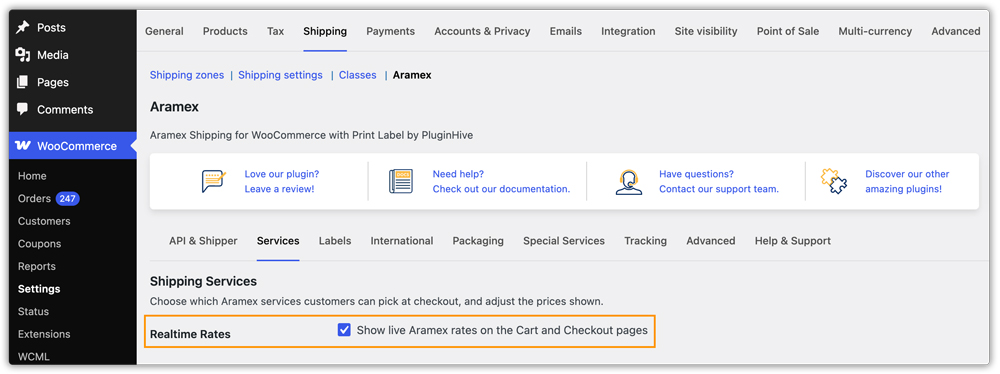
- Enable real-time rates: Enable the Realtime Rates option in the plugin settings to retrieve live Aramex shipping rates.
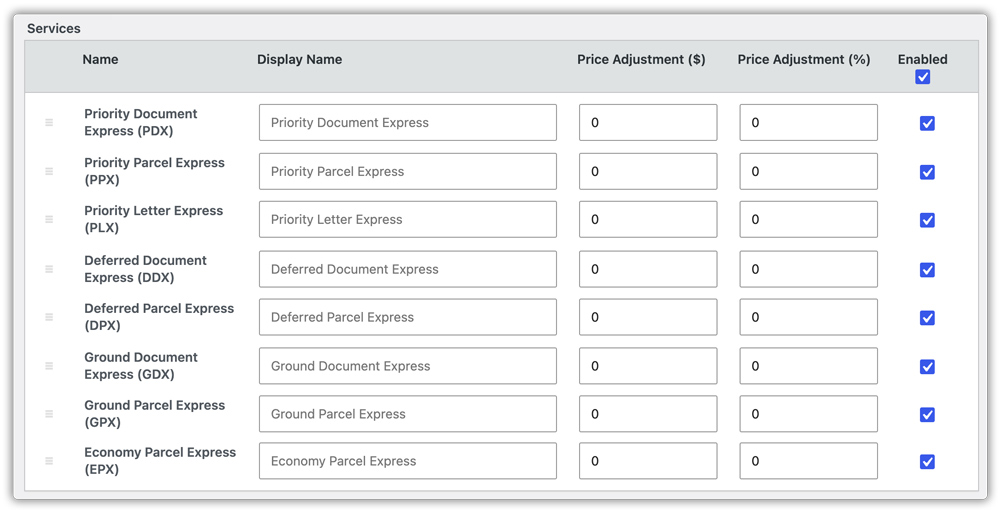
- Select shipping services: In the Services settings, enable the Aramex services you want to offer. You can also customize their display names and control their order at checkout.
- Display rates at checkout: Once configured, the plugin retrieves live Aramex rates for eligible shipments and displays them on the cart and checkout pages.
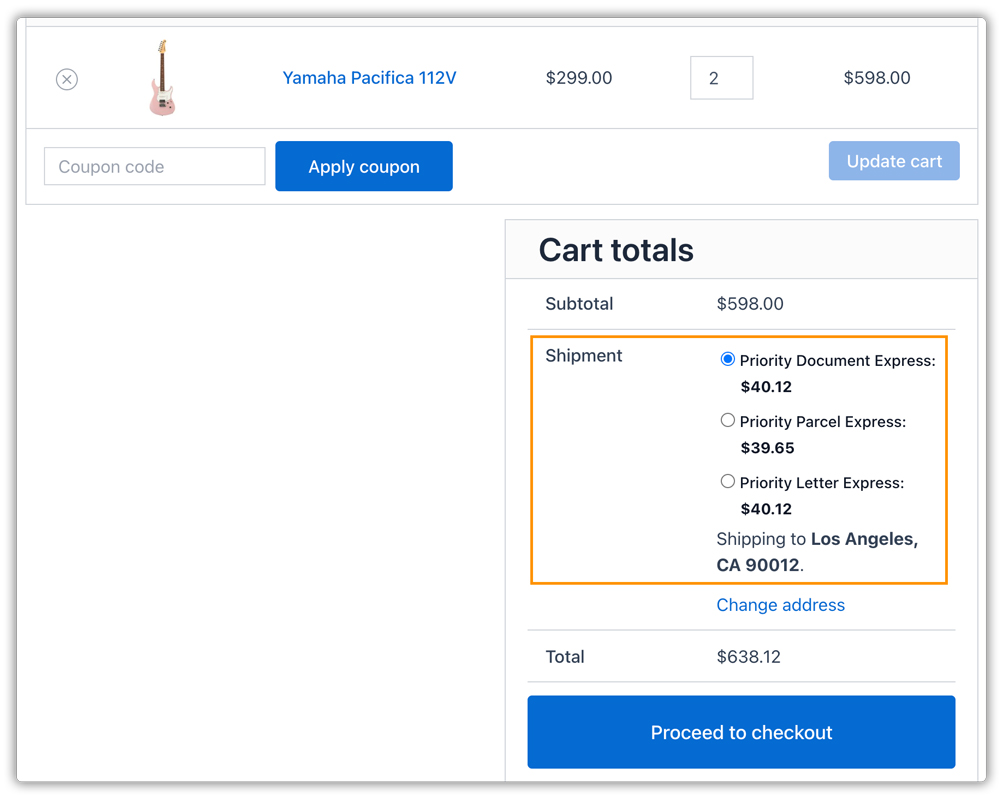
Review the Rates at Checkout
After saving your settings, test the shipping calculation using different shipping addresses and sample orders. Check that:
- The correct Aramex services appear for each destination.
- Shipping prices reflect different package details.
- Rate adjustments work as expected.
- The fallback rate works when configured.
- The displayed prices use the correct store currency.
Real-World WooCommerce Use Case
A WooCommerce store selling home fragrance products shipped orders to customers in several countries. The store used one flat international shipping rate for every order. This approach overcharged customers shipping lightweight products to nearby destinations. It also left the store covering the difference when heavier orders cost more to ship than the flat rate allowed.
How the Plugin Helped
The store connected its Aramex account using the PH Aramex Shipping Plugin for WooCommerce with Print Label. The team configured the appropriate Aramex services and added a small percentage adjustment to account for packaging expenses. The store then tested different product weights, package dimensions, and destinations to verify the rates displayed at checkout.
The Result
- Customers could see shipping rates calculated for their shipment instead of one universal flat rate.
- The store could adjust shipping charges to account for packaging expenses.
- Customers saw the services configured for their destinations.
- The store reduced its reliance on manually maintained shipping prices.
Conclusion
Displaying live Aramex shipping rates in WooCommerce helps you calculate shipping costs based on the package weight, dimensions, destination, and available services. Instead of charging every customer the same flat rate, you can show shipping options that better reflect the cost of each shipment. With the right setup, you can reduce manual rate management, avoid charging too much or too little for shipping, and make the checkout experience clearer for your customers.
If you need help setting up Aramex shipping rates or troubleshooting an issue with your WooCommerce store, contact our support team for assistance.
FAQs
Q. Why are Aramex rates not showing at checkout?
Check that your Aramex credentials are correct and the required services are enabled. Also verify the product shipping details and review the plugin logs if the problem continues.
Q. Can I configure a fallback rate if Aramex does not return a price?
Yes. You can configure a fallback rate in the Aramex Shipping Plugin‘s settings. It provides an alternative shipping amount when Aramex does not return a rate, such as when a request fails or no service covers the destination.
Q. Can I offer Cash on Delivery with Aramex?
Yes. The Aramex Shipping Plugin supports COD as a configurable Aramex special service. Check your Aramex account permissions and configure the required settings before offering COD to customers.
Q. Can I show estimated delivery dates alongside Aramex rates?
You can use the Estimated Delivery Date Plugin for WooCommerce to display estimated delivery dates on product pages, the cart, and checkout. Configure the dates according to your delivery rules and available information.
Q. Can I hide Aramex shipping methods for specific products or categories?
Yes. You can use the PH Hide Shipping Methods & Rate Adjustment for WooCommerce plugin to hide shipping methods based on products, categories, cart conditions, and other rules. This helps you prevent customers from selecting shipping options that are unsuitable for certain items.
Q. Can I calculate shipping rates based on order weight or cart total?
Yes. If you need custom shipping rules based on weight, cart subtotal, quantity, or other conditions, the PH Table Rate Shipping Pro Plugin for WooCommerce lets you configure shipping costs using flexible rules. You can use it to set up shipping rates for different order conditions alongside your existing shipping methods.
