


WooCommerce has become a go-to platform for selling services online, and astrology is no exception. Whether you’re a solo astrologer offering personalized consultations or an entrepreneur building a multi-astrologer marketplace like AstroTalk or AstroYogi, delivering a smooth booking experience is key to winning client trust.
In this article, we’ll show you how to combine WooCommerce with the PluginHive WooCommerce Bookings and Appointments plugin to streamline appointment scheduling, manage astrologer availability, and automate your day-to-day operations so you can focus on delivering real value to your clients.
Table of Contents
- For Solo Astrologers: Offer Seamless Consultations with WooCommerce Bookings
- From Individual to Platform: Building a Scalable Astrology Marketplace with Dokan
- Real-World Example: Automating Consultations for an Astrology Business
- Final Thoughts
- FAQs
For Solo Astrologers: Offer Seamless Consultations with WooCommerce Bookings
Running your astrology practice online opens doors to global clients, but it also brings operational challenges that can quickly overwhelm a solo practitioner.
Challenges Faced by Independent Astrologers
Many astrologers face these common hurdles when offering consultations online:
- Manual scheduling via WhatsApp, email, or Instagram often leads to double bookings or confusion.
- Serving clients across the globe creates time zone conflicts, especially with NRI clients.
- Astrologers can’t collect birth details, questions, or preferences upfront, which delays preparation.
- Opportunities to upsell related services, such as PDF reports or gemstone suggestions, are often missed.
- Without automated reminders, clients may miss appointments entirely.
- Finally, many lack a secure, online payment system with deposit options, leading to last-minute cancellations or unpaid sessions.
Streamlining Solo Astrology Consultations with WooCommerce Bookings
By using WooCommerce Bookings and Appointments, you can completely automate your astrology consultations from slot selection to payment and session delivery.
Note: To get started, make sure the PluginHive Bookings plugin is installed, activated, and configured properly. Follow this Quick Setup Guide
Here’s how the plugin helps you overcome the common challenges solo astrologers face:
- Automatically Adjust for Client Time Zones

Serving clients across time zones? The plugin detects your client’s local time and displays your availability accordingly, perfect for NRI clients or international consultations.
- Offer Flexible Consultation Durations
Create different session types like 15-minute, 30-minute, or 60-minute readings, each with its own consultation fee.


Learn here about how to set booking costs.
- Display Real-Time Availability & Avoid Double Bookings
Let your clients see exactly when you’re available and book a slot instantly, without back-and-forth messages or Google Sheets.

Learn how to Set Booking Availability.
This is exactly how your astrology consultation booking experience will appear on your website’s frontend:

- Collect Astrological Information & Offer Upsells During Booking
Use PH WooCommerce Product Add-Ons to gather essential client details like birth date, time, location, and specific questions directly on the product page before the session begins. You can also let clients upload their birth chart (Jathagam / kundli ) for personalized readings.
With the same Product Add-Ons, offer valuable upsells like gemstone recommendations or PDF horoscope reports using checkboxes or dropdowns. You can even charge extra for these add-ons to boost your session revenue.
Prefer using Booking Resources instead? You can also configure paid upsells that way.
Set up booking resources using this guide.

Set up product add-ons using this guide.

- Accept Payments Seamlessly
Easily collect payments for astrology consultations right through your WooCommerce store. You can charge clients the full fee upfront or offer a partial payment option using the PH WooCommerce Deposits plugin, perfect for high-ticket sessions or follow-ups.

Need help setting up partial payments? Follow this step-by-step guide.
- Automate Email Confirmations & Reminders
Reduce no-shows and manual follow-ups by enabling automatic emails for confirmations, reminders, and cancellations.
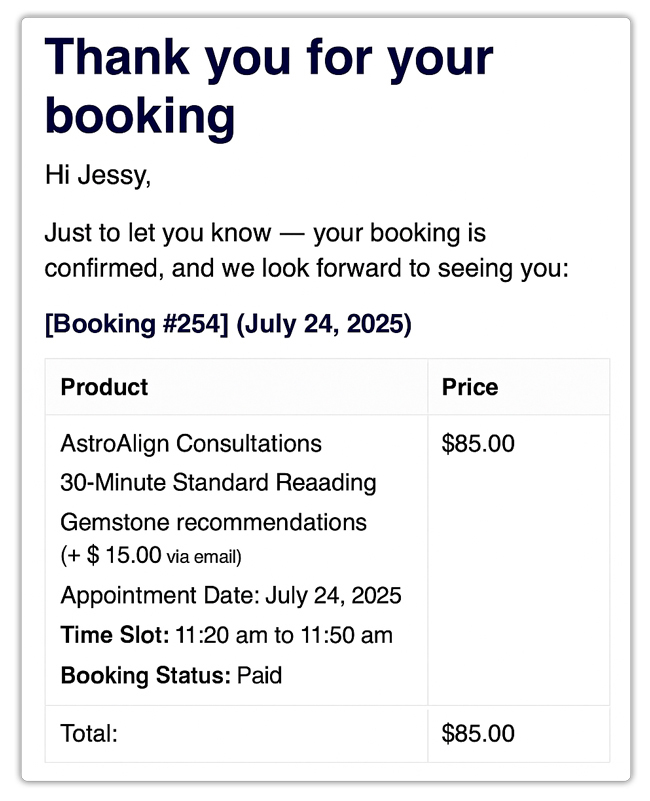
Learn how to set up booking email notifications.
With everything centralized in one dashboard, you spend less time coordinating and more time focusing on what you do best, guiding your clients.
From Individual to Platform: Building a Scalable Astrology Marketplace with Dokan
Once your astrology services gain traction, you might consider scaling your business into a full-fledged online marketplace, bringing in multiple astrologers, offering specialized services, and serving more customers. But managing multiple practitioners under one roof presents its own set of hurdles.
Challenges of Running a Multi-Astrologer Business
Running a team-based astrology business isn’t just about adding more calendars; it’s about building a system that works for both astrologers and clients. Common challenges include:
- Coordination Chaos: Without a centralized system, managing each astrologer’s availability and service types becomes unmanageable.
- Revenue Sharing: There’s no built-in way to split payments between astrologers and platform owners.
- Limited Admin Control: Manually tracking who delivers what service, whether sessions are completed, and who gets paid leads to errors and friction.
- No Self-Serve Tools for Astrologers: Independent astrologers can’t manage their profiles, schedules, or pricing, which reduces their incentive to join your platform.
- Scaling Without Systems: Without automation, onboarding more astrologers means exponentially more admin work.
Powering Multi-Astrologer Platforms with PluginHive and Dokan Integration
By combining WooCommerce Bookings and Appointments with Dokan and the PH Dokan Bookings Integration plugin, you can build a scalable astrology consultation marketplace with all the right building blocks:
- Vendor Dashboards for Each Astrologer: Astrologers can manage their services, availability, pricing, and session types independently right from the frontend.
- Automatic Commission Splits: You define the revenue split once, and Dokan ensures each astrologer gets paid automatically on each booking.
- Custom Profiles and Service Listings: Let astrologers showcase their specialties (e.g., Vedic, Tarot, Numerology), upload images, and even collect reviews.
- Centralized Booking Flow with Decentralized Management: Clients experience a unified booking flow, while behind the scenes, each astrologer runs their schedule.
- Admin Oversight with Scalability in Mind: You retain control over onboarding, approvals, and overall platform operations without handling every booking manually.
With this setup, you’re no longer limited by your own time. You can grow your brand, support more clients, and create a thriving astrology ecosystem without micromanaging every consultation.
Real-World Example: Automating Consultations for an Astrology Business
Let’s say you’re a solo astrologer offering personalized readings such as Vedic astrology consultations, tarot sessions, birth chart analysis, and gemstone recommendations. Clients reach out via WhatsApp or Instagram DMs to book a session, and you manually coordinate times, payment, and session details.
The Challenges You Will Face
- You constantly juggle messages and calls to confirm availability, leading to delays and miscommunication.
- Double bookings become common, especially when you’re managing sessions across time zones without a proper calendar system.
- Clients forget session timings or cancel last minute, leaving you with empty, unpaid time slots.
- Payment is collected manually, often after the consultation, resulting in no-shows and late payments.
- As you become more popular and want to collaborate with other astrologers, it becomes impossible to manage everyone’s calendar and services from a single source.
How It Can Be Solved
With the WooCommerce Bookings and Appointments plugin by PluginHive, you can eliminate manual coordination and focus on delivering impactful sessions:
- Clients can view your real-time availability and instantly book their preferred consultation type, Kundli reading, tarot, numerology, etc., based on predefined time slots.
- You can set buffer times between appointments and block last-minute bookings to prevent burnout and scheduling stress.
- Set clear cancellation policies with automatic enforcement, freeing up last-minute cancelled slots for new bookings.
- Collect full or partial payments upfront using the PH WooCommerce Deposits plugin, reducing no-shows and improving revenue consistency.
- Partner with other astrologers and build a full-fledged platform. Using Dokan and PH Dokan Bookings integration, each astrologer gets their dashboard to manage services, pricing, availability, and Zoom links, all while you earn a commission per booking.
With WooCommerce and flexible booking solution, your astrology business becomes automated, scalable, and easy to manage, whether you’re reading a single birth chart or coordinating 30 astrologers across the country.
Final Thoughts
Managing astrology consultations, reports, or spiritual guidance sessions doesn’t have to feel overwhelming. With the WooCommerce Bookings and Appointments plugin by PluginHive, you can automate your entire scheduling process, whether you’re a solo astrologer or running a multi-expert astrology marketplace.
From real-time booking and time zone adjustments to collecting client details and reducing no-shows, the plugin brings structure, professionalism, and scalability to your astrology business all within your WooCommerce store.
Need help getting started? Reach out to PluginHive Support for setup assistance tailored to your specific services.
FAQs
1. Can I offer both phone and video astrology consultations via WooCommerce Bookings?
Yes. With the WooCommerce Bookings plugin by PluginHive, you can include call details such as Zoom links or phone instructions in confirmation emails sent automatically after a customer books a session.
2. Does WooCommerce Bookings automatically adjust for different time zones?
Yes. The plugin detects the client’s local time zone and displays astrologer availability accordingly, making it perfect for international or NRI consultations.
3. Can I set buffer times between astrology appointments using WooCommerce Bookings?
Yes. You can define buffer durations between sessions to avoid back-to-back bookings and ensure smooth transitions.
4. Will WooCommerce Bookings send automated reminders and follow-ups to clients and astrologers?
Yes. The plugin sends email notifications for confirmations, reminders, reschedules, cancellations, and follow-ups based on your settings preferences, keeping everyone in the loop without manual effort.
5. Can I set individual commissions per astrologer or per service using Dokan Integration?
Yes. Dokan allows you to set commission rates globally, per vendor, per category, or even per service, giving you full flexibility to incentivize high-performing astrologers.
6. Is there a limit on the number of astrologer vendors I can onboard with Dokan and WooCommerce?
No. You can onboard unlimited astrologers using Dokan. The only practical limitation depends on your hosting/server capacity and site performance.
