


Every peak season, the same thing catches unprepared WooCommerce stores: orders keep coming in right up until the last possible moment, customers expect them to arrive in time, and Australia Post MyPost Business’s network simply can’t move parcels fast enough once volume peaks past a certain date. Missing the cut-off isn’t a delivery failure at that point; it’s a planning gap, and it lands squarely on the seller. This guide explains how Australia Post MyPost Business’s holiday lodgement deadlines work, what actually drives them, and how to prepare your WooCommerce store’s fulfillment process around them.
On This Page
- How MyPost Business Sets Its Holiday Lodgement Deadlines
- Why Business Lodgement Dates Differ From General Public Deadlines
- What Determines Your WooCommerce Store’s Actual Cut-Off
- How to Prepare Your WooCommerce Store for Australia Post Holiday
- Real-World WooCommerce Use Case
- Conclusion
- FAQs
How MyPost Business Sets Its Holiday Lodgement Deadlines
Australia Post publishes recommended last lodgement dates for the holiday season each year. These dates indicate the latest recommended time to lodge a parcel for the best chance of delivery before Christmas. The exact dates change each year because Australia Post calculates them based on Christmas Day and the time needed to process and deliver parcels. Customers can still receive items lodged after the recommended dates, but Australia Post does not guarantee delivery before Christmas.
Why Business Lodgement Dates Differ From General Public Deadlines
Australia Post has separate lodgement guidance for business senders, including MyPost Business customers, because businesses typically send higher parcel volumes and may use different lodgement arrangements from individual consumers.
A few details are important when planning around these dates:
- Parcel Post lodgement dates: These dates generally assume parcels are collected from a metropolitan location by an Australia Post truck or van and taken directly to a processing facility. Parcels sent from non-metro areas or lodged over the counter may require additional time.
- Over-the-counter lodgements: Parcel Post items lodged over the counter have a 2:30 pm cut-off on the relevant lodgement date.
- Interstate movement: For international shipments from South Australia, Tasmania, and the Northern Territory, parcels may need to travel interstate before departing Australia. Australia Post recommends allowing additional business days for these origins.
- International shipments: International lodgement dates vary by destination and service and are published separately from domestic deadlines.
What Determines Your WooCommerce Store’s Actual Cut-Off
The published MyPost Business dates are a starting point, not necessarily your WooCommerce store’s actual customer cut-off. Your final cut-off depends on how quickly you process WooCommerce orders, where customers are located, and which Australia Post service you use.
- WooCommerce order processing time: Allow enough time between receiving a WooCommerce order and having it packed and ready for Australia Post collection or lodgement.
- Customer location: Regional and remote destinations may require additional time compared with metro destinations.
- MyPost Business service: Express Post and Parcel Post have different lodgement windows and delivery timeframes.
- Domestic or international delivery: International lodgement dates are generally earlier and vary by destination and service.
For example, a WooCommerce store that processes and dispatches orders the same day can accept orders closer to the published lodgement deadline than a store that takes two or three days to prepare orders for Australia Post.
How to Prepare Your WooCommerce Store Using the MyPost Business Plugin
The PH Australia Post MyPost Business Shipping for WooCommerce plugin can help you manage labels and fulfillment more efficiently during the holiday rush. Let’s see how you can prepare your WooCommerce store for higher order volumes and tighter holiday lodgement deadlines using the plugin.
If you’re installing the plugin for the first time, check out this guide: Setting Up WooCommerce Australia Post MyPost Business Plugin.
Use Bulk Label Printing to Handle the Volume Spike
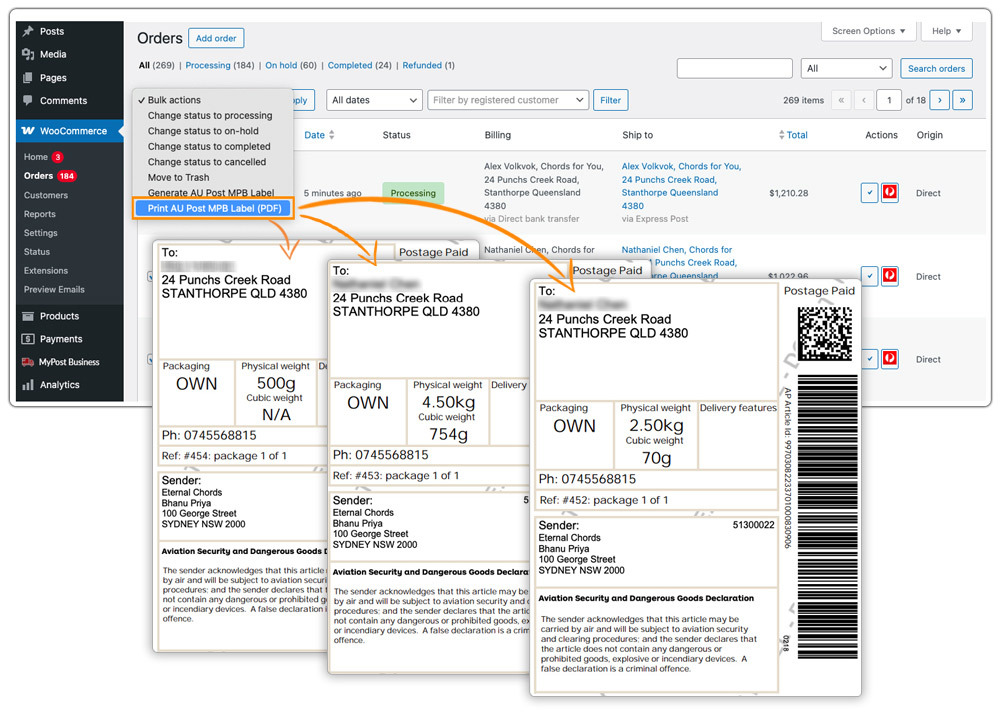
Order volume in the lead-up to a lodgement deadline is typically well above normal. The plugin’s bulk label printing lets you select multiple Processing orders from the WooCommerce Orders page and generate all their labels in a single action, far more useful in the final two weeks before a cut-off than at any other point in the year.
Turn On Automatic Label Generation
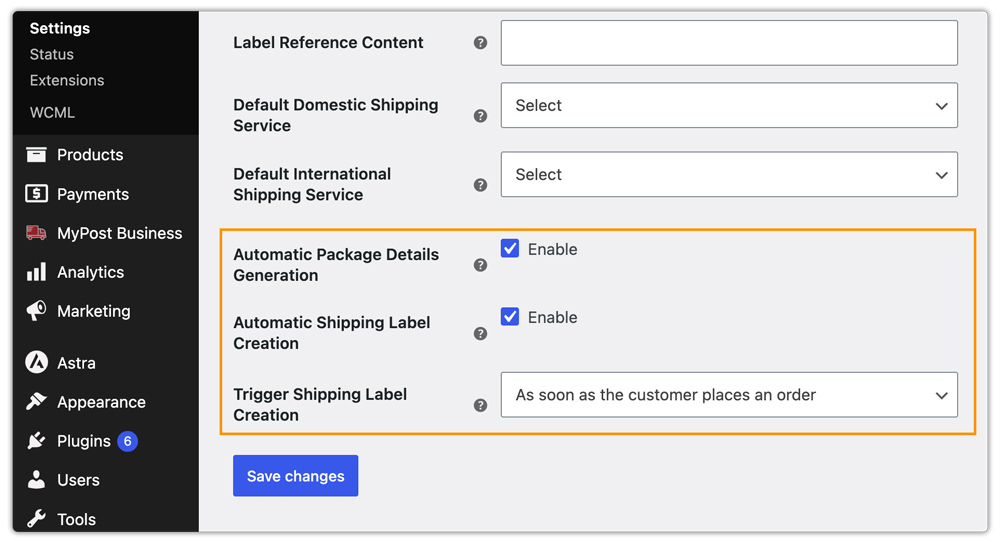
In the plugin’s settings, store owners can enable automatic label generation to create labels as soon as an order reaches a defined status, without manually opening the order.
Set a Fallback Rate Before the Rush Starts
A fallback rate can be configured as the default shipping cost shown if MyPost Business doesn’t return a live rate for some reason. This keeps checkout functioning during high-traffic periods instead of stalling out for a customer at the worst possible moment.

Consider Extra Cover for Higher-Value Holiday Orders
Gift purchases often have higher declared values than typical orders. Sellers can enable Extra Cover for each product under the Shipper tab, which protects items valued up to $5,000. Australia Post provides the first $100 of cover free and charges $2.50 for each additional $100. For items valued over $500, Australia Post charges a $2.95 Signature on Delivery fee unless sellers send the shipment via Registered Post, which includes signature service.

Real-World WooCommerce Use Case
A WooCommerce store selling personalised gifts had no cut-off messaging on their site during their first holiday trading period. Orders kept coming in right up to the final days before Christmas, and customers assumed standard delivery timeframes applied year-round. A meaningful share of orders placed in the final week arrived after Christmas Day, triggering a spike in refund requests and reviews mentioning late delivery, despite the parcels moving through Australia Post’s network within normal peak-season timeframes.
How the Store Fixed It
The following year, the store checked the Australia Post MyPost Business lodgement dates once published and added clear cut-off messaging to their site ahead of the deadline. They enabled automatic label generation and bulk label printing in the PH Australia Post MyPost Business Shipping for WooCommerce plugin to keep pace with the volume spike, and enabled Extra Cover on their higher-priced personalised items.
The Result
- Late-delivery complaints and refund requests during the following peak season dropped substantially
- Customers ordering close to the deadline understood upfront that delivery might slip past the holiday, reducing the surprise factor
- The fulfillment team processed the pre-deadline order spike in a fraction of the time using bulk and automatic label generation
- Higher-value personalised gifts were covered under Extra Cover, reducing the store’s financial exposure during the highest-volume period of the year
Conclusion
MyPost Business’s holiday lodgement dates are a genuine operational limit, not a formality, and the exact dates shift every year based on where Christmas Day falls. The pattern underneath them stays consistent. Checking the current dates once published and building your fulfillment process to handle the volume spike ahead of time is what actually prevents the wave of late-delivery complaints that catches unprepared sellers every year.
Need help preparing your store for peak season? The PluginHive support team is here.
FAQs
Q. What happens if a customer’s order is lodged after the recommended cut-off?
Australia Post will still deliver the parcel as quickly as possible, but once the recommended lodgement date passes, it can no longer guarantee on-time arrival before the holiday. Clear cut-off messaging on your WooCommerce store before checkout helps set the right expectation for customers ordering close to or after the deadline.
Q. Can I track orders placed during peak season the same way as any other time of year?
Yes. Tracking numbers are saved to WooCommerce orders automatically when labels are printed through the plugin, whether individually or in bulk. For live tracking links in WooCommerce order emails and the customer’s My Account page, use the Shipment Tracking Pro for WooCommerce alongside the Australia Post plugin, particularly useful during peak season when tracking enquiries spike.
Q. Can I show customers a delivery estimate that reflects the holiday period?
The Estimated Delivery Date Plugin for WooCommerce displays delivery estimates on product pages, cart, and checkout. During peak season, store owners typically update these estimates manually to reflect the current year’s MyPost Business lodgement dates, since automated estimates are based on standard transit times rather than holiday-specific cut-offs.
Q. Can WooCommerce marketplaces manage holiday deadlines across multiple vendors?
Yes. The PH Multi-Vendor Shipping Plugin for WooCommerce calculates MyPost Business rates separately per vendor, and bulk label printing during peak season works across vendor orders within the same fulfillment workflow.
