



As your Shopify store grows, shipping can quickly become a daily task that takes up valuable time. Dropping parcels at Australia Post may work for low order volumes, but it becomes less practical once shipments increase. That is why Australia Post pickup is useful for growing merchants. Instead of visiting a post office, you can schedule parcel collection directly from your business location, making dispatch faster and more consistent.
In This Article:
- Types of Australia Post Pickup In Shopify
- Pickup Requirements for Shopify Merchants Before Booking
- How to Schedule Pickup from Shopify
- Australia Post Cut-Off Times and Delivery Impact
- What to Do If a Pickup Is Missed in Shopify
- Conclusion
- FAQ’s
Types of Australia Post Pickup In Shopify
One-Off Pickup
For merchants who do not ship every day, Australia Post offers one-time parcel pickup in major metropolitan areas. Merchants can book a pickup after creating shipping labels in the portal, and Australia Post notes that pickups are available Monday to Friday between 9 am and 5 pm. If customers place orders before 1 pm on the previous day, carriers can collect them on the next business day.
Regular Scheduled Pickup
For businesses shipping consistently, Australia Post also provides scheduled pickup services and collects parcels from the business address on fixed business days each week. Australia Post designed this option for merchants who want to build collection into their daily fulfillment routine instead of booking each pickup manually. Australia Post lists scheduled pickup as a recurring service and arranges it based on business needs.
Contract-Based Pickup for Large Merchants
Larger merchants using an Australia Post parcel contract, such as an eParcel Contract, can access additional pickup options as part of their shipping agreement. Australia Post intends this service for businesses that send 2,000 or more domestic parcels per year and typically handles pickup arrangements and service terms through account setup and business support.
Pickup Requirements for Shopify Merchants Before Booking
Before booking a pickup, merchants should make sure parcels are fully prepared so that collection happens without delays.
- Pack parcels securely before collection
All shipments should be completely packed, sealed, and ready before pickup. Boxes or satchels must be strong enough for transport, especially for fragile or heavier items. - Attach shipping labels clearly
Attach labels created through Australia Post MyPost Business securely to each parcel and place them where carriers can scan them easily during processing. - Keep parcels ready before the pickup window
The selected pickup time is the earliest collection time, so parcels should already be accessible when the driver arrives. - Follow pickup booking cut-off times
Businesses generally submit pickup requests before 1 pm on the previous day, and carriers collect parcels Monday to Friday between 9 am and 5 pm in eligible metro areas. - Check service availability by location
Australia Post currently offers pickup only in eligible metropolitan areas, so you should confirm availability during booking.
How to Schedule Pickup from Shopify
Pickup Through the Australia Post Website
If you are handling pickups manually, the simplest method is through your MyPost Business account on the Australia Post website.
- Log in to your Australia Post account
- Create and pay for your shipping labels first, since you must prepare the parcels before booking pickup.
- Go to the pickup section and choose Book a Pickup
- Enter your pickup address, contact details, and the number of parcels
- Select the collection day based on available time slots
Automating Pickup with PluginHive Australia Post Ship App
For merchants shipping regularly from Shopify, automation removes most of the manual work and keeps pickup inside the Shopify workflow.
- Add your own Australia Post account inside the PluginHive Australia Post Ship app
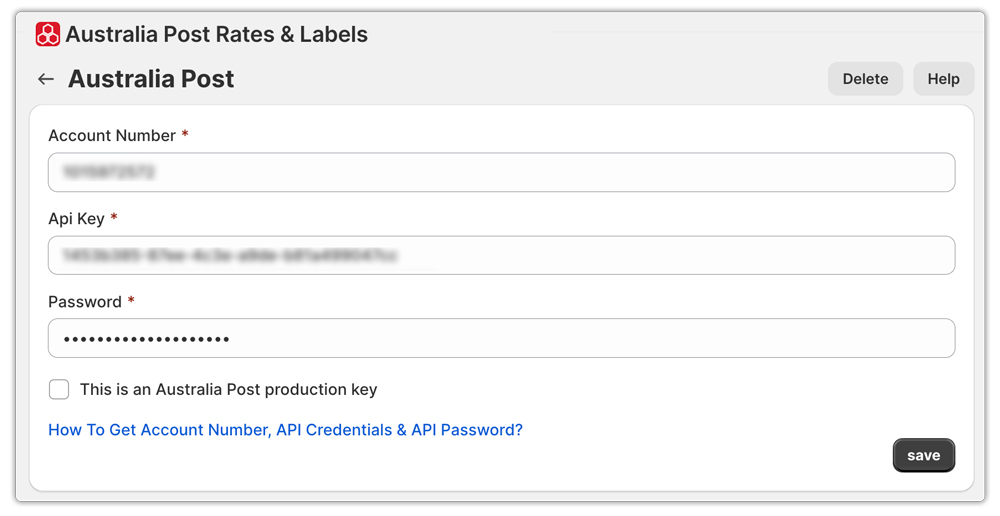
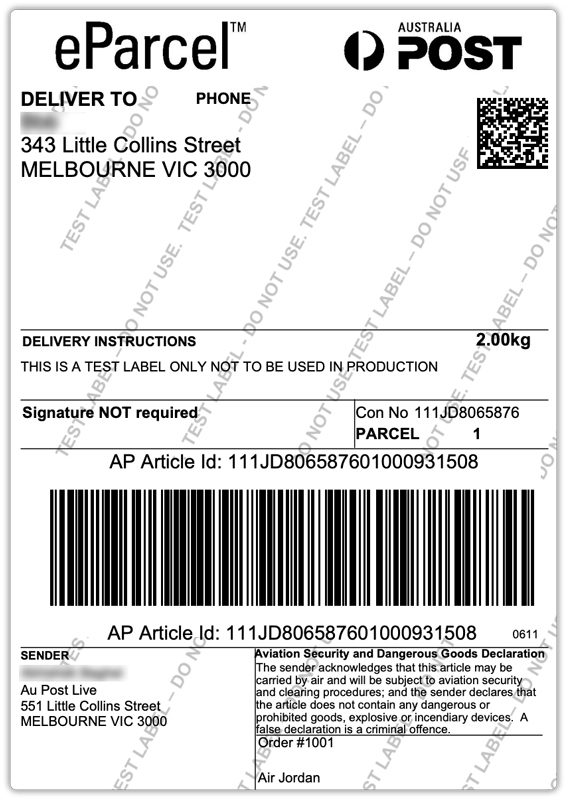
- Generate shipping labels directly from the Shopify dashboard without switching platforms
- Once you create the labels, raise the pickup request from inside the app.
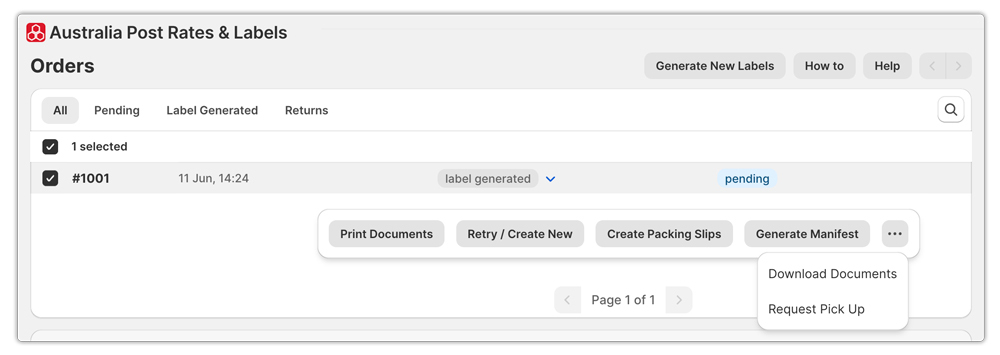
- Orders waiting for collection move into a separate Pickup tab for easy tracking. The pickup tab shows collection status and pickup-related shipment details

Advanced Pickup Controls in PluginHive
The app also gives merchants more control over pickup scheduling:
- Set preferred pickup start time
- Add the company closing time
- Define the exact pickup point for driver collection
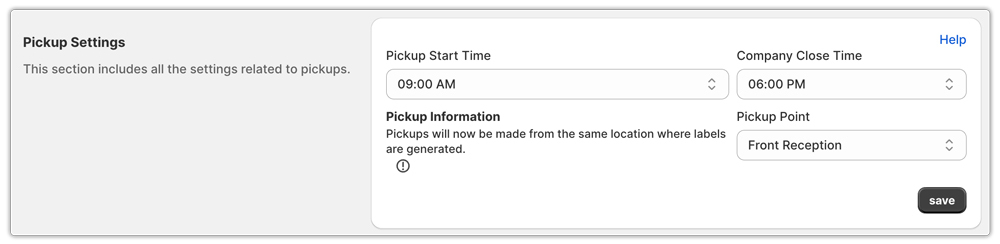
This is useful when your warehouse, office, or dispatch area has specific collection instructions, helping pickups happen more smoothly and with fewer missed collections.
Australia Post Cut-Off Times and Delivery Impact
Pickup timing plays an important role in how quickly parcels enter the Australia Post network and start moving toward delivery.
- Most pickups need to be booked in advance
For Australia Post, businesses generally place pickup requests before 1 pm on the previous business day to schedule next-business-day collection in eligible metro areas. - Earlier pickups help parcels move faster
When you prepare and label parcels early in the day, carriers can process them sooner and help avoid dispatch delays. - Late preparation can push delivery timelines back
If parcels are not ready when the driver arrives, they may miss that day’s collection and move to the next available pickup. - Peak seasons may affect collection timing
During busy periods such as holiday sales or major shopping events, pickup demand increases, so booking early becomes more important to maintain regular dispatch.
What to Do If a Pickup Is Missed in Shopify
If a scheduled pickup is missed, first confirm that you prepared the parcels and kept them ready at the pickup point during the selected collection window.
- Confirm that you packed, labeled, and placed all parcels at the nominated pickup location for easy access.
- Check your pickup booking details in Australia Post to confirm the selected date and address
- If the driver did not arrive, contact Australia Post support through your business account to report the missed collection
- If orders are urgent, you can still lodge parcels at a nearby post office to avoid delaying customer deliveries.
- For merchants using automation tools such as the PluginHive Australia Post Ship app, pickup status can also be reviewed inside the app before rebooking
Conclusion
For growing Shopify merchants, pickups can make daily shipping far more manageable by reducing the need for repeated post office visits and bringing parcel collection directly into your fulfillment routine.
Whether you are booking an occasional pickup, using scheduled collections, or managing larger shipping volumes through a contract account, the key is making sure parcels are prepared correctly, and pickup is planned. As order volume increases, even small improvements in dispatch timing can make a noticeable difference in workflow and customer delivery experience.
FAQ’s
Q. How long do you have to pick up a parcel from Australia Post?
If you choose a Post Office as your pickup location, Australia Post will hold your parcel for 10 business days. This gives you time to collect it after receiving the pickup notification. If the parcel is not collected within that period, it is normally returned to the sender.
Q. How do I authorize someone else to pick up my parcel from Australia Post?
If someone else is collecting the parcel on your behalf, they usually need to show a signed authorization letter from you along with valid identification. In some cases, delivery staff may also accept a company photo ID for business deliveries. Australia Post may also ask the person collecting the parcel to present two government-issued IDs before handing over the item.
Q. Is Australia Post Parcel Collect free?
Yes, Parcel Collect is a free service. It allows you to send eligible parcels to a participating Post Office instead of your home or business address. Once the parcel arrives, Australia Post sends an email notification so you can collect it during business hours.
