


Every WooCommerce store owner has been there. A customer messages you asking where their order is, and when you check the tracking, it just says “Item Processed at Facility” – again. You’re not sure if that’s normal. They’re not sure either. The problem isn’t the delivery. It’s that neither of you really knows what that status means.
Australia Post tracking statuses are straightforward once you know how to read them. This guide breaks down every status in simple language, explains the ones that trip people up the most, and shows you how the PH Australia Post MyPost Business Shipping Plugin for WooCommerce can automatically keep your customers updated, so you’re not the middleman every time someone wants to know where their parcel is.
Table of Contents
- Why Tracking Statuses Matter for WooCommerce Stores
- Common Australia Post Tracking Statuses Explained
- How WooCommerce Stores Can Automatically Share Tracking Updates with customers
- Tips for Managing Australia Post Tracking Efficiently in WooCommerce
- Conclusion
- FAQs
Why Tracking Statuses Matter for WooCommerce Stores
Tracking updates play an important role in the overall shipping experience. When customers can understand where their order is, it reduces confusion and builds trust.
- Fewer support requests: when customers can check their Australia Post tracking and understand what it says, they don’t need to contact you for updates
- More customer confidence: clear updates reassure customers that their order is on its way
- Better post-purchase experience: the delivery journey doesn’t end at checkout. Efficient WooCommerce shipment tracking keeps the experience positive all the way to the door.
- Catch delays early: spotting an unusual status quickly means you can act before customers raise concerns
- Faster replies: when a customer does reach out, knowing the statuses means you can respond confidently in seconds
When both you and your customers understand what’s happening with a shipment, the whole delivery experience runs smoother.
Common Australia Post Tracking Statuses Explained
Here’s every tracking status your customers will see, what it actually means, and whether you need to do anything when it shows up.
| Tracking Status | What It Means | Action Needed? |
|---|---|---|
| Shipping Information Received | Label created. Australia Post has the booking details but hasn’t physically scanned the parcel yet. | Let the customer know it’s booked and will update after drop-off. |
| Shipment Received by Australia Post Network | Parcel has been scanned for the first time. Delivery officially begins. | No action. This is the first real movement. |
| Item Processed at Sorting Facility | Parcel arrived at a sorting hub and is being routed to the next stop. | No action. May appear multiple times; that’s completely normal. |
| In Transit to Next Facility | Parcel has left one facility and is heading to the next. | No action unless it stays here for 3+ business days. |
| Arrived at Destination Facility | Parcel reached the facility closest to the delivery address. | Delivery is usually 1–2 business days away. |
| Out for Delivery | A driver has the parcel and will deliver it today. | Let the customer know to expect it. |
| Delivered | Parcel successfully delivered. | Order complete. |
| Awaiting Collection at Post Office | Delivery was attempted, but nobody was home. Parcel is held at the local post office. | Notify the customer of the collection location and the hold deadline. |
| Delivery Attempted – Card Left | Australia Post tried to deliver, but couldn’t complete it. A card was left at the address. | Ask the customer to arrange redelivery or collect from the post office. |
| Delayed | The parcel is taking longer than expected. | Contact Australia Post if there’s no update after 3 – 4 business days. |
The Three Statuses That Confuse Customers the Most
“Shipping Information Received”: This is the most common cause of “my tracking isn’t working” messages. The label exists, but the parcel hasn’t been handed to Australia Post yet. Tracking only activates after the first physical scan. A short message to customers explaining this gap at the time of purchase goes a long way.
“Item Processed at Sorting Facility” shows up three times: Parcels travelling interstate pass through multiple sorting hubs. Each one logs the same status. Seeing this three or four times is not a sign of a problem; it means the parcel is actively moving through the network toward the customer.
“Awaiting Collection at Post Office” – customer doesn’t know what to do: This status means a delivery was attempted and the parcel is now waiting at a nearby post office. Australia Post holds it for 10 business days. After that, it gets returned to the sender. Customers need to know the post office location, bring ID, and act within that window.
How WooCommerce Stores Can Automatically Share Tracking Updates with customers
When you’re shipping multiple orders a day, manually copying tracking numbers and emailing customers one by one just isn’t practical. The PH Australia Post MyPost Business Shipping Plugin for WooCommerce takes care of this automatically; tracking information gets to your customers without any extra work on your end.
Follow the step-by-step setup guide to get Australia Post tracking up and running on your WooCommerce store.
Here’s what the plugin does:
- Tracking numbers added automatically: the moment you generate a shipping label, the tracking number is saved directly to the WooCommerce order. No copying, no pasting, no manual entry

- Live tracking from your dashboard: check the current Australia Post tracking status for any order right inside WooCommerce, without logging into the Australia Post website separately

- One-click status refresh: get the latest tracking update from Australia Post with a single click directly from the order page
For customer-facing tracking, the plugin gives you full control over what they see and when:
- Automatic email notifications: customers receive their tracking number in the order completion email
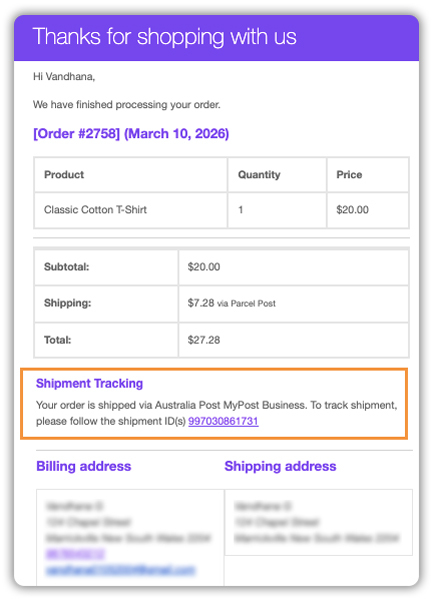
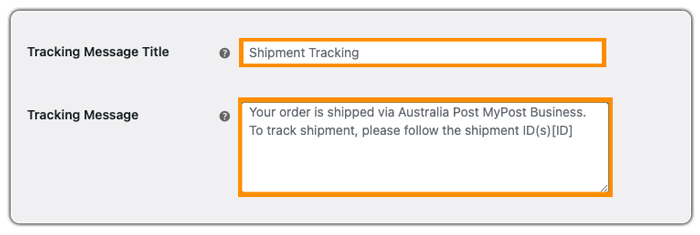
- Tracking Message Title and Tracking Message: enabling this lets you add a custom title and message alongside the tracking number
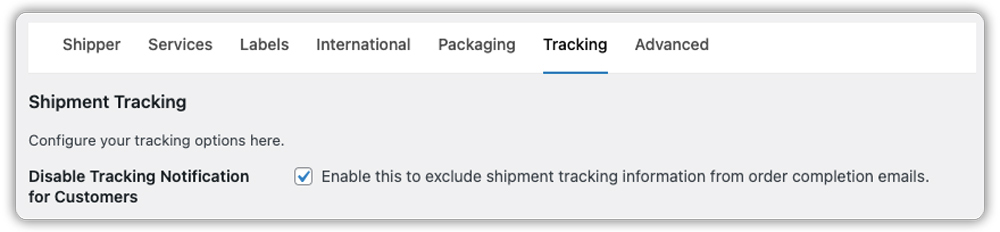
- Disable Tracking Notification for Customers: Enabling this stops the tracking number from being sent in the order completion email
- Hide Tracking in My Account: Enabling this prevents tracking details from showing in the customer’s My Account order history

- Live Tracking: enabling this gives customers real-time updates in their My Account, and lets you monitor live status from the Orders page in WooCommerce

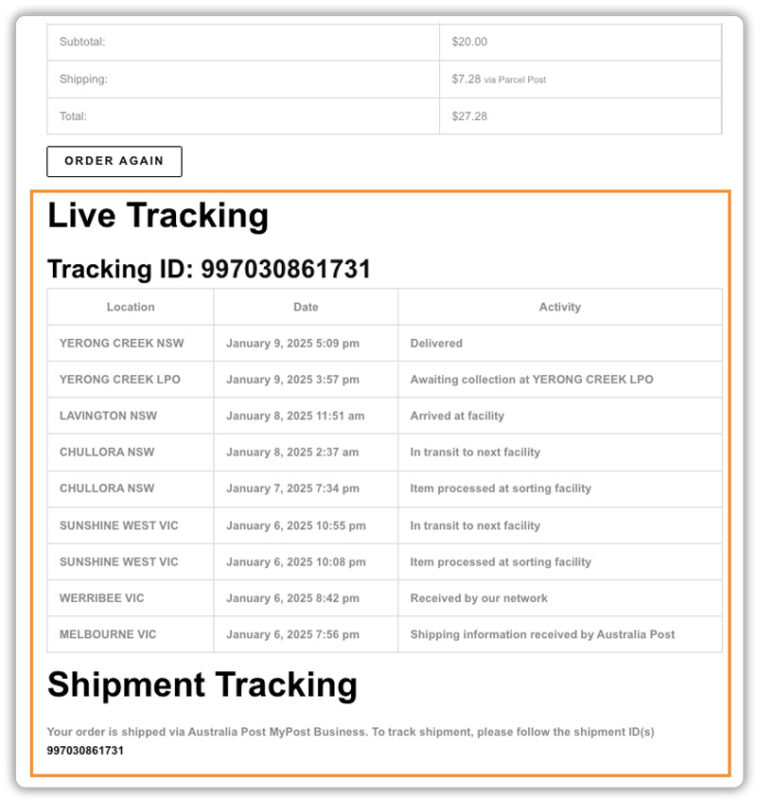
Once the plugin is set up, every shipment you create automatically has tracking built in. You generate the label, and the plugin takes care of the rest.
Tips for Managing Australia Post Tracking Efficiently in WooCommerce
Knowing the statuses is one part of it. Managing tracking well day to day is another. Here are some practical habits that make a real difference.
- Set expectations before the order is even placed: most tracking questions come from customers who didn’t know what to expect in the first place. The Estimated Delivery Date Plugin for WooCommerce by PluginHive lets you show delivery estimates directly on the product page, cart, and checkout, so customers already have a timeframe in mind before they even get a tracking number
. - Create shipping labels soon after an order is placed: this allows Australia Post tracking to begin earlier, so customers see movement sooner and are less likely to reach out asking for updates.
- Provide a dedicated order tracking page for customers: using the Shipment Tracking Pro for WooCommerce plugin by PluginHive, you can add a tracking page to your store where customers enter their order details and check their latest shipment status themselves, without needing to contact you.
- Keep an eye on your tracking dashboard during busy periods: delays are more common around Christmas, sales events, and the end of the financial year. Checking in regularly means you catch issues before customers do.
- Act quickly on “Delayed” status: if a parcel hasn’t moved in 3 – 4 business days, contact Australia Post with the tracking number before the customer notices. It’s much easier to manage when you’re already on top of it.
Small habits like these, backed by the right tools, turn tracking from a daily headache into something that quietly runs itself.
Conclusion
Once you understand what each Australia Post tracking status means, managing shipments becomes a lot less stressful. You can answer customer questions confidently, spot delays early, and keep the post-purchase experience smooth from dispatch to delivery.
The PH Australia Post MyPost Business Shipping Plugin for WooCommerce takes care of the hard part; it automatically adds tracking numbers to orders, emails customers their tracking details, and lets you monitor every shipment live from your WooCommerce dashboard. If you need help setting up this in your WooCommerce store, the PluginHive support team is ready to assist you with configuration and guidance.
FAQs
- How to track Australia Post package?
With the PH Australia Post MyPost Business Shipping Plugin, tracking numbers are automatically added to your WooCommerce orders when you generate a shipping label. You can monitor the live status directly from your dashboard, and customers receive their tracking number in the order completion email. - Why can’t I track my package with Australia Post?
This usually happens when the parcel hasn’t been scanned by Australia Post yet. Tracking only activates after the first scan at the post office, not when the label is created. If it has been more than 48 hours since drop-off, contact Australia Post with the tracking number to follow up. - Why has my parcel been in transit for so long?
Parcels travelling interstate pass through multiple sorting facilities, which adds time to the journey. A few days in transit is normal. If tracking hasn’t moved for more than 3 – 4 business days, lodge an enquiry with Australia Post using the tracking number.
