



Automating TNT pickup for Shopify is one of those small changes that makes a big difference in your day-to-day workflow. Instead of spending time scheduling collections manually or rushing to a TNT depot before the cutoff, automation ensures a driver shows up when you need them every time. This is especially helpful for busy Shopify merchants who handle a high volume of orders and can’t afford delays or mix-ups. Whether you rely on TNT’s standard end-of-business collection or their on-demand out-of-hours service, automating the process keeps things running smoothly, reduces stress for your team, and lets you stay focused on packing orders and keeping customers happy rather than managing pickup logistics.
In This Article
- How TNT Pickups Work for Shopify Stores
- Why Automate TNT Pickups Instead of Manual Scheduling
- How Automated TNT Pickups Reduce Costs
- Automating TNT Pickups in Shopify
- Best Practices for TNT Pickup Automation
- Conclusion
- FAQs
How TNT Pickups Work for Shopify Stores
TNT integrates with Shopify to give merchants a reliable way to ship orders without leaving the platform. When you connect your TNT account to Shopify through a multi-carrier shipping app, you can generate TNT labels directly and schedule collections based on your daily fulfillment workflow. TNT operates across 200 countries, making it a strong choice for Shopify sellers shipping both domestically and internationally.
TNT Pickup vs. TNT Drop-Off: What’s the Difference?
The main difference comes down to convenience.
- TNT Pickup (Collection): A TNT driver comes to your home, warehouse, or office to collect packages. It’s ideal for Shopify sellers who ship regularly or want a consistent daily routine.
- TNT Drop-Off: You bring your packages directly to a TNT depot. TNT has depot locations across many countries. This works fine for small volumes, but it becomes inconvenient when shipping multiple orders every day.
In short, drop-offs require you to travel to TNT, while pickups bring TNT to you, especially helpful when you automate the process.
TNT Pickup Options for Shopify Merchants
TNT offers Shopify sellers a few distinct collection options depending on their shipping needs:
- Standard End-of-Business Pickup: TNT collects your shipments before the end of the business day. This is the default option for most merchants and works well for steady, predictable order volumes.
- On-Demand Out-of-Hours Collection: For collections outside TNT’s usual hours, their on-demand service means your goods can start their journey whenever you’re ready. This is ideal for merchants who pack late or have urgent shipments that can’t wait until the next business day.
When these options are automated inside Shopify, you can customize pickup times and triggers, giving you a faster and more predictable shipping process, so you can confidently tell a delivery date to your customers.
Why Automate TNT Pickups Instead of Manual Scheduling
- Significant time savings for fulfillment teams: Automation eliminates daily manual scheduling, allowing staff to focus on packing, quality checks, and faster order turnaround instead of repeatedly filling out TNT pickup request forms.
- Fewer errors and almost zero missed pickups: Automated rules prevent forgotten requests, incorrect details, and missed cutoff times, reducing last-minute rushes to TNT depots.
- Smoother workflow for high-volume shipping: When you’re processing large batches of orders, automated pickups keep packages moving consistently and prevent bottlenecks, especially during peak seasons.
How Automated TNT Pickup Reduces Costs
Automating your TNT pickup does not just save time; it can actually lower your overall shipping and operational expenses.
- Avoid unnecessary TNT depot trips: When pickups are automated, you stop wasting fuel, time, and labor on daily drop-off runs to TNT depots. Everything gets collected right from your location, cutting down on travel costs and freeing up staff for more important tasks.
- Lower shipping mistakes: Manual scheduling often leads to missed pickups, incorrect times, rushed packaging, or mislabeled parcels. Automation stabilizes your workflow, reducing costly mistakes like reshipping packages or processing unnecessary refunds.
- Real examples of savings for Shopify merchants: Stores shipping 50–200 packages a day often save hours of labor per week by eliminating manual scheduling. Merchants report fewer missed collections, lower overtime costs, and a smoother end-of-day process because staff know exactly when TNT will arrive.
Overall, automation creates a more predictable, efficient, and cost-effective shipping routine for Shopify businesses of any size.
Automating TNT Pickup in Shopify
Automating TNT pickup in Shopify is simple when you use the PH Multi-Carrier Shipping Label app. Here’s how to set it up:
1. Install the PH Multi-Carrier Shipping Label App
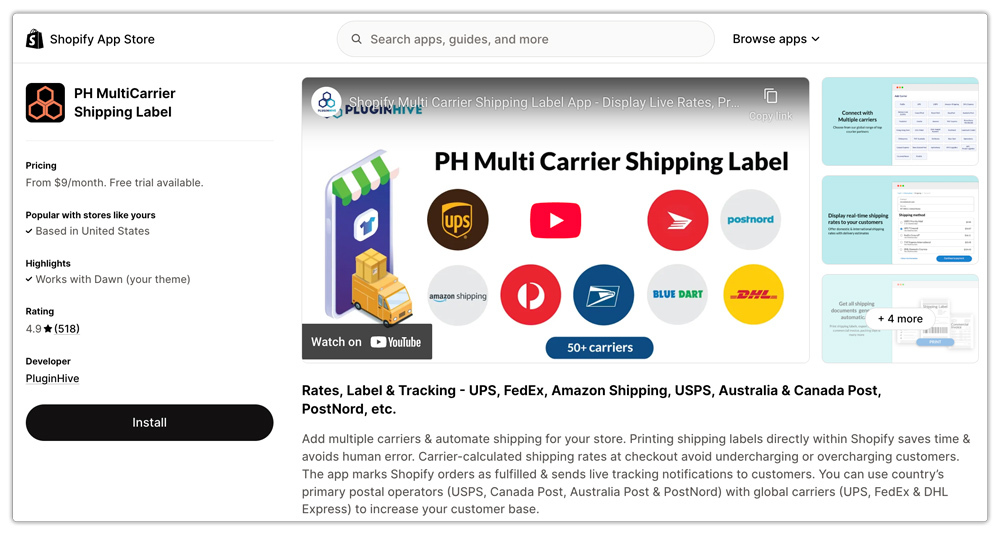
Start by downloading and installing the PH Multi-Carrier Shipping Label app from the Shopify App Store.
2. Add Your TNT Account
Once the app is installed, connect your TNT account inside the settings. This ensures that all your labels, live TNT rates, and pickups use your own TNT credentials and negotiated services.

3. Generate TNT Labels and Request Pickup for New Orders
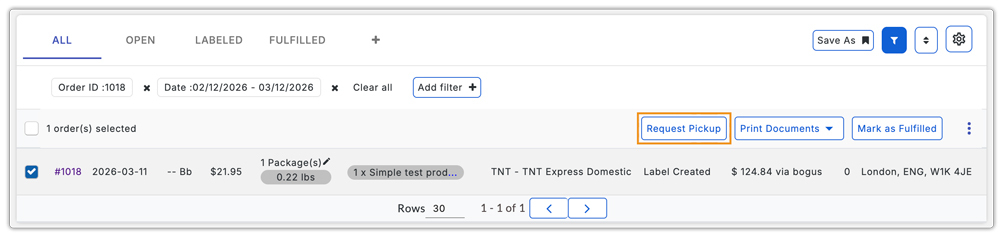
Whenever a new order comes in, open it through the app and generate your TNT shipping label as usual. As soon as the label is created, you’ll see an option to Request TNT Pickup right from the same screen; there’s no need to visit the TNT website separately.
4. Review Pickup Details in the Pickup Log
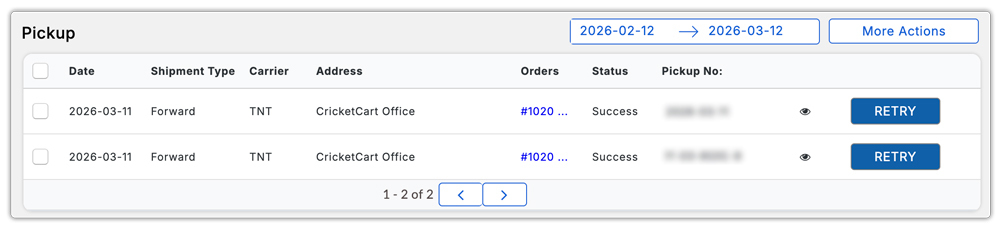
All your scheduled collections, including dates, times, and package information, are stored in the app’s Pickup Log. This makes it easy to track what’s already been requested and what’s coming up.
5. Use Advanced Pickup Features
The app also provides advanced controls to make TNT pickup even more reliable:
- You can set your company’s close time inside the app.
- Also gives you the option to select the pickup time, i.e., the time at which the pickup will happen.
- If a pickup request is made after your closing time, it will automatically be scheduled for the next business day.

With these steps, your TNT pickup becomes fully automated and integrated into your Shopify shipping flow.
Best Practices for TNT Pickup Automation
- Choose a proper pickup window: Set a collection time that matches your team’s workflow. Give yourself enough buffer to pack orders without rushing, but early enough for TNT to collect everything the same day before their end-of-business cutoff.
- Keep packages consolidated: Group parcels in one clear pickup spot so the TNT driver can grab everything quickly. This avoids missed boxes and keeps the collection process smooth.
- Use TNT-approved packaging: Following TNT packaging guidelines helps prevent damage, delays, or rejected shipments. Strong boxes, proper cushioning, and secure tape go a long way toward hassle-free delivery.
- Automate shipping notifications and tracking: Once a collection is confirmed, let your customers know their orders are on the way. Automated email updates reduce support tickets and keep customers informed without extra effort from your team.
Conclusion
Automating TNT pickup for Shopify is a simple upgrade that delivers a big payoff. Instead of juggling manual scheduling, making trips to TNT depots, or worrying about missed collections, automation keeps your shipping routine predictable and stress-free. With tools like the PH Multi-Carrier Shipping Label app, you can generate labels, trigger pickups, and track everything in one place, saving time, reducing mistakes, and keeping your fulfillment team focused on what really matters: getting orders out quickly and keeping customers happy.
Whether you’re shipping a few packages a day or handling high-volume operations, automated TNT pickups make your workflow smoother, faster, and far more efficient. It’s one of the easiest ways to scale your Shopify shipping process while giving your business the consistency it needs to grow.
FAQs
1. Can you schedule a TNT pickup through Shopify?
Yes, you can schedule a TNT collection in Shopify by using the PH Multi-Carrier Shipping Label app. It lets you request and automate TNT pickups directly from your Shopify dashboard without visiting the TNT website.
2. How do I set up TNT pickup on Shopify?
Install the PH Multi-Carrier Shipping Label app from the Shopify App Store. Once installed, connect your TNT account, generate your TNT labels inside the app, and request a pickup from the same screen. All pickup details will appear in the app’s Pickup Log, making the whole process quick and easy.
3. Do I need a TNT account to automate pickups on Shopify?
Yes, you need your own TNT account to automate pickups through Shopify. Once you connect your TNT credentials inside the PH Multi-Carrier Shipping Label app, the app can request collections on your behalf, trigger them automatically after label generation, and log all pickup activity for easy tracking.
