


For growing Shopify stores, UPS pickup in Shopify becomes important once daily shipments start increasing. Manually requesting pickups every day or driving parcels to a drop-off location often slows fulfillment and adds unnecessary operational work.
When pickup scheduling is connected directly to label generation, merchants save time, reduce missed collections, and make daily shipping far more predictable. This is why many stores automate UPS pickup in Shopify instead of managing pickups separately through the carrier website.
In This Article
- How UPS Pickup in Shopify Works for Daily Fulfillment
- Why Automate UPS Pickups Instead of Manual Scheduling
- How Automated UPS Pickups Reduce Costs
- Automating UPS Pickups in Shopify
- Common UPS Pickup Issues in Shopify
- Best Practices for UPS Pickup Automation
- Conclusion
- FAQ’s
How UPS Pickup in Shopify Works for Daily Fulfillment
UPS works seamlessly with Shopify, making it easy for merchants to ship orders without leaving the platform. When you use Shopify Shipping or connect your own UPS account, you can generate UPS labels directly in Shopify and then schedule pickups based on your daily workflow.
UPS Pickup vs. UPS Drop-Off: What’s the Difference?
The main difference comes down to convenience.
- UPS Pickup: A driver comes to your home, warehouse, or office to collect packages. It’s ideal for Shopify sellers who ship regularly or want a consistent daily routine.
- UPS Drop-Off: You bring your packages to a UPS Store, Access Point, or drop box. This works fine for small volumes, but it becomes inconvenient when shipping multiple orders every day.
In short, drop-offs are more manual, while pickups allow UPS to come to you – especially helpful when you automate the process.
UPS Pickup in Shopify: Available Pickup Options
UPS gives Shopify sellers several pickup choices depending on how frequently they ship:
- Scheduled Pickup: Your UPS driver comes at the same time every day or on selected days. Great for steady order volume.
- On-Demand Pickup: You request a pickup whenever you need one, perfect for irregular shipping days.
- Recurring Pickup: A long-term setup where UPS visits your location regularly, without needing to request individual pickups.
When these options are automated inside Shopify, you can customize pickup times, frequency, and triggers, giving you a faster and more predictable shipping process.
Why Automate UPS Pickups Instead of Manual Scheduling
- Significant time savings for fulfillment teams: Automation eliminates daily manual scheduling, allowing staff to focus on packing, quality checks, and faster order turnaround instead of repetitive UPS forms.
- Fewer errors and almost zero missed pickups: Automated rules prevent forgotten requests, incorrect details, and missed cutoff times, reducing last-minute rushes to UPS drop-off locations.
- Smoother workflow for high-volume shipping: When you’re processing large batches of orders, automated pickups keep packages moving consistently and prevent bottlenecks, especially during peak seasons.
- Instant label creation + automatic pickup requests: As soon as labels are generated in Shopify, the system can trigger a UPS pickup automatically, removing extra steps and speeding up the entire fulfillment cycle.
How Automated UPS Pickup Reduces Costs
Automating your UPS pickup does not just save time; it can actually lower your overall shipping and operational expenses.
- Avoid unnecessary UPS drop-off trips: When pickups are automated, you stop wasting fuel, time, and labor on daily drop-off runs. UPS collects every shipment directly from your location, reducing travel costs and freeing your staff for more important tasks.
- Lower shipping mistakes: Manual scheduling often leads to missed pickups, incorrect times, rushed packaging, or mislabeled parcels. Automation stabilizes your workflow, reducing costly mistakes like reshipping packages or processing unnecessary refunds.
- Real examples of savings for Shopify merchants: Stores shipping 50–200 packages a day often save hours of labor per week by eliminating manual scheduling. Merchants also report fewer missed pickups, lower overtime costs, and a smoother end-of-day process because staff know exactly when UPS will arrive.
Overall, automation creates a more predictable, efficient, and cost-effective shipping routine for Shopify businesses of any size.
Automating UPS Pickup in Shopify
Automating UPS pickup in Shopify is simple when you use the PH Multi-Carrier Shipping Label app. Here’s how to set it up in a clear, human-friendly way:
1. Install the PH Multi-Carrier Shipping Label App
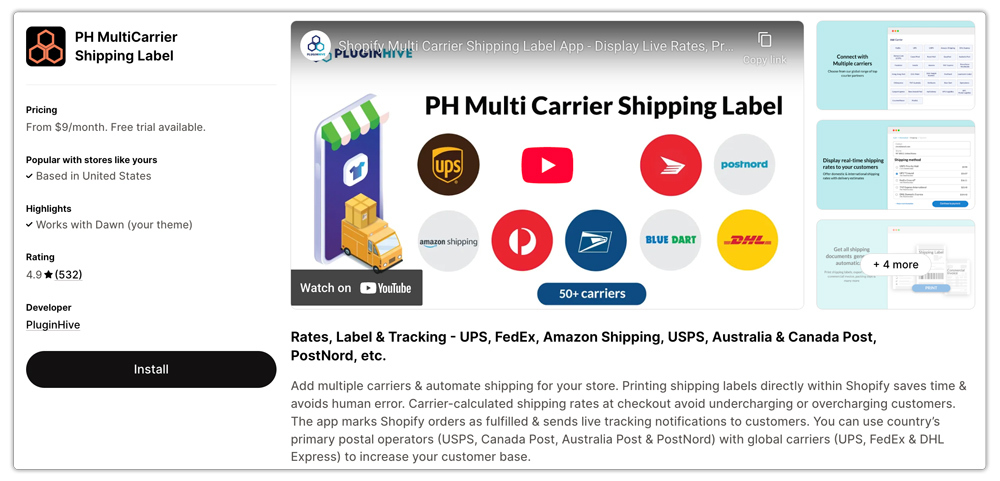
Start by downloading and installing the PH Multi-Carrier Shipping Label app from the Shopify App Store.
2. Add Your UPS Account
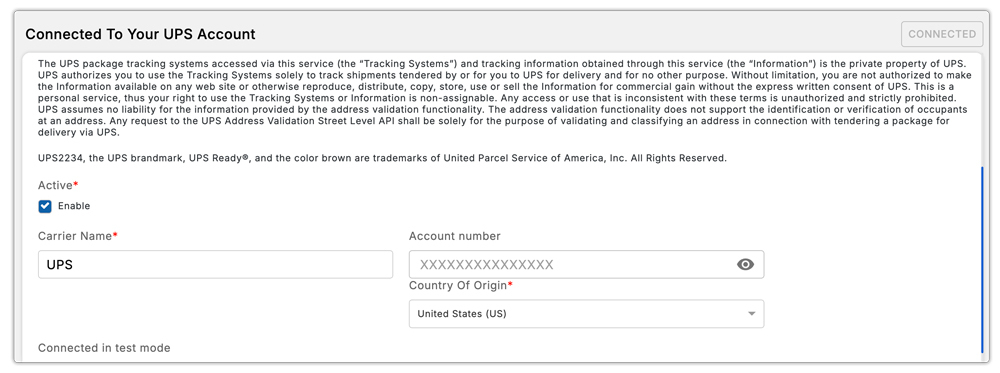
Once the app is installed, connect your UPS account inside the settings. This ensures that all your labels, live UPS rates, and pickups use your own UPS services.
3. Generate UPS Labels for New Orders
Whenever a new order comes in, open it through the app and generate your UPS shipping label as usual. As soon as the label is created, you’ll see an option to Request UPS Pickup right from the same screen; no need to visit the UPS website.

4. Review Pickup Details in the Pickup Log
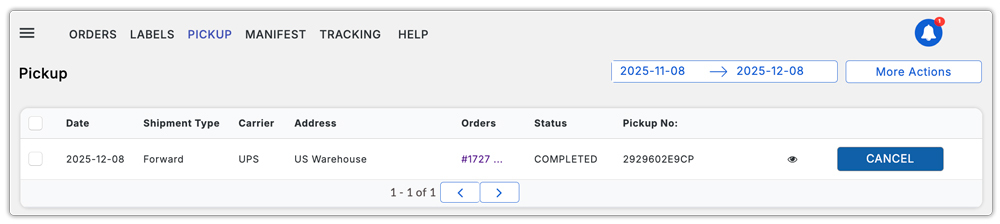
All your scheduled pickups, including dates, times, and package information, are stored in the app’s Pickup Log.
5. Use Advanced Pickup Features
The app also provides advanced controls to make UPS pickup even more reliable:
- You can set your company’s open time and close time inside the app.
- If a pickup request is made after your closing time, it will automatically be scheduled for the next business day with the services that you desire.
- You can also choose a different pickup address, which allows you to schedule UPS pickups from warehouses, offices, or any alternate location.
- For merchants shipping from different addresses, UPS pickup in Shopify works better when each pickup location is clearly configured inside the app, which also eases the return process.
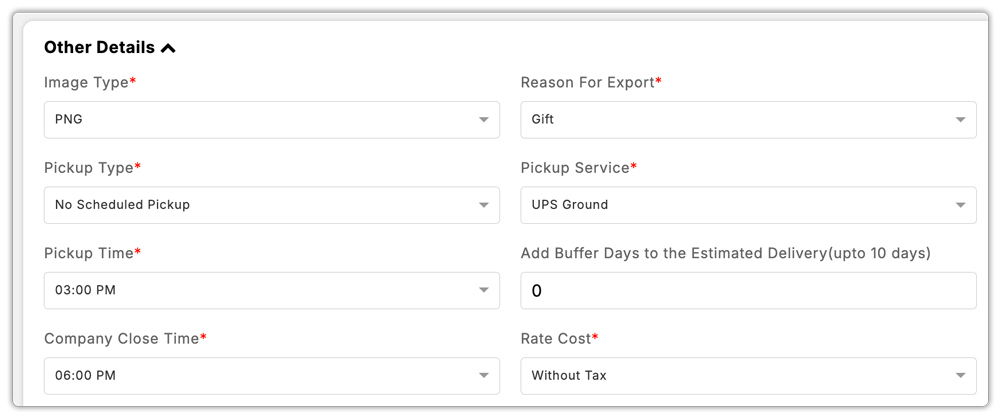
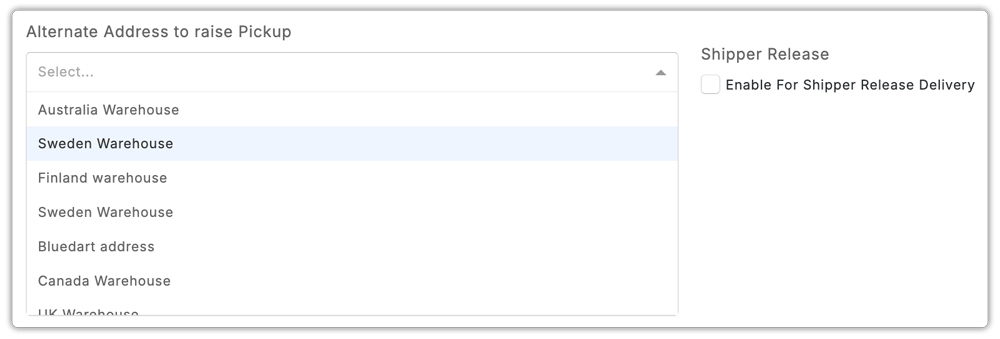
With these steps, your UPS pickup becomes fully automated and integrated into your Shopify shipping flow. Some Shopify merchants also report that manual pickup requests become harder to manage when confirmation numbers are not easy to track later.
Common UPS Pickup Issues in Shopify
Even when labels are generated correctly, pickup requests may still fail because of:
- Incorrect pickup cutoff time
- Wrong pickup address
- Closed warehouse hours
- Delayed label generation after carrier cutoff
Before relying fully on automation, merchants should test pickup timing against actual UPS collection windows.
Best Practices for UPS Pickup Automation
- Choose a proper pickup window: Set a pickup time that matches your team’s workflow. Give yourself enough buffer to pack orders without rushing, but early enough for UPS to collect everything the same day.
- Keep packages consolidated: Group parcels in one clear pickup spot so the UPS driver can grab everything quickly. This avoids missed boxes and keeps the pickup process smooth.
- Use UPS-approved packaging: Following UPS packaging guidelines helps prevent damage, delays, or rejected pickups. Strong boxes, proper cushioning, and secure tape go a long way toward hassle-free delivery.
- Automate shipping notifications and tracking: Once a pickup is confirmed, let your customers know their orders are on the way. Automated email updates reduce support tickets and keep customers informed without extra effort from your team.
Conclusion
For merchants shipping regularly, UPS pickup in Shopify removes one of the most repetitive parts of fulfillment by connecting pickup requests directly to the shipping workflow.
Instead of managing separate carrier requests every day, merchants can generate labels, trigger pickups, and track collection activity from one place. This improves fulfillment consistency, especially when order volume increases.
FAQ’s
1. Can you schedule a UPS pickup through Shopify?
Yes, you can schedule a UPS pickup in Shopify by using the PH Multi-Carrier Shipping Label app. It lets you request and automate UPS pickup directly from your Shopify dashboard.
2. How do I set up pickup on Shopify?
You can set up UPS pickups on Shopify by installing the PH Multi-Carrier Shipping Label app. Once installed, connect your UPS account, generate your UPS labels inside the app, and then simply request a pickup from the same screen. All your pickup details will appear in the app’s Pickup Log, making the whole process quick and easy.
3. Do I need a UPS account to automate pickups on Shopify?
Yes, you need your own UPS account to automate pickups through Shopify. Once you connect your UPS credentials inside the PH Multi-Carrier Shipping Label app, the app can request pickups on your behalf, trigger them automatically after label generation, and log all pickup activity for easy tracking.
4. Why does UPS pickup in Shopify sometimes fail even after label creation?
Common reasons include cutoff timing, pickup address mismatch, or pickup requests submitted after warehouse closing hours.
5. Can Shopify automate UPS pickup for every label you create?
A carrier-connected shipping app can trigger pickup requests immediately after you generate the shipping label.
