


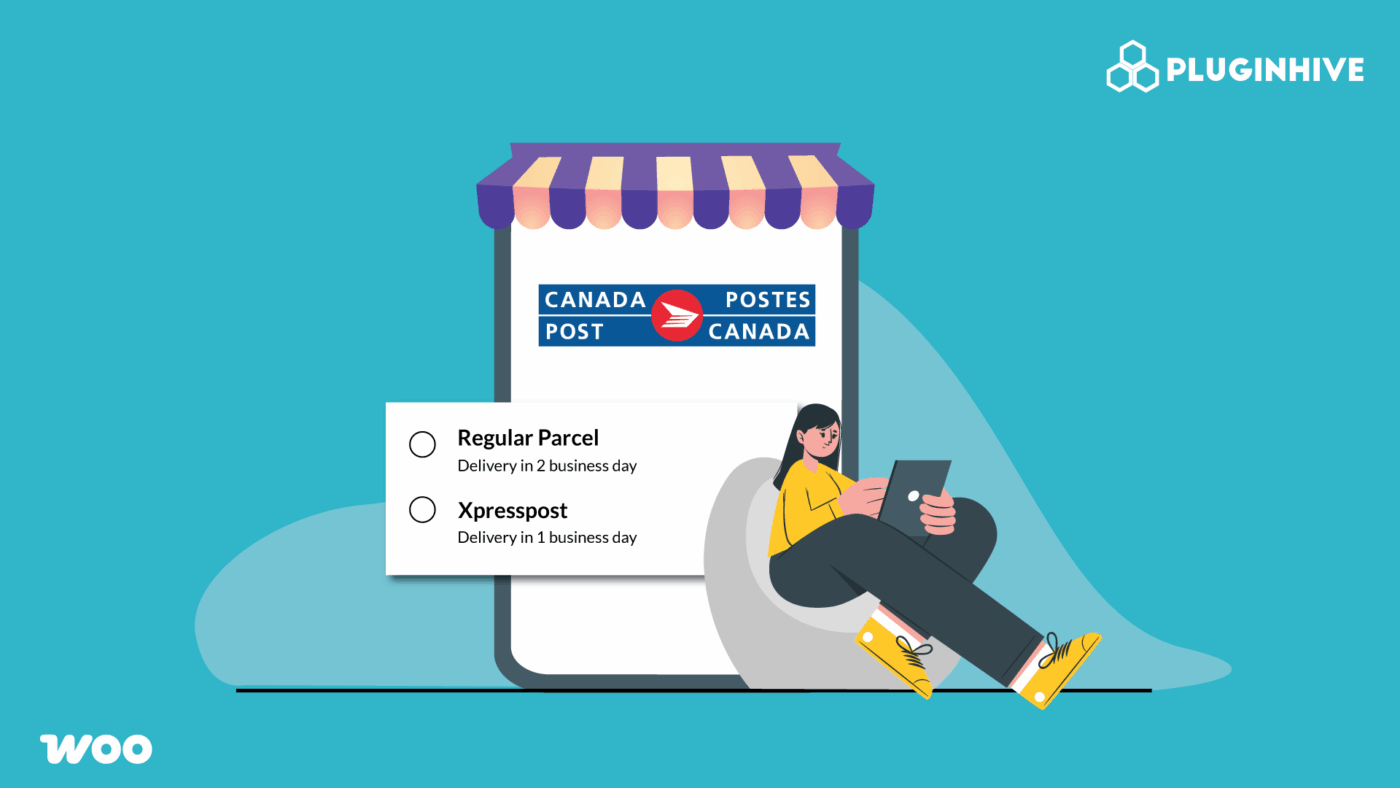
For WooCommerce store owners in Canada, showing real-time Canada Post shipping rates at checkout isn’t just a nice-to-have; it’s essential. Accurate rates help customers make informed decisions, increase trust, and reduce the chances of cart abandonment. When customers see exactly what they’ll pay for shipping before completing their order, they’re more likely to follow through with the purchase. In this article, we’ll explore the best WooCommerce shipping plugins for Canada Post to show live shipping rates, so you can improve customer trust and streamline fulfillment.
Table of Contents
- Benefits of Live Canada Post in WooCommerce Checkout
- Top Canada Post WooCommerce Plugins
- Show Canada Post Rates in WooCommerce
- Real World Business Case
- Conclusion
- FAQs
Benefits of Live Canada Post in WooCommerce Checkout
Integrating live Canada Post shipping rates directly into your WooCommerce checkout transforms the customer experience and streamlines your operations. Here’s how it helps your business:
- Accurate Shipping Costs: Customers see the exact Canada Post rate based on their location and order details, reducing disputes and refunds.
- Increased Transparency: No hidden fees or surprises at checkout, which builds trust and boosts conversions.
- Reduced Cart Abandonment: When customers know the shipping cost upfront, they’re more likely to complete their purchase.
- Time Savings: Automating rate calculation eliminates manual updates and guesswork.
- Better Service Selection: Offer multiple Canada Post options (Expedited, Xpresspost, Priority) so customers can choose the right balance of speed and price.
- Improved International Sales: Display live rates for U.S. and global destinations to expand your reach.
- Professional Checkout Experience: Real-time shipping information makes your store look polished and reliable.
By adding live Canada Post rates to your WooCommerce store, you create a smoother buying journey, protect your margins, and enhance customer satisfaction all in one simple step.
Top WooCommerce Shipping Plugins for Canada Post Rates
PluginHive offers two powerful WooCommerce solutions for displaying live Canada Post shipping rates, one dedicated to Canada Post and another designed for multiple carriers, including Canada Post.
WooCommerce Canada Post Shipping Plugin with Print Label
This Canada Post–certified plugin integrates real-time rates directly into your WooCommerce checkout. It works for both contract and non-contract accounts, supports domestic and international shipping, and lets customers see accurate rates based on package weight, destination, and selected service.
Pricing
- $99/year for a single-site license.
- Includes 1 year of updates, premium support, and a 30-day money-back guarantee.
Key Features
- Live domestic & international Canada Post rates at cart, checkout, and order pages (supports both contract and non-contract accounts).
- Automatically determine the most cost-effective box using product weight and dimensions.
- Print Canada Post shipping labels, return labels, and manifests individually or in bulk, complete with tracking numbers.
- Supports commercial and residential address classification, insurance, and custom shipping services (Expedited, Xpresspost, Priority, etc.).
- Offer estimated delivery dates to help customers choose the right service.
Customer Reviews:
Highly rated by WooCommerce merchants for its accuracy, automation, and ease of use. Store owners especially appreciate the plugin’s ability to handle both domestic and international orders without manual calculations.
Ideal For:
WooCommerce store owners who rely primarily on Canada Post for domestic or international shipping and want an all-in-one, automated solution.
WooCommerce Shipping Services (Multi-Carrier Plugin)
If you use Canada Post alongside other carriers, such as UPS, FedEx, USPS, or DHL, the Multi-Carrier plugin is the best fit. It centralizes all carriers in one dashboard, allowing you to show live rates for each and let customers choose their preferred option at checkout.
Pricing
- Starts at $9/month (Basic plan, single carrier).
- Goes up to $99/month (Enterprise plan with multiple carriers and higher volume).
Key Features
- Real-time shipping rates from multiple carriers, including Canada Post, at the cart and checkout.
- One-click label generation and tracking updates directly from the WooCommerce orders page.
- Compatible with multi-vendor marketplaces and WCFM via the PH Multivendor Shipping Addon.
- Flexible carrier assignment uses Canada Post for Canadian deliveries and other carriers for international or regional orders.
- Supports bulk label printing and automated pickup scheduling.
Customer Reviews:
Trusted by thousands of WooCommerce merchants, with over 4000 five-star reviews highlighting its versatility and seamless integration with multiple carriers.
Ideal For:
WooCommerce stores that are looking for a unified shipping solution that combines Canada Post with other carriers, perfect for businesses handling both domestic and cross-border orders.
Show Canada Post Rates in WooCommerce
Displaying accurate Canada Post shipping rates in your WooCommerce store is simple when using the right plugin.
1. Using the WooCommerce Canada Post Shipping Plugin
Setting up Canada Post live rates in WooCommerce with this plugin is quick and straightforward. Here’s how to get started:
Note: For detailed setup steps, see the WooCommerce Canada Post Shipping Plugin Setup Guide.
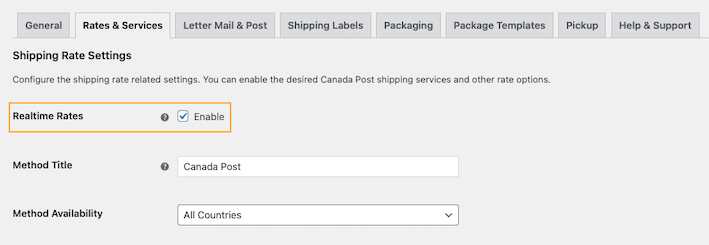
- Enable live Canada Post rates: In the Rates and Services section of the plugin, turn on RealTime Rates. This ensures your customers see accurate shipping costs based on package weight, dimensions, and destination.
- Customize shipping services: Choose which Canada Post services to offer (e.g., Expedited Parcel, Xpresspost, Priority).
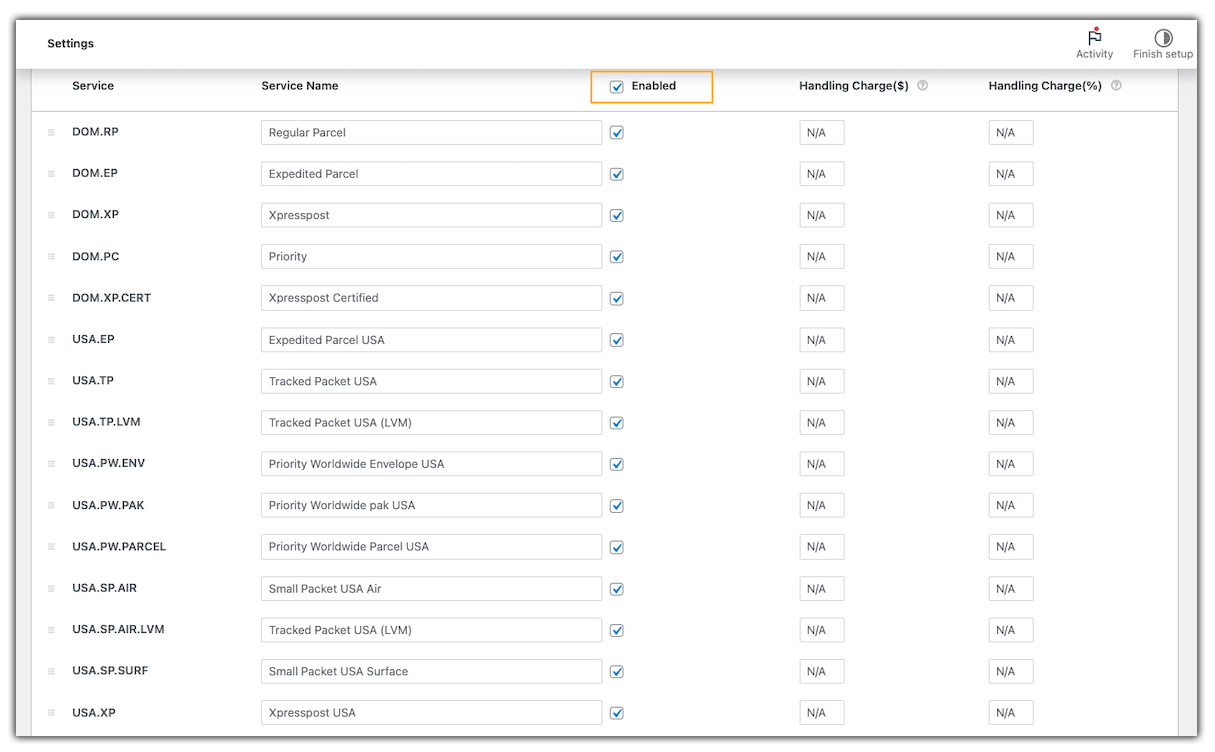
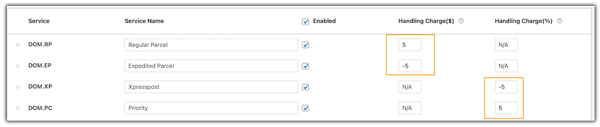
You can rename service labels for a better customer experience (e.g., “Xpresspost” → “Fast Delivery”) and adjust rates by adding handling fees or applying discounts:
- Test live rates: Both domestic and international Canada Post rates will display based on the services you’ve enabled.
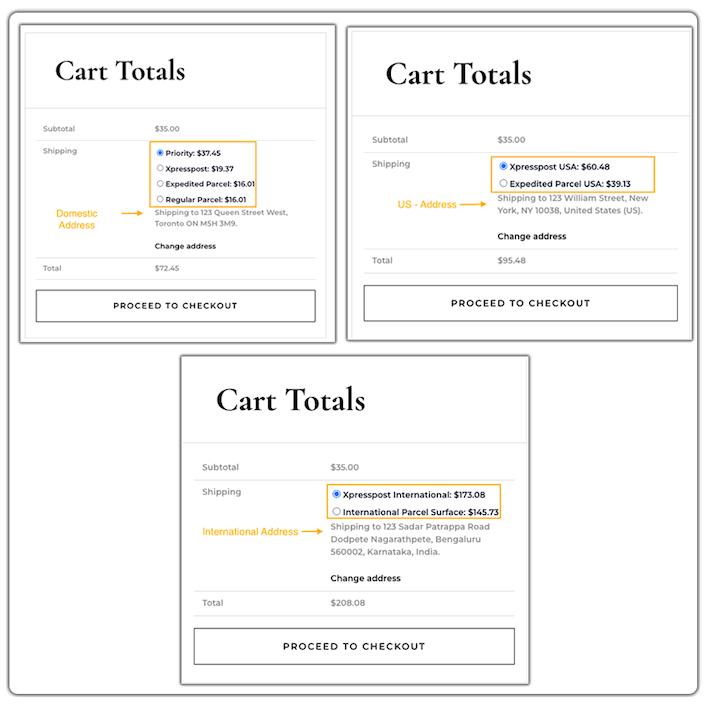
With this setup, your customers will always see transparent and accurate Canada Post shipping rates, improving trust and checkout completion.
2. Using the WooCommerce Shipping Services (Multi-Carrier) Plugin
Install and activate the WooCommerce Shipping Services Plugin to manage Canada Post alongside other carriers like FedEx, UPS, and USPS.
Note: For detailed setup, see the WooCommerce Shipping Services Setup Guide.
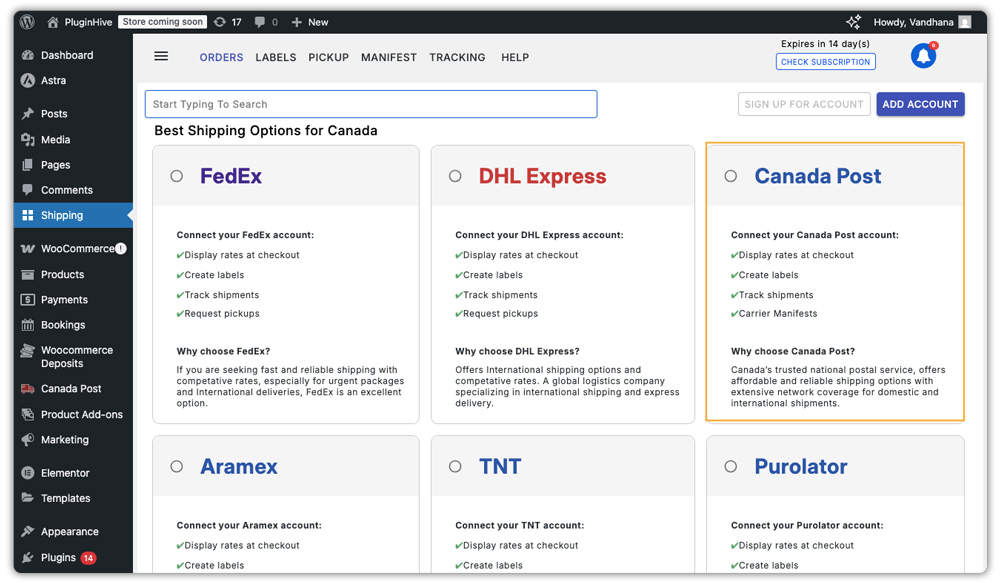
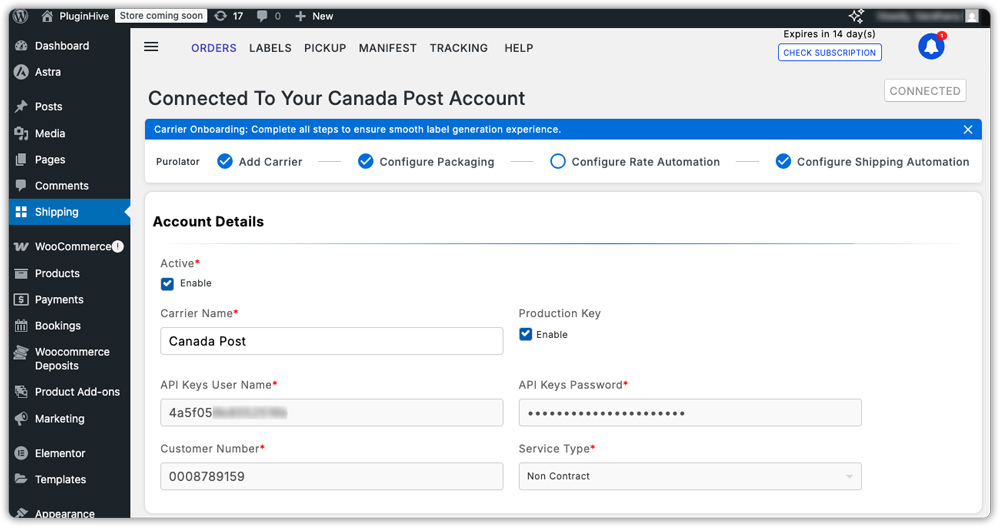
- Connect Canada Post to the Multi-Carrier plugin: After configuration, add Canada Post as a carrier and enter your API credentials.
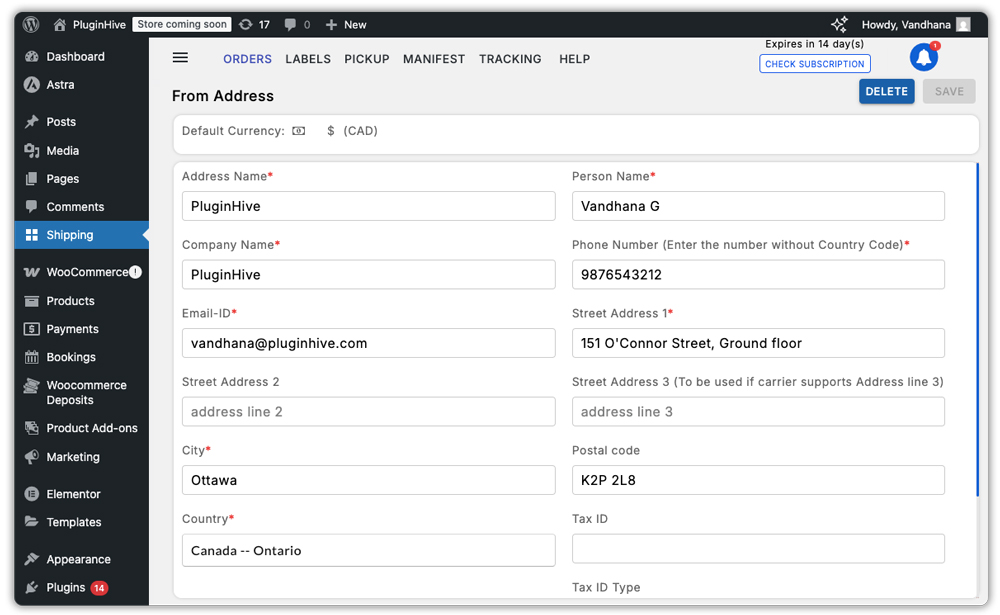
- Verify your shipper address to ensure correct rate calculations.
- Choose Canada Post Services to Display: By default, all Canada Post services appear at checkout, but you can customize this in Settings > Shipping Rates > Rate Automation by editing the Canada Post automation rule and selecting only the services you want to offer, such as Expedited Parcel, Xpresspost, or Priority.
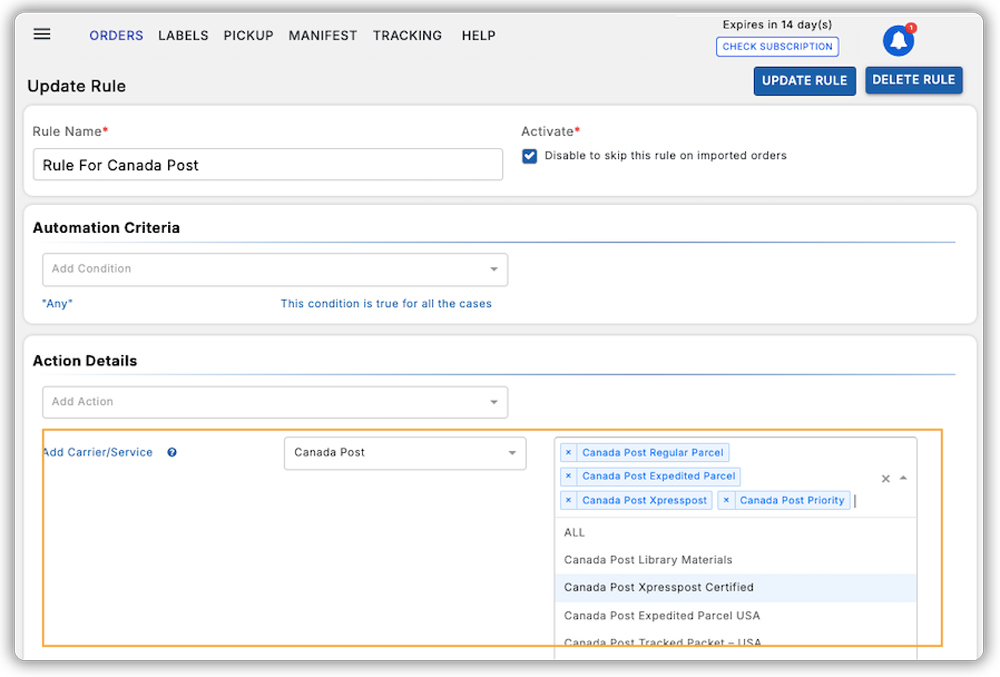
You can set conditions for showing Canada Post shipping options based on factors like shipping zones, cart quantity, weight, subtotal, vendor, time of order, price range, or selected shipping method. Packaging can be configured using weight-based, box, stack, or quantity-based methods to ensure accurate rate calculations.
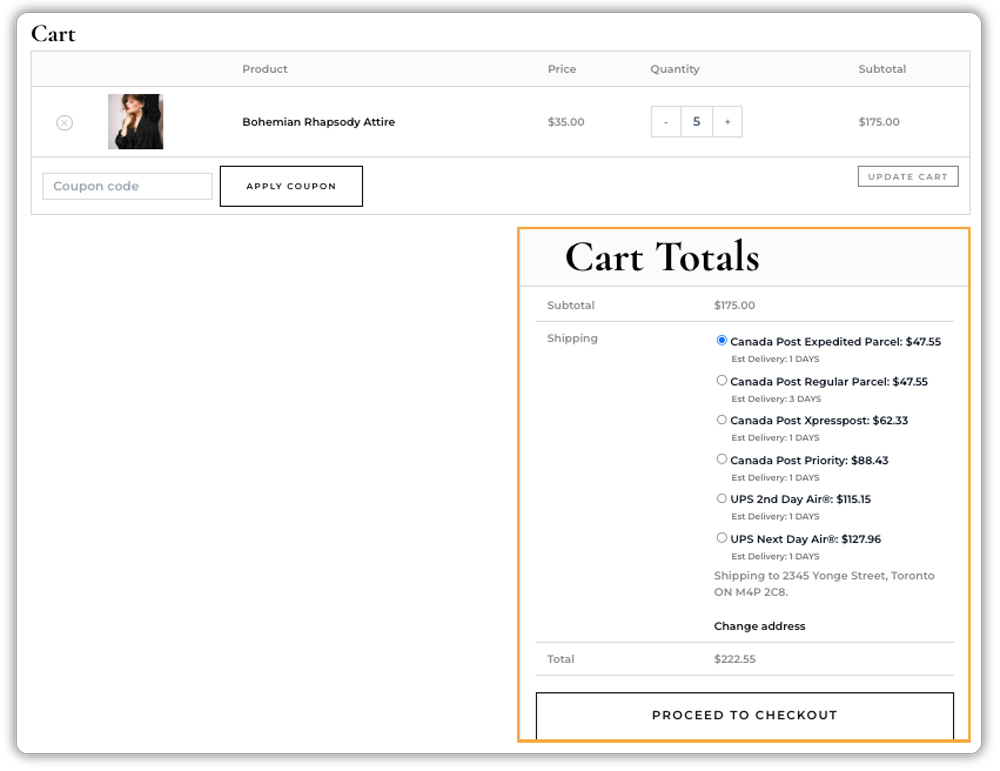
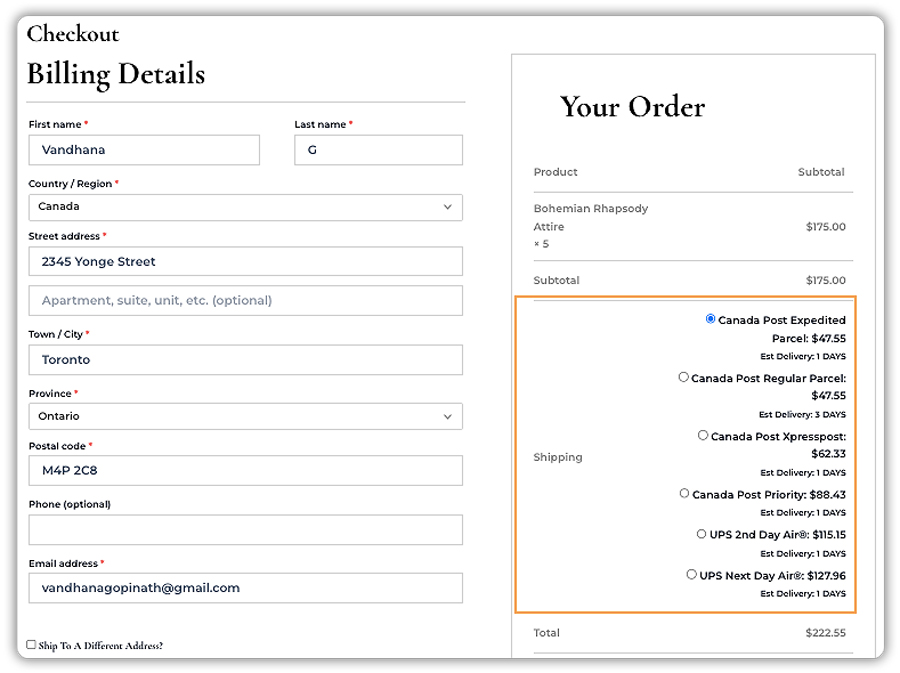
- Display Live Rates at Cart & Checkout: Once configured, Canada Post live shipping rates will appear at both the cart and checkout pages, alongside other connected carriers, allowing customers to choose the most suitable option.
Cart Page:
Checkout page:
This setup is perfect for stores that want flexibility and a single dashboard to manage all carriers, including Canada Post.
Real World Business Case
Let’s say you run a WooCommerce store shipping products all over Canada, from local orders to nationwide deliveries. You start with flat-rate shipping to keep things simple, but soon run into issues:
The challenge:
- Customers close to your location feel overcharged and hesitate to buy.
- Long-distance shipments cost you more than you charge, eating into your profit.
- Customers abandon their carts when they see unexpected shipping fees at checkout.
The solution:
- Based on your needs, you can: Use the WooCommerce Canada Post Shipping Plugin, or go for the WooCommerce Shipping Services (Multi-Carrier Plugin) to show real-time Canada Post rates right at checkout.
- Shipping costs are calculated automatically based on the customer’s address, package size, and weight – no guesswork.
- Every customer sees accurate, transparent shipping charges, helping them trust your store and complete their purchase.
The impact:
- Fewer abandoned carts thanks to clear, trusted shipping options.
- No more profit loss from undercharging on distant deliveries.
- Happier customers who feel they’re paying a fair shipping price.
- A smoother checkout experience that works for both local and nationwide orders.
- Flexibility to stick with Canada Post only or mix multiple carriers in one setup.
Whether you’re selling small parcels or large packages, this plugin ensures your Canada Post rates are always accurate, helping you ship smarter, save time, and keep customers coming back.
Conclusion
Displaying real-time Canada Post shipping rates in your WooCommerce store ensures accurate pricing, eliminates surprises at checkout, and builds customer trust. Whether you choose a Canada Post–focused solution or a multi-carrier setup, the right plugin helps you streamline fulfillment and deliver a professional checkout experience.
With tools like the WooCommerce Canada Post Shipping Plugin or the WooCommerce Shipping Services (Multi-Carrier Plugin), you can automate label printing, show live rates, and handle shipping efficiently across Canada. Need help? Contact PluginHive Support for expert assistance with installation, configuration, or any shipping-related queries.
FAQs
1. Do I need a Canada Post account to use these plugins?
Yes. You’ll need either a contract or non-contract Canada Post account to generate API credentials, which are required for the plugin to fetch live rates and create shipping labels.
2. Can these plugins handle both domestic and international Canada Post shipments?
Absolutely. Both plugins support domestic (within Canada) and international shipments. You can choose specific Canada Post services like Expedited Parcel, Xpresspost, or Priority for each region.
3. Can I limit which Canada Post services appear at checkout?
Yes. Both plugins allow you to select only the services you want to offer.
4. Do these plugins print Canada Post shipping labels?
Yes. You can generate and print Canada Post shipping labels directly from your WooCommerce orders page. Some plugins also allow bulk label printing, return labels, and manifest creation.
5. Will customers see estimated delivery dates?
Yes, the WooCommerce Canada Post Shipping Plugin can display estimated delivery dates alongside each service, helping customers choose the best shipping option.
6. Do these plugins work with multi-vendor marketplaces?
Yes, the Multi-Carrier Plugin is compatible with marketplace solutions like WCFM via the PH Multivendor Shipping Addon, allowing each vendor to ship with their own Canada Post account.
8. Are Canada Post’s live rates accurate?
Yes. Rates are pulled directly from the Canada Post API in real time, ensuring accuracy based on the latest Canada Post pricing and your specific account rates.
