




Running a bootcamp business, whether it’s a HIIT bootcamp, outdoor strength training, or a group fitness bootcamp, means constantly managing class schedules, participant limits, cancellations, and payments. Without the right system, you’re left juggling spreadsheets, fielding repetitive client queries, and dealing with overbookings or no-shows.
That’s where WooCommerce, combined with the Bookings And Appointments for WooCommerce plugin by PluginHive, becomes a game-changer. In this article, we’ll show you how to automate bootcamp registrations, control availability, manage client slots, and accept payments directly through your WooCommerce store, all without the administrative chaos.
Table of Contents
- Common Challenges Faced by Bootcamp Trainers
- Automate Bootcamp Registrations with WooCommerce Bookings
- Real World Example
- Final Thoughts
- FAQs
Common Challenges Faced by Bootcamp Trainers
Managing a bootcamp business isn’t just about the training; it’s the behind-the-scenes tasks that pile up. Without the right booking system, things get disorganized fast. Let’s look at some common struggles:
- Managing Class Schedules and Slot Availability: Without a real-time booking calendar, customers often see outdated info. This leads to overbookings, confusion around batch timings, and missed opportunities.
- Manual Registrations & Repetitive Queries: Customers frequently call or message to ask about timings, availability, or how to sign up. This eats into your time and delays the actual service delivery.
- Lack of Booking Limits per Session: If your classes have a fixed capacity, there’s no built-in way to stop overbooking. This causes overcrowded sessions and impacts customer experience.
- Inflexible Scheduling: Managing personal training, group sessions, or recurring bootcamps on different days can quickly become chaotic.
- No Option for Add-ons or Upgrades: Whether it’s gear rentals or branded merchandise, there’s no way to offer them during checkout.
- Forgetful Customers & Missed Bookings: Clients often forget their sessions without automated reminders, resulting in no-shows and lost revenue.
- Handling Cancellations: Without automation, cancellations lead to empty spots and refund confusion. You either lose revenue or spend time managing exceptions.
Without automation, running a bootcamp business is inefficient and hard to scale. That’s why a bookings solution built for WooCommerce is worth exploring.
Automate Bootcamp Registrations with WooCommerce Bookings
Running a morning bootcamp, weekend HIIT session, or strength training class?
With PluginHive’s Bookings And Appointments for WooCommerce plugin, you can automate your entire booking process, save time, prevent overbookings, and make the experience smooth for your clients.
Just make sure the booking plugin is installed and set up correctly. Follow this quick setup guide.
Here’s how it helps you manage everything with ease.
- Show Real-Time Availability & Bootcamp Schedule
Make your classes bookable online with a live calendar. Define the days and time slots each class is available daily, weekends only, or seasonal batches.
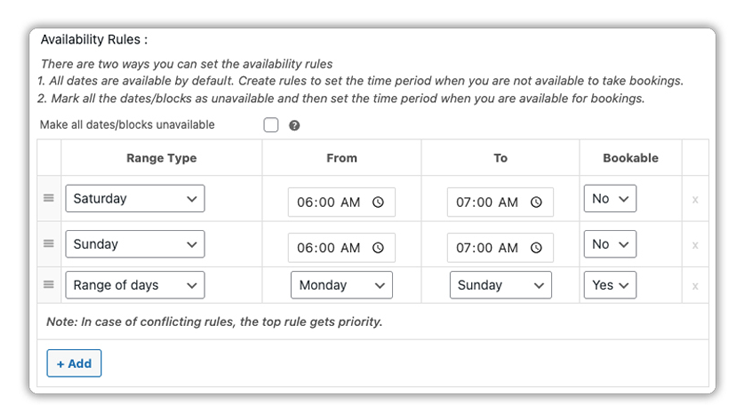
Learn how to Set Bookings Availability.
- Manage Duration, Buffers, and Cancellations
Customize how your bootcamp sessions run, set a fixed duration like 45 or 60 minutes, and add buffer time before and after to allow for equipment setup, cooldown, or prep.
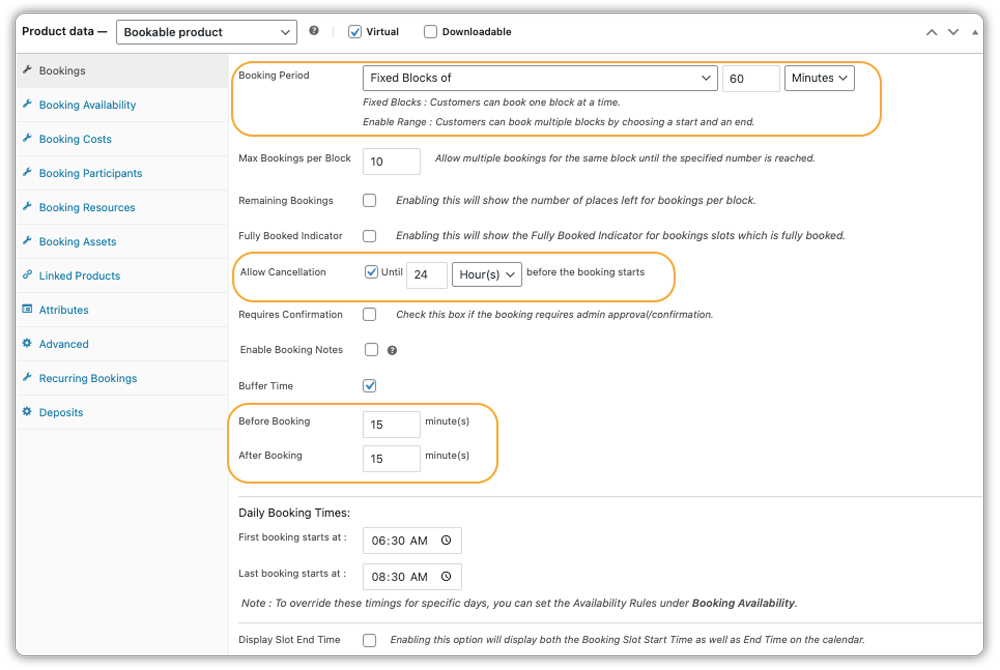
You can also define your cancellation policy to allow cancellations 24 or 48 hours in advance, or disable them entirely.
Learn how to configure duration, buffer time between two bookings, and cancellation settings.
- Define Booking Costs the Way You Want
Charge a flat fee for each bootcamp session, offer discounts, or set different prices for weekdays vs weekends. You’re in full control of your pricing model.

See how to set up your booking costs step by step.
- Control Participant Limit & Group Size
Set a maximum number of participants per session to avoid overbookings. You can even charge based on the number of participants, ideal for group fitness bootcamps or team-based training sessions.

Learn how to set participant limits and booking pricing.
- Upsell Gear Rentals or Training Upgrades
Add options like resistance band rentals, bootcamp T-shirts, or Post-workout meal plans using PH WooCommerce Product add-ons or booking resources.

Want to add upsell options? Learn how with this setup guide.
This is exactly how your bootcamp class booking experience will appear on your website’s frontend:

- Easily Offer Recurring Bootcamp Sessions
Running a 4-week strength bootcamp or a weekly HIIT class? With the PH Recurring Bookings Add-On, your clients can sign up for the full program at once, instead of booking each session separately.
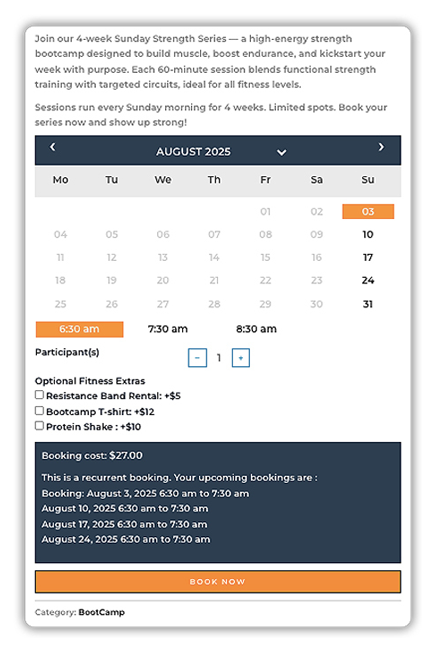
Learn how to set up recurring bookings in WooCommerce.
- Send Automatic Reminders & Booking Emails
Reduce no-shows with automated emails. Clients get instant confirmations, reminder emails, and cancellation alerts, fully customizable to your brand.
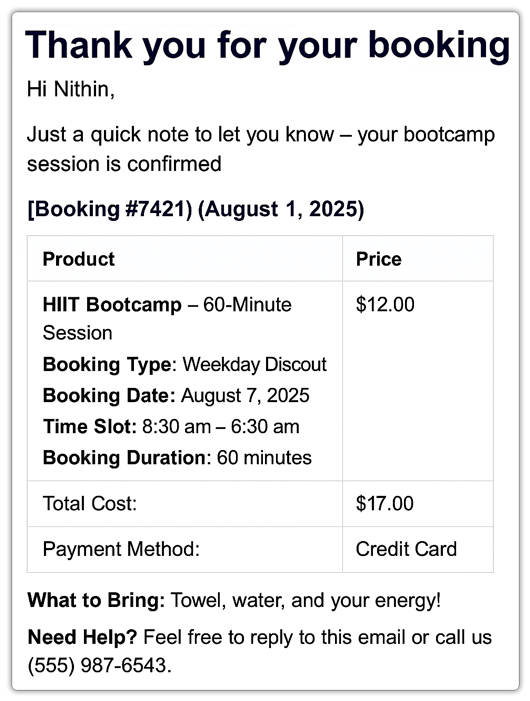
Set up booking email notifications in a few clicks.
With PluginHive’s Bookings And Appointments for WooCommerce plugin, you get full control over your bootcamp’s registration process from scheduling and pricing to client reminders and payments, all without needing extra custom development or multiple additional plugins.
Real-World Example: Managing a Group Fitness Bootcamp with WooCommerce
Let’s say you run a group fitness bootcamp business, you offer weekday morning HIIT sessions, weekend strength bootcamps, and even outdoor circuit training classes in different parks across your city.
The Challenges You’ll Likely Face
- You’re manually managing registrations via DMs or phone calls, which is time-consuming and prone to errors.
- You need to limit each session to a fixed number of participants to maintain quality and safety, but tracking headcount manually gets messy.
- Your early morning sessions often go underbooked simply because people forget to register on time or assume spots will be available.
- Cancellations, waitlists, and last-minute changes are a headache to coordinate without an automated system.
- You’d love to offer optional add-ons like resistance band rentals or post-session protein shakes, but collecting payments for extras complicates things further.
How WooCommerce Bookings Solves It All
With the Bookings And Appointments for WooCommerce plugin, you can automate the entire bootcamp scheduling and registration process from start to finish:
- Let participants book bootcamp sessions directly from your website, with live calendar availability and location-specific scheduling.
- Cap the number of participants for each slot, so sessions don’t get overcrowded.
- Use the PH Recurring Bookings add-on to let customers sign up for multiple sessions in one go, without needing to book each date manually.
- Add buffer time between classes to reset equipment, travel between parks, or just take a breather.
- Let participants add extras like mat rentals or bootcamp t-shirts using Booking Resources.
- Automate email confirmations and reminders so no one misses their session.
- Allow cancellations up to a set time before class; canceled slots become instantly available for someone else to book.
By switching to WooCommerce Bookings, your bootcamp business becomes easier to run, less prone to human error, and scalable. Whether you train 10 or 100 people a week, your schedule stays organized and your clients stay happy.
Final Thoughts
Running fitness bootcamps, HIIT classes, or outdoor group sessions doesn’t have to be stressful. With the Bookings And Appointments for WooCommerce plugin, you can fully automate your registration, scheduling, and payment process right from your WooCommerce store.
Whether you’re offering weekly classes, weekend bootcamps, or location-based training, the plugin helps you stay organized, avoid overbookings, and deliver a smooth experience for your clients.
Need help getting started? PluginHive’s Support Team is always ready to guide you based on your specific business needs.
FAQs
1. Can I charge based on the number of participants in Bookings And Appointments for WooCommerce plugin?
Yes, you can set tiered pricing where the cost is calculated based on how many participants book a session (ideal for group fitness bootcamps).
2. Does Bookings And Appointments for WooCommerce support add-ons like gear or kit rentals?
Absolutely. With WooCommerce Bookings’ Resource feature or PH WooCommerce Product Add‑Ons along with the bookings plugin, you can offer gear rentals (like resistance bands or recovery kits) and branded merchandise during bookings, without separate product pages or checkouts.
3. Can I export bookings to a CSV file in the Bookings And Appointments for WooCommerce plugin?
Yes, you can export all your bookings to a CSV file for backup, reporting, or further analysis. The export includes booking details like customer name, booking date, time slot, status, and product information.
4. Can Bookings And Appointments for WooCommerce plugin handle different trainer schedules?
Yes, you can assign different trainers using booking assets. Each trainer (set up as a resource) can have their own availability, capacity, and time slots, making it easy to manage multiple schedules without conflicts.
5. How customizable is the booking time interval in the Bookings And Appointments for WooCommerce plugin?
Very customizable. You can set booking durations and time intervals based on your class needs, like 30, 45, or 60 minutes, so your bootcamp sessions run exactly how you want.
