


Managing shipping labels one order at a time can slow down order fulfillment, especially for WooCommerce stores handling multiple daily orders. For Canadian merchants using Canada Post, bulk label printing directly from the WooCommerce orders dashboard helps speed up the fulfillment process. Data shows that automating tasks like label printing can reduce fulfillment time by up to ~70% or more.
This guide shows how to batch print Canada Post labels from WooCommerce, and why it’s useful for growing stores, making it easier to process shipments.
On This Page
- Canada Post Shipping for WooCommerce
- Importance of Batch Printing Canada Post Labels in WooCommerce
- How to Print Canada Post Labels in Bulk from WooCommerce
- Real-World Use Case
- Conclusion
- FAQs
Canada Post Shipping for WooCommerce
Canada Post is a reliable shipping carrier for WooCommerce stores that ship within Canada and to international destinations. When integrated with WooCommerce via the Canada Post Shipping Plugin, it helps automate key shipping tasks and simplifies order fulfillment directly from the WordPress dashboard.
How the Canada Post shipping process works in WooCommerce:
- Once a customer places an order, WooCommerce uses product weight, dimensions, destination, and the selected Canada Post service to calculate shipping costs.
- These rates are shown at checkout, helping customers choose the right delivery option while ensuring accurate postage for the store owner.
- After the order is confirmed, store owners can create a Canada Post shipment from the WooCommerce order screen.
- The shipping label generated includes the recipient address, service type, barcode, and tracking number.
- This label is required for handing over the package to Canada Post and for enabling shipment tracking for customers.
Managing shipping at scale:
For stores processing multiple orders daily, creating and printing labels one by one can slow down fulfillment. Managing Canada Post shipping and labels directly within WooCommerce keeps everything centralized, but efficiency truly improves when labels can be printed in bulk.
Let’s see why bulk printing Canada Post labels is important for faster and more efficient WooCommerce shipping.
Importance of Batch Printing Canada Post Labels in WooCommerce
Batch printing Canada Post labels helps WooCommerce stores handle multiple orders efficiently without slowing down fulfillment.
- Faster order processing: Bulk label printing saves time by reducing repetitive actions. This makes it easier to dispatch orders quickly, especially during busy days or peak sales periods.
- Fewer manual errors: When labels are printed individually, mistakes such as skipped orders or incorrect selections are more likely to occur. Batch printing ensures consistent and accurate label generation across multiple shipments.
- Smoother fulfillment workflow: Printing all labels together simplifies packing and sorting. Warehouse or fulfillment teams can match orders and labels easily, improving overall shipping efficiency.
- Scales with growing order volumes: As a WooCommerce store grows, batch label printing helps manage higher shipping volumes without adding extra workload, keeping Canada Post shipping organized and reliable.
Overall, batch printing Canada Post labels improves speed, accuracy, and scalability for WooCommerce shipping operations.
How to Print Canada Post Labels in Bulk from WooCommerce
Printing Canada Post labels in bulk becomes effortless once you have an automated setup in place. The Canada Post Shipping Plugin for WooCommerce with Print Label allows you to manage rates, shipments, and labels directly from your WooCommerce dashboard, without switching between systems.
To get started, refer to the Canada Post Plugin Setup Guide for detailed, step-by-step configuration instructions.
Once the plugin is set up, your store can display real-time Canada Post shipping rates at the cart and checkout. These rates are calculated automatically based on product weight, dimensions, destination, and selected Canada Post services.
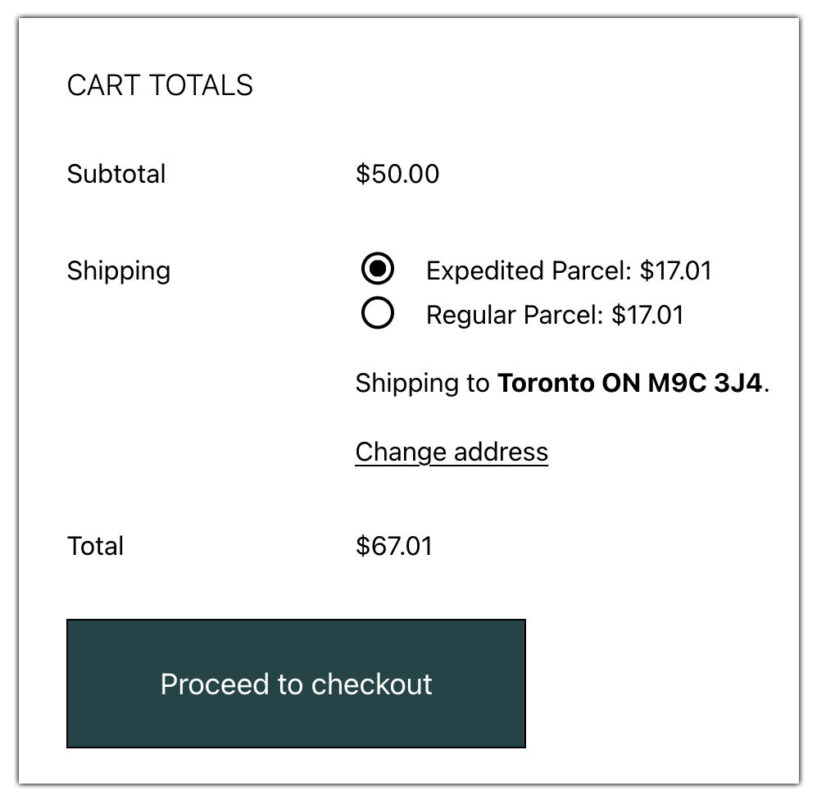
After orders are placed, you can choose to print Canada Post shipping labels either individually or in bulk, depending on your workflow. Simply select the orders.

Click on Generate Canada Post Label, and then Print Canada Post labels from the Bulk Action drop-down and apply.
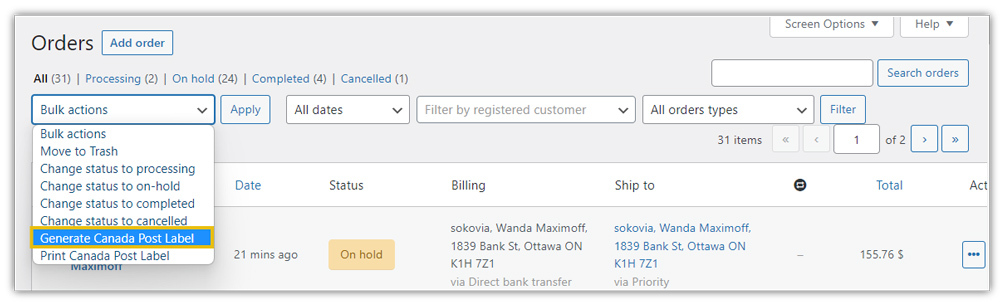

All the labels will be printed for each selected order at the same time.

Label printing also triggers automated tracking. Once an order is fulfilled, customers automatically receive an email with the tracking details.
For more details on how tracking works, you can refer to this guide: Canada Post Live Tracking in WooCommerce .
Real-World Use Case: A Canadian WooCommerce Store Handling Rushed Holiday Orders
A Canada-based WooCommerce store selling consumer electronics and gift items experiences a sharp spike in orders during the holiday season. While the store typically processes 25-30 orders per day, volumes increase to over 120 daily orders during peak holiday sales, with Canada Post handling most domestic shipments.
As demand surged and customers expected fast delivery, the store began facing fulfillment bottlenecks.
Key Challenges
- Generating Canada Post shipments manually for each order
- Printing shipping labels one at a time, slowing down packing workflows
- Switching between WooCommerce and the Canada Post portal to manage shipments
- Delayed dispatch during peak days, risking missed holiday delivery timelines
The Solution
To streamline holiday fulfillment, the store integrated Canada Post directly with WooCommerce using the Canada Post Shipping Plugin.
The Results
- Label generation time reduced by nearly 60%, with labels created directly from WooCommerce
- Bulk label printing reduced daily fulfillment time from 3 hours to under 1 hour during peak holiday periods
- Faster dispatch, with most holiday orders shipped the same day
- Improved customer experience through automated tracking emails after label creation
The store owner highlighted that the biggest improvement was fulfillment speed and reliability during high-pressure holiday sales. By batch printing Canada Post labels, the team stayed on schedule without adding extra staff, proving how bulk label printing can make WooCommerce shipping scalable during peak seasons.
Conclusion
Batch printing Canada Post labels is a simple yet powerful way to streamline WooCommerce order fulfillment. By centralizing label generation and automating tracking, store owners can ensure faster dispatch and a better customer experience without extra operational overhead.
If you need help with setup or have questions, reach out to support here: PluginHive Support.
FAQs
- Can I notify customers automatically when their Canada Post shipment status changes?
Yes! You can automatically send an email whenever a Canada Post shipment is updated. To have more flexibility for WooCommerce order tracking, you can use the WooCommerce Shipment Tracking Pro plugin.
- Can I display estimated delivery dates for my Canada Post shipments in WooCommerce?
Yes! You can display the delivery dates with the Canada Post Plugin, but for more flexibility, like adding buffer time, you can use the Estimated Delivery Date Plugin for WooCommerce.
- Can I hide certain Canada Post shipping services or adjust rates based on package size?
Yes. With the Hide WooCommerce Shipping Methods & Rate Adjustment plugin, you can hide specific Canada Post services for certain products, package weights, or dimensions.
- Can I manage Canada Post shipping for a multi-vendor WooCommerce store?
Yes. The WooCommerce Multi-Vendor Shipping Addon lets each vendor generate their own Canada Post labels, track shipments, and manage orders independently.
- What if I only want to print the Canada Post label and the rates I want to customize?
You can choose to print only the Canada Post label while continuing to display your own customised rates. You can use the WooCommerce Table Rate Shipping Pro Plugin, which lets you set your own rules and conditions.
