



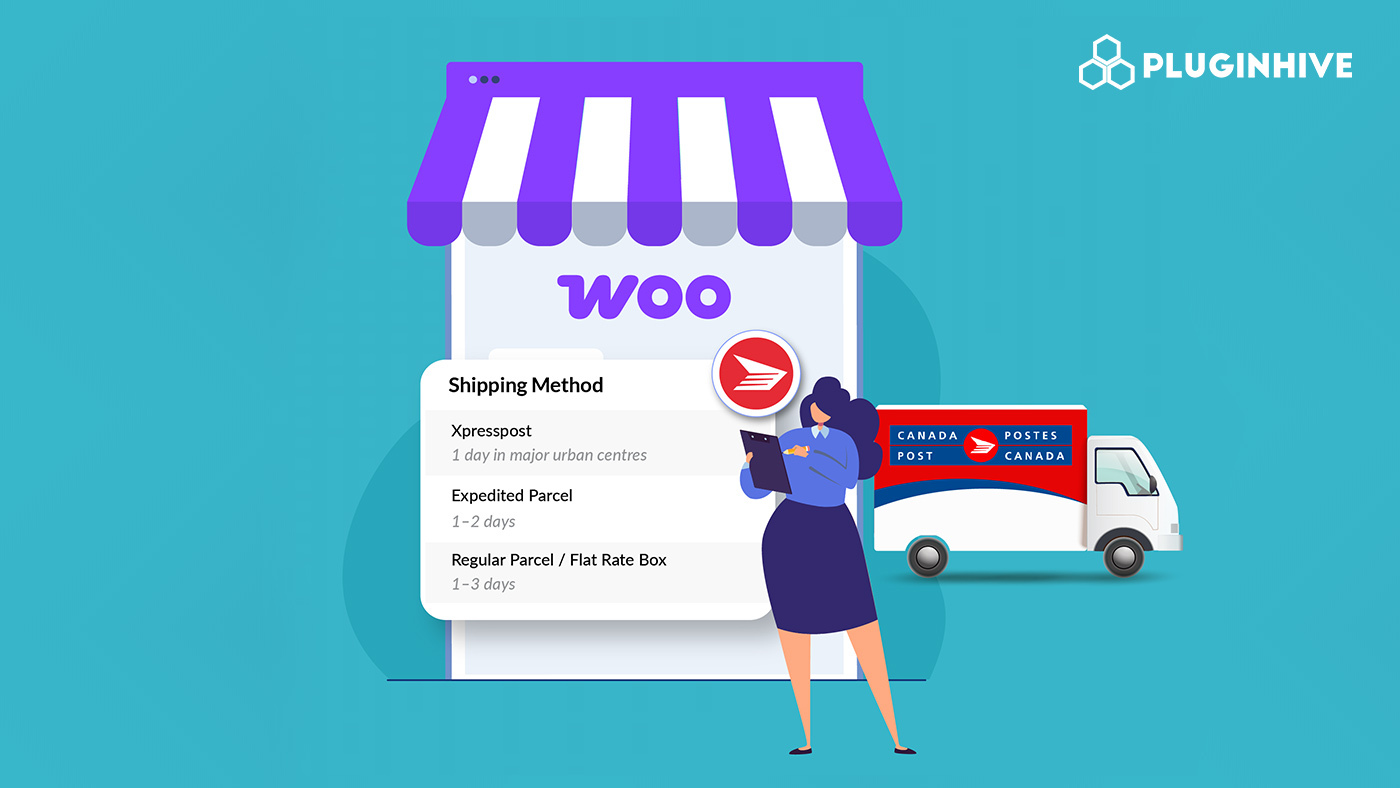
Canada Post contract rates give WooCommerce store owners access to discounted shipping prices that aren’t available at the counter. For Canadian merchants shipping regularly, these rates can meaningfully reduce per-order shipping costs, improve checkout conversion, and make it easier to offer competitive delivery options to customers.
This guide explains what Canada Post contract rates are, how they differ from standard rates, who qualifies, and how to display them automatically in your WooCommerce store.
Table of Contents
- What Are Canada Post Contract Rates?
- Difference Between Regular Rates and Contract Rates
- Who Qualifies for Canada Post Contract Rates?
- Integrate Canada Post Contract Rates with Your WooCommerce Store
- Best Practices for WooCommerce Store Owners
- Real-World Example
- Conclusion
- FAQs
What Are Canada Post Contract Rates?
For WooCommerce merchants, Canada Post contract shipping rates offer a smart way to reduce shipping costs, streamline operations, and provide affordable options to customers. With these rates, businesses can access discounts, flexible shipping options, and efficient account management tools.
Benefits of Canada Post Contract Rates:
- Reduced Shipping Costs: Significant savings compared to standard retail rates, especially for regular shippers.
- Flexible Shipping Options: Apply to services like regular parcels, expedited, and express delivery.
- Efficient Account Management: Track shipments, manage invoices, and access special shipping features with a Canada Post business account.
These rates are based on shipping volume, frequency, and service type, making them ideal for businesses looking for predictable shipping expenses and improved profitability.
Difference Between Non-Contract Rates and Contract Rates
For WooCommerce store owners, understanding the difference between non-contract and contract Canada Post rates is key to managing shipping costs effectively. Contract rates provide discounts, flexibility, and predictable pricing that standard rates do not.
| Feature | Non-Contract Rates | Contract Rates |
|---|---|---|
| Pricing | Standard, no discounts | Discounted for volume and frequency |
| Services | Basic shipping options | Multiple options: standard, expedited, express |
| Account | No business account needed | Requires a Canada Post business account |
| Cost Predictability | Can fluctuate | Stable and predictable |
By using contract rates, WooCommerce merchants can save on shipping, offer better options to customers, and streamline their store operations. This makes contract rates a practical solution for any store with regular shipping needs.
Who Qualifies for Canada Post Contract Rates?
Canada Post offers contract pricing to businesses of different sizes through two main account types:
Solutions for Small Business (non-contract): This program is available to any Canadian business and provides modest discounts compared to counter rates. It requires no minimum shipping volume and is a practical starting point for smaller WooCommerce stores.
Canada Post Contract Shipping: This is a formal commercial agreement between your business and Canada Post. It provides deeper discounts based on your committed shipping volume. Merchants who ship consistently even at modest volumes can negotiate contract pricing directly with Canada Post.
If you are unsure which account type you currently have, check your Canada Post account dashboard or contact Canada Post directly. Either account type can be connected to WooCommerce using the Canada Post plugin.
Integrate Canada Post Contract Rates with Your WooCommerce Store
Canada Post contract rates simplify and make shipping more affordable for WooCommerce store owners, offering discounted rates for services such as Regular Parcel, Expedited Parcel, Xpresspost, and Priority. The easiest way to apply these rates in your store is with the WooCommerce Canada Post Shipping Plugin, which connects directly to your Canada Post account and automatically displays your contract rates at checkout.
How it works:
1. Sign in to Canada Post: Enter your account details (contract) and select your preferred payment method.
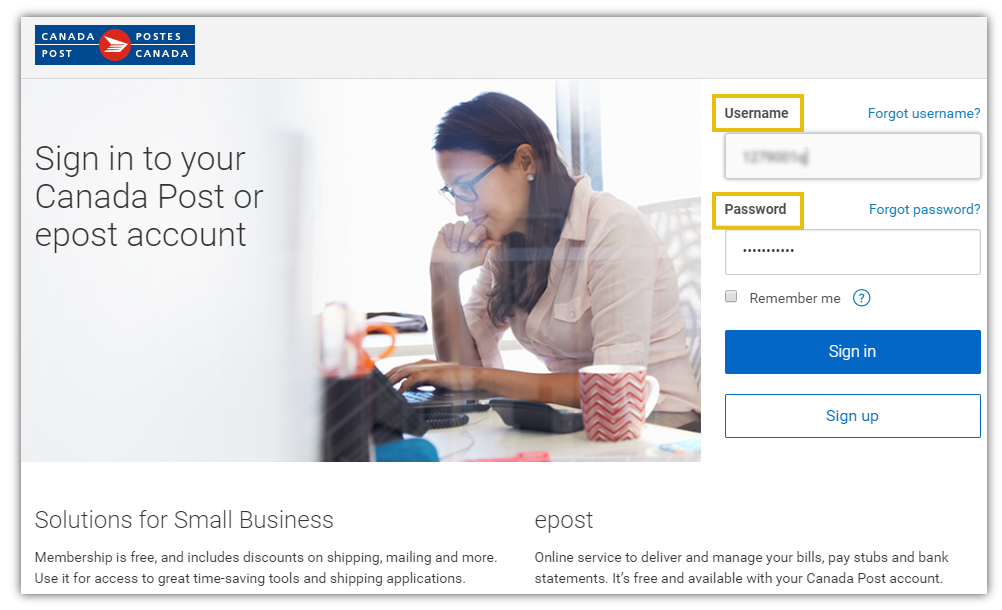

Once completed, your Canada Post account will be successfully integrated with WooCommerce. And the plugin settings will be ready to configure.
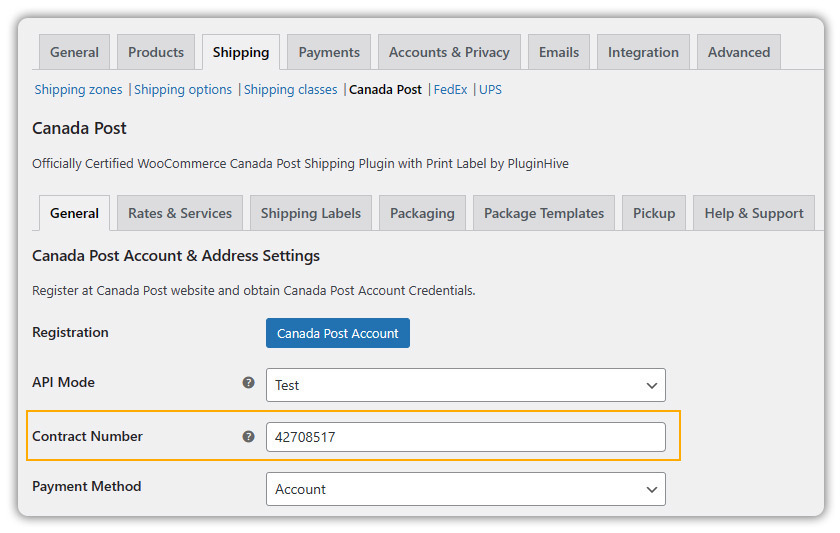
2. Enter Contract Number: Provide your Canada Post Contract Shipping Number to apply discounted rates.
3. Enable Services: Choose which shipping services you want to offer, all supported under your contract.
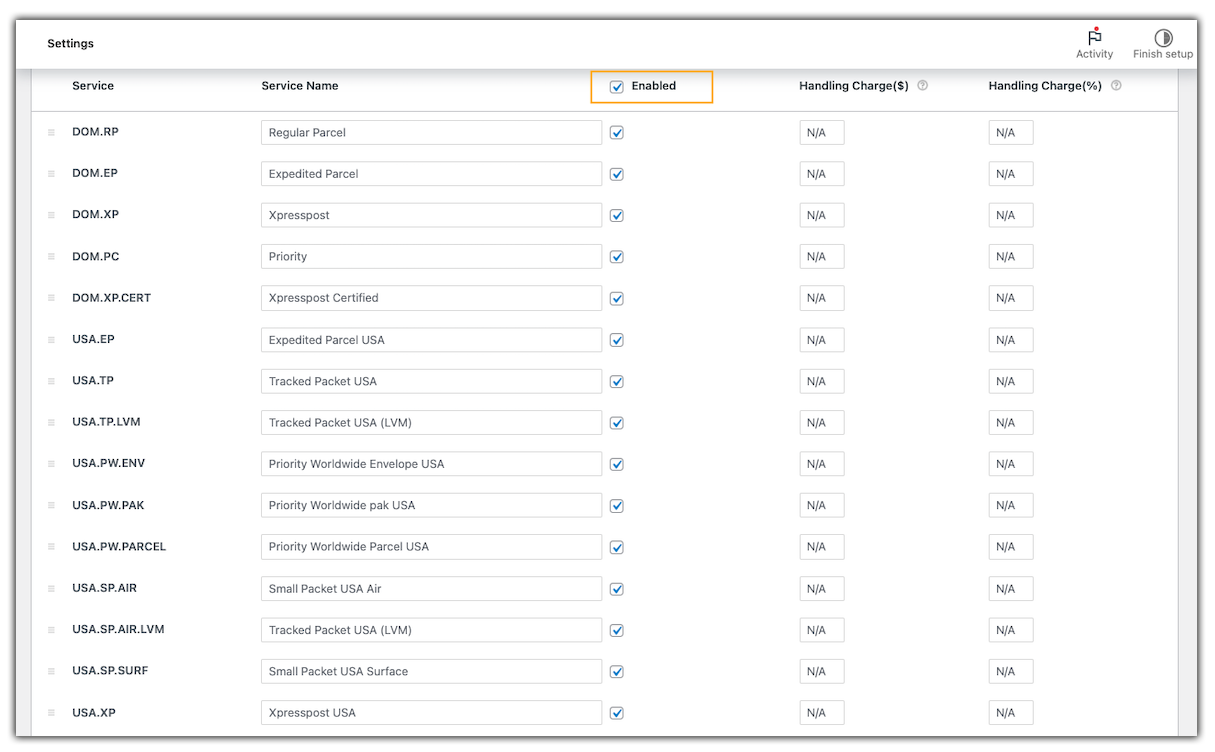
Make sure all products in your store have accurate weights and dimensions, as this information is crucial for calculating shipping rates and generating labels.
4. Display Rates: The plugin shows the correct contract rates to your customers at the cart and checkout, making shipping costs clear and consistent.

For detailed, step-by-step instructions, please refer to this setup guide: Setting Up WooCommerce Canada Post Shipping Plugin
By using Canada Post contract rates with the WooCommerce Canada Post Shipping Plugin, WooCommerce merchants can offer affordable, reliable shipping, simplify operations, and provide a better experience for customers without dealing with complicated setup or technical steps.
Best Practices for WooCommerce Store Owners
To make the most of Canada Post contract rates and streamline shipping in WooCommerce, follow these best practices:
- Regularly Monitor Shipping Costs: Keep an eye on your shipping expenses and compare them with your contract rates to ensure you’re maximising savings.
- Offer Multiple Shipping Options: Provide customers with different delivery speeds, like Regular Parcel, Expedited Parcel, Xpresspost, and Priority, so they can choose what fits their needs.
- Keep Account Details Up to Date: Ensure your Canada Post contract number and payment method are always current to avoid disruptions.
- Communicate Shipping Benefits to Customers: Highlight affordable shipping rates and faster delivery options on product pages and checkout to improve customer trust and conversion.
- Test Before Going Live: Use test orders in the plugin’s Test mode to ensure rates and labels work correctly before processing real shipments.
Following these practices helps WooCommerce merchants save on shipping, provide better service to customers, and manage operations efficiently.
Real-World Example: How Contract Rates Change Checkout for a WooCommerce Store
Consider a WooCommerce store based in Toronto selling handmade candles across Canada. Before setting up contract rates, the store displayed Canada Post’s public list prices at checkout. Customers in western provinces saw high shipping costs and frequently abandoned their carts before completing a purchase.
After connecting a Canada Post contract account through the plugin:
- The store’s negotiated Expedited Parcel rates replaced the public list rates at checkout
- Shipping costs dropped noticeably for customers in British Columbia and Alberta
- Cart abandonment on those routes decreased because the shipping cost no longer felt disproportionate to the order value
- The store was able to set a $100 free shipping threshold using their contract rates, knowing the actual shipping cost was low enough to absorb it profitably
The change required no modifications to the store’s fulfillment workflow. Labels, tracking, and order management continued working exactly as before, the only visible difference was lower, more accurate rates at checkout.
Conclusion
Canada Post contract shipping rates give WooCommerce store owners a reliable way to reduce costs, streamline shipping, and offer customers more affordable delivery options. By taking advantage of discounted rates and flexible services, businesses can improve both profitability and the overall customer experience.
If you’re ready to set up Canada Post contract rates in your WooCommerce store, the WooCommerce Canada Post Shipping Plugin makes the process simple. Need help setting it up? Contact PluginHive Support and get started with a shipping solution that saves you time, money, and effort.
Frequently Asked Questions
- Do I need a Canada Post business or contract account to access discounted contract rates?
Yes. You must have a Canada Post Commercial or business account and negotiate a contract to get those reduced rates and special services. - Is it possible to use contract rates for small businesses or low shipping volumes?
Yes. Small businesses may qualify under programs like “Solutions for Small Business” that unlock discounts even if volume is lower. - Are contract shipping rates always cheaper than non-contract (“regular”) rates?
Typically, yes. Contract rates tend to be lower, especially for higher volume shipments, but it depends on your shipping frequency, destinations, and negotiated terms. - Can I display contract rates automatically in WooCommerce checkout?
Yes. By using the WooCommerce Canada Post Shipping Plugin, you can connect your Canada Post contract account and display real-time discounted contract rates directly at checkout. - Do contract rates apply automatically after signing up, or do I need to do additional setup in WooCommerce?
Contract rates don’t apply automatically. You need to enter your Canada Post contract account credentials in the WooCommerce plugin. Then, enable the services you want to offer and configure your shipping settings.
