



When delivering a parcel, Canada Post may leave it at a safe location near the recipient’s door if nobody is home. While this makes delivery more convenient, it can increase the risk of theft or damage, especially for high-value orders. WooCommerce store owners can use the Canada Post Do Not Safe Drop option to prevent eligible parcels from being left at a safe drop location.
In this guide, you’ll learn how Canada Post Do Not Safe Drop works, when to use it, and how to enable it using the Canada Post Shipping Plugin for WooCommerce with Print Label.
On This Page
- What Is Canada Post Do Not Safe Drop?
- Why Use Do Not Safe Drop for WooCommerce Orders?
- How Does Canada Post Do Not Safe Drop Work?
- How to Enable Canada Post Do Not Safe Drop in WooCommerce
- Best Practices for Safer Canada Post Deliveries in WooCommerce
- Conclusion
- FAQs
What Is Canada Post Do Not Safe Drop?
Canada Post Do Not Safe Drop is a delivery option. It stops the carrier from leaving an eligible parcel at a safe drop location when nobody can receive it at the door. Instead, the recipient may need to collect the parcel from a designated post office.
Here are a few things to know about this option:
- Eligible services: It is available for supported services such as Regular Parcel, Expedited Parcel, Xpresspost, and Priority.
- Delivery at the door: The option applies when Canada Post attempts to deliver the parcel at the recipient’s door.
- Mailbox deliveries: It does not prevent Canada Post from placing a parcel in the recipient’s mailbox when it fits, and mailbox delivery is permitted.
- Shipment details: The option affects how an eligible parcel is handled during delivery. It does not change the parcel’s contents or packaging.
Availability can depend on the service and shipment conditions. For more details, see our guide to Canada Post shipping services for WooCommerce.
Why Use Do Not Safe Drop for WooCommerce Orders?
Not every parcel belongs outside a customer’s home. Do Not Safe Drop helps when protecting an order matters more than unattended delivery.
Here are a few situations where WooCommerce store owners may consider using it:
- High-value orders: Electronics, jewellery, and collectibles may need extra care to reduce the risk of theft.
- Weather-sensitive products: Items such as cosmetics and certain packaged goods may be affected by rain, heat, or freezing temperatures.
- Shared entrances: Parcels delivered to apartment buildings or homes with easily accessible entrances may be more exposed to other people.
- Clearer delivery arrangements: If nobody can receive the parcel, the customer goes to a designated post office. They won’t find the package unattended outside.
The main trade-off is convenience. Customers may need to visit a post office to collect their parcel. Consider their delivery preferences before you apply this option to every shipment.
How Does Canada Post Do Not Safe Drop Work?
Once Do Not Safe Drop is selected for an eligible shipment, Canada Post follows the applicable delivery procedures. Here’s how it generally works:
- Someone is available at the door: Canada Post attempts to deliver the parcel as usual, subject to the service requirements.
- Nobody is available: The courier won’t leave the parcel at a safe drop location. If delivery isn’t possible, the recipient may receive a delivery notice and be directed to collect the parcel from a designated post office.
- The parcel fits in the mailbox: Canada Post may still deliver it to the mailbox when permitted. Do Not Safe Drop does not automatically prevent mailbox delivery.
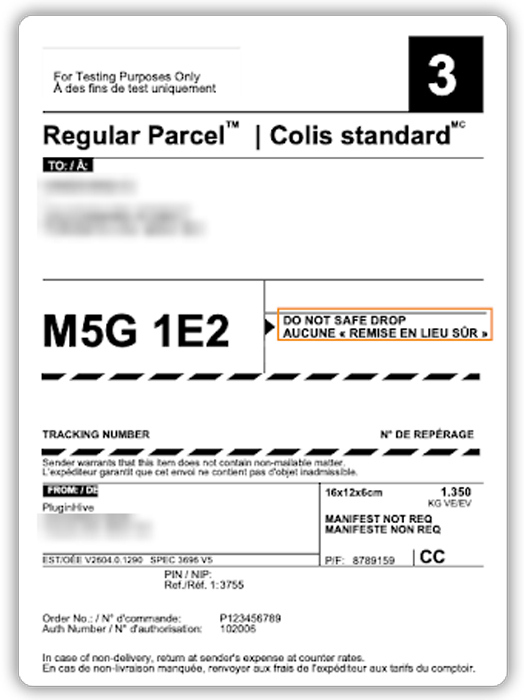
When you create a shipment using the Canada Post Shipping Plugin for WooCommerce with Print Label, the selected delivery option is included in the shipment details sent to Canada Post. This helps you manage delivery preferences for your WooCommerce orders based on your customers’ needs.
How to Enable Canada Post Do Not Safe Drop in WooCommerce
Turning on Canada Post Do Not Safe Drop takes only a minute. The Canada Post Shipping Plugin for WooCommerce with Print Label includes it alongside its other delivery options. If you haven’t connected your Canada Post account yet, our setup guide covers that first.
Once you’re connected, go to WooCommerce Settings, open the Shipping tab, select Canada Post, and then click the Rates & Services tab. Scroll to Additional Options, select “Do not safe drop”, and save your changes. You can also add Signature, Card (Hold) for pickup, or Proof of age to a shipment from the same section, depending on what the order needs.

If you only need it for certain orders, open the order in WooCommerce, choose “Do not safe drop” in the Canada Post section, and print the label as usual. The plugin takes the option into account when it shows the shipping rate on that page, so it’s worth checking the price before you print.

With this in place, your eligible parcels will follow the Do Not Safe Drop process instead of being left at the door.
Best Practices for Safer Canada Post Deliveries in WooCommerce
To use Do Not Safe Drop effectively, think about the products you ship, your customers’ preferences, and the impact on delivery convenience.
- Use it for suitable orders: Enable Do Not Safe Drop for high-value items or shipments that shouldn’t sit unattended.
- Consider pickup options: If customers prefer to collect their orders, check whether Canada Post’s Card (Hold) for Pickup service suits your shipment.
- Set clear expectations: Mention in your shipping policy or order emails that a failed delivery attempt may require customers to collect their parcels.
- Review shipment details: Before you generate a shipping label, confirm that the delivery options match the order’s requirements.
- Keep customers informed: Use shipment tracking to help customers follow their parcels and check for delivery updates. The Shipment Tracking Pro for WooCommerce plugin can help you provide tracking information to customers.
These practices help you choose the right delivery options while balancing parcel protection and customer convenience.
Conclusion
Canada Post Do Not Safe Drop helps WooCommerce store owners reduce the risk of eligible parcels being left unattended at the door. By choosing this option for suitable shipments, you can manage delivery preferences more effectively while helping customers receive their orders with greater peace of mind.
With the Canada Post Shipping Plugin for WooCommerce with Print Label, you can manage Canada Post shipping and print labels directly from your WooCommerce store. Configure the available delivery options based on your shipping needs, and contact the PluginHive support team if you need help with the setup.
FAQs
Q: What does “delivered with safe drop” mean?
It means the courier left the parcel in a safe spot near the recipient’s door because no one was available to receive it. Do Not Safe Drop is what prevents this from happening.
Q: What does Canada Post Do Not Safe Drop mean?
It is a delivery option that stops the courier from leaving a parcel at a safe location when nobody is home. A Delivery Notice Card is left instead, and the parcel waits at the post office for pickup.
Q: Will Do Not Safe Drop change my shipping rate?
It can. The plugin includes the selected option when it calculates the rate on the order page, so check the rate before you print the label.
Q: Can you drop packages at Canada Post?
Yes. You can take your packed orders to a Canada Post location instead of scheduling a pickup. Our guide on Canada Post drop-off for WooCommerce explains how to set it up.
Q: Can I stop a package from being delivered on Canada Post?
Recipients can refuse a parcel by telling the delivery agent, or by returning it unopened to a post office. A parcel waiting at the post office goes back to the sender after 15 days if it isn’t picked up. The sender pays the return charges in every case.
