


If you ship orders with Canada Post, you can either have your packages picked up from your store or take them to a Canada Post drop-off location yourself. For many WooCommerce stores, dropping off packages can be a simple way to manage daily shipments.
In this guide, we’ll explain how Canada Post drop off works, how to choose a Canada Post drop off location, and how to prepare your WooCommerce orders for shipment using the Canada Post Shipping Plugin for WooCommerce with Print Label.
On This Page
- What Is Canada Post Drop-Off?
- Canada Post Pickup vs Drop-Off: What’s the Difference?
- Finding a Canada Post Drop-Off Location for Your Store
- How Does Canada Post Drop-Off Work for WooCommerce?
- Preparing Your WooCommerce Orders for Drop-Off
- Best Practices for Canada Post Drop-Off
- Conclusion
- FAQs
What Is Canada Post Drop-Off?
Canada Post drop-off means taking your packed orders to a post office or a designated Canada Post facility yourself, instead of waiting for a courier to pick them up from your store.
- You choose when to drop off, within the location’s business hours
- No pickup fee applies, since you’re not requesting a scheduled collection
- Works for small and large parcel volumes
- Available at thousands of post offices and Canada Post outlets across Canada
For store owners shipping a handful of orders a day, drop-off often fits better into a daily routine than waiting around for a pickup window.
Canada Post Pickup vs Drop-Off: What’s the Difference?
Both options get your package into Canada Post’s network, but the process is different.
- Pickup: Canada Post sends a driver to collect your shipments directly from your store or warehouse. This is useful if you ship high volumes daily and don’t want to leave your location.
- Drop-off: You deliver your packages to a post office or Canada Post facility. This works well for lower volumes or stores that are close to a convenient location.
You can only use one option at a time in the plugin. If Pickup is enabled, drop-off settings won’t apply, and vice versa. Choosing between the two usually comes down to your order volume and how close a Canada Post location is to your store.
Finding a Canada Post Drop-Off Location for Your Store
Before you can set up drop-off in WooCommerce, you need to find a Canada Post location and its Site# – this is the ID the Canada Post Shipping Plugin for WooCommerce with Print Label uses later. Canada Post assigns each pickup facility a unique Site# through its Find a Deposit Location tool.
- Select the type of mailing you’re sending, such as parcels or lettermail
- Enter the number of pieces you plan to deposit
- Enter the postal code of the location you want to use
- Click Submit to see a list of matching deposit locations
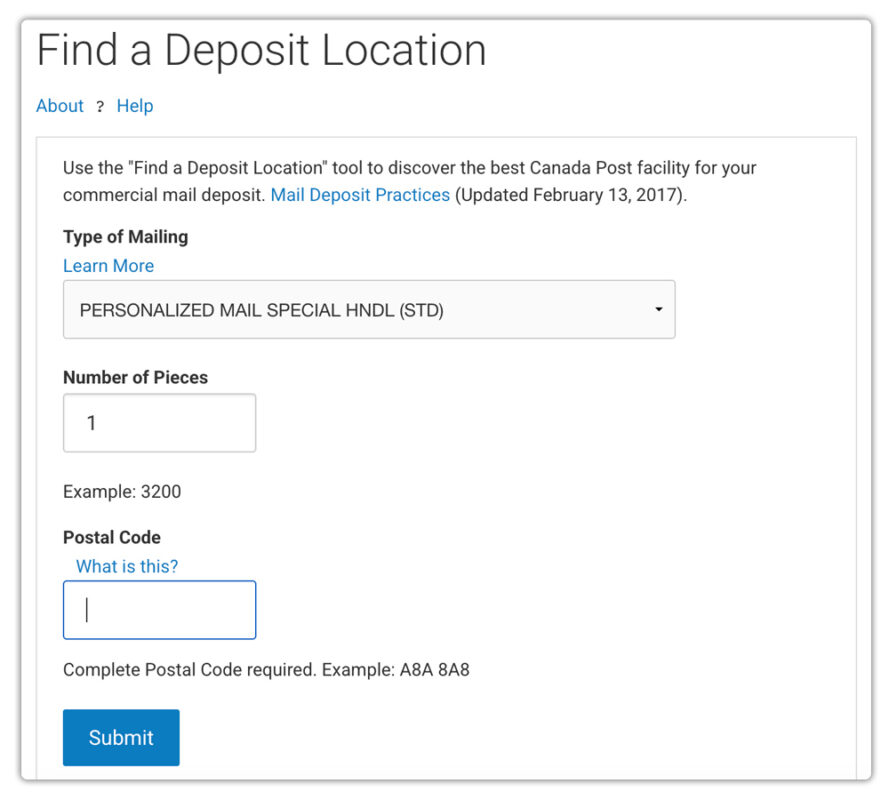
The results show the name, address, city, province, and postal code for each location, along with its Site#. Note down the Site# for your preferred location – you’ll need it in the next step. For a full walkthrough, see how to find your Pickup Point ID.

How Does Canada Post Drop-Off Work for WooCommerce?
With your location’s Site# in hand, the next step is adding it to your store settings so Canada Post knows exactly where your packages will be dropped off.
- Go to WooCommerce > Settings > Shipping > Canada Post > Pickup
- Disable the Enable Pickup Point Service option. This tells the plugin you’re depositing packages yourself, not waiting for a Canada Post pickup
- Paste your Site# into the Pickup Point Id field
- Save your settings, and you’re done

That’s really all it takes. Once saved, every shipping label and manifest you generate will automatically reflect your chosen drop-off location, so your Canada Post account and WooCommerce records always stay in sync. For the complete list of shipping settings, check the setup guide for the Canada Post plugin.
Preparing Your WooCommerce Orders for Drop-Off
Before heading to your chosen Canada Post drop-off location, make sure your WooCommerce orders are ready to ship.
- Generate the shipping label from the WooCommerce order using the Canada Post Shipping Plugin.
- Print the label and attach it securely to the package.
- Check the package weight and dimensions to make sure they match the shipment details.
- Use the bulk label feature if you’re preparing multiple orders for drop-off.
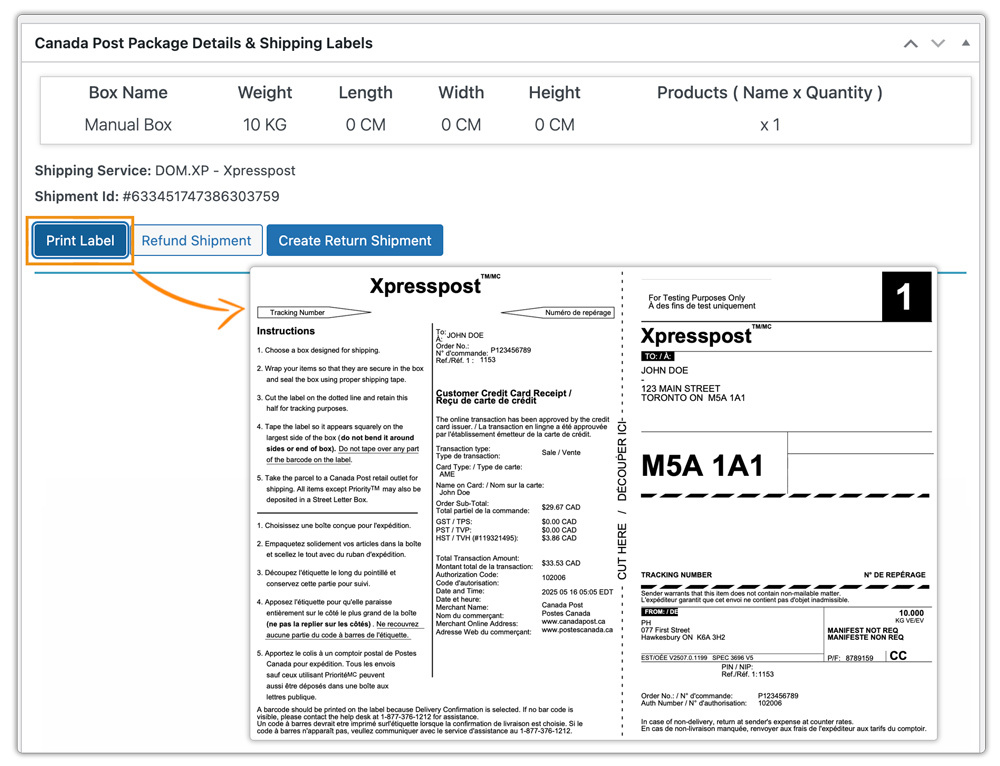
Once your packages are packed and labeled, you can simply take them to your selected Canada Post location and deposit them.
Best Practices for Canada Post Drop-Off
A few habits make Canada Post drop off run smoothly once it’s set up in your store.
- Pick a location close to your daily route: Choosing a post office you already pass by cuts down on extra trips. The Find a Deposit Location tool shows several nearby options to compare.
- Batch your drop-offs: Instead of making a trip for every order, print labels for the day’s orders together and deposit them in one visit.
- Double-check the mailing type: Parcels, lettermail, and other mailing types have different requirements, so confirm you’ve selected the right one before finding your location.
- Keep your Pickup Point Id updated: If you switch to a different post office, update the setting so labels and manifests stay accurate.
- Track your shipments after drop-off: Pairing drop-off with a tracking solution like Shipment Tracking Pro for WooCommerce keeps customers informed once the package leaves your hands.
These small habits add up to a drop-off routine that fits your store’s pace instead of working around a courier’s schedule.
Conclusion
Canada Post drop off gives WooCommerce store owners a straightforward way to hand off shipments without scheduling a pickup. With the Pickup Point Id setting in the Canada Post Shipping Plugin for WooCommerce with Print Label, you can choose a convenient deposit location and keep your labels and records accurate. If you run into any setup questions, PluginHive’s support team is available to help.
FAQs
Q: What is Canada Post drop off?
Canada Post drop off is when you deliver your packed orders to a post office or Canada Post facility yourself, rather than requesting a scheduled pickup.
Q: How do I find Canada Post drop off locations for my WooCommerce store?
Use Canada Post’s Find a Deposit Location tool with your mailing type, number of pieces, and postal code. See the step-by-step guide for details.
Q: Does drop-off cost less than scheduled pickup?
Drop-off doesn’t carry a pickup fee since you’re not requesting a courier collection, which can make it a lower-cost option for stores near a convenient location.
