


When shipping within Canada, customers often look for a delivery option that is reasonably priced and includes tracking. Expedited Parcel is one such option for WooCommerce stores shipping orders across Canada. However, adding the service to your store is more than simply making it available at checkout – you also need to manage shipping rates, labels, and tracking for the orders you receive.
In this article, we’ll look at what Canada Post Expedited Parcel is, why it’s worth offering, and how to offer it in WooCommerce with the Canada Post Shipping Plugin for WooCommerce with Print Label, from live checkout rates to labels and tracking.
On This Page
- Understanding Canada Post Expedited Parcel
- Why Offer Expedited Parcel on Your WooCommerce Store?
- Prerequisites for Offering Canada Post Expedited Parcel
- How to Offer Canada Post Expedited Parcel in WooCommerce
- Best Practices for Canada Post Shipping in WooCommerce
- Conclusion
- FAQs
Understanding Canada Post Expedited Parcel
Expedited Parcel is a domestic ground shipping service specifically designed for business customers. Available to merchants with a Canada Post Solutions for Small Business account or a commercial contract, it offers a faster delivery experience than the standard Regular Parcel service while keeping costs incredibly low.
Here are the core features of Canada Post Expedited Parcel:
- Delivery Speed: Typically takes 1 to 7 business days, depending on whether the destination is local, regional, or national.
- Tracking: Includes comprehensive end-to-end tracking so both you and your customers can monitor the package’s journey.
- Liability Coverage: Comes with up to $100 CAD of built-in liability coverage for loss or damage, with the option to purchase additional coverage for high-value items.
- Signature and Safe Drop: You can request a signature upon delivery or instruct the carrier to “Leave at Door” (Safe Drop) if the customer is not home.
- Return to Sender: Undeliverable items are returned to the sender at no extra charge.
Because it is exclusive to business accounts, Expedited Parcel is priced similarly to Regular Parcel but is prioritized in the Canada Post delivery network.
Why Offer Expedited Parcel on Your WooCommerce Store?
A shipping option customers can’t see is one they can’t choose. Here’s what Expedited Parcel adds to your WooCommerce checkout:
- A fair-priced middle option: Shoppers who find express shipping too expensive still get a faster, tracked service, so fewer of them leave at the shipping step.
- Fewer delivery questions: Customers can follow their parcel on their own, so you spend less time answering “where is my order?” emails.
- A good fit for bigger parcels: It works well for heavier or bulkier orders that don’t need express speed.
- More trust at checkout: Clear delivery times and built-in coverage give buyers confidence in your store.
- Room to grow: Expedited Parcel USA lets you offer a similar service to customers in the United States.
In short, offering Expedited Parcel lets your WooCommerce store deliver faster at a low shipping cost. It’s an easy way to improve the checkout experience and keep customers coming back.
Prerequisites for Offering Canada Post Expedited Parcel
Before you can start displaying Expedited Parcel rates on your WooCommerce checkout page, you need to have a few things in place:
- A Functioning WooCommerce Store: Your e-commerce website should be set up and ready to process orders.
- A Canada Post Business Account: You need either a Canada Post Commercial account or a free Solutions for Small Business account to access the Expedited Parcel service.
- Accurate Product Data: Ensure all the physical products in your store have their accurate weights and dimensions configured in WooCommerce.
- WooCommerce Canada Post Shipping Plugin with Print Label: You will need this dedicated plugin to fetch live Canada Post rates, generate labels, and track shipments directly from your WooCommerce dashboard.
How to Offer Canada Post Expedited Parcel in WooCommerce
The Canada Post Shipping Plugin for WooCommerce with Print Label makes it easy to offer this shipping service in your store. Once your Canada Post account is connected, you simply enable Expedited Parcel in the plugin’s service options.
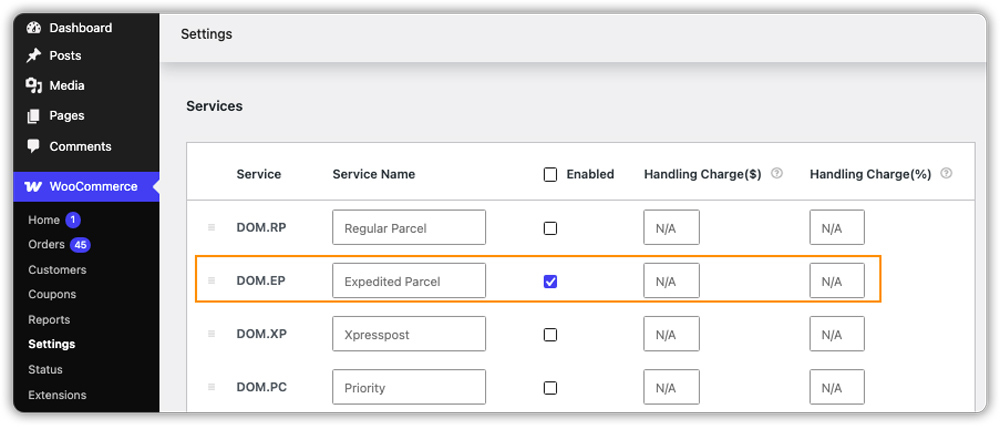
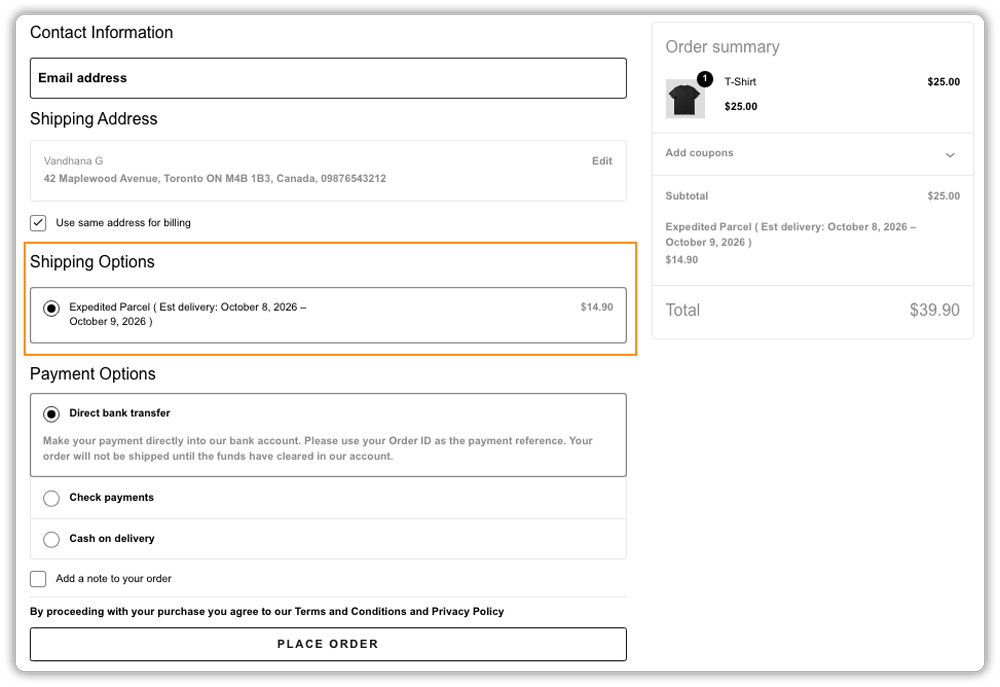
It then appears at checkout with a live rate based on the customer’s address and the weight of their order. You can also rename it, for example, to “Expedited Shipping”, so customers instantly understand what they’re choosing.
Create Canada Post Expedited Parcel Shipping Labels
When a customer chooses Expedited Parcel, the plugin picks that service for the order automatically. You can create and print the Canada Post shipping label right from the WooCommerce order page, without visiting the Canada Post website.
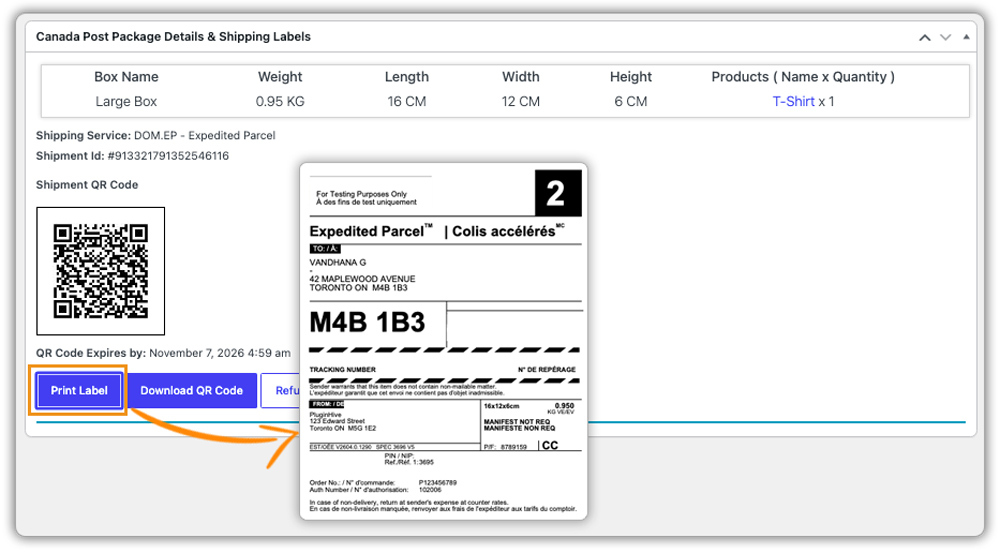
If you have a lot of orders, you can print labels in bulk instead of one at a time. Even free shipping orders can go out with Expedited Parcel, as you can select the service yourself on the order page.
Track Canada Post Expedited Parcel Orders
As soon as a label is created, the plugin adds the Canada Post tracking number to the order. Your customer receives an email with the shipping date, tracking number and a tracking link. You can follow every parcel from your WooCommerce dashboard as well.
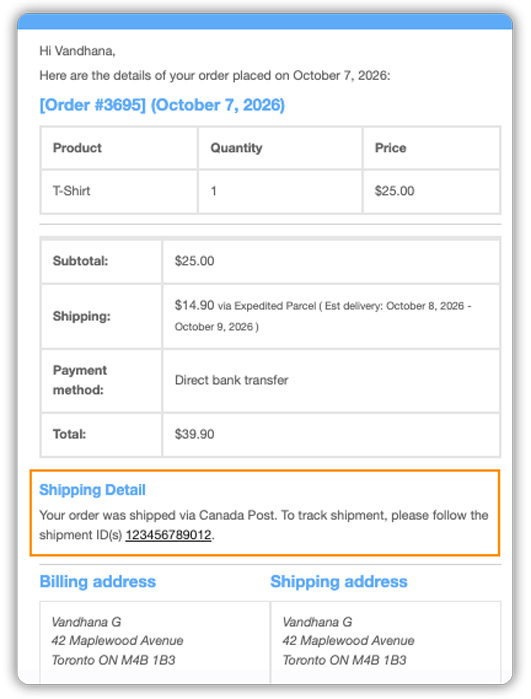
If you’d like branded tracking pages on your own store, the plugin also works with Shipment Tracking Pro for WooCommerce.
Best Practices for Canada Post Shipping in WooCommerce
A few small choices can help Expedited Parcel work better for your WooCommerce store and keep your shipping process simple.
- Pair it with a faster option: Offer Expedited Parcel as your everyday service and add Xpresspost for urgent buyers. This Canada Post services guide can help you choose the right mix.
- Show estimated delivery dates: Let customers see when their order will arrive before they pay. Clear delivery expectations at WooCommerce checkout lead to fewer abandoned carts.
- Cover packaging costs: Add a small handling fee to Expedited Parcel rates, or offer a discount to encourage larger orders.
- Set a fallback rate: If Canada Post can’t return a rate, a fixed fallback rate keeps shipping available at checkout.
- Add coverage for valuable items: Choose extra coverage for products worth more than the built-in $100.
These small adjustments make Expedited Parcel easier for customers to choose and simpler for you to manage.
Conclusion
Canada Post Expedited Parcel gives WooCommerce customers a faster, tracked shipping option without a high price. With the Canada Post Shipping Plugin for WooCommerce with Print Label, you can show live rates, print labels and share tracking details from your dashboard. If you need help getting started, reach out to the PluginHive support team.
FAQs
Q: What is Canada Post Expedited Parcel?
Canada Post Expedited Parcel is a domestic ground shipping service for business customers. It delivers faster than Regular Parcel at a low cost, and it includes tracking and built-in liability coverage.
Q: How long does a Canada Post Expedited Parcel take?
It typically takes 1 to 7 business days, depending on whether the destination is local, regional, or national.
Q: What’s the difference between Expedited Parcel and Xpresspost?
Xpresspost is Canada Post’s faster, higher-priced service, while Expedited Parcel is a more affordable ground option. Choose Xpresspost for urgent orders and Expedited Parcel for everyday shipments.
