


If you run a WooCommerce store that ships orders with Canada Post, handling multiple packages every day can quickly become time-consuming. Taking each shipment to a Canada Post location adds an extra step to your fulfillment process, especially as your order volume grows. Canada Post Pickup offers a convenient alternative by allowing eligible shipments to be collected from your business location.
In this guide, we’ll explain how Canada Post Pickup works, how it differs from drop-off, and how you can configure the pickup option using the Canada Post Shipping Plugin for WooCommerce with Print Label. You’ll also learn how to prepare your orders and manage the pickup process more efficiently.
On This Page
- What Is Canada Post Pickup?
- Canada Post Pickup vs. Drop-Off for WooCommerce
- How Does Canada Post Pickup Work With WooCommerce?
- One-Time vs. Recurring Canada Post Pickup
- Tips for a Smooth Canada Post Pickup Process
- Conclusion
- FAQs
What Is Canada Post Pickup?
Canada Post Pickup is a service that lets a Canada Post carrier collect packages from your business address. You don’t need to take them to a post office or postal facility. Once you pack and label your shipments, Canada Post collects them at a scheduled time. This saves you the trip and reduces time spent waiting in line.
The service is available to businesses with a Canada Post account. Canada Post offers two pickup options: one-time and recurring. You can request a one-time pickup when needed. You can also set a daily or weekly pickup schedule. Both options suit different shipping volumes. This makes pickup useful for businesses that ship occasionally or several times a week.
Canada Post Pickup vs. Drop-Off for WooCommerce
Once your WooCommerce orders are packed and labelled, you have two ways to get them into Canada Post’s network: dropping them off yourself or having them picked up. Here’s how the two compare.
Canada Post Drop-Off:
- Cost: Free. There’s no pickup fee since you’re not requesting a scheduled collection.
- Convenience: Lower. You need to pack up your shipments and take them to a post office or Canada Post facility yourself.
- Best for: Stores with a low or occasional order volume, where a trip to a nearby location isn’t a big time cost.
Canada Post Pickup:
- Cost: Canada Post charges a pickup fee, which depends on your account type and shipping volume.
- Convenience: Higher. A Canada Post driver collects your shipments directly from your store or warehouse.
- Best for: Stores shipping multiple orders a day, where the time saved on trips outweighs the pickup fee.
Which option makes sense for your store usually comes down to order volume and how close a Canada Post location is to you. If you’d rather stick with drop-off, our guide on Canada Post Drop-Off for WooCommerce walks you through setting that up.
How Does Canada Post Pickup Work With WooCommerce?
With the Canada Post Shipping Plugin for WooCommerce with Print Label, setting up Pickup for your store follows a simple workflow:
- Enable Pickup: Turn on the Pickup option in the plugin settings to let Canada Post know your shipments will be collected rather than dropped off.

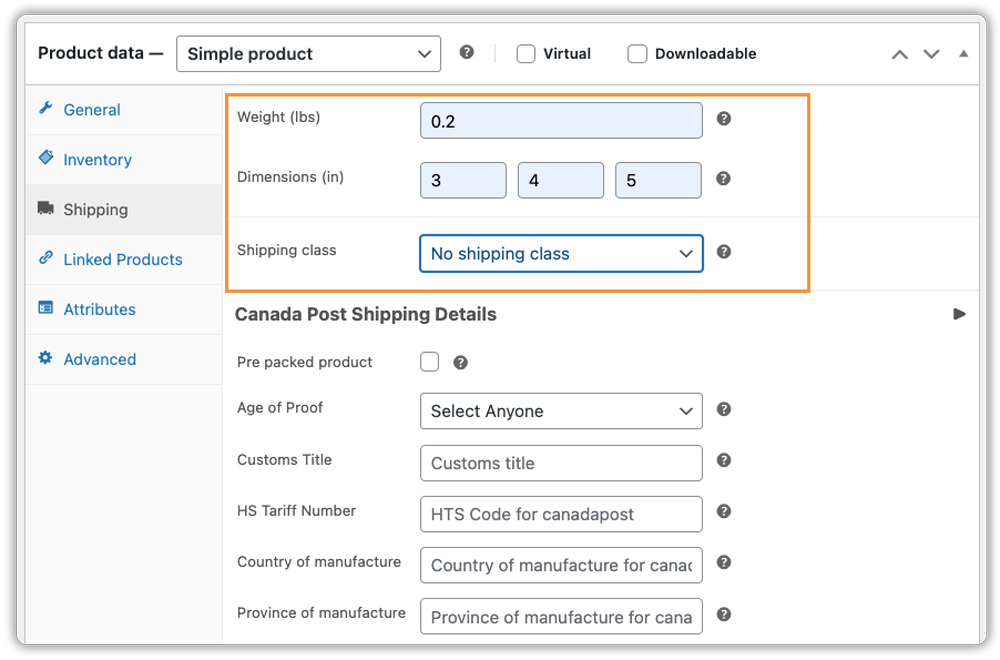
- Verify Weights and Dimensions: Check the product weight and dimensions in your WooCommerce settings. Accurate details ensure your shipment data is correct.
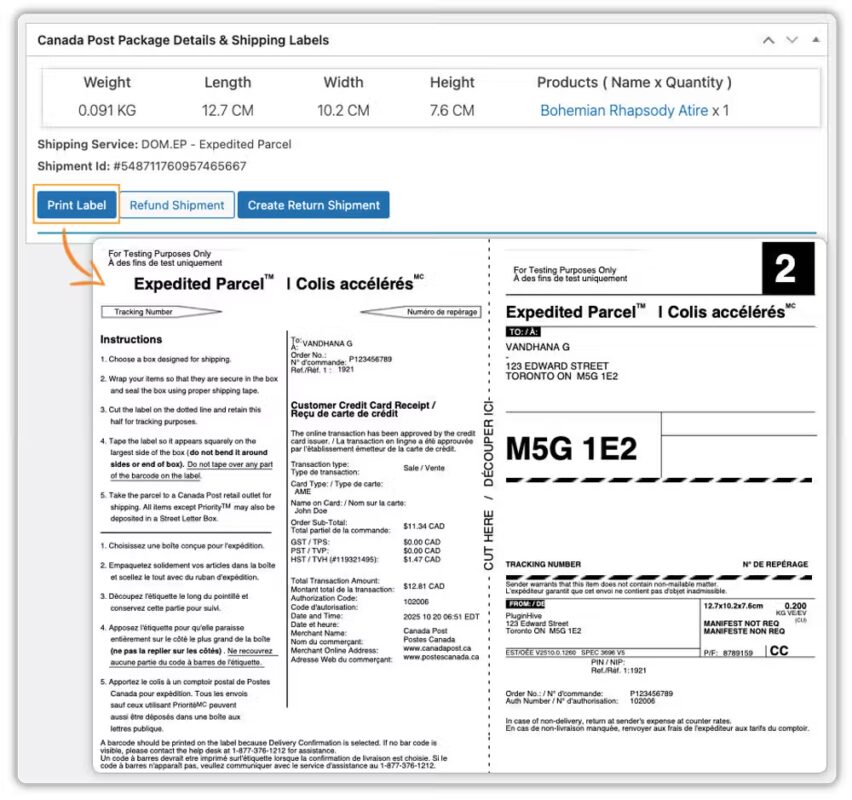
- Process Your Orders: Generate and print the shipping label for each order directly from your dashboard. Our guide on how to print Canada Post shipping labels in WooCommerce covers this step in detail.
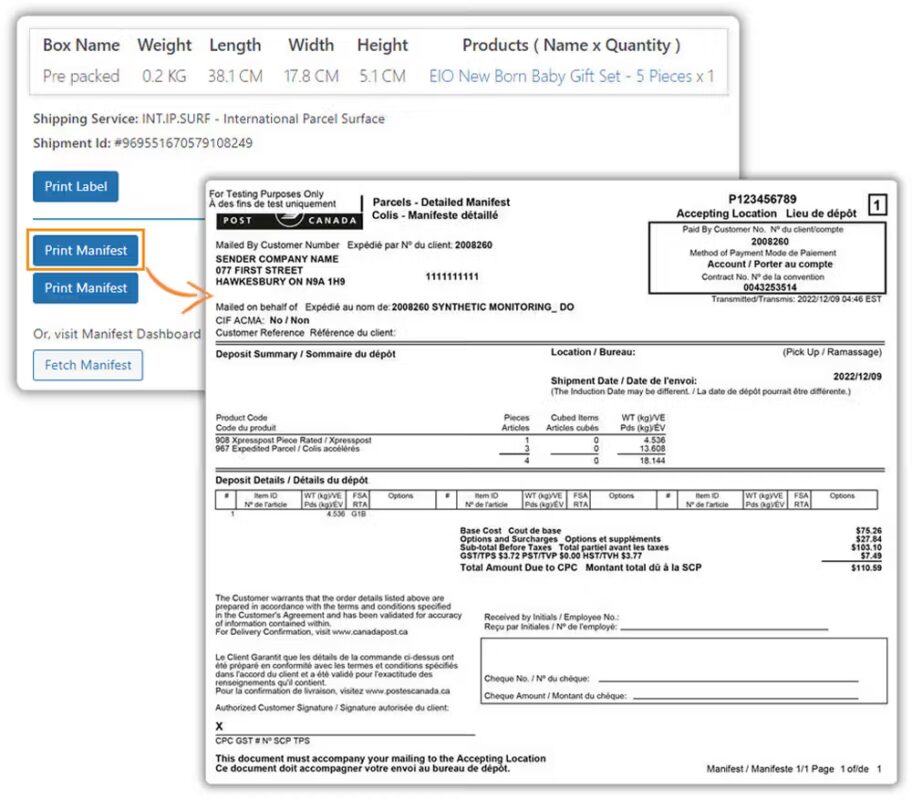
- Create Your Manifest: Transmit the shipment to generate your manifest, which lists all the shipments being handed over. This step sends the pickup request to Canada Post. See our guide on Canada Post shipping manifests in WooCommerce for the full process.
- Prepare for Collection: Pack your items securely, seal the packages, and attach the shipping labels properly. Keep all prepared shipments together at your designated pickup location so nothing is left behind.
- Canada Post collects the shipments: Canada Post comes and picks up the prepared shipments according to the pickup arrangement set up for your account.
Important: The plugin doesn’t include a calendar or time-slot option for scheduling pickups. The pickup schedule itself is arranged separately through your Canada Post account.
How to Schedule Your Pickup
Since the day and time for pickup are set outside WooCommerce, you’ll need to head to the Canada Post website to finalize your schedule. Here’s where you actually set the pickup time for your orders:
- Log in: Sign in to your Canada Post business account.
- Access the pickup tool: Go to the “Request a Pickup” tool to choose when you want your shipments collected.
- Set your schedule: Choose your preferred pickup dates and time windows. You can pick a one-time pickup or a recurring collection, and we’ll cover how these differ in the next section.
- Save your preferences: Once saved, Canada Post will automatically collect any shipment you’ve marked for pickup in the plugin, based on this schedule.
The best part of this setup is that you won’t need to repeat these steps for every order. Once your schedule is saved on the Canada Post side, every shipment you transmit with Pickup enabled in the plugin will simply be included in your next scheduled collection
One-Time vs. Recurring Canada Post Pickup
Canada Post offers two pickup options, and which one fits your WooCommerce store depends on how often you ship.
One-Time Pickup
You request a pickup only when you have a batch of orders ready to go, rather than committing to a fixed schedule.
- Cost: A pickup fee may apply, depending on your Canada Post account and shipment type.
- Best for: Stores with fluctuating or lower shipping volumes that don’t need pickups on a set routine.
Recurring Pickup
Canada Post collects your shipments at the same time each day or week, so you don’t need to request a pickup every time.
- Cost: Fees and eligibility depend on your Canada Post account and shipping volume.
- Best for: Stores that ship regularly and need consistent, frequent collection.
Which option works best comes down to your store’s shipping frequency and what your Canada Post account is set up for.
Tips for a Smooth Canada Post Pickup Process
A few simple habits can help keep your Pickup process running smoothly, especially as your order volume grows.
- Keep your shipper address up to date: If your pickup location changes, update it in the plugin so Canada Post always collects from the right address.
- Watch your daily cutoff times: Orders processed after your pickup window may need to wait for the next scheduled collection.
- Batch your orders where possible: Preparing all of the day’s shipments together makes the pickup faster and reduces the chance of missed packages.
- Track your shipments after pickup: Once your parcels are collected, keeping an eye on their status helps you stay ahead of any delivery issues.
- Review your pickup schedule periodically: If your order volume increases, check with Canada Post whether switching to a more frequent pickup works better for your store.
These small checks go a long way in keeping your pickup process reliable as your store scales.
Conclusion
Canada Post Pickup helps WooCommerce store owners save time by having shipments collected directly from their business address, instead of making a trip to a post office. Once you’ve enabled Pickup in the Canada Post Shipping Plugin for WooCommerce with the Print Label plugin and set up your schedule through your Canada Post account, transmitting a shipment and having it collected becomes a routine part of your fulfillment process. If you run into any questions while setting this up, PluginHive’s support team is happy to help.
FAQs
Q: How do I schedule a pickup with Canada Post?
You can schedule a pickup by signing in to your Canada Post business account and using the “Request a Pickup” tool. From there, you can choose a one-time pickup or set up a recurring schedule based on how often you ship.
Q: How much does it cost to ship a parcel with Canada Post?
Shipping costs depend on factors like package weight, dimensions, destination, and the service you choose. The Canada Post Shipping Plugin for WooCommerce with Print Label displays live rates on your cart and checkout page, so customers see accurate costs based on their order.
Q: Does Canada Post charge for pickup?
Yes, Canada Post charges a pickup fee that depends on your account type and shipping volume. In some cases, the fee may be waived if you meet certain shipping thresholds, so it’s best to check the details directly with Canada Post.
