


Late deliveries cost your WooCommerce store more than shipping fees ever will. WooCommerce late deliveries often lead to refunds, reshipments, and negative reviews, especially when Canada Post delivery timelines stretch longer than customers expect.
In this guide, you’ll learn how Canada Post Priority Services can help you reduce late deliveries by speeding up and making shipping more predictable. We’ll walk through how Priority services work and how you can start using them in your WooCommerce store without complicating shipping.
Table of Contents
- The Business Impact of Late Deliveries on WooCommerce Stores
- Understanding Canada Post Priority Services
- How Canada Post Priority Services Reduce Late Deliveries in WooCommerce
- Offer Canada Post Priority Services in Your WooCommerce Store
- Real-World Example: Reducing Late Deliveries with Canada Post Priority
- Best Practices for Reliable WooCommerce Deliveries Using Canada Post Priority
- Conclusion
- FAQs
The Business Impact of Late Deliveries on WooCommerce Stores
Late deliveries affect more than just when an order arrives. They create a chain reaction across your WooCommerce store that’s hard to control once it starts.
Each delayed package creates a cascade of problems for your store:
- Customer trust evaporates – 69% of shoppers say they’re less likely to shop with a retailer again after experiencing just one late delivery
- Review scores plummet – Late delivery complaints show up in Google reviews and directly impact your search rankings and conversion rates
- Support costs multiply – Your team spends hours answering “where’s my order” emails instead of growing the business
- Refund requests surge – Frustrated customers demand their money back, costing you both the sale and the shipping expense
- Customer lifetime value drops – Each late delivery reduces the chance of repeat purchases by 47%, cutting your most profitable revenue stream
Most late deliveries don’t come from a single issue. They build up due to slow shipping methods, unclear delivery timelines, and limited visibility after checkout. Choosing a more reliable shipping service is one of the most effective ways to prevent these problems.
Understanding Canada Post Priority Services
Canada Post Priority is designed for shipments where delivery speed and reliability matter. Unlike standard shipping options, Priority focuses on faster transit and clearer delivery timelines.
What Canada Post Priority services offer:
- Faster delivery timelines: Most Priority shipments arrive in 1–2 business days within Canada, especially between major cities
- Defined delivery commitments: Priority includes delivery guarantees based on destination
- Priority handling: Packages move through the Canada Post network ahead of slower services
- End-to-end tracking: Customers can track orders from dispatch to delivery
- Delivery confirmation: Proof of delivery reduces disputes and uncertainty
Here’s what the delivery timeline difference looks like:
| Service Type | Toronto → Vancouver* | Toronto → Montreal* | Coverage | Tracking |
|---|---|---|---|---|
| Regular Parcel | 6–10 business days | 3–7 business days | Optional (add-on) | Basic |
| Expedited Parcel | 4–7 business days | 2–4 business days | Optional (add-on) | Basic |
| Xpresspost | 2–3 business days | Next business day | $100 included | Real-time |
| Priority | Next business day (by end of day or noon, location-dependent) | Next business day (by noon or end of day) | $100 included | Real-time |
*Delivery times are typical estimates, not guarantees, and may vary by destination, cutoff time, and service conditions.
Canada Post Priority works best when delivery timing matters more than the lowest shipping cost. By offering a faster and more predictable option, you reduce uncertainty at checkout and lower the risk of orders arriving later than customers expect. Next, let’s look at how these Priority services directly help reduce late deliveries in WooCommerce.
How Canada Post Priority Services Reduce Late Deliveries in WooCommerce
Canada Post Priority helps reduce late deliveries by narrowing delivery expectations and improving control over time-sensitive shipments.
Instead of relying only on standard shipping:
- Customers can choose Priority when delivery speed matters
- Urgent orders move faster through the shipping network
- Delivery timelines are clearer before checkout
- Fewer customers contact support about delays
By letting customers self-select Priority for urgent orders, you reduce pressure on slower shipping methods and improve overall delivery reliability without changing how every order is fulfilled.
Offer Canada Post Priority Services in Your WooCommerce Store
To start offering Canada Post Priority services, you don’t need to rebuild your shipping setup. You can manage everything directly from WooCommerce using the Canada Post Shipping Plugin for WooCommerce with Print Label by PluginHive, which connects your store with Canada Post and displays live shipping options at checkout.
To get started with Canada Post in your WooCommerce store, follow the step-by-step setup guide here: Canada Post Shipping Plugin Setup Guide .
Here’s how you can offer Priority services in a simple, practical way:
- Show Priority at checkout: Priority appears alongside other Canada Post services, with accurate rates calculated based on order weight, dimensions, and destination, so customers see clear pricing before placing an order.

- Use Priority selectively, not for every order: If you don’t want to show Canada Post Priority for every order, you can choose when it appears at checkout. With PH Hide Shipping Methods & Rate Adjustment for WooCommerce, you can show Priority only for specific orders based on things like order value, product type, or shipping location.
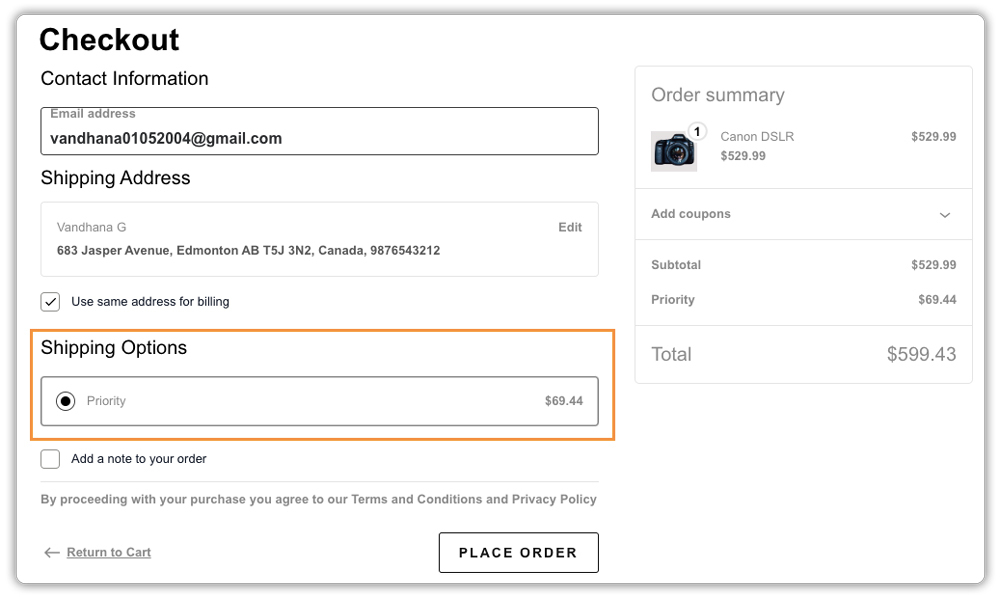
This lets you offer Priority mainly for high-value or urgent orders where fast delivery matters.
To configure this correctly, you can follow this step-by-step guide on hiding and adjusting WooCommerce shipping methods.
- Generate shipping labels: You can create Canada Post shipping labels directly from your WooCommerce dashboard using the plugin, helping you dispatch Priority shipments faster and avoid delays from manual steps.

- Share tracking details automatically: Customers receive tracking updates as soon as the order ships, which reduces delivery-related questions and follow-ups.

Learn more about how Canada Post tracking works in WooCommerce and how to enable automatic tracking notifications for customers.
By offering Canada Post Priority services in a controlled and flexible way, you give customers faster delivery options without complicating your fulfillment process. Next, let’s look at a real-world example that shows how Priority services help reduce late deliveries in practice.
Real-World Example: Cutting Late Deliveries with Canada Post Priority Services
Let’s look at a simple example of a WooCommerce store based in Canada that ships skincare and wellness products nationwide using Canada Post.
Before Using Canada Post Priority Services
- Orders shipped using standard services often arrived later than expected
- Customers complained when deliveries took 7–10 business days
- Refund requests increased for gift and time-sensitive orders
- Support teams handled frequent “Where is my order?” messages
- Delivery timelines felt unpredictable during busy seasons
- Late deliveries hurt repeat purchases, even when products were well received
After Offering Canada Post Priority Services at Checkout
- Customers chose Priority for urgent and high-value orders
- Orders arrived in 1–2 business days for most major destinations
- Delivery expectations were clear before checkout
- Tracking updates reduced delivery-related questions
- Complaints about late deliveries dropped noticeably
- Support teams spent less time on shipping issues
- Customers trusted delivery timelines and reordered with confidence
This example shows how offering Canada Post Priority services gives customers a reliable delivery option when timing matters. By reducing uncertainty and setting clear expectations, late deliveries become less common, and overall delivery reliability improves without changing the entire fulfillment process.
Best Practices for Reliable WooCommerce Deliveries Using Canada Post Priority
Canada Post Priority works best when you support it with clear communication and smart shipping habits. These best practices help you get the most out of Priority services while keeping delivery expectations realistic.
Follow these practices to improve delivery reliability:
- Show clear delivery expectations before checkout: Customers feel more confident when they know when an order will arrive. Using an estimated delivery date plugin for WooCommerce helps you display realistic delivery timelines based on the selected shipping method, including Priority.
- Process Priority orders first: Packing and dispatching Priority orders earlier in the day helps you meet delivery commitments more consistently.
- Keep product weights and dimensions accurate: Correct shipping data ensures accurate rates and prevents unexpected delays caused by reprocessing or label issues.
- Monitor shipments during peak seasons: During holidays or sales periods, keep a closer eye on Priority shipments so you can respond quickly if an issue comes up.
- Share tracking updates at every stage of delivery: Customers worry less when they can see where their order is. With WooCommerce Shipment Tracking Pro, you can automatically share tracking details, status updates, and delivery progress through emails and the order page.
Reliable delivery isn’t just about shipping faster. It’s about setting the right expectations, keeping customers informed, and using Priority services where they make the biggest difference. When these practices work together, late deliveries become far less common.
Conclusion
Canada Post Priority services help reduce late deliveries by offering faster and more predictable shipping compared to standard options. When orders arrive on time, you avoid refund requests, reduce delivery complaints, and build stronger trust with your customers.
You can start offering Priority services at checkout using the Canada Post Shipping Plugin for WooCommerce with Print Label by PluginHive, and use it mainly for high-value or time-sensitive orders. This keeps your shipping simple while improving delivery reliability. If you need help setting up Canada Post Priority services in your WooCommerce store, the PluginHive support team is ready to assist you with configuration and guidance.
FAQs
- What is the fastest delivery option for Canada Post?
Canada Post Priority is the fastest delivery option and is designed for urgent shipments, helping reduce late deliveries. - How long does Canada Post Priority take?
Canada Post Priority usually delivers in 1–2 business days within Canada, depending on the destination. These shorter timelines make it more reliable than standard shipping for WooCommerce orders. - What is the difference between Canada Post Priority and Xpresspost?
Xpresspost typically takes 1–3 business days, while Priority focuses on next-business-day delivery where available. Both options can be offered in WooCommerce using the Canada Post Shipping Plugin for WooCommerce with Print Label by PluginHive. - Does Canada Post Priority require a signature?
A signature is not required by default for Canada Post Priority. Signature on delivery can be added as an extra option if you want additional confirmation for high-value or sensitive orders.
