


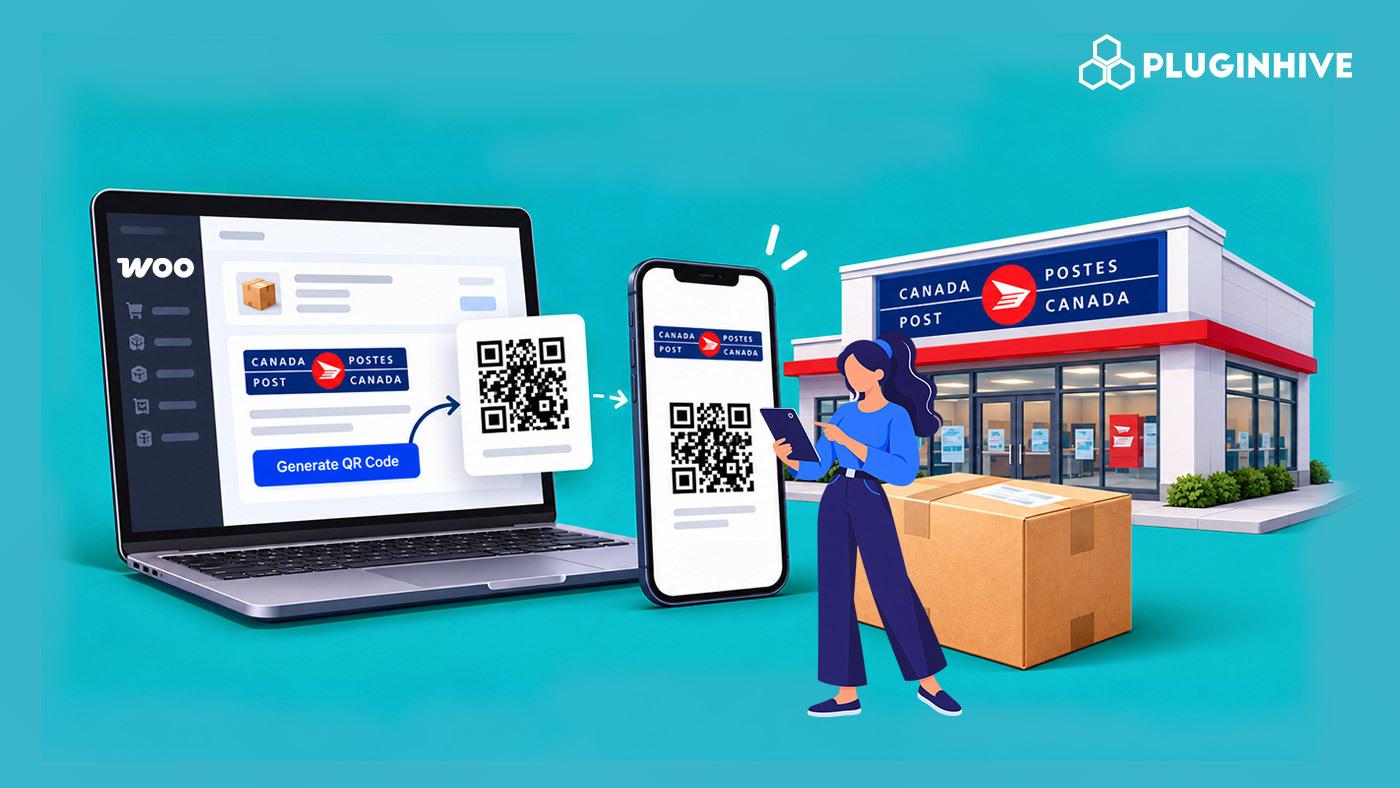
Printing shipping labels takes a working printer, ink, and paper. That is a hassle for small stores and a real blocker for customers who want to return an order. Canada Post QR codes remove the printer from the process because the label is printed at a Canada Post retail location instead.
In this article, we’ll explain how Canada Post QR codes work with WooCommerce and how to ship without a printer using the Canada Post Shipping Plugin for WooCommerce with Print Label. We’ll also cover the benefits and best practices for using Canada Post QR codes.
On This Page
- What Is a Canada Post QR Code?
- How Do Canada Post QR Codes Work for WooCommerce?
- How to Ship With Canada Post QR Codes in WooCommerce
- Why Use QR Codes for WooCommerce Shipping?
- Best Practices for Using Canada Post QR Codes
- Conclusion
- FAQs
What Is a Canada Post QR Code?
A Canada Post QR code is a scannable code linked to a shipment that allows you to print a shipping label at a participating Canada Post retail location. Instead of printing the label at home or in your office, you can simply show the QR code when dropping off the package.
Canada Post QR codes can be used for two types of shipments:
- Outgoing shipments: WooCommerce Sellers can take the package and QR code to a Canada Post retail location to have the shipping label printed.
- Return shipments: Customers can bring their return package along with the QR code and have the return label printed at the location.
Canada Post QR-code label printing is available for eligible domestic shipments within Canada, making it a convenient option for Canadian WooCommerce stores shipping to local customers.
How Do Canada Post QR Codes Work for WooCommerce?
With the Canada Post Shipping Plugin for WooCommerce, QR codes are part of the shipment workflow. Once a Canada Post shipment is created for an order, the plugin provides the required QR code along with the shipment details.
The basic workflow is:
- Create a Canada Post shipment from the WooCommerce order.
- Get the Shipment QR Code generated for the shipment.
- Take the QR code and package to a participating Canada Post location.
- Have the shipping label printed there and hand over the package.
For returns, the plugin can also generate a return label with a QR code. Customers can access their return label from their My Account page. You can learn more about this process in the guide on managing returns in WooCommerce using Canada Post.
The plugin is also officially certified by Canada Post, helping keep the shipping connection reliable while managing shipments, labels, QR codes, and tracking from WooCommerce.
How to Ship With Canada Post QR Codes in WooCommerce
- Connect your Canada Post account: Go to WooCommerce > Settings > Shipping > Canada Post. In the General tab, click Canada Post Account and sign in. The plugin works with both Contract and Non-Contract accounts, so you can use the account type that applies to your business.

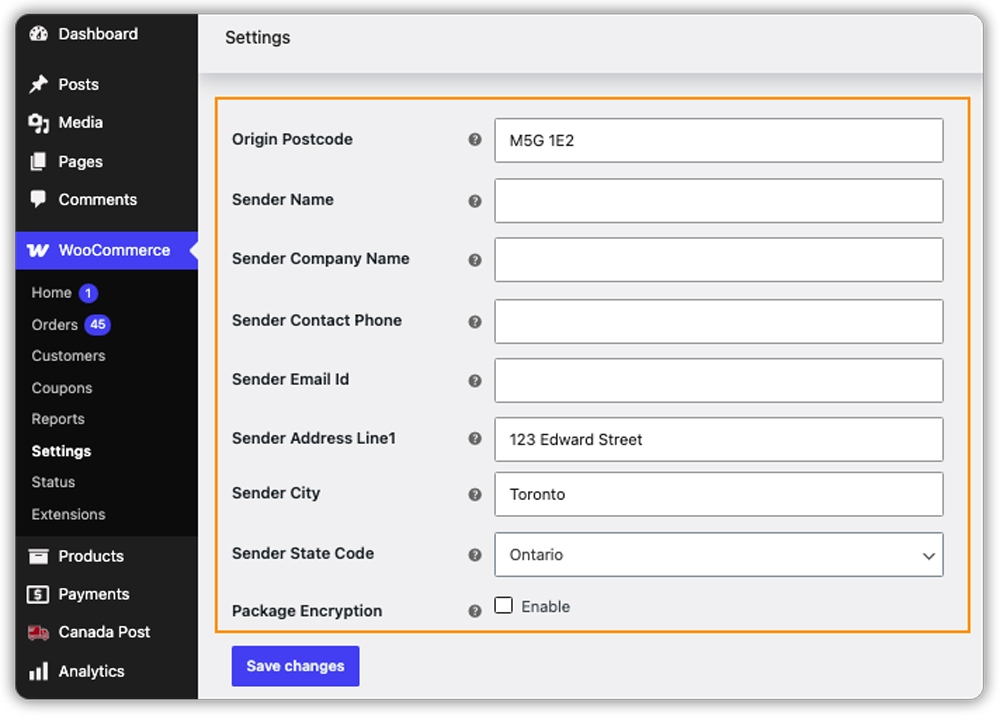
- Add your shipper address: Fill in the origin postcode, sender name, address, phone number, and email. These details are used when creating your Canada Post shipments, so make sure they are correct.
- Check rates and packaging: Shipping rates are displayed based on the product weight, packaging settings, and the Canada Post services selected in the plugin settings.

- Create the shipment: Open the WooCommerce order and select the Canada Post shipping service. Check the package details and create the shipment. The plugin will then show the Shipment QR Code and its expiry date. You can also print the label or download the QR code from the order.
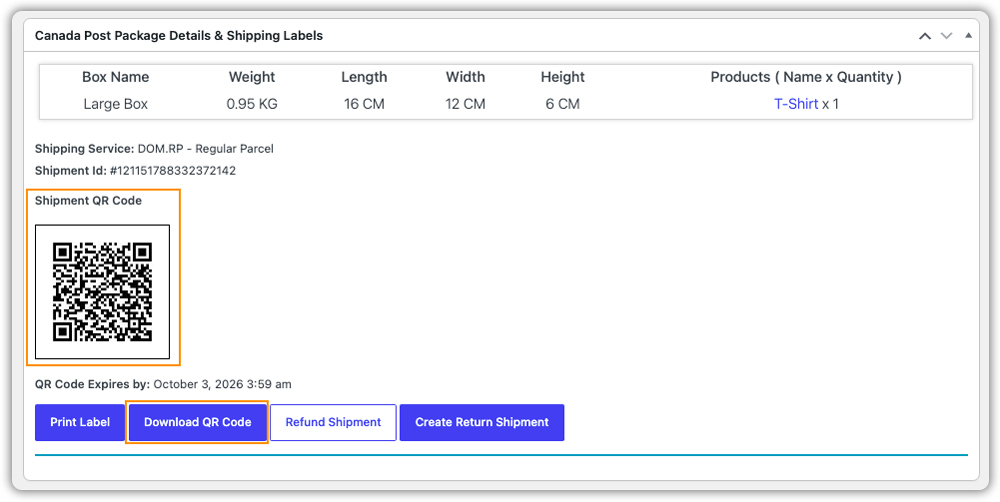
- Use the QR code: Download and take the QR code to a Canada Post retail location to have the label printed. For returns, create a return shipment so customers receive a QR code with theirs.
Use Test Mode in the General tab first. You can create test labels without being charged. When everything looks right, switch to Live. With these steps done, printing a label is no longer part of your daily routine.
Why Use QR Codes for WooCommerce Shipping?
The benefit of Canada Post QR codes goes beyond not having to print a label. They can also make everyday shipping easier, especially when you have a small team or need more flexibility when handling orders.
- More flexible drop-offs: You can create the shipment in WooCommerce and take the package to Canada Post when it is convenient, instead of having to print and prepare everything at the same time.
- Easy to hand off: The QR code can be accessed digitally, so you can share the shipment details with a team member or someone helping with your deliveries. They can take the package to Canada Post without needing access to your WooCommerce store.
- Fewer printing issues: You don’t have to deal with common printing problems such as incorrect label sizes, poor-quality prints, or unreadable barcodes. The label is printed from the shipment details already created in WooCommerce.
- A simpler returns experience: Offering a QR-code option can make returns easier for customers who don’t have access to a printer. This can reduce the need for customers to contact your support team for help with printing return labels.
- Tracking remains connected: Since the shipment is created through WooCommerce, the tracking information remains associated with the order. You can continue managing shipment details and tracking from your store.
For stores that regularly ship orders or process returns, these small improvements can make the overall WooCommerce shipping workflow easier to manage. The Canada Post Shipping Plugin also includes other features that can help with rates, labels, tracking, and shipment management.
Best Practices for Using Canada Post QR Codes
Getting the most out of QR code shipping comes down to a few simple habits:
- Keep product details accurate: Make sure your products have the correct weight and dimensions. This helps ensure that Canada Post shipping rates and shipment details are calculated correctly.
- Check the QR code expiry date: Each Shipment QR Code has an expiry date. Make sure it is used before it expires, and let customers know about the deadline when providing QR codes for returns.
- Give customers clear instructions: Add a short note to your return instructions explaining that customers can take their QR code and package to a participating Canada Post retail location.
- Generate return labels in advance: If your store regularly handles returns, generating return labels automatically can make the process easier. Customers can then receive the return label and QR code when they need to send an order back.
These simple steps can help you avoid unnecessary shipping issues and make the Canada Post shipping experience easier for both you and your customers.
Conclusion
Canada Post QR codes give WooCommerce sellers a convenient way to manage shipments without printing every label themselves. They can be especially useful for small businesses, home-based stores, and sellers who want more flexibility in how they handle shipping and returns.
With the Canada Post Shipping Plugin for WooCommerce with Print Label, you can create shipments, access QR codes, manage labels, and track orders from your WooCommerce store. If you need help with the setup or have questions about using the plugin, you can contact PluginHive Support.
FAQs
1. Can Canada Post scan QR codes?
Yes. Canada Post retail locations scan the QR code and print the shipping label for you on the spot. You don’t need a printer.
2. How do customers use a Canada Post QR code to return an item?
Customers get the QR code along with their return label. They take it to any Canada Post retail location, where the label is printed for them. Learn more in our guide on Canada Post returns in WooCommerce.
3. How do I get a shipping label from Canada Post?
With the Canada Post Shipping Plugin, open the order, create the shipment, and generate the label. You can print it yourself or use the QR code to print it at a Canada Post retail location.
4. How to label a Canada Post package?
Attach the label flat on the largest side of the package, where it is easy to see. Make sure the barcode is clear and not covered by tape or creases.
