


Running a WooCommerce store means handling many moving parts, and delivery disputes are one issue that can quickly cause frustration. You may see customers claim an order was “not received” even though tracking shows delivery completion. This isn’t rare; around 23% of Canadians have experienced package theft or loss, and globally, nearly one in three shoppers has faced a missing delivery. When this happens, you must decide whether to issue a refund, deal with a chargeback, or spend time on support follow-ups.
This is where Canada Post‘s signature-on-delivery service can help. By collecting a signature at delivery, you get clear proof of delivery that confirms the order reached the customer. This reduces false claims, makes disputes easier to resolve, and adds transparency to your shipping process. In this article, you’ll learn how signature services can help you reduce order disputes and deliver a more reliable experience to your customers.
Table of Contents
- Why Delivery-Related Order Disputes Occur in WooCommerce
- Understanding Canada Post Signature Services
- Implement Canada Post Signature Services in Your WooCommerce Store
- Real-World Scenario: How Signature on Delivery Prevents Disputes
- Conclusion
- FAQs
Why Delivery-Related Order Disputes Occur in WooCommerce
Delivery disputes usually happen because there’s a gap between delivery confirmation and actual receipt. Once an order leaves your WooCommerce store, limited visibility into the final handoff can lead to confusion, claims, and disputes, even when nothing went wrong during shipping.
Common Reasons Behind Delivery Disputes
- Package theft after delivery: Thieves can steal packages that carriers leave at doorsteps or common areas shortly after delivery. Even when tracking shows delivered, there’s no way to prove the customer personally received the order.
- Packages received by someone else: Family members, roommates, reception staff, or neighbours may accept deliveries without informing the buyer, leading to “not received” claims.
- Incorrect or incomplete addresses: Missing apartment numbers, outdated autofill addresses, or unclear rural details can cause carriers to deliver packages to the wrong location. Using address validation helps ensure accurate delivery addresses.
- Neighbour delivery mix-ups: In apartments or dense neighbourhoods, packages can end up with nearby residents. If they don’t return them quickly, disputes often follow.
- False or fraudulent claims: While less common, some customers may claim non-delivery despite receiving the order, especially when there’s no proof showing who accepted it.
Delivery disputes happen when there’s no clear proof that an order reached the customer. Without that confirmation, store owners are often forced to refund or resolve claims manually. Adding a signature on delivery helps avoid this uncertainty and makes disputes easier to prevent.
Understanding Canada Post Signature Services
Canada Post signature services are designed to add an extra layer of delivery confirmation. Instead of leaving packages unattended, deliveries are completed only when someone signs for the order.
Types of Signature Services
Canada Post offers different signature options based on the level of confirmation you need. Each type suits specific use cases.
| Signature Service Type | What It Means | Best For |
|---|---|---|
| Signature Required | The package is delivered only after collecting a signature from the recipient or an authorized person. | Electronics, jewelry, designer goods, or any order over $150 |
| Adult Signature Required | The recipient must be an adult and provide a signature at delivery. | Age-restricted products where legal compliance matters |
| Card for Pickup (Signature) | If no one is available, the package is held at a post office and released only with ID and signature. | High-risk delivery locations or repeated delivery issues |
How Canada Post Signature Services Work
- The delivery agent collects a signature at the time of delivery
- The carrier hands the package directly to the recipient or an authorised person
- Canada Post updates the delivery record to confirm signature collection
- The signature serves as proof that the carrier successfully delivered the order
- You can reference this confirmation if a delivery dispute arises
Signature services add a small delivery cost but offer clear proof that an order reached the right person. This added confirmation helps reduce false claims, discourages theft, and provides delivery evidence that payment providers recognise during disputes. Many WooCommerce store owners see 70–80% fewer delivery disputes within the first few months of using signature services.
Next, let’s look at how to set this up in your WooCommerce store so you can start protecting orders automatically.
Implement Canada Post Signature in Your WooCommerce Store
Once you decide to use signature services, the next step is adding them to your WooCommerce shipping flow. With the Canada Post Shipping plugin for WooCommerce, this can be done without changing how you normally process orders.
Note: To get started with Canada Post in your WooCommerce store, follow the step-by-step setup guide here: Canada Post Shipping Plugin Setup Guide
Once you set up the Plugin and connect it to your Canada Post account, you can apply signature services through the Canada Post shipping options available in the plugin. Select delivery options that require a signature, such as Signature Required or Adult Signature Required.
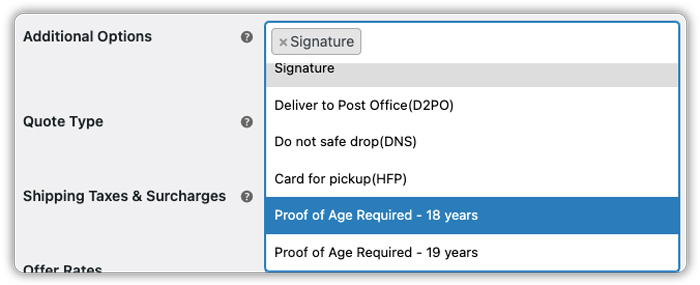
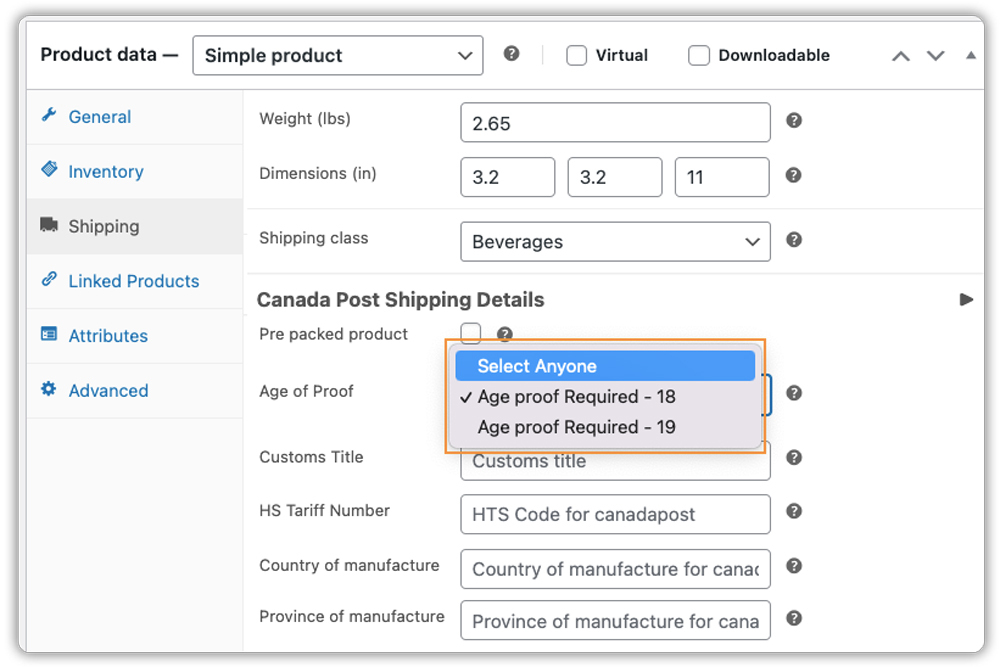
For age-restricted products, you can enable Proof of Age (18 or 19) at the product level. This ensures Canada Post verifies ID and collects a signature before handing over the package.
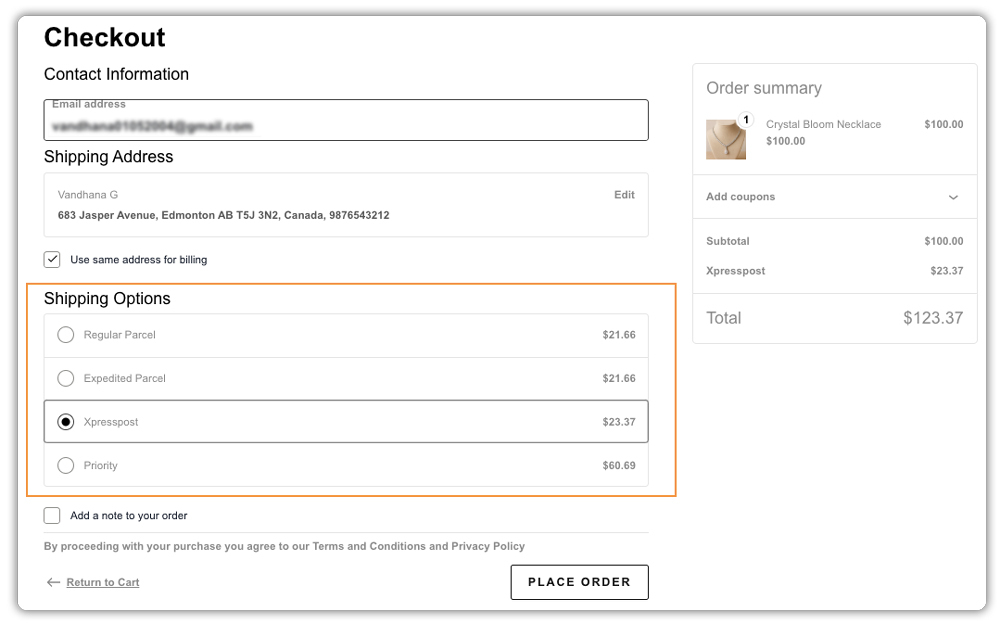
The plugin includes any additional cost for signature services in the real-time shipping rates it shows to customers at checkout.
The selected signature option also appears on the Canada Post shipping label, helping ensure carriers follow the correct delivery process.

Once signature services are added, Canada Post will collect a signature during delivery and record it as proof of delivery. This helps you protect your orders, reduce delivery disputes, and spend less time handling shipping-related issues.
Real-World Scenario: How Signature on Delivery Prevents Disputes
Let’s look at a simple example of a WooCommerce store based in Canada that sells high-value lifestyle and electronic products nationwide using Canada Post.
Before Using Signature on Delivery
- Customers often claimed orders were not received, and each dispute took hours to investigate, checking tracking details, contacting Canada Post, and going back and forth with customers
- Refunds and replacements were issued for orders likely stolen after delivery
- Chargebacks increased when customers contacted their card provider
- Support teams spent most of their time answering delivery-related complaints
- High-value orders felt risky, especially during peak seasons
After implementing signature services through the Canada Post Shipping Plugin for WooCommerce:
- Customers knew they needed to sign for expensive orders
- “Not received” claims dropped quickly
- Signature proof was used to resolve disputes in minutes
- Packages were no longer left unattended at doorsteps
- Support teams spent less time on disputes and more time helping customers
- The store shipped high-value products with greater confidence
This example shows how a signature on delivery adds simple, effective protection. It reduces delivery confusion, prevents false claims, and helps WooCommerce store owners handle disputes quickly and confidently.
Conclusion
Dealing with delivery disputes takes up time you could spend growing your store. The good news is that Canada Post’s signature services give you a simple way to protect your orders. When someone signs for a package, you have proof that it was delivered to the right person. This makes disputes much easier to handle and cuts down on false “not received” claims. It’s a small change that can save you from refunds, chargebacks, and hours of back-and-forth emails.
Setting this up is straightforward with the Canada Post Shipping Plugin for WooCommerce. You can automatically add signature requirements to orders based on their value or what you’re shipping. If you need help getting this set up in your store, the PluginHive support team can walk you through it. Just reach out to them, and they’ll help you configure everything so you can start protecting your shipments right away.
FAQs
Q. What happens if a WooCommerce order requires a signature and no one is home (Canada Post)?
If a signature is required, Canada Post will attempt delivery at the address. If no one is available to sign, a delivery notice card is left. The customer can then collect the package from a nearby post office using a valid ID and signing at pickup.
Q. How much does Canada Post Signature on delivery cost for WooCommerce orders?
The cost depends on the shipping service used. Some services include signature confirmation at no extra charge, while others offer it as a small add-on fee. When using the Canada Post Shipping Plugin for WooCommerce, the exact cost is calculated automatically and shown in real-time at checkout.
Q. Can I see the actual signature image in my WooCommerce dashboard?
Yes. When you use the Shipment Tracking Pro for WooCommerce plugin, the tracking link in the WooCommerce order page takes you to the Canada Post tracking page. From there, you can view and download the signature image. This helps you keep records and use the signature as proof during delivery disputes.
