



In today’s e-commerce world, customers expect more than fast delivery; they want transparency. Knowing where their order is and when it will arrive builds trust and keeps shoppers informed. For WooCommerce merchants shipping in Canada, adding live Canada Post shipment tracking to order emails is a game-changer.
In this guide, we’ll cover why shipment tracking matters, its key benefits, and how to integrate it using Canada Post into your WooCommerce store.
On This page
- Why Shipment Tracking Matters in WooCommerce
- Overview of Canada Post Live Tracking for WooCommerce
- Integrate Live Canada Post Tracking in WooCommerce
- Real-World Example
- Conclusion
- FAQs
Why Shipment Tracking Matters in WooCommerce
Providing shipment tracking in WooCommerce is essential for both merchants and customers. Here’s why it matters:
- Builds Customer Trust: Customers feel more confident knowing exactly where their order is and when it will arrive.
- Reduces Support Inquiries: Clear tracking information decreases emails and calls asking about order status.
- Enhances Transparency: Live tracking links from Canada Post allow customers to monitor their packages in real time.
- Improves Customer Experience: Keeping shoppers informed throughout the delivery process leads to higher satisfaction and loyalty.
- Strengthens Brand Reputation: A smooth post-purchase experience positions your store as professional and reliable.
By understanding these advantages, it becomes clear why integrating live Canada Post tracking is the next step toward improving your WooCommerce store’s shipping experience.
Overview of Canada Post Tracking for WooCommerce
If you integrate Canada Post tracking with your WooCommerce store, all shipment updates and notifications become completely automated. This means both you and your customers stay informed at every stage of the delivery process, without any manual effort. Here’s how it works and what it offers:
- When an order is shipped through Canada Post, the tracking number is automatically added to the WooCommerce order.
- The same tracking link appears in order emails and the customer’s “My Account” section.
- Customers can click the link to view real-time updates, from pickup and transit to final delivery.
What It Means for Store Owners
- No need to manually copy and paste tracking details into emails.
- Fewer support requests asking, “Where is my order? (WISMO)”
- Automated, accurate shipment updates for every Canada Post package.
What It Means for Customers
- Instant access to live tracking information.
- Real-time visibility of every shipping stage.
- A smoother, more transparent post-purchase experience.
By setting up live tracking, you create a fully automated system that keeps both you and your customers informed.
Integrate Live Canada Post Tracking in WooCommerce
Integrating Canada Post tracking becomes effortless once you have an automated setup in place. The Canada Post Shipping Plugin for WooCommerce with Print Label lets you integrate Canada Post directly into your store, automating the entire shipping process.
To get started, refer to the Canada Post Plugin Setup Guide for detailed step-by-step instructions.
Once the plugin is configured, enable Shipment Tracking in the plugin settings to automatically obtain tracking details for every order. You can also customize the tracking email content and choose when customers receive notifications.

After placing an order in your WooCommerce store, when you Generate Packages, the Canada Post API automatically assigns a Shipment Number and a Tracking PIN to the package.

Once the order status is marked as Completed, WooCommerce automatically sends the Order Completion Email to the customer with the tracking number included.
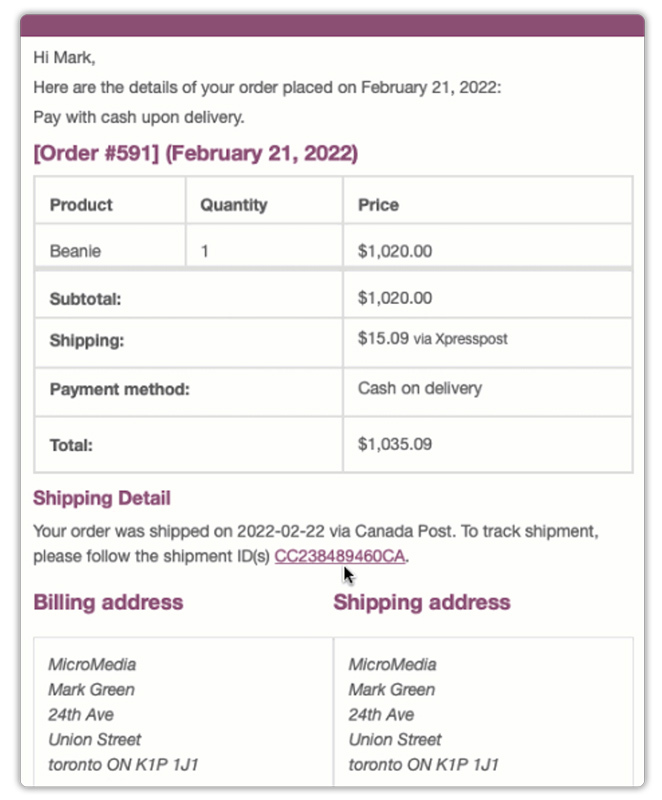
Customers can easily track their shipments using the Canada Post Tracking Tool, directly from the link provided in their order email or from the “My Account” section in your store.
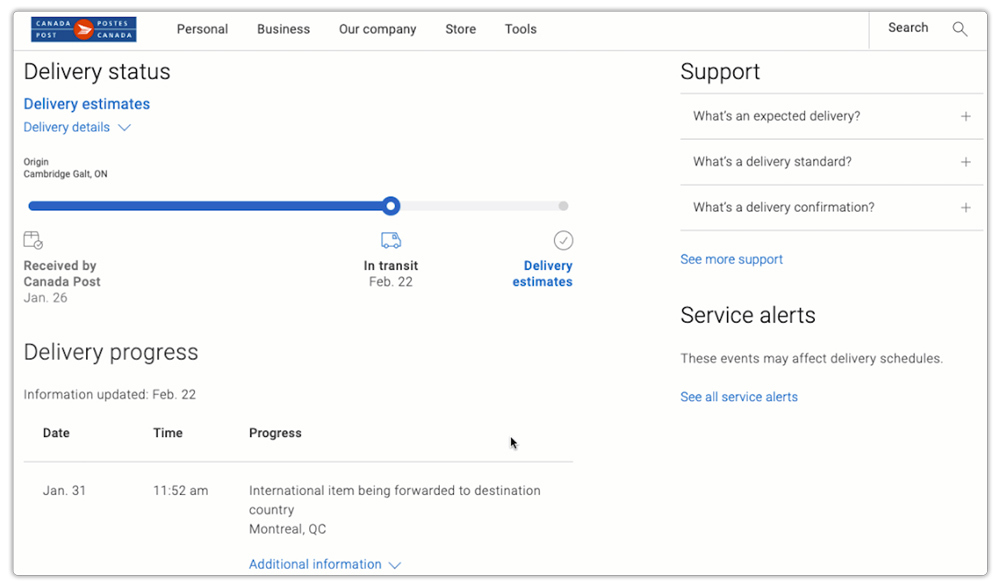
By completing this integration, your WooCommerce store offers a fully automated shipping experience, where tracking numbers are generated, synced, and shared with customers instantly after each order is fulfilled.
Real-World Example: Canadian WooCommerce Store Using Live Tracking
A Canadian WooCommerce store selling handmade home decor was struggling with delayed shipment updates and frequent customer inquiries about order status. While they shipped exclusively through Canada Post, their manual tracking process created confusion and extra workload for the support team.
Challenge:
- Tracking details had to be manually entered and shared after each order.
- Customers often contacted support to ask for their tracking numbers or delivery updates.
- The lack of automated shipment notifications reduced post-purchase satisfaction.
Solution:
The store integrated Live Canada Post Tracking using the Canada Post Shipping Plugin. This automation allowed them to:
- Automatically generate tracking PINs and shipment numbers once labels are created.
- Sync tracking details directly with WooCommerce orders.
- Send customers automated tracking links through order confirmation and completion emails.
- Allow customers to track their orders anytime through the “My Account” page.
With live Canada Post tracking in place, customer inquiries about shipment status dropped by nearly 70%. The store now provides a fully transparent post-purchase experience, ensuring customers always know where their package is, from dispatch to delivery.
To learn more about the WooCommerce Canada Post Plugin, watch this video.

Conclusion
Adding live Canada Post shipment tracking to your WooCommerce store is a simple yet powerful way to improve the post-purchase experience. With real-time tracking updates, customers always know where their order is, while store owners save time managing shipments. Whether you’re a small business or an established store, live tracking helps you deliver a professional and reliable shopping experience.
Need help setting up the Canada Post plugin? Contact PluginHive Support for expert assistance.
FAQs
1. Can I notify customers automatically when their Canada Post shipment status changes?
Yes! You can automatically send an email whenever a Canada Post shipment is updated. To have more flexibility for WooCommerce order tracking, you can use the WooCommerce Shipment Tracking Pro plugin.
2. Can I display estimated delivery dates for my Canada Post shipments in WooCommerce?
Yes! Using the Estimated Delivery Date Plugin for WooCommerce, you can show accurate delivery dates for all Canada Post shipments on the product page, cart, and checkout. This helps customers know when their orders are likely to arrive, complementing live tracking information.
3. Can I hide certain Canada Post shipping services or adjust rates based on package size?
Yes. With the Hide WooCommerce Shipping Methods & Rate Adjustment plugin, you can hide specific Canada Post services for certain products, package weights, or dimensions.
4. Can I offer expedited shipping with Canada Post?
Yes. For parcels, you can use services like Expedited Parcel™, Xpresspost™, or Priority™ for faster delivery. Standard options such as Lettermail and Letter-Post don’t come with guaranteed speed or tracking.
5. Does the plugin support Lettermail and other lightweight parcel options?
Yes, the plugin allows you to configure and offer Lettermail and small parcel services for lightweight shipments. Read the full guide here – WooCommerce Canada Post Lettermail and Parcel Services
