


Choosing a shipping carrier is one of the most practical decisions a Canadian WooCommerce store owner will make. It affects checkout rates, delivery timelines, and how often customers reach out asking “where’s my order?” Two names come up again and again in this conversation: Canada Post and Purolator.
This Canada Post vs Purolator comparison breaks down how each carrier works for WooCommerce stores, where each one fits best, and how to get either (or both) connected to your store without guesswork.
Table of Contents
- Understanding Canada Post and Purolator for WooCommerce Stores
- Canada Post vs Purolator: A Quick Comparison
- Which Carrier Fits Your WooCommerce Store?
- Adding Canada Post and Purolator to Your WooCommerce Store
- Can You Use Both Canada Post and Purolator in WooCommerce?
- Conclusion
- FAQs
Understanding Canada Post and Purolator for WooCommerce Stores
Canada Post is the national postal service, and it’s the carrier most Canadian online shoppers already recognize. It delivers to every address in the country, including rural and remote regions that many private couriers don’t cover as consistently. For WooCommerce stores, this makes Canada Post a dependable default, especially for standard parcels, letters, and everyday domestic orders. The Canada Post Shipping Plugin for WooCommerce with Print Label connects your store directly to Canada Post’s published rates and services.
Purolator is a private Canadian courier, majority-owned by Canada Post itself, known for time-definite and express delivery options. It’s built for speed rather than universal reach, with strong domestic express services and cross-border shipping into the US. For WooCommerce stores that need guaranteed delivery windows or faster transit times, Purolator is typically the stronger fit. The Purolator Shipping Plugin for WooCommerce with Print Label brings Purolator’s rates, labels, and tracking into the WooCommerce dashboard.
Both plugins work the same way from a store owner’s perspective: connect your carrier account, choose your services, and let rates and tracking flow through to checkout automatically. What differs is the carrier behind the scenes, and what each one is actually optimized for.
Canada Post vs Purolator: A Quick Comparison
Here’s a side-by-side look at how the two carriers compare on the things that matter most to a WooCommerce store.
| Feature | Canada Post | Purolator |
|---|---|---|
| Coverage | Every address in Canada, including rural and remote areas | Strong urban and suburban coverage; rural delivery may take longer |
| Best for | Everyday domestic parcels and letters, budget-conscious shipping | Time-sensitive, express, and cross-border shipments |
| Domestic Services | Regular Parcel, Expedited Parcel, Xpresspost, Priority | Purolator Ground, Purolator Express (9am/10:30am/12pm/Evening) |
| US & International | International Parcel, Tracked Packet, Xpresspost International | Purolator Express US, Purolator Ground US, Purolator Express International |
| Delivery Speed | Standard to moderately fast, depending on service | Generally faster, with time-definite delivery windows |
| Tracking | Available, though tracking numbers often need to be entered manually | Automated, real-time tracking through the carrier account |
| Pricing | Generally more budget-friendly for standard domestic shipping | Typically priced higher, reflecting faster and guaranteed delivery |
This table gives you the broad strokes, but the right pick depends on what you’re shipping and how your customers expect to receive it.
Which Carrier Fits Your WooCommerce Store?
There’s no universal winner here. The better carrier depends on your product type, shipping volume, and how your customers shop.
Canada Post tends to work well when:
- Most of your orders ship within Canada, including to rural or remote addresses
- You sell lightweight items like clothing, books, accessories, or small household goods
- Keeping shipping costs low matters more than guaranteed delivery windows
- Standard delivery timelines are acceptable to your customers
- You want a carrier Canadian shoppers already know and trust at checkout
Purolator tends to work well when:
- You need express or time-definite delivery, especially within cities and suburban areas
- A meaningful share of your orders ship to the US
- You’re shipping higher-value or time-sensitive products where reliable tracking matters
- Customers are willing to pay more for faster, more predictable delivery
- You want an express tier to offer alongside a standard shipping option
Many Canadian WooCommerce stores don’t treat this as an either-or decision. Canada Post often handles the bulk of standard domestic orders, while Purolator is offered as a faster (and pricier) option at checkout for customers who want it. That combination is covered in more detail further down.
Adding Canada Post and Purolator to Your WooCommerce Store
Both plugins follow the same simple process: install, connect your account, and choose your services. Here’s a quick look at how each one works.
Adding Canada Post to Your WooCommerce Store
The Canada Post Shipping Plugin for WooCommerce with Print Label connects your WooCommerce store to your Canada Post business account. Once it’s set up, your customers see live Canada Post rates at checkout based on their delivery address and order details.
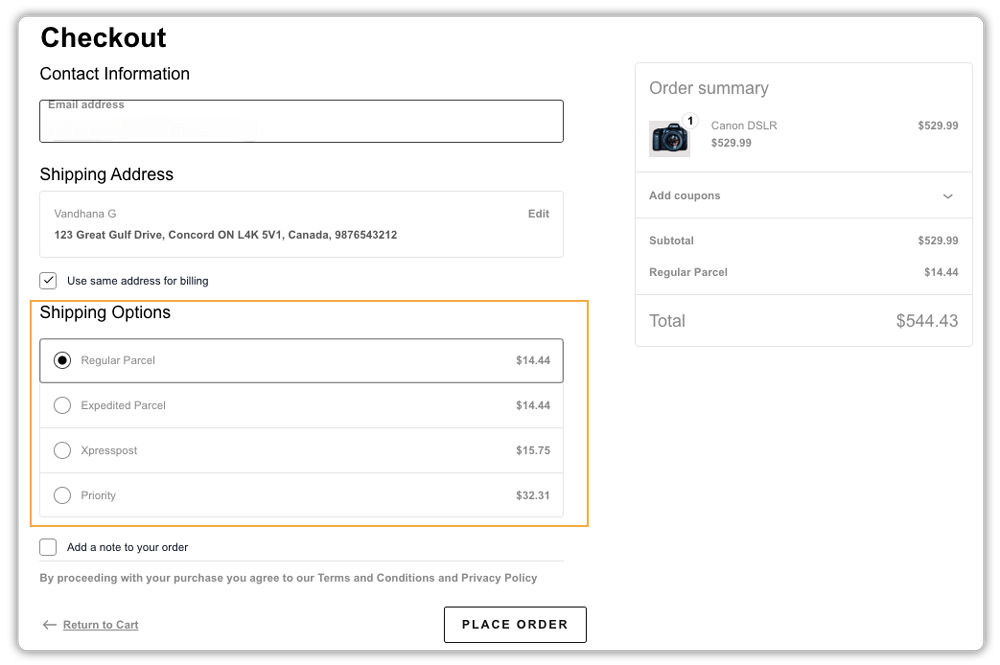
The plugin lets you choose which Canada Post services to display, such as Expedited Parcel, Xpresspost, Priority, or Lettermail, and whether to show list rates or your own negotiated contract rates.
You can print shipping labels directly from your WooCommerce orders page, without logging into Canada Post separately.
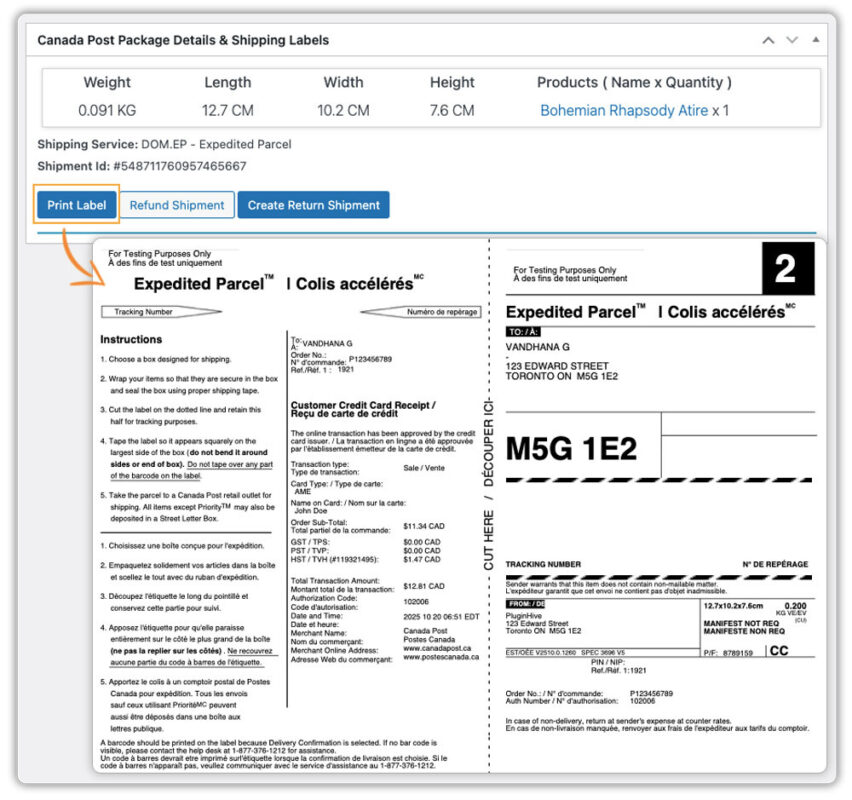
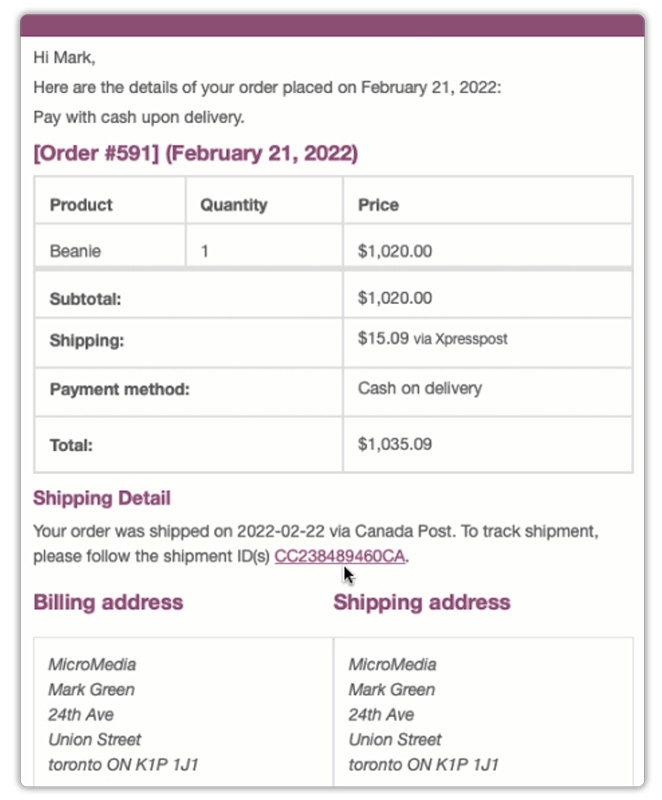
Tracking is handled automatically. Once a label is generated, the tracking number is added to the order, and the customer gets notified without any manual work on your end.
For a detailed walkthrough, refer to the Canada Post Plugin Setup Guide.
Adding Purolator to Your WooCommerce Store
The Purolator Shipping Plugin for WooCommerce with Print Label connects your WooCommerce store to your Purolator business account.
Once it’s set up, live Purolator rates appear at checkout based on the customer’s address and order weight, including any discounted or negotiated rates tied to your account.
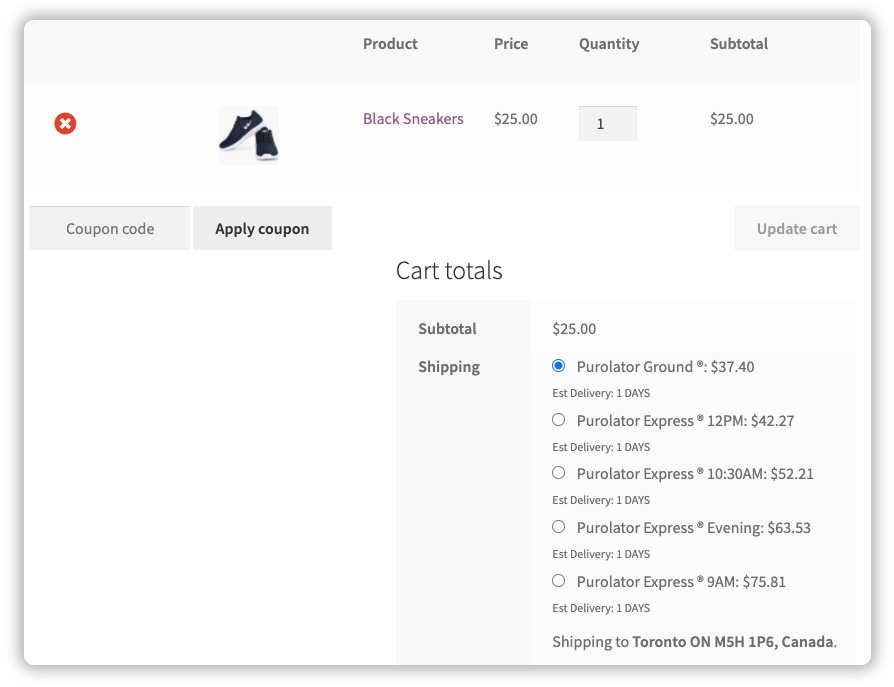
You can choose which Purolator services to display at checkout, such as Purolator Ground and Purolator Express, and configure rates based on your Purolator account.
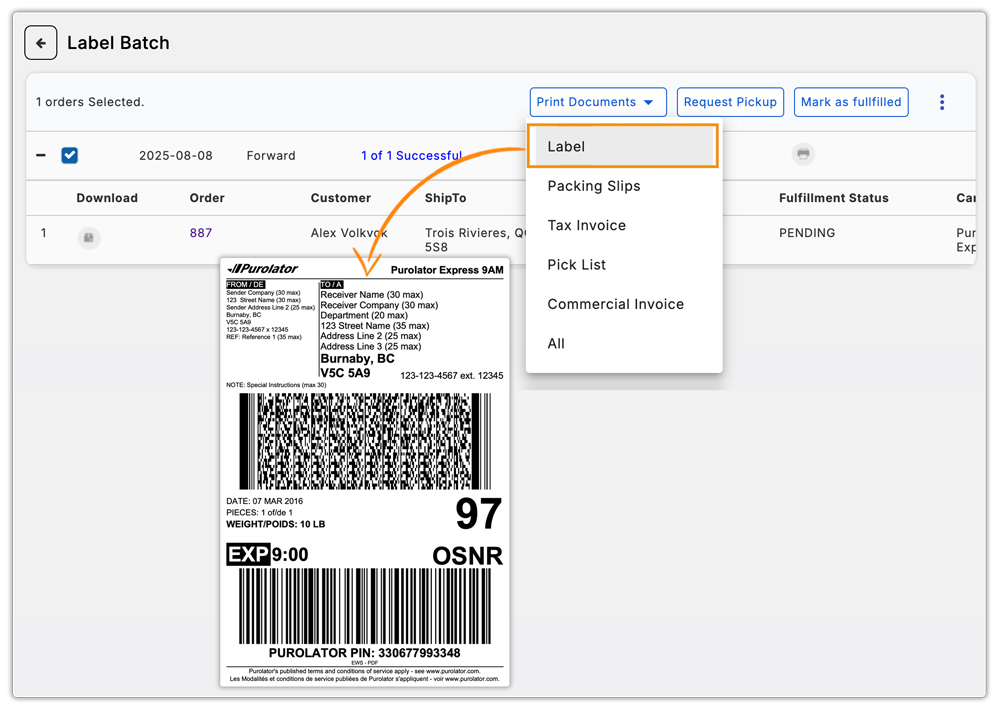
Labels are generated directly from your WooCommerce orders page, so there’s no need to switch between systems, and you can even request pickups without logging into the Purolator portal separately.
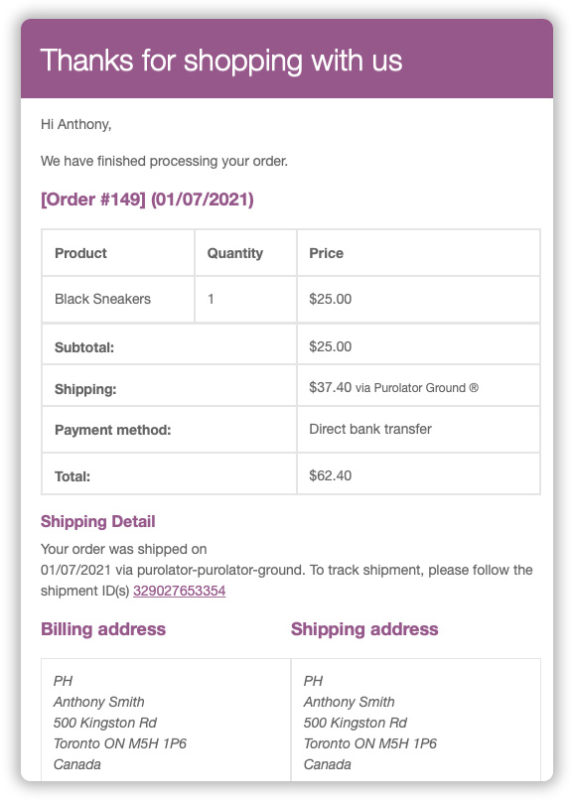
Tracking is automatic as well. Once a shipment is booked, the tracking number is attached to the order, and the customer receives an update without any extra steps.
For a detailed walkthrough, refer to the Purolator Setup Guide.
Can You Use Both Canada Post and Purolator in WooCommerce?
Yes, and many Canadian stores do exactly this. A common setup is using Canada Post as the default option for standard domestic orders, while offering Purolator as a faster (and typically pricier) alternative for customers who want it, or for higher-value shipments where guaranteed delivery windows matter.
The WooCommerce Shipping Services plugin by PluginHive supports both Canada Post and Purolator, along with other major carriers, from a single dashboard. This means you can manage rates, labels, and tracking for both carriers without switching between separate tools or plugins.
At checkout, customers see rates from both carriers side by side and can choose based on cost and delivery speed. This gives your store broader flexibility, letting budget-conscious shoppers pick the cheaper option while still offering an express choice for customers who need it faster.
Conclusion
In the Canada Post vs Purolator decision, there isn’t a single right answer; it comes down to what your store ships and what your customers expect. Canada Post is generally the more affordable, widely trusted option for everyday domestic shipping across Canada, including rural addresses. Purolator steps in when speed, time-definite delivery, or cross-border shipping to the US are priorities.
The Canada Post Shipping Plugin for WooCommerce with Print Label gets Canada Post running in your store quickly, while the Purolator Shipping Plugin for WooCommerce with Print Label does the same for Purolator. And if you’d rather offer both from one dashboard, WooCommerce Shipping Services handles that too. Either way, the goal is the same: give your customers shipping options that match what they’re buying and how soon they need it.
FAQs
Q: Is Purolator better than Canada Post?
Not universally. Canada Post is generally more affordable and covers every address in the country, including rural areas. Purolator is faster and better suited for time-sensitive or cross-border shipments. The better choice depends on what you’re shipping and how quickly it needs to arrive.
Q: Is Purolator owned by Canada Post?
Purolator operates as a separate courier company, though Canada Post holds a majority ownership stake in it. For WooCommerce purposes, they function as two distinct carriers with separate accounts, rates, and services.
Q: Which carrier is cheaper for small Canadian stores?
For standard domestic parcels, Canada Post is typically the more budget-friendly option. Purolator’s pricing reflects its faster, time-definite delivery services, so it generally costs more for comparable shipments.
Q: Can I offer both Canada Post and Purolator at checkout?
Yes. Using a plugin like WooCommerce Shipping Services, you can display live rates from both carriers at checkout, letting customers choose between standard and express delivery based on their needs.
