


Running a car rental business means managing time-sensitive bookings, ensuring vehicle availability, and offering smooth pickup and drop-off experiences. Whether you rent out sedans for short city rides, SUVs for weekend trips, or vans for intercity travel, keeping everything organized can quickly become overwhelming.
Suppose you’re using WooCommerce to sell rental services. In that case, the Bookings and Appointments for WooCommerce plugin by PluginHive can help you automate bookings, prevent double rentals, manage durations, and accept payments with ease. In this article, we’ll explore how car rental businesses like yours can streamline scheduling and deliver a seamless rental experience, both for you and your customers.
Table of Contents
- Common Challenges in Managing Car Rentals
- Automating Car Rental Bookings with WooCommerce
- Real-World Example
- Final Thoughts
- FAQs
Common Challenges in Managing Car Rentals
Managing a car rental business through a WooCommerce store isn’t always straightforward. Whether you rent out hatchbacks for daily commutes or SUVs for long weekend trips, there are a few common challenges most business owners face:
- Booking Conflicts: Without a proper system, it’s easy to accept overlapping bookings for the same car, especially during weekends or holidays, leading to double bookings and dissatisfied customers.
- Tracking Vehicle Availability: Keeping tabs on which vehicles are available, which are out for rental, and which ones are due for return can quickly become overwhelming as bookings increase.
- Offering Flexible Rental Durations: Customers may want to rent by the hour, by the day, or even for a full week. Manually adjusting pricing and availability for each duration makes things unnecessarily complicated.
- Add-Ons Like GPS, Child Seats & Insurance: Many customers want to include extras like GPS navigation, insurance, or baby seats. Managing these manually can lead to missed upsell opportunities or confusion during pickup.
- Payment & Confirmation Delays: If customers can’t complete their booking and payment in one go, it increases drop-offs and uncertainty. They expect instant confirmation, and anything slower hurts the experience.
You can address each of these challenges by automating your rental process with the Bookings and Appointments for WooCommerce plugin by PluginHive, and that’s exactly what we’ll cover next.
Automating Car Rental Bookings with WooCommerce
Running a car rental business online doesn’t have to be complex. With the Bookings and Appointments for WooCommerce plugin, you can handle daily or hourly car rentals, manage your fleet’s availability, and even offer extras like insurance or GPS add-ons, all from your WooCommerce store.
Here’s how to get your car rental system up and running with ease:
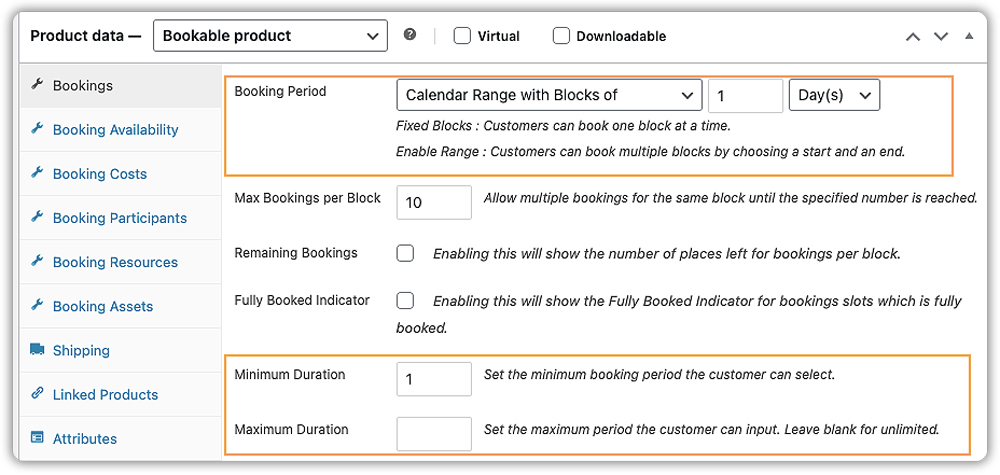
- Offer Daily or Hourly Car Rentals
You can offer full-day or Multi-day rentals, hourly bookings (e.g., 3-hour or 6-hour blocks), or even custom durations depending on your rental model. For instance, you might offer hourly bookings for local city rides and daily bookings for long trips.
- Set Business Hours, Off-Days & Rental Availability
Easily define which days and hours your cars are available for rent. Block out weekends, public holidays, or maintenance days. You can also prevent late-night bookings if needed.
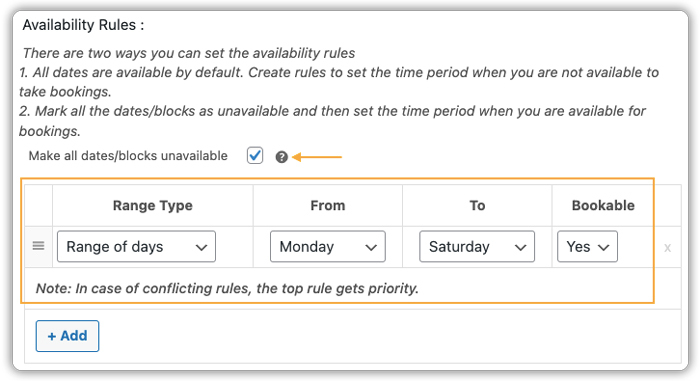
Need help configuring this? Check out this guide to setting booking availability.
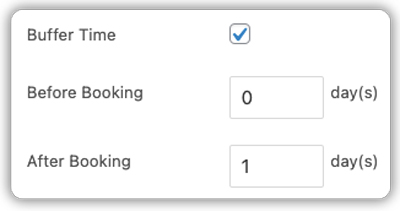
- Add Buffer Time Between Rentals
Want to make sure there’s time between bookings for vehicle inspection, cleaning, or fuel top-ups? You can add buffer time before and after each booking to ensure your fleet is always ready for the next trip.
Learn how to add buffer time in this step-by-step guide.
- Set Rental Pricing & Discounts
Charge by the hour or day, offer weekend pricing, and even add discounts for long-duration rentals. The plugin auto-calculates the total as customers choose their pickup and drop-off times, no manual quote sharing needed.
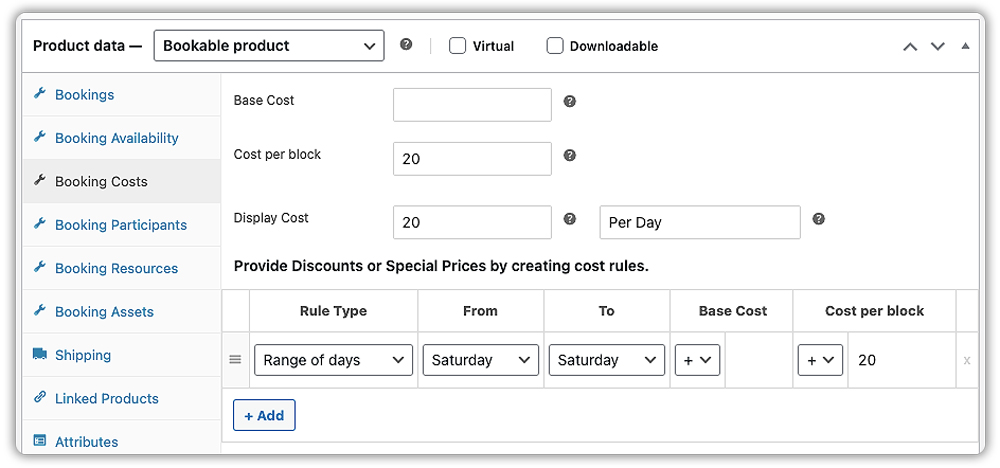
Want to set dynamic pricing rules? See how to configure pricing in WooCommerce Bookings.
- Let Customers Choose the Number of Cars or Seats
If you allow bookings for multiple vehicles or seat-based rentals (like luxury vans or cabs), you can let customers choose how many cars or seats they want directly while booking.
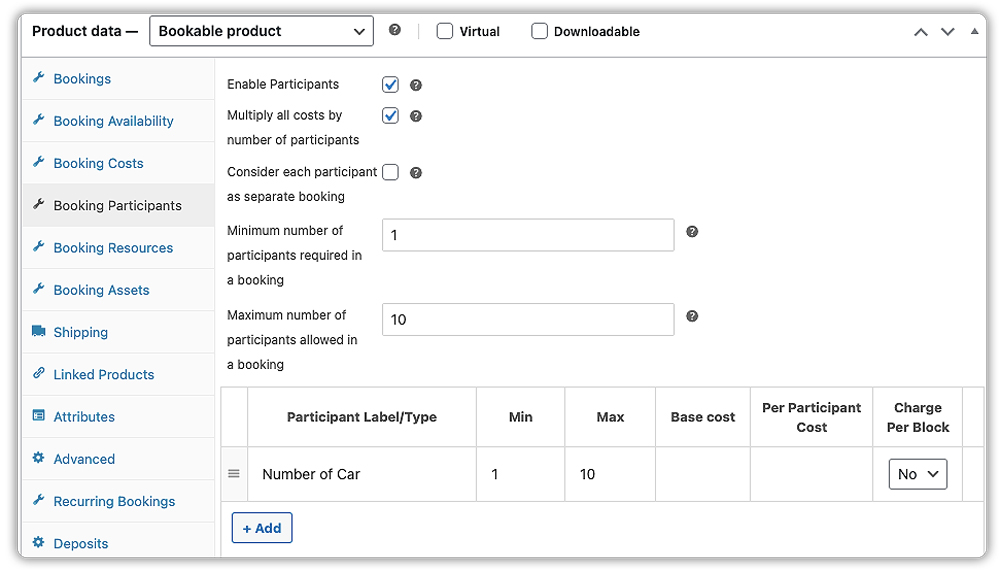
See how to enable participant-based rentals in this detailed guide
- Track Fleet Availability with Car Type-Based Inventory
If you have different categories of cars, like 10 SUVs and 15 Sedans, you can add them as booking assets and assign a quantity for each type. When customers book a car, the quantity is auto-updated, preventing overbookings. You don’t need to list each car unless required.
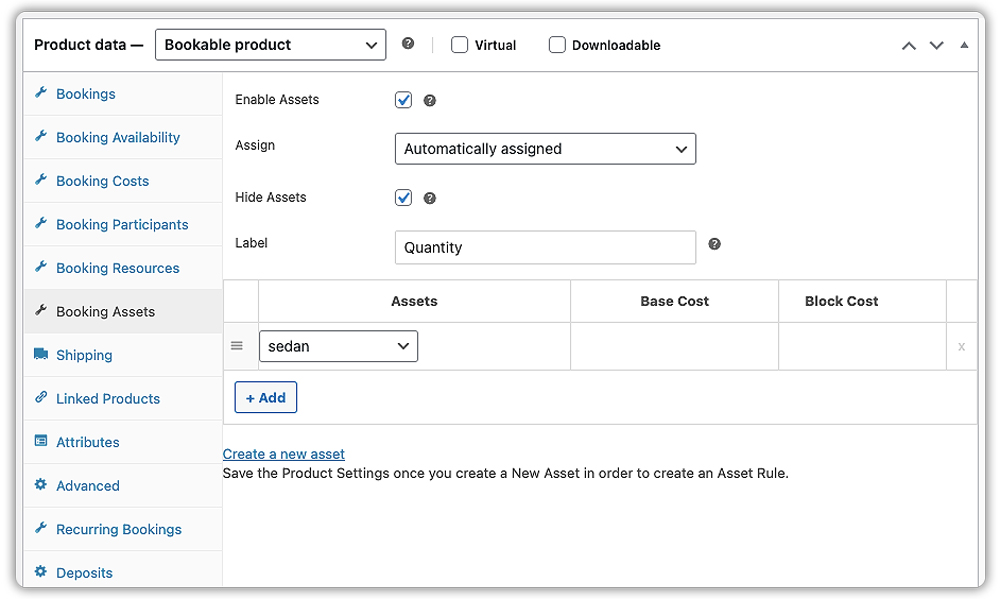
- Upsell Extras Like GPS, Insurance & Baby Seats
Offer extras like child seats, navigation devices, extra insurance, or even fuel packages. You can price them individually and show them as optional add-ons during the booking process.
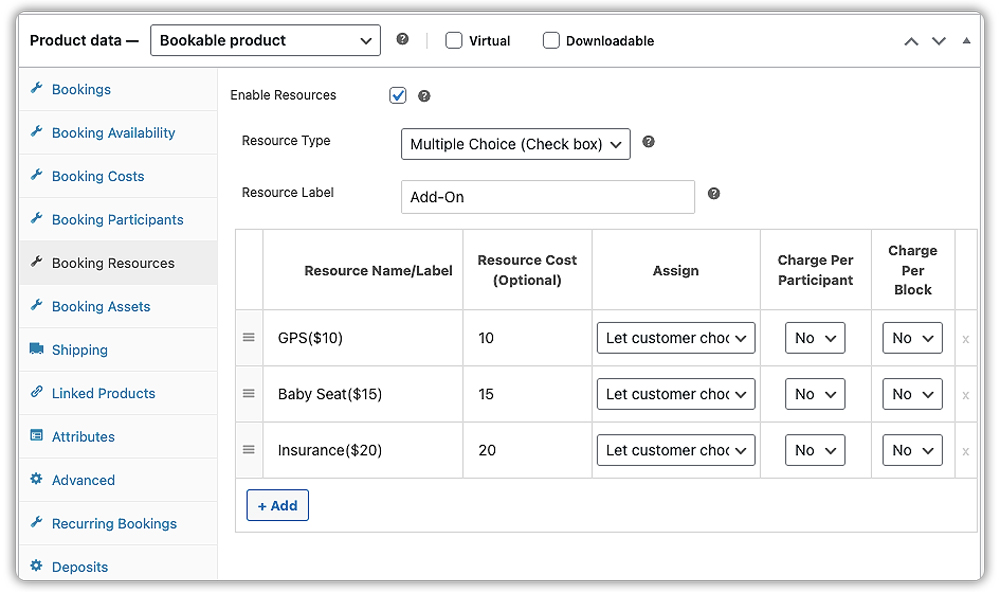
Need help with this? Learn how to configure booking resources.
You can also use the PH Product Add-Ons for WooCommerce plugin to request file uploads (e.g., driver’s license or ID proof) as part of the booking form.
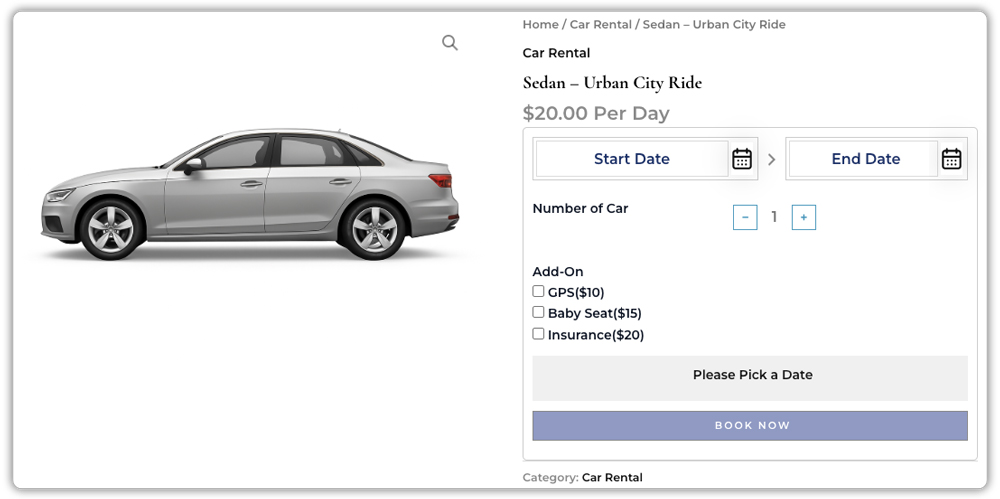
This is exactly how the car rental booking experience appears on your website’s frontend:
- Flexible Payment Collection Options
You can choose to collect full payment upfront, partial payments, or just a deposit during booking, perfect if you want to confirm a booking without requiring 100% payment.
Want to enable deposits or partial payments? Use the PH Deposits for WooCommerce Plugin
- Send Booking Confirmations & Rental Reminders
The plugin automatically sends booking confirmation emails. You can also schedule reminders (e.g., one day before pickup) and follow-up messages to collect feedback or promote repeat bookings.
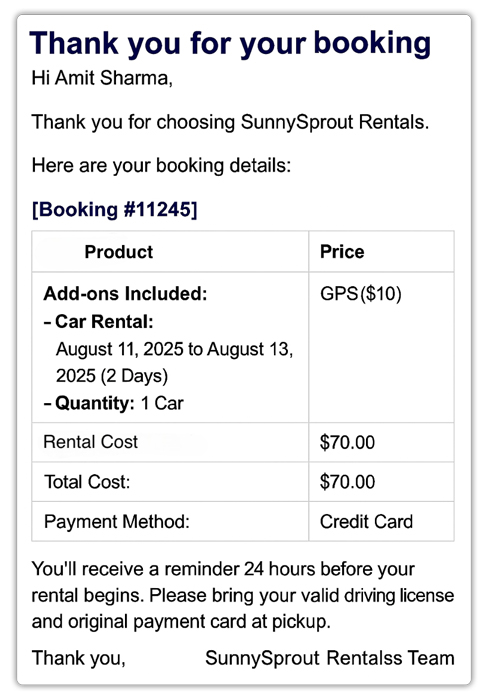
See how to enable automated email reminders and follow-ups in this email notification guide
With everything from slot availability to payments and extras handled automatically, WooCommerce Bookings takes the stress out of running a car rental business, whether you have 5 cars or 50.
Real-World Example: Running a Car Rental Business on WooCommerce
Let’s say you operate a WooCommerce-based car rental service offering a fleet of vehicles, sedans, SUVs, and luxury cars for both daily and hourly hire.
The Challenges You Will Face
- You rely on phone or WhatsApp to manage bookings, so customers can’t check availability or reserve instantly.
- Double bookings are common, especially during holidays, because the same vehicle gets promised to multiple customers.
- Vehicle preparation, like cleaning and fueling, happens without buffer scheduling, leading to delays.
- There’s no way to upsell services like GPS, baby seats, or additional insurance online.
- Payment tracking and booking confirmations are handled manually, increasing the chances of errors or missed follow-ups.
How It Can Be Solved
With the Bookings and Appointments for WooCommerce plugin by PluginHive, these challenges can be solved effortlessly:
- Each car can be listed as a bookable product with its own availability calendar, letting customers choose dates and times in real time.
- Buffer time can be added before and after each booking for cleaning and inspection.
- Rental duration flexibility allows you to offer hourly or daily bookings depending on the vehicle type.
- Optional extras like GPS, child seats, or extra insurance can be offered as paid add-ons on the product page.
- Automated booking confirmation and reminders reduce manual communication and no-shows.
- Payments can be handled using WooCommerce itself or integrated with the PH Deposits for WooCommerce plugin for upfront collection.
With PluginHive’s solution, you get a complete booking system built right into your WooCommerce store, making it easier to manage rentals, increase revenue, and offer a professional customer experience.
Final Thoughts
Running a car rental business doesn’t have to involve endless phone calls, availability mix-ups, or manual coordination. With the Bookings and Appointments for WooCommerce plugin, you can automate your entire rental process from selecting pickup and drop-off times to managing inventory, add-ons, and payments right from your WooCommerce store.
Whether you offer self-drive rentals, outstation trips, or premium vehicles with extra services like GPS or insurance, this plugin helps you deliver a smooth, professional, and scalable booking experience to your customers.
Need help getting started? Reach out to PluginHive Support for personalized setup assistance for your car rental business.
FAQs
1. Can I set different prices for different car models?
Yes. The plugin allows you to create individual bookable products for each car model, each with its own specific pricing rules.
2. Does the plugin handle security deposits?
While the core plugin focuses on bookings, it is fully compatible with the PH Deposits for WooCommerce plugin, which allows you to accept partial payments or security deposits at the time of booking.
3. Is it possible to manually add a booking for a customer who calls in?
Absolutely. You can use the plugin’s backend interface to create new bookings manually, ensuring you track all reservations in one place, no matter how they are made.
4. Can I set a minimum and maximum rental duration?
You can easily set the minimum and maximum number of days or hours for car bookings, giving you full control over your rental terms.
5. Is the PluginHive support reliable if I encounter issues setting up?
User reviews consistently praise PluginHive support for fast, effective help with setup and troubleshooting. Many report responses within hours and provide detailed guidance for unique situations.
6. Can I require customers to upload documents (like a driver’s license) during booking?
While not built-in, you can use the PH Product Add-on for WooCommerce plugin to request file uploads during the Booking process, such as for license verification.
