



Offering UPS returns on Shopify isn’t just a nice add-on anymore; it’s one of the biggest factors customers consider before purchasing. When shoppers know they can send an item back easily, they’re more confident placing an order. For Shopify merchants, this translates into higher conversion rates, fewer abandoned carts, and a stronger sense of trust around your brand.
Automating UPS return labels takes things a step further. Instead of spending time manually generating return labels or responding to repetitive support messages, automation lets the system handle it for you. The result? Faster turnaround, lower support workload, and a far smoother experience for your customers when they need to return something.
Shopify, combined with UPS and the PH MultiCarrier Shipping Label app, makes this entire process even more efficient. You can generate, send, and manage UPS return labels directly inside your workflow, turning what used to be a complicated reverse-shipping task into a streamlined, customer-friendly system.
In This Article
- Prerequisites for Enabling UPS Returns on Shopify
- Packaging Requirements for UPS Returns
- How to Create UPS Return Labels on Shopify
- Benefits of Creating & Printing UPS Return Labels With PH MCSL App
- Tips to Reduce UPS Return Shipping Costs
- Conclusion
- FAQ’s
Prerequisites for Enabling UPS Returns on Shopify
Before offering UPS return labels, make sure a few basics are set up:
- UPS Account: You’ll need an active UPS account. Having negotiated contract rates helps lower the cost of return shipments.
- PH Multi-Carrier Shipping Label App: Install the PH Multi-Carrier Shipping Label app. This unlocks UPS return services, automation, and easy label generation inside Shopify.
- Proper Packaging & Clear Return Policy: Ensure you have suitable packaging (boxes, poly mailers, padded mailers) and a simple, transparent return policy that customers can follow.
- Meet UPS Return Label Requirements: Confirm that your shipment details, addresses, dimensions, and item type meet UPS guidelines so labels generate correctly without errors.
Packaging Requirements for UPS Returns
Good packaging is key to making sure your UPS return shipments move smoothly and don’t rack up unnecessary fees.
1. Acceptable Box Sizes & Materials
UPS is flexible with packaging as long as it’s sturdy. You can use:
- Regular cardboard boxes
- Poly mailers for soft or lightweight items
- Padded mailers for smaller or fragile products
Just make sure whatever you choose can handle another trip without falling apart.
2. Reusing the Original Packaging
Customers can reuse the box their order came in as long as it’s still in good shape. The only rule is to remove or cover any old labels and barcodes so UPS doesn’t get confused during scanning.
3. Avoiding Extra Fees for Oversized Packages
UPS charges extra for oversized or awkwardly shaped packages. To avoid these surprise fees:
- Stick to a compact box that fits the item properly
- Avoid tube-shaped or irregular packaging
- Double-check your dimensions since even an extra inch can trigger a surcharge
A clean, well-sized package helps keep return costs predictable and hassle-free.
How to Create UPS Return Labels on Shopify
You can create UPS return labels in two main ways: manually through the UPS website or directly inside Shopify using the PH Multi-Carrier Shipping Label app.
Manual Method (Using the UPS Website)
If you prefer doing things manually, you can generate a return label directly on the UPS website:
- Open ups.com. Log in to your UPS account.
- Go to Shipping>Create a Shipment>Return Services.
- Enter the customer’s address and package details.
- Choose the UPS return service.
- Download or email the label to your customer.
This method works, but it’s time-consuming, especially if you process returns often.
Using the PH Multi-Carrier Shipping Label App
With the PH Multi-Carrier Shipping Label app, creating UPS return labels becomes much easier:
- Open the orders page in the app

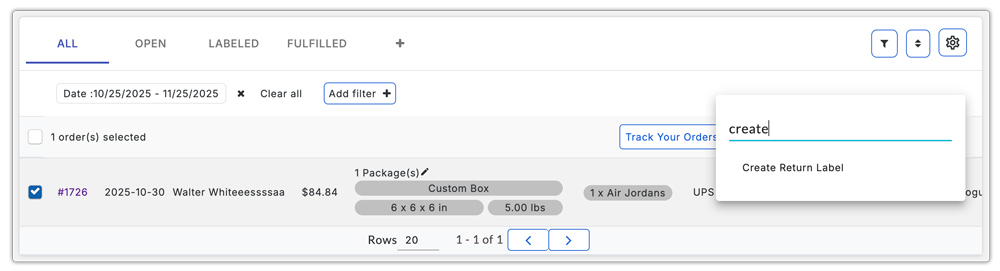
- In the app, open a label-created order, mark it as Fulfilled, then select the order. Click on the three dots (⋮) after selecting the order and choose Create Return Label.
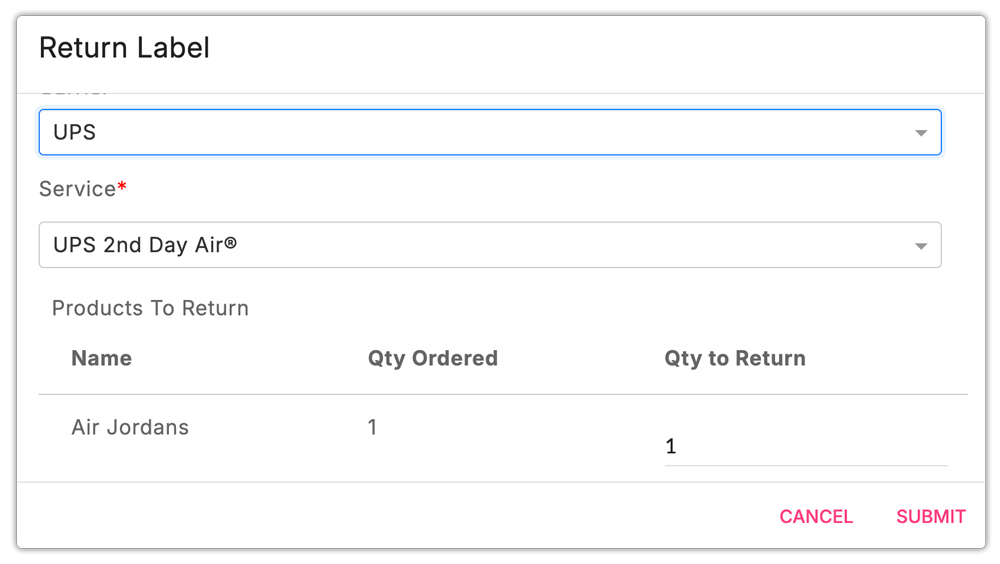
- The app automatically pulls the shipment details and generates a UPS return label instantly.
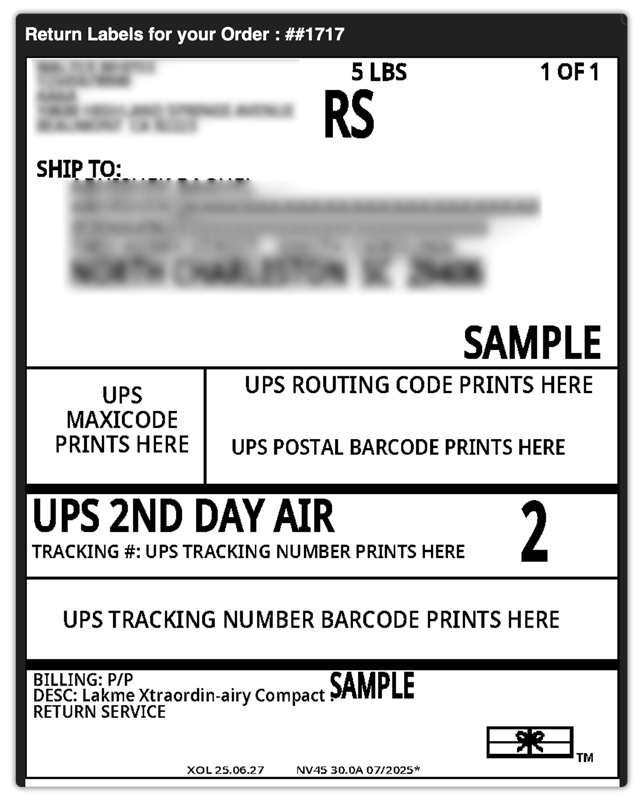
- After this, the return label is automatically sent to your customer via Email.
Benefits of Creating & Printing UPS Return Labels With PH Multi-Carrier Shipping Label app
Using PluginHive MCSL gives you several advantages over creating return labels manually:
- One-click return label generation: no repeated data entry, no switching between websites.
- Automatic customer emails: return labels are sent instantly without extra work.
- Accurate shipment data: weights, dimensions, and addresses are auto-filled from the original order.
- Lower risk of errors: no typos, mismatches, or missed UPS requirements.
- Faster workflow for high-volume stores: ideal if you handle returns every day.
Tips to Reduce UPS Return Shipping Costs
Here are a few practical ways to keep your UPS return expenses under control:
- Use negotiated UPS rates: Make sure your UPS account has discounted or contract rates. This instantly lowers the cost of every return label.
- Offer store credit instead of refunds: When possible, encourage customers to choose store credit or an exchange. It reduces the number of return labels you need to generate.
- Provide labels only for eligible products: Don’t issue a prepaid return label for every item. Limit labels to products that meet your return policy or quality criteria.
- Encourage customers to consolidate items: If they’re returning multiple products, ask them to put everything into one package. One label is always cheaper than two.
- Use automation to prevent unnecessary labels: With apps like the PH Multi-Carrier Shipping Label app, you can set rules so labels are created only when a return is approved, avoiding accidental or premature label generation.
Conclusion
Offering UPS returns on Shopify doesn’t just make your store look more professional; it genuinely improves the customer experience and builds long-term trust. With clear packaging guidelines, a solid return policy, and the right tools in place, managing returns becomes far less of a headache.
While you can create UPS return labels manually through the UPS website, automating the process with the PH Multi-Carrier Shipping Label app makes everything faster, more accurate, and far easier to manage. From one-click return label creation to automatic customer emails and error-free shipment data, the workflow becomes smooth enough to support high-volume operations without added stress.
By reducing unnecessary labels, encouraging consolidated returns, and taking advantage of negotiated UPS rates, you can also keep costs under control while still offering a flexible, customer-friendly return experience.
FAQ’s
- Does UPS integrate with Shopify?
To use UPS smoothly on Shopify, you can use the PH Multi-Carrier Shipping Label app. MCSL connects your UPS account directly to Shopify and unlocks complete UPS functionality, including returns and automation.
- What is a UPS Electronic Return Label?
A UPS Electronic Return Label is a digital return label sent to the customer by email. It includes a scannable barcode that the customer can show at any UPS location, where the staff will print the physical label for them. This makes returns easy, especially for customers who don’t have access to a printer.
- Can I generate a UPS label online?
Yes, you can generate a UPS label online through your UPS account. Shopify merchants can also create UPS labels directly inside their store using the PH Multi-Carrier Shipping Label app, which makes the process faster and fully automated.
