



For WooCommerce stores shipping across India, Delhivery is a popular logistics partner known for wide pin code coverage and reliable delivery. However, handling Delhivery shipments manually can cause delays, errors, and inconsistent shipping charges. Integrating Delhivery with WooCommerce helps automate shipping tasks.
This guide explains how Delhivery shipping works with WooCommerce and how integration can simplify order fulfillment.
On This Page
- Overview of Delhivery
- Why Integrate Delhivery with WooCommerce
- How to Integrate Delhivery Shipping with WooCommerce
- Real-World Example
- Conclusion
- FAQs
Overview of Delhivery
Delhivery is one of India’s largest integrated logistics and supply chain companies, offering end-to-end shipping solutions for businesses of all sizes.
Delhivery Shipping Services
It provides a wide range of logistics services, including express parcel delivery for small and medium shipments, freight services for heavy or bulk consignments, warehousing and fulfillment support, cross-border shipping, and reverse logistics for returns and pickups. These services help businesses manage both forward and reverse supply chain operations efficiently.
Network & Technology Capabilities
Delhivery operates a large nationwide delivery network covering thousands of cities and PIN codes across India. Its logistics platform is powered by automated sorting, real-time tracking, route optimization, and API-based systems that enable scalable, reliable, and transparent shipment movement across regions.
Why Integrate Delhivery with WooCommerce
Integrating Delhivery with WooCommerce helps store owners automate shipping operations while offering reliable and cost-effective delivery across India. Instead of managing orders and shipments manually, integration ensures smoother fulfillment and a better customer experience.
Key Benefits of Delhivery Integration
- Automated Order Fulfillment: Orders placed in WooCommerce can be automatically pushed to Delhivery, reducing manual work and fulfillment errors.
- Real-Time Tracking & Updates: Customers can track shipments in real time, improving transparency and reducing “Where is my order?” support queries.
- Cash on Delivery (COD) Support: Delhivery’s COD services make it easier for WooCommerce stores to cater to customers who prefer pay-on-delivery options.
- Reverse Logistics & Returns: Built-in return and reverse pickup services help stores manage failed deliveries and customer returns efficiently.
- Scalable for High Order Volumes: Delhivery’s infrastructure is designed to handle peak sales and large shipment volumes without operational slowdowns.
Now, let’s see how you can integrate Delhivery shipping with WooCommerce.
How to Integrate Delhivery Shipping with WooCommerce
To integrate Delhivery shipping into your WooCommerce store, install and activate the WooCommerce Shipping Services plugin.
For a detailed, step-by-step installation and setup process, refer to the Setup Guide for the WooCommerce Shipping Services Plugin.
Once installed, navigate to the plugin’s carrier settings and add Delhivery as a carrier, as shown in the image below.
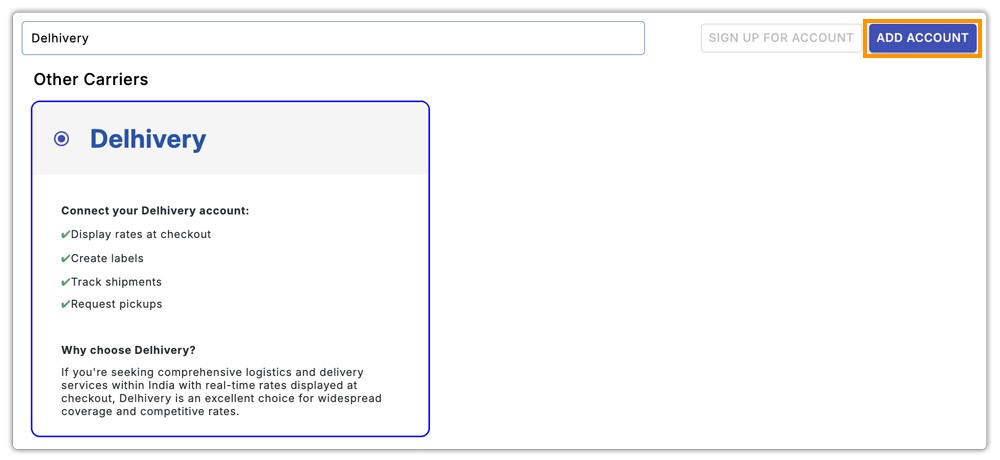
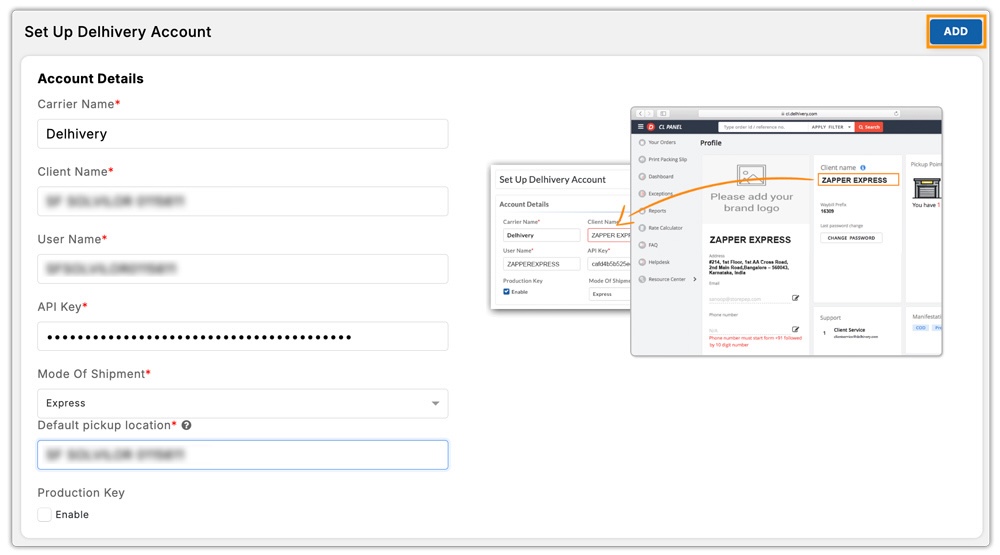
Next, enter your Delhivery account credentials to connect your Delhivery account with WooCommerce. This links your Delhivery account directly with your WooCommerce store.
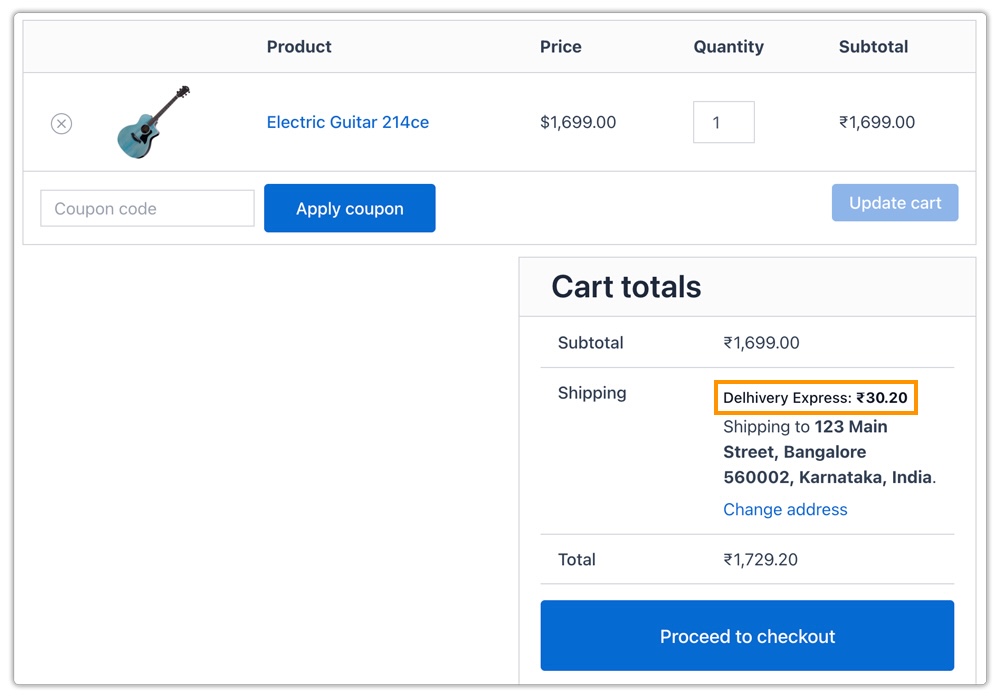
After connecting your account, access the plugin settings and configure your shipping requirements. Select the Delhivery services you want to display at checkout and set the order conditions that control when Delhivery shipping appears.
The plugin also allows you to configure shipping label generation. You can generate and print Delhivery shipping labels directly from your WooCommerce dashboard, simplifying order fulfillment and reducing manual work.
Real-World Example: Indian WooCommerce Store Using Delhivery Shipping
An Indian WooCommerce store selling home decor and lifestyle products ships orders across multiple states, including metro cities and remote tier-2 and tier-3 locations. With daily orders ranging from small parcels to medium-weight shipments, reliable nationwide delivery was essential for the business.
Challenges Faced
The store initially relied on flat shipping rates and manual courier selection. This caused several issues:
- Shipping costs varied significantly based on destination and package weight
- Orders to remote areas often resulted in undercharged shipping
- Manual label creation increased fulfillment time
- Customers experienced delays due to incorrect service selection
Solution Implemented
The store integrated Delhivery shipping with WooCommerce using the WooCommerce Shipping Services plugin. Live Delhivery rates were enabled at checkout, allowing shipping costs to be calculated automatically based on weight, destination, and service availability.
Delhivery shipping labels were generated directly from the WooCommerce dashboard, and only relevant delivery services were shown to customers based on their location.
Results
- Accurate shipping costs displayed at checkout
- Reduced cart abandonment due to transparent pricing
- Faster order fulfillment with automated label printing
- Reliable deliveries across metro and non-metro regions
- Improved customer satisfaction and fewer shipping-related support queries
By integrating Delhivery with WooCommerce, the store streamlined its shipping workflow and scaled operations smoothly across India without manual intervention.
Conclusion
Integrating Delhivery with WooCommerce streamlines shipping operations, ensures accurate delivery charges, and improves the overall customer experience. Whether handling daily orders to metro cities or remote locations, Delhivery integration makes fulfillment faster, more reliable, and cost-effective.
Need help with setting up Delhivery shipping or configuring live rates? Reach out to PluginHive Support for assistance.
FAQs
Q. Can I combine Delhivery real-time rates with free shipping or flat rates?
Yes. You can create conditional shipping rules to offer free shipping above a certain order value or combine Delhivery live rates with flat-rate options using the WooCommerce Table Rate Shipping Pro Plugin for more flexible shipping strategies.
Q. Can I show estimated delivery dates along with Delhivery real-time shipping rates?
Yes. Delhivery provides estimated delivery timelines for most services, which you can display alongside live shipping rates at checkout. For more advanced delivery date logic, you can use the Estimated Delivery Date Plugin for WooCommerce.
Q. Can multi-vendor WooCommerce stores display Delhivery real-time shipping rates?
Yes. Using the WooCommerce Multi-Vendor Shipping Addon, each vendor can display Delhivery live rates based on their own warehouse location, order weight, and package dimensions, ensuring accurate shipping costs at checkout.
Q. Can I hide specific Delhivery shipping methods or adjust rates for certain products or zones?
Yes. You can use the PH Hide WooCommerce Shipping Methods & Rate Adjustment Plugin to hide particular Delhivery services or adjust shipping costs based on products, shipping zones, or other order conditions.
