


A package leaves your warehouse on time. The carrier picks it up. And then somewhere between your fulfilment desk and your customer’s front door, something goes wrong. A failed delivery attempt. A customs hold. An incorrect address flag. A weather delay. These are delivery exceptions, and for Shopify merchants, how you handle them is just as important as how fast you ship.
The gap most merchants don’t realise they have is not in their shipping setup; it’s in their visibility. When a delivery exception happens, Shopify doesn’t tell you. It doesn’t tell your customer either. This guide covers what delivery exceptions are, why Shopify’s default setup leaves you blind to them, and how to build a system that catches and communicates exceptions before they become complaints.
In This Article
- What Delivery Exceptions Actually Are
- Why Shopify Doesn’t Surface Delivery Exceptions Automatically
- The Hidden Cost of Catching Exceptions Too Late
- What a Proper Exception Management Setup Looks Like on Shopify
- How PluginHive Shipment Tracking & Notify Handles Delivery Exceptions
- How to Communicate Delays to Customers Without Losing Trust
- Benefits of Proactive Exception Management for Shopify Merchants
- Conclusion
- FAQ
What Delivery Exceptions Actually Are
A delivery exception is any event in a shipment’s journey that prevents it from being delivered on schedule or as planned. The term covers a wide range of scenarios, and understanding the types helps you respond appropriately:
- Failed delivery attempt: no one was available to receive the package, or access to the delivery location was restricted
- Incorrect or incomplete address: the carrier cannot locate the address as entered, triggering a hold or return-to-sender process
- Customs delay: for international shipments, the package is held at customs pending documentation, duties payment, or inspection
- Weather or natural disaster: severe conditions delay carrier operations across a region or route
- Refused delivery: the recipient actively declined to accept the package
- Damaged in transit: the carrier has flagged the package as damaged and pulled it from the delivery route
- Lost shipment: the package cannot be located within the carrier’s network
Why Shopify Doesn’t Surface Delivery Exceptions Automatically
Shopify’s default setup handles the pre-fulfilment and fulfilment stages well. It processes orders, generates fulfilment records, and fires a shipping confirmation email with a tracking number. After that, Shopify’s role in the shipment’s journey is essentially over.
Shopify does not:
- Pull live carrier status updates back into your store after fulfilment
- Flag shipments that have entered exception status on a carrier’s network
- Send automated notifications to customers or merchants when a delivery exception occurs
- Provide a consolidated view of shipments by status so your team can spot problems at a glance
This means that when a delivery exception happens a customs hold on a cross-border DHL shipment, a failed delivery attempt for a UPS package, an address issue flagged by USPS the only person who typically finds out in a timely way is the customer, when they check the carrier’s tracking page directly.
For stores managing higher order volumes or shipping internationally, this invisibility is a genuine operational risk. The guide to automated shipping notifications on Shopify covers the full landscape of what Shopify sends by default and what requires an additional layer to automate.
The Hidden Cost of Catching Exceptions Too Late
The business impact of reactive exception management isn’t always obvious until it compounds. Consider what typically happens when a delivery exception goes unnoticed:
- The customer receives no update past the original shipping confirmation
- They check the carrier’s tracking page and see an exception status with no explanation from your store
- They email your support team sometimes after days of waiting
- Your team investigates, contacts the carrier, and scrambles to resolve an issue that may have been easily fixed days earlier
At low order volumes, this is manageable. At scale, it generates a support backlog that’s expensive to staff and damaging to customer retention. WISMO (Where Is My Order) tickets are already the most common category of e-commerce support requests; delivery exceptions amplify that volume significantly.
The post-purchase experience guide for Shopify frames this well: customers who receive proactive exception alerts before they have to look for information are far more forgiving of delays than those who discover problems on their own.
What a Proper Exception Management Setup Looks Like on Shopify
Handling delivery exceptions well requires two things working in parallel: merchant-side visibility so your team knows what’s happening, and customer-side communication so buyers are informed before they reach out.
A complete setup includes:
- A live shipment dashboard that shows all active shipments grouped by status: In Transit, Out for Delivery, Delivered, and Exception, updated in real time as carrier scan events come in
- Exception-triggered customer notifications sent automatically the moment a carrier flags a delivery exception, so buyers hear from your store before they check the carrier’s page themselves
- A branded on-store tracking page where customers can self-serve their shipment status at any time, including during exceptions, without leaving your domain
Together, these shift exception management from reactive scrambling after a customer complaint to proactive, catching and communicating issues as they happen.
How PluginHive Shipment Tracking & Notify Handles Delivery Exceptions
The PluginHive Shipment Tracking & Notify app is built to give Shopify merchants exactly this kind of live visibility and automated communication, specifically across exception and delay scenarios.
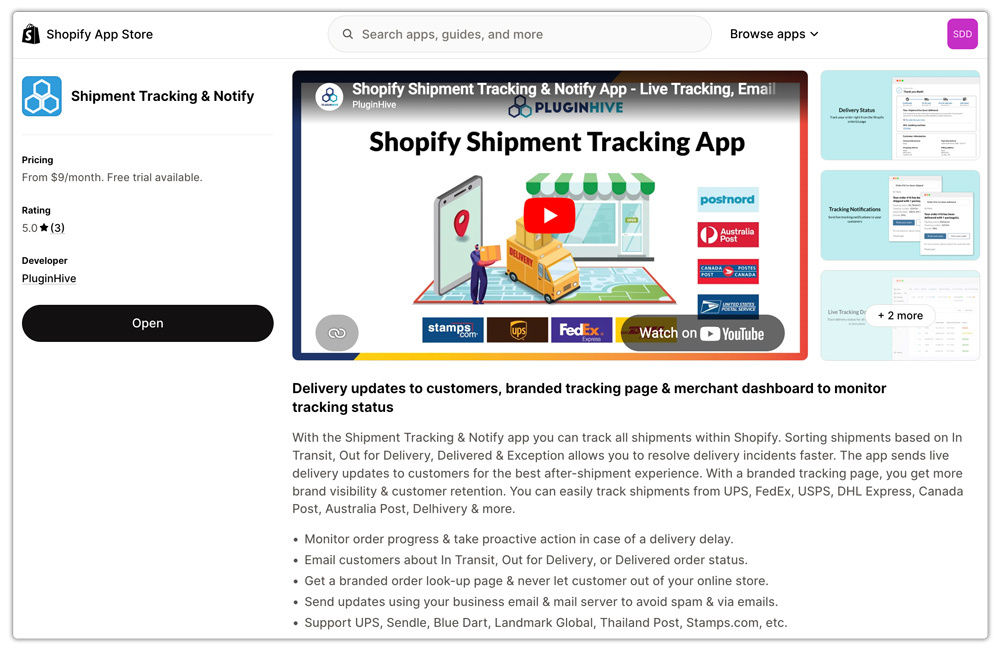
- Live status syncing, even for delayed shipments. The app continuously pulls real-time status from the carrier’s network for every fulfilled order. When a shipment enters exception status, regardless of the carrier or reason, that status is immediately reflected in the app’s shipment dashboard.
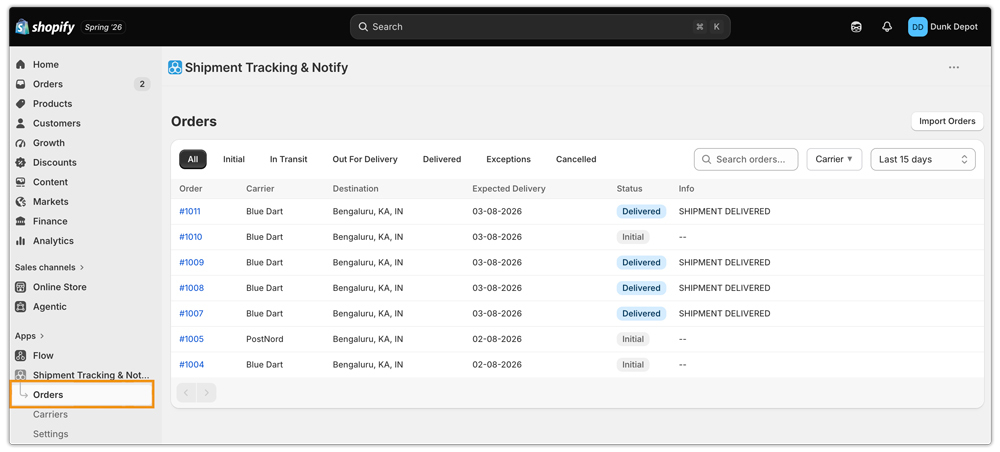
- Shipment dashboard with exception filtering. Inside the app, all shipments are organised by status: Initial, In Transit, Out for Delivery, Delivered, Exception, and Cancelled. The Exception tab shows every shipment currently flagged by a carrier as having a delivery exception, with the order number, carrier, and last known status visible at a glance. Each order can be individually opened up, and all statuses can be checked.

- Automated exception notification emails to customers. When a delivery exception is detected, the app automatically sends a notification email to the customer.

- Branded tracking page with live exception status. The app’s on-store tracking page shows live shipment status, including exception events. When customers visit the page and look up their order, they see the current carrier status in real time, including delivery exception information without being redirected to the carrier’s own website.

The app supports a wide range of carriers, including UPS, FedEx, USPS, DHL Express, Canada Post, Australia Post, PostNord, Blue Dart, Aramex, and more, all managed from a single dashboard. If you’re managing cross-border shipments where customs delays are a common exception type, this Shopify international shipping guide covers the carrier and documentation considerations that affect exception frequency.
How to Communicate Delays to Customers Without Losing Trust
Delivery exceptions are largely outside a merchant’s control, but how you communicate them is entirely within it. The merchants who handle exceptions best follow a consistent pattern:
- Notify before the customer asks. An exception email that arrives before a customer goes looking for updates signals that you’re on top of the situation, even if you can’t immediately resolve it
- Be specific about what happened. Vague messages like “there may be a delay” are less reassuring than “your package had a failed delivery attempt on [date] and the carrier will reattempt tomorrow.” Use the status information the carrier provides.
- Tell them what happens next. Whether that’s a redelivery attempt, a customs clearance process, or a carrier investigation, give customers a clear next step so they know what to expect
- Send from your own email address. Exception alerts that come from a no-reply third-party domain feel impersonal and are more likely to land in spam. Sending from your own SMTP through PluginHive Shipment Tracking & Notify keeps the communication personal and reliable
- Make it easy to follow up. A Reply-To address on your exception emails means customers who have questions can respond directly to your support team, rather than having to find a contact page separately
For carrier-specific exception handling, the FedEx failed deliveries guide and the FedEx late delivery article cover resolution workflows in detail for one of the most commonly used Shopify carriers.
Benefits of Proactive Exception Management for Shopify Merchants
Building a proper delivery exception management setup has measurable impact across both operations and customer experience:
- Fewer WISMO tickets. When customers receive automatic exception alerts and can check live status on your tracking page, the volume of “where is my order?” support requests drops significantly
- Faster resolution times. Seeing exceptions in a live dashboard the moment they occur means your team can contact the carrier, update the customer, and begin resolution before the issue escalates
- Higher customer retention. Customers are more forgiving of delays when they’re communicated to proactively and honestly; it’s the silence that damages trust, not the exception itself
- Better carrier performance data. Tracking exceptions by carrier over time reveals patterns and routes with high failure rates, and carriers with frequent customs delays, which inform smarter shipping decisions going forward
- Reduced return costs. When you catch and resolve delivery exceptions early, you can avoid the cost of reshipping orders or processing returns.
Conclusion
Delivery exceptions are an unavoidable part of running a Shopify store that ships at any meaningful volume. The difference between merchants who handle them well and those who don’t isn’t luck; it’s visibility and communication. With PluginHive Shipment Tracking & Notify, every delivery exception across every carrier surfaces in a live dashboard the moment the carrier flags it, triggers an automatic notification to the customer before they have to ask, and stays visible on a branded tracking page that keeps buyers on your domain. The result is fewer support tickets, faster resolution, and a post-purchase experience that holds up even when deliveries don’t go to plan.
FAQ
Q. What is a delivery exception in Shopify?
A delivery exception occurs when a carrier flags an issue that prevents a shipment from arriving as scheduled, such as a failed delivery attempt, customs hold, incorrect address, weather delay, or damaged package. Shopify does not automatically flag these exceptions, so you need a tracking app to identify them in real time.
Q. Does Shopify send automatic notifications when a delivery exception occurs?
No. Shopify sends a shipping confirmation email at fulfilment but does not send follow-up notifications for transit events, delays, or delivery exceptions. PluginHive Shipment Tracking & Notify adds automatic exception notifications sent from your own email address.
Q. How do I see all shipments currently in exception status across my Shopify orders?
With PluginHive Shipment Tracking & Notify, the app’s shipment dashboard groups all active orders by status. The Exception tab shows every shipment currently flagged by a carrier as having a delivery exception, updated in real time.
