


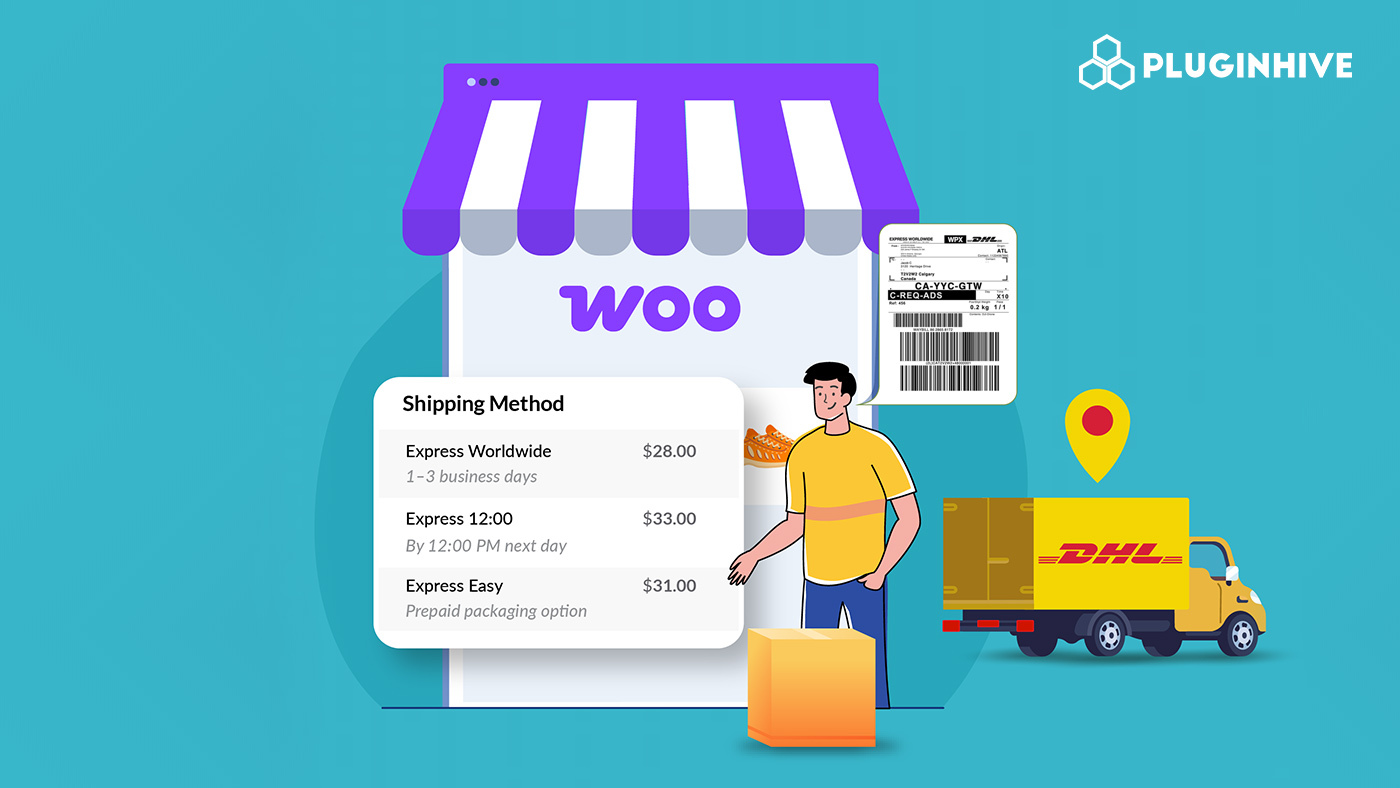
Shipping plays a crucial role in shaping the customer experience for any online store. For WooCommerce businesses that ship locally or across borders, DHL Express is a trusted name known for its fast delivery, accurate order tracking, and dependable service. It’s the go-to choice for merchants who want to offer customers a smooth and reliable delivery experience.
The PH DHL Shipping Plugin for WooCommerce with Print Label makes it easy to manage every step of your DHL Express shipping process right from your store. From showing live DHL rates at checkout to printing shipping labels and sending tracking updates automatically, the plugin helps you save time and reduce manual effort. This guide shows how to use DHL Shipping in WooCommerce to streamline fulfillment and improve customer satisfaction.
Table of Contents
- Overview of DHL Express for WooCommerce Stores
- Common Challenges in Managing DHL Shipments in WooCommerce
- Integrating and Offering DHL Express Shipping in WooCommerce
- Real-World Example
- Tips to Optimize DHL Express Shipping in WooCommerce
- Conclusion
- FAQs
Overview of DHL Express for WooCommerce Stores
DHL Express is a global leader in logistics, offering fast, reliable, and time-definite door-to-door delivery to over 220 countries. It’s a trusted choice for WooCommerce stores that ship both locally and internationally.
Popular DHL Express Services
1. DHL Express Worldwide: The most widely used international express service offering fast delivery (usually 1–3 business days) across the globe. Ideal for WooCommerce merchants shipping internationally.
2. DHL Express 9:00 / 10:30 / 12:00: Time-definite delivery options that guarantee shipment arrival by a specific time on the next business day for select routes, perfect for urgent orders.
3. DHL Economy Select: A cost-effective solution for less urgent international shipments, typically delivered within 2–5 business days.
4. DHL Express Envelope: Designed for lightweight document shipments that require quick international delivery.
5. DHL Express Domestic (available in select countries): DHL also provides domestic express delivery in supported regions for stores shipping within the same country.
DHL Express also offers specialized services such as Medical Express, Breakbulk Express, and Same Day delivery for specific industries or time-critical needs, available in select countries.
With its wide reach and flexible options, DHL Express helps WooCommerce businesses ship faster, more accurately, and more efficiently, creating a better experience for customers.
Common Challenges in Managing DHL Shipments in WooCommerce
While DHL Express offers fast and reliable delivery, managing it manually in WooCommerce can be time-consuming and error-prone. Here are some common challenges store owners face:
- Inaccurate Shipping Rates: Without real-time DHL integration, rates must be entered manually, often leading to incorrect or inconsistent pricing.
- No Automatic Tracking: Customers may not receive real-time order tracking updates, leading to more “Where is my order?” queries.
- Manual Label Creation: Creating labels one by one on the DHL portal takes extra time and increases the risk of address errors.
- Complicated International Shipping: Manually handling customs forms, duties, and taxes can cause delivery delays or added costs.
- Limited Checkout Options: Without live DHL rates, customers only see flat or basic shipping options, reducing flexibility and accuracy.
Manually managing DHL shipments in WooCommerce can be time-consuming and error-prone. Automating the process helps speed up fulfillment, reduce mistakes, and keep customers informed with real-time updates, all from one place.
Integrating and Offering DHL Express Shipping in WooCommerce
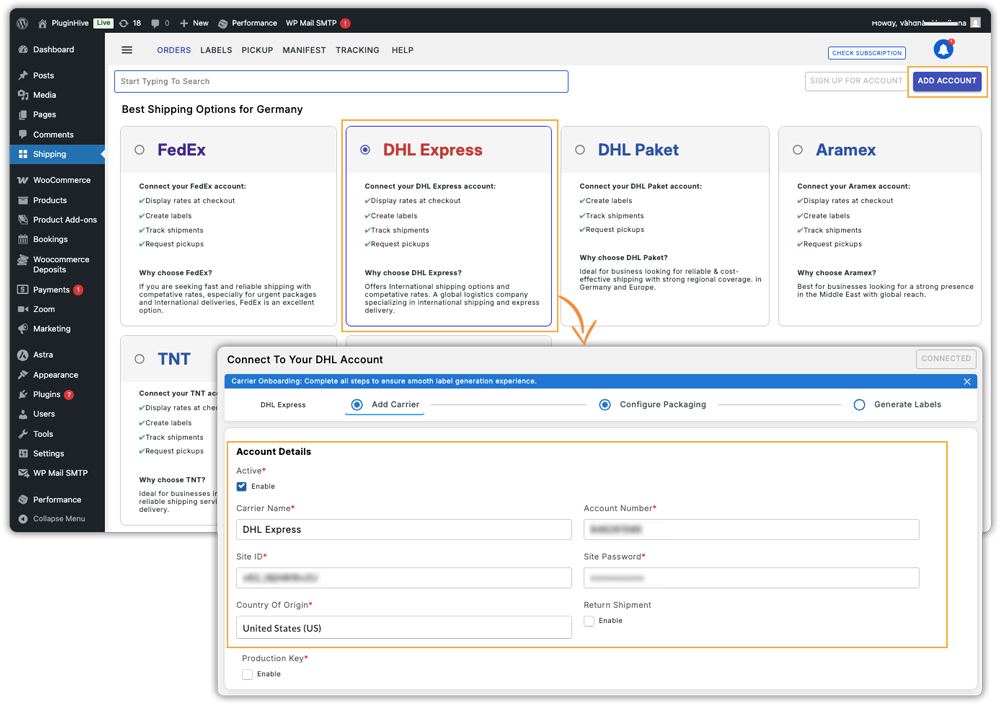
Managing shipping becomes much easier when everything happens inside your WooCommerce store. With the PH DHL Shipping Plugin for WooCommerce, you can display live DHL Express rates, print labels, and share DHL tracking updates all without switching between multiple platforms.
Note: Before you start, install and activate the PH DHL Shipping Plugin. You can follow the setup guide for a quick overview of connecting your DHL Express account and configuring shipping in WooCommerce.
Display Live DHL Express Rates at Checkout
Showing live DHL Express rates at checkout helps customers see accurate shipping costs before placing an order. The plugin connects with your DHL account to fetch rates in real time based on the customer’s address, package weight, and dimensions.
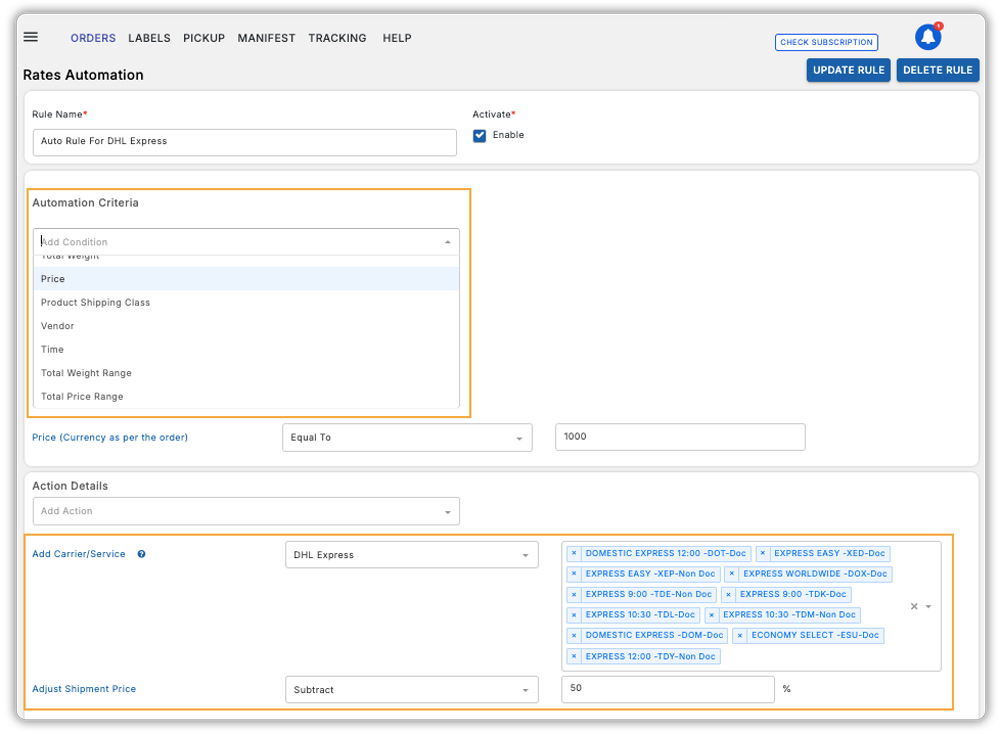
- You can also automate how these shipping rates appear, for example, by adding handling fees or discounts, offering free shipping above a certain order value.
Note: Enable Realtime Rates under WooCommerce → Settings → Shipping → PluginHive WooCommerce Shipping Services → General to display live DHL rates at checkout.
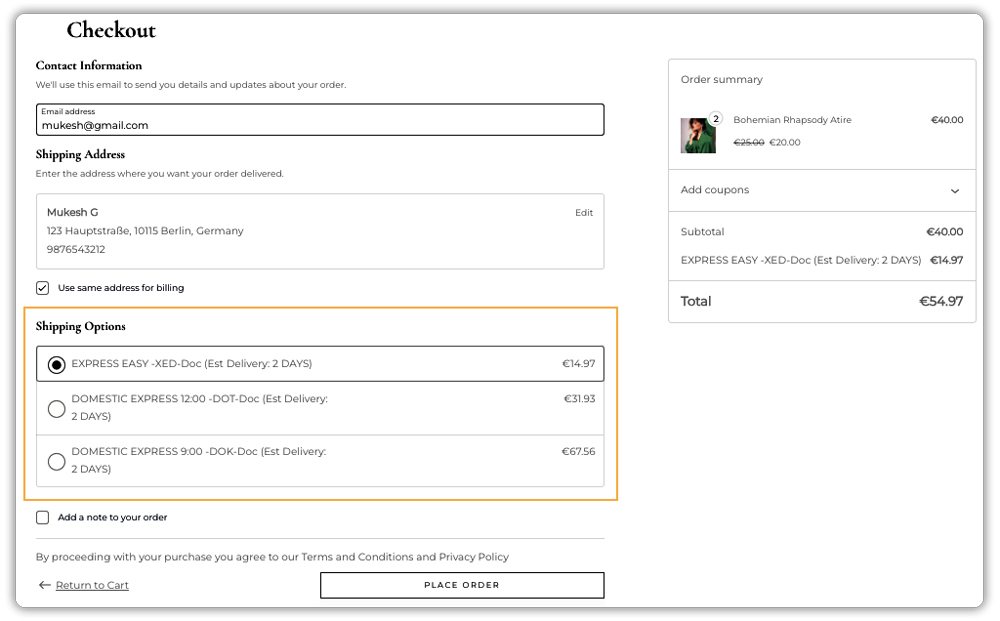
With real-time rates, your customers get transparent pricing, and you avoid undercharging or overcharging, making checkout smoother and more reliable.
Generate and Print DHL Shipping Labels Instantly
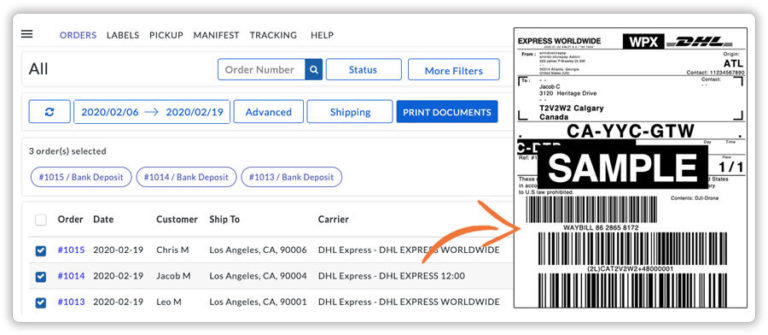
Once an order is placed, the plugin lets you create and print DHL shipping labels right from your WooCommerce dashboard. It automatically fills in the order and address details, so you don’t have to do it manually. You can generate labels for one or multiple orders at once, then print and attach them to your packages before handing them to DHL. This makes your shipping process faster, easier, and more organized, all within WooCommerce.
DHL Tracking in WooCommerce
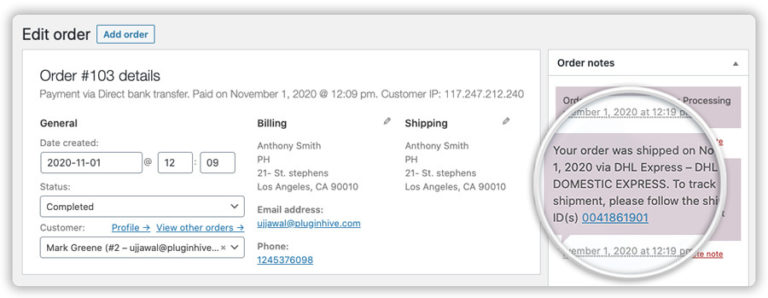
The plugin automatically adds the DHL tracking number to your WooCommerce orders, enabling you to track shipments and ensure timely deliveries easily.

Customers also receive this tracking number in their order completion email, so they can follow their package’s journey without needing to contact you for updates.
Using the PH DHL Shipping Plugin for WooCommerce with Print Label, you can manage DHL Express shipping from live rates to labels and tracking all within WooCommerce. It saves time, minimizes errors, and ensures a faster and more reliable shipping experience.
Watch this YouTube video to have a better understanding
Real-World Example: Streamlining DHL Express Shipping in WooCommerce
Let’s say you run a WooCommerce store that sells handmade leather accessories to customers worldwide. As your business grows, you’ll likely face challenges in managing international shipping efficiently.
The Problem: Without automation, you may face inconsistent shipping rates, time-consuming label creation, slower order fulfillment, and limited shipment visibility, forcing customers to contact you for updates.
The Solution: By integrating the WooCommerce DHL Express plugin by PluginHive, you can show live DHL Express rates at checkout, generate labels automatically from your dashboard, and send tracking details directly to customers. You can also manage multiple shipments easily, saving time and reducing mistakes.
The Results: Your store delivers faster and more accurately, keeps customers informed with real-time tracking, and builds trust with reliable DHL Express delivery, leading to better satisfaction and higher conversions.
Tips to Optimize DHL Express Shipping in WooCommerce
Automating your shipping process with the PH DHL Shipping Plugin for WooCommerce is a great start. But to truly make the most of DHL Express, saving time, reducing costs, and improving delivery accuracy, it helps to follow a few smart shipping practices.
- Offer appropriate DHL services: Provide customers with multiple DHL Express shipping options such as Express Worldwide, Express 12:00, or Express Envelope to balance delivery speed, cost, and expectations.
- Choose the right packaging: Use the plugin’s Packaging feature to select the most suitable packing method for your products. This ensures accurate rate calculation.
- Simplify international shipping: Use the plugin to automatically generate customs documents like the commercial invoice and manifest based on order details.
- Offer free shipping above a limit: Encourage higher cart values by offering free DHL Express shipping on large orders.
- Review settings regularly: Check your DHL shipping rules, fees, and rate settings often to ensure they still fit your business goals.
By following these simple DHL Express shipping tips, you’ll save time, cut costs, and offer a better delivery experience to your WooCommerce customers.
Conclusion
Integrating DHL Express with WooCommerce simplifies your entire shipping process, from showing live rates and printing labels to sharing real-time tracking updates. With the PH WooCommerce DHL Shipping Plugin, you can manage everything directly from your WooCommerce dashboard without switching platforms.
This not only saves time and reduces errors but also improves transparency for your customers, helping you build trust and encourage repeat purchases. For assistance or setup guidance, you can always reach out to PluginHive Support for guidance.
FAQs
Q1: Do I need a DHL Express account to use the PH DHL Shipping Plugin in WooCommerce?
Yes, you’ll need valid DHL Express account credentials (API or merchant account) to use live rates, print labels, or enable tracking via the plugin. Without a DHL account, your WooCommerce store may only display manual or flat-rate shipping options.
Q2: Can the PH DHL Shipping Plugin handle both domestic and international DHL Express shipping in WooCommerce?
Yes, the plugin supports DHL Express services for both domestic and international shipments. For international shipping, you’ll also want to configure customs paperwork, duties/taxes, and choose the correct DHL Express service via the plugin.
Q3: How does tracking work for DHL Express shipments in WooCommerce with the PH DHL Shipping Plugin?
Once you generate a DHL label via the plugin, the tracking number is saved with the WooCommerce order. Customers receive it via email and can also see it under My Account → Orders. This reduces “Where is my order?” inquiries.
Q4: Can I use my negotiated DHL Express rates in WooCommerce via the PH DHL Shipping Plugin?
Yes, the plugin allows you to display account-specific (negotiated) DHL Express rates instead of standard retail rates. This means the shipping cost shown in WooCommerce aligns with your carrier agreement.
