


Automating DHL Freight Sweden pickup for Shopify is one of those small changes that makes a big difference in your day-to-day workflow. Instead of spending time scheduling collections manually or logging into the DHL portal after every fulfilled order, automation ensures a driver shows up when you need them every time. This is especially helpful for busy Shopify merchants in Sweden who handle a high volume of orders and can’t afford delays or mix-ups. Whether you rely on DHL Freight’s standard end-of-business collection or need to trigger DHL pickups on demand, automating the process keeps things running smoothly, reduces stress for your team, and lets you stay focused on packing orders and keeping customers happy.
In This Article:
- DHL Freight Sweden Pickup vs. Drop-Off: What’s the Difference?
- Why Automate DHL Freight Pickups Instead of Manual Scheduling
- How Automated DHL Freight Pickup Reduces Costs
- Automating DHL Freight Sweden Pickups in Shopify
- Best Practices for DHL Freight Sweden Pickup Automation
- Conclusion
- FAQ’s
DHL Freight Sweden Pickup vs. Drop-Off: What’s the Difference?
The core difference is who moves the shipment to DHL’s network. With a DHL pickup, DHL Freight collects your goods directly from your location. With a drop-off, you bring the shipment to a DHL Freight terminal or DHL ServicePoint yourself.
DHL Freight Pickup: A DHL Freight driver comes to your warehouse or business address to collect your shipment. You book the collection using Book Direct DHL Freight’s online booking tool, which requires a DHL Freight customer number.
DHL Drop-Off: You bring your shipment to a DHL Freight terminal or a DHL ServicePoint. DHL operates 1,850 ServicePoints across Sweden and many European countries. Terminals are open Monday–Friday, with last drop-off times varying by location (typically 16:45–17:30).
DHL Freight Sweden Pickup Options for Shopify Merchants
DHL Freight Sweden’s domestic freight services each have distinct pickup arrangements.
| Service | What it ships | Pickup arrangement | Operating hours |
|---|---|---|---|
| DHL Pall | EUR pallets within Sweden (120×80 cm, max height 220 cm) | You choose: daily, flexible, or scheduled DHL pickup | Next-day delivery to consignee |
| DHL Stycke | Pallets, boxes, cartons, cages, long goods. Max 2,500 kg per shipment, 1,000 kg per piece | You decide which day or days goods are to be picked up | 07:00–17:00, weekdays (excluding bank holidays). Next-day delivery. |
| DHL Parti | Direct deliveries to companies across Sweden | Collection booked via Book Direct or myDHLFreight | 365 days a year, around the clock |
For drop-offs, DHL operates freight terminals across Sweden, including Borås, Borlänge, Eskilstuna, Gävle, Gothenburg, Halmstad, and Helsingborg, among others. Terminal hours are generally Monday–Friday, 07:00–18:00, depending on location. For smaller parcels, DHL’s 1,850 ServicePoints across Sweden also accept drop-offs.
Why Automate DHL Freight Pickups Instead of Manual Scheduling
- Significant time savings for fulfillment teams: Automation eliminates daily manual scheduling, allowing staff to focus on packing, quality checks, and faster order turnaround instead of repeatedly filling out DHL Freight pickup request forms.
- Fewer errors and almost zero missed pickups: Automated rules prevent forgotten requests, incorrect details, and missed cutoff times, removing last-minute rushes to DHL terminals.
- Smoother workflow for high-volume shipping: When processing large batches of orders, automated DHL pickups keep shipments moving consistently and prevent bottlenecks, especially during peak seasons like Black Friday or pre-holiday periods.
- Better customer experience: When pickups are reliable, fulfillment timelines become predictable, which means accurate delivery estimates and fewer “where is my order?” support tickets.
How Automated DHL Freight Pickup Reduces Costs
Automating your DHL Freight Sweden pickup does not just save time; it can actually lower your overall shipping and operational expenses.
- Avoid unnecessary terminal trips: When DHL pickups are automated, you stop wasting fuel, time, and labor on drop-off runs to DHL Freight terminals. Everything gets collected right from your location, cutting travel costs and freeing up staff for higher-value tasks.
- Lower shipping mistakes: Manual scheduling often leads to missed pickups, incorrect times, rushed packaging, or mislabeled freight. Automation stabilizes your workflow, reducing costly mistakes like reshipping or processing unnecessary refunds.
- Real savings for Shopify merchants: Stores shipping 50–200 orders a week often save several hours of labor per week by eliminating manual scheduling. Merchants report fewer missed collections, lower overtime costs, and a smoother end-of-day process because staff know exactly when DHL Freight will arrive.
Automating DHL Freight Sweden Pickups in Shopify
DHL Freight Sweden pickup in Shopify is straightforward when you use the PH Multi-Carrier Shipping Label app. Here’s how to set it up step by step:
1 Install the PH Multi-Carrier Shipping Label App
Start by downloading and installing the PH Multi-Carrier Shipping Label app from the Shopify App Store. It supports DHL Freight Sweden along with dozens of other carriers, making it your single shipping hub inside Shopify.

2 Add Your DHL Freight Sweden Account
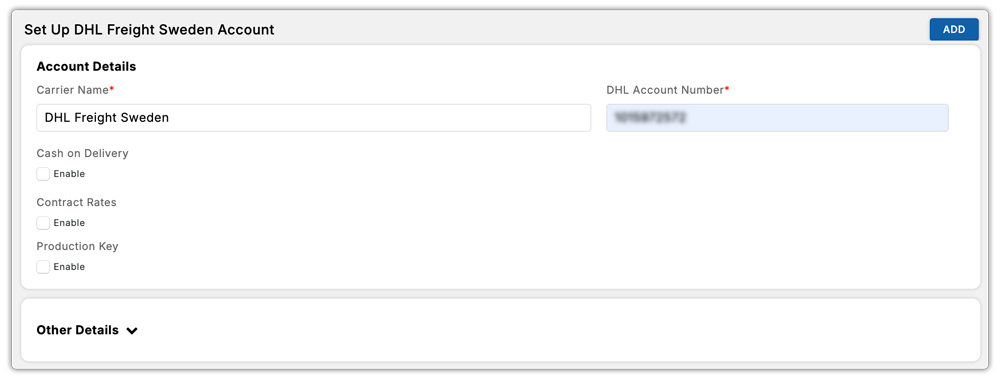
Once the app is installed, connect your DHL Freight Sweden account inside the app settings. Enter your DHL customer number and API credentials provided by your DHL Freight account manager. This ensures all labels and pickups use your own DHL account and negotiated rates.
3 Generate DHL Freight Labels and Request Pickup for New Orders
Whenever a new order comes in, open it through the app and generate your DHL Freight shipping label. As soon as the label is created, you’ll see an option to Request DHL Freight Pickup right from the same screen, no need to visit the DHL portal separately.

4 Review Pickup Details in the Pickup Log
All your scheduled DHL Freight collections, including dates, time windows, confirmation numbers, and package information, are stored in the app’s Pickup Log. This makes it easy to track what’s been requested and what’s coming up.

Best Practices for DHL Freight Sweden Pickup Automation
- Choose a proper pickup window: Set a collection time that gives your team enough buffer to pack and weigh orders without rushing, but early enough for DHL Freight to collect everything before their daily cutoff.
- Keep freight consolidated in one location: Group all shipments in one clearly marked pickup zone so the DHL Freight driver can load everything quickly. This avoids missed pallets or packages and speeds up the collection.
- Use DHL Freight-approved packaging: Following DHL Freight Sweden’s packaging guidelines, correct pallet wrapping, weight limits per unit, labeling requirements, prevent rejected shipments, damage claims, and costly delays.
- Automate shipping notifications and tracking: Once a collection is confirmed, let customers know their orders are on the way. Automated email updates with the DHL Freight tracking number reduce support tickets and keep customers informed without extra effort from your team.
- Audit your pickup log weekly: A quick review of the pickup log each week helps catch any failed requests, pattern issues (e.g., pickups consistently missing on Fridays), or API errors before they impact customer orders.
Conclusion
Automating DHL Freight Sweden pickup for Shopify is a simple upgrade that delivers a big payoff. Instead of juggling manual scheduling, making trips to DHL terminals, or worrying about missed collections, automation makes your shipping routine predictable and stress-free. With tools like the PH Multi-Carrier Shipping Label app, you can generate labels, trigger pickups, and track everything in one place, saving time, reducing mistakes, and keeping your fulfillment team focused on what really matters: getting orders out quickly and keeping customers happy.
Whether you’re shipping a few freight consignments a week or handling high-volume operations across Sweden and the Nordics, automated DHL Freight pickups make your workflow smoother, faster, and far more efficient. It’s one of the easiest ways to scale your Shopify shipping process while giving your business the consistency it needs to grow.
FAQ’s
Q. How to Schedule a DHL Freight Sweden Pickup?
You can schedule a DHL Freight Sweden pickup directly from Shopify using the PH Multi-Carrier Shipping Label app. Install the app, connect your DHL Freight account, and generate your shipping label. The app will give the option to request a pickup without you ever needing to visit the DHL portal.
Q. Who can pick up my DHL package?
Anyone can pick up your DHL package at a ServicePoint, as long as they carry a duly completed authorization letter and a copy of your identity document, along with their own ID at the time of collection.
Q. Do I Need a DHL Freight Account to Automate Pickups?
Yes, you need an active DHL Freight Sweden account with API access enabled. Once you connect your DHL credentials inside the PH Multi-Carrier Shipping Label app, it can request collections on your command.
