


When you’re shipping pallets, heavy equipment, bulk inventory, or oversized products, freight costs aren’t small. And if customers only see those costs after placing an order or worse, after you manually email them a quote, it creates friction.
That’s where DHL Freight Sweden comes in. As part of the global DHL network, DHL Freight specializes in road freight, pallet shipping, and groupage transport across Sweden and Europe. It’s a strong choice for Shopify merchants handling large or B2B shipments.
The good news? You can show live DHL Freight Sweden rates directly at Shopify checkout. No manual quoting. No guesswork. Just accurate, real-time freight pricing based on your actual contract rates.
In this guide, I’ll walk you through everything step by step, from prerequisites to setup, customization, and best practices, so you can confidently offer freight shipping at checkout.
In This Article:
- Prerequisites Before Showing Live DHL Freight Sweden Rates
- How to Show Live DHL Freight Sweden Rates in Shopify
- Optimizing and Controlling Your DHL Freight Sweden Rates in Shopify
- Best Practices for Using DHL Freight Sweden on Shopify
- Testing and Validating Your DHL Freight Sweden Rates Before Going Live
- Conclusion
- FAQ’s
Prerequisites Before Showing Live DHL Freight Sweden Rates
Before you can display live DHL Freight Sweden rates at checkout, a few things need to be in place. These ensure your rates are accurate and your checkout runs smoothly.
DHL Freight Sweden Business Account
First, you’ll need an active DHL Freight Sweden business account.
This gives you:
- A customer number
- Access to your negotiated freight pricing
- API credentials
These credentials allow Shopify to pull real-time DHL Freight Sweden rates directly from your freight agreement.
If you don’t have an account yet, you’ll need to register with DHL Freight Sweden and request a contract based on your expected shipment volume.
Shopify Plan with Carrier-Calculated Shipping (CCS)
Shopify can only display real-time carrier rates if carrier-calculated shipping (CCS) is enabled.
CCS is:
- Included with Advanced Shopify
- Included with Shopify Plus
- Available on the Grow plan if you:
- Switch to annual billing, or
- Ask Shopify Support to enable it for an extra fee
Without CCS, live DHL Freight Sweden rates won’t appear at checkout.
Recommended App for DHL Freight Sweden Shipping
To connect everything properly, you’ll need a shipping app that supports freight-level integrations.
The PH Multi-Carrier Shipping Label app is a reliable option because it allows you to:
- Connect your DHL Freight Sweden account via API
- Display live freight rates at checkout
- Configure pallet and weight-based rules
- Add handling fees or markups
- Generate freight labels
Once this is set up, your store is ready to show accurate freight pricing automatically.
How to Show Live DHL Freight Sweden Rates in Shopify
Step 1: Get Your DHL Freight Sweden Credentials
Log in to your DHL Freight Sweden business account and locate:
- Customer number
- API username and password
- Contract rate details
If API access isn’t active yet, contact your DHL Freight Sweden representative to enable it.
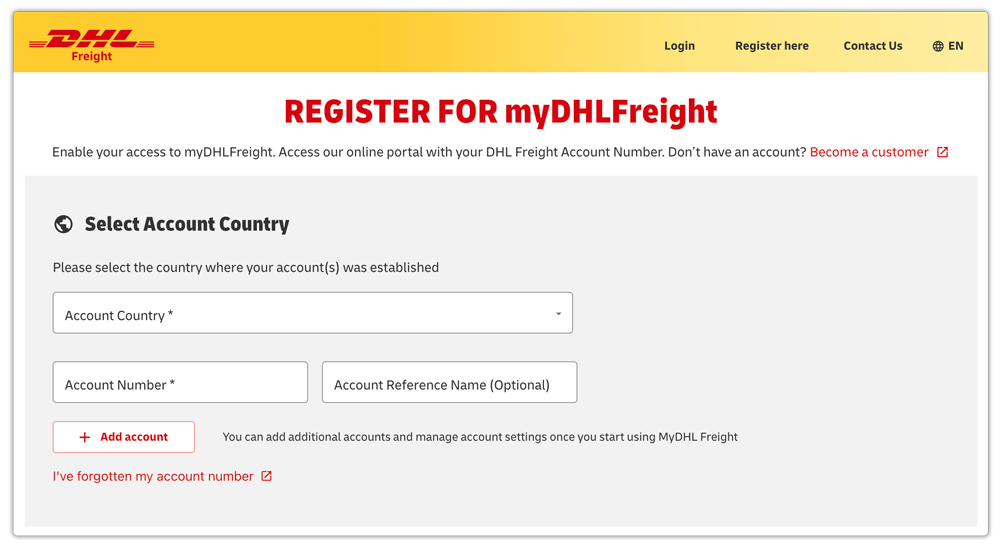
These credentials are what allow Shopify to pull live freight rates. You can create your own DHL Freight Sweden from the REGISTER FOR myDHLFreight page
Step 2: Install the PH Multi-Carrier Shipping Label App
Next, go to the Shopify App Store and install the PH Multi-Carrier Shipping Label app.

After installing:
- Open the app dashboard
- Add a new carrier
- Select DHL Freight Sweden
- Enter your account credentials
Once connected, the app will start pulling your real-time freight rates.
Step 3: Configure Your Freight Services
Inside the app, you’ll choose which DHL Freight Sweden services to offer. On top of that, you can also adjust the rates according to your wish, i.e., you can add handling charges, etc.

Depending on your contract, this may include:
- Domestic pallet shipping within Sweden
- Nordic road freight
- European groupage transport
- Full truckload (FTL) services
If you sell furniture, gym equipment, wholesale goods, machinery, or heavy inventory, this configuration step is critical for accurate pricing.
Step 4: Enable Live Rates at Checkout
Once everything is configured:
- Make sure carrier-calculated shipping is active in Shopify
- Enable DHL Freight Sweden services inside the app
- Test your checkout
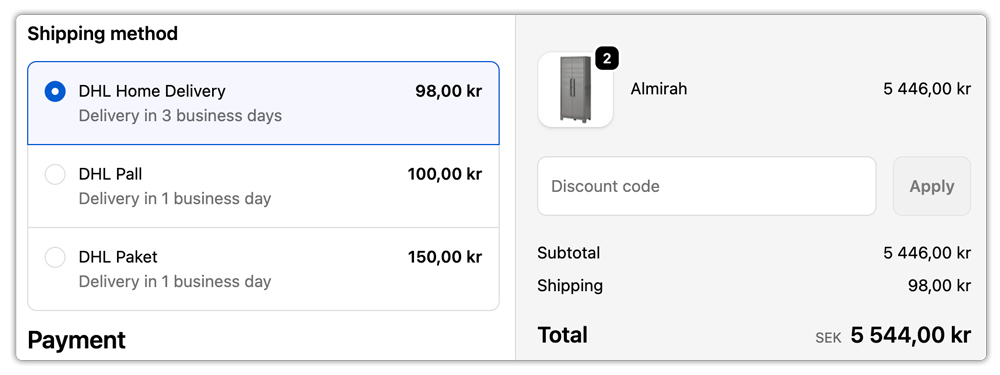
Add a heavy product to your cart, enter a Swedish or European shipping address, and you should see live DHL Freight Sweden rates displayed automatically.
Optimizing and Controlling Your DHL Freight Sweden Rates in Shopify
Once your live DHL Freight Sweden rates are showing correctly at checkout, the next step is optimization. Live rates give you accuracy, but smart customization gives you control.
Freight shipping involves pallet handling, fuel costs, loading time, and sometimes special delivery requirements. So it’s important to fine-tune how those rates appear to customers while protecting your margins.
With the PH Multi-Carrier Shipping Label app, you can:
- Add a handling fee for pallet wrapping, protective packaging, or loading support so you’re not absorbing operational costs that reduce your profit.
- Apply a small percentage-based or flat-rate markup to freight charges to protect your margins, especially when fuel prices fluctuate, or accessorial charges may apply.
- Offer free freight above a specific cart value to encourage larger wholesale or bulk purchases while keeping smaller orders paid.
- Create destination-based freight rules, such as offering different services for Sweden, the Nordics, or the broader European region.
This level of flexibility allows you to stay profitable without sacrificing transparency. Customers still see real-time DHL Freight Sweden rates, but now those rates align perfectly with your operational costs and business strategy.
Best Practices for Using DHL Freight Sweden on Shopify
Freight shipping requires more precision than parcel shipping. Here are a few practical tips:
- Always Use Accurate Weights and Dimensions: Freight pricing is heavily based on weight and volume. Incorrect data can result in undercharging or billing adjustments later.
- Set Up Pallet Rules Properly: If your products ship on pallets, configure exact pallet dimensions in your shipping app.
- Separate Freight and Parcel Shipping: If you sell both small and heavy items, use shipping rules to prevent mixing freight and parcel rates.
- Clarify Delivery Conditions: Freight deliveries may require business hours, loading docks, or liftgate services. Make this clear at checkout.
- Automate Pickups: Scheduling DHL Freight Sweden pickups directly from your shipping app saves time and keeps operations smooth.
Testing and Validating Your DHL Freight Sweden Rates Before Going Live
Before you fully rely on live DHL Freight Sweden rates at checkout, it’s important to properly test your setup. Freight shipping involves more variables than standard parcel shipping, and small configuration errors can lead to incorrect pricing.
Taking time to validate your rates ensures your customers see accurate costs and prevents unexpected freight invoices later.
Here’s how to test properly inside Shopify:
- Run Multiple Address Scenarios: Test deliveries within Sweden, to Nordic countries, and to other European regions to ensure rates are calculated correctly across zones.
- Test Different Order Weights: Add products with varying weights to confirm your freight rules trigger at the correct thresholds.
- Verify Residential vs Business Addresses: If your contract differentiates between them, test both scenarios to check whether additional charges appear.
- Compare App Rates with DHL Quotes: Manually generate a rate quote from your DHL Freight Sweden account and compare it with the Shopify checkout rate to confirm alignment.
- Test Edge Cases: Try high-value carts, maximum weight scenarios, and restricted regions to ensure no errors occur at checkout.
- Perform a Real Shipment Test: Before announcing freight shipping publicly, process one real order internally to validate pickup scheduling, labeling, and invoicing accuracy.
Freight mistakes can be expensive. A structured testing phase helps you avoid undercharging, miscalculations, or operational disruptions.
Adding this section strengthens your article because it shows merchants how to confidently implement live DHL Freight Sweden rates, not just enable them.
Conclusion
Setting up live DHL Freight Sweden rates at your Shopify checkout is more than a technical setup; it’s a smarter way to handle freight.
When customers see accurate, real-time freight costs upfront, it removes uncertainty and builds trust. You avoid manual quotes, pricing mistakes, and unexpected adjustments from the carrier.
By connecting your DHL Freight Sweden contract account, enabling carrier-calculated shipping, and using a solution like the PH Multi-Carrier Shipping Label app to automate rates and fulfillment, you create a smooth, reliable freight workflow from checkout to delivery.
In short, live freight rates mean better transparency, stronger margins, and a more professional buying experience for your customers.
FAQ’s
Q. Does DHL deliver in Sweden?
Yes, DHL delivers across Sweden, covering both domestic and international shipments.
DHL Freight Sweden handles road freight and pallet transport, while DHL Express manages parcel and express deliveries. DHL serves residential, business, and industrial addresses throughout the country.
Q. Is FedEx or DHL cheaper?
FedEx is generally cheaper and faster for domestic U.S. shipments. DHL, especially DHL Express, is often more cost-effective and faster for international shipping.
Q. Can I show live DHL Freight Sweden rates on any Shopify plan?
No. You need carrier-calculated shipping (CCS). It’s included with Advanced Shopify and Shopify Plus. On the Grow plan, you can enable it by switching to annual billing or contacting Shopify Support for an additional fee.
