



DHL is one of the most widely used carriers among Shopify merchants, known for its global reach, fast transit times, and dependable delivery network. But shipping with DHL and giving customers a great DHL order tracking experience are two different things. The moment a DHL label is generated, and your package leaves the warehouse, Shopify’s role in the tracking journey essentially ends. Customers receive a fulfillment email with a link to DHL’s website, and from that point on, they’re on their own.
That gap between a great product and a great delivery experience is exactly what proper DHL order tracking in Shopify is designed to close.
In This Article
- How Shopify Handles DHL Tracking by Default
- What DHL Order Tracking Actually Covers
- What a Complete DHL Tracking Setup Looks Like in Shopify
- How to Add DHL Tracking to Shopify: Step by Step
- The Customer-Facing DHL Tracking Experience in Shopify
- Benefits of Proper DHL Order Tracking for Shopify Merchants
- Conclusion
- FAQ
How Shopify Handles DHL Tracking by Default
When you fulfill a Shopify order and attach a DHL tracking number, Shopify records it against the order and makes tracking information available through the order status page, shipping notifications, and the Shop app. Customers can track their shipment using Shopify’s built-in tracking experience, and Shopify automatically recognizes DHL as a supported carrier.
Shopify also displays shipment progress for supported carriers, allowing customers to view tracking updates such as when a package is in transit, out for delivery, or delivered. Customers can access these updates from the order status page without necessarily leaving your store.
For stores with lower shipping volumes, Shopify’s built-in tracking capabilities may be sufficient. High-volume merchants often need advanced tracking, branded experiences, proactive updates, and centralized shipment management.
What DHL Order Tracking Actually Covers
Before getting into the Shopify setup, it’s worth understanding what DHL tracking actually provides.
DHL tracking gives visibility into a shipment’s journey from pickup through final delivery. Customers can view updates for key milestones, including:
- Courier pickup
- Facility arrivals and departures
- Customs clearance
- Transit movements
- Out-for-delivery status
- Delivery confirmation
- Shipment exceptions or hold statuses
DHL updates tracking information as shipments move through its network, helping customers stay informed throughout the delivery process.
DHL provides Electronic Proof of Delivery (ePOD), giving shippers and recipients access to delivery details and digital signatures.
This visibility benefits Shopify merchants, but delivering it seamlessly to customers often requires more than adding a tracking number.
What a Complete DHL Tracking Setup Looks Like in Shopify
A complete DHL order tracking integration on Shopify brings together several components that don’t exist in Shopify’s default setup:
- Live status syncing: DHL tracking events are pulled automatically into your store’s system the moment a fulfillment is created, with no manual effort required
- Automated customer notifications: Email updates triggered by real DHL scan events: shipped, in transit, out for delivery, delivered
- A branded on-store tracking page: Customers check their DHL order tracking status directly on your domain, not DHL’s website
- Merchant-facing shipment dashboard: A centralized view of all active DHL shipments, organized by delivery status, so your team can catch exceptions before customers do
Together, these components turn a bare tracking number into a full post-purchase experience. If you’re also managing international shipments with DHL, having exception visibility is especially important. You can read more about how DHL fits into cross-border workflows in the guide to international shipping on Shopify.
How to Add DHL Tracking to Shopify: Step by Step
The most practical way to set this up is with the PluginHive Shipment Tracking & Notify app. It automates DHL order tracking inside Shopify without requiring custom development or manual status checks.
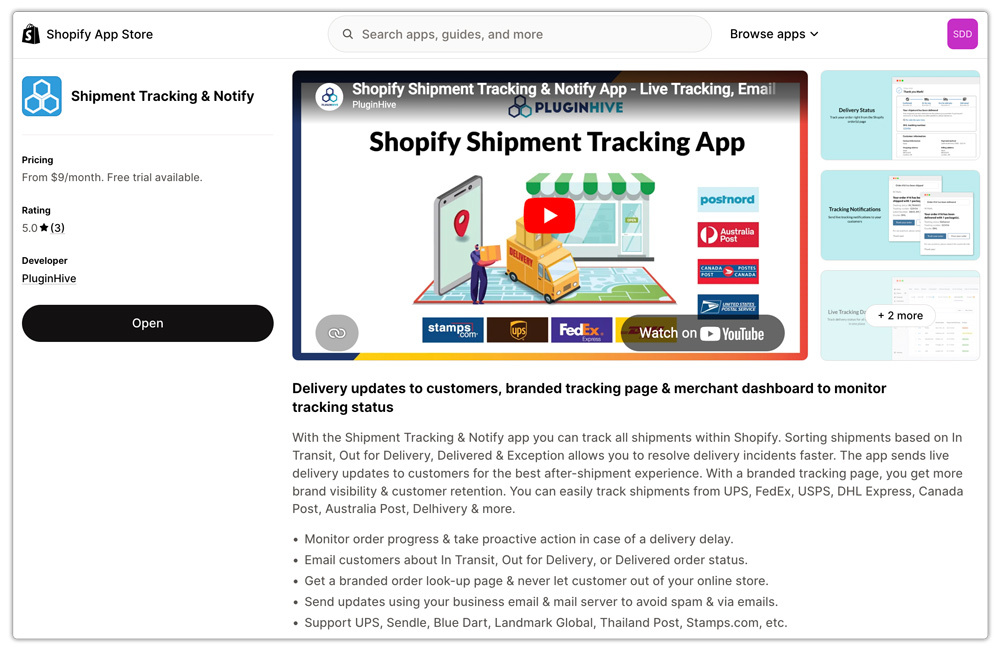
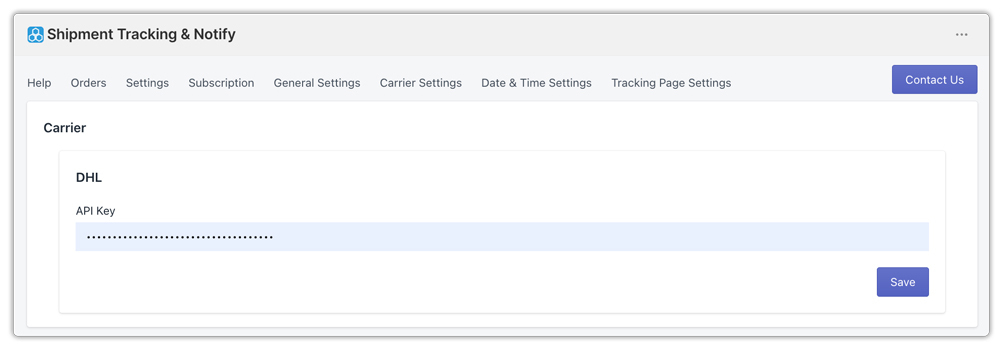
Here’s how the setup works:
Step 1: Connect your DHL carrier account. Inside the app, add your DHL carrier account credentials. This authenticates the app with DHL directly, so tracking events pulled into your store are live data specific to shipments under your account.
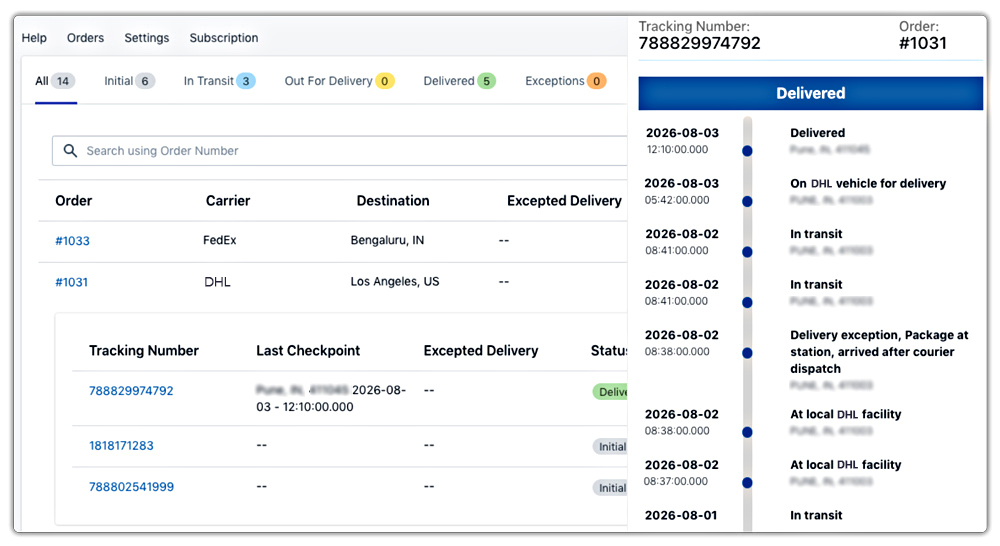
Step 2: Orders sync automatically at fulfillment. Once connected, the app works in the background continuously. Every time a DHL tracking number is added to a fulfilled Shopify order, it appears in the app’s shipment dashboard automatically, no manual imports or re-entry needed.
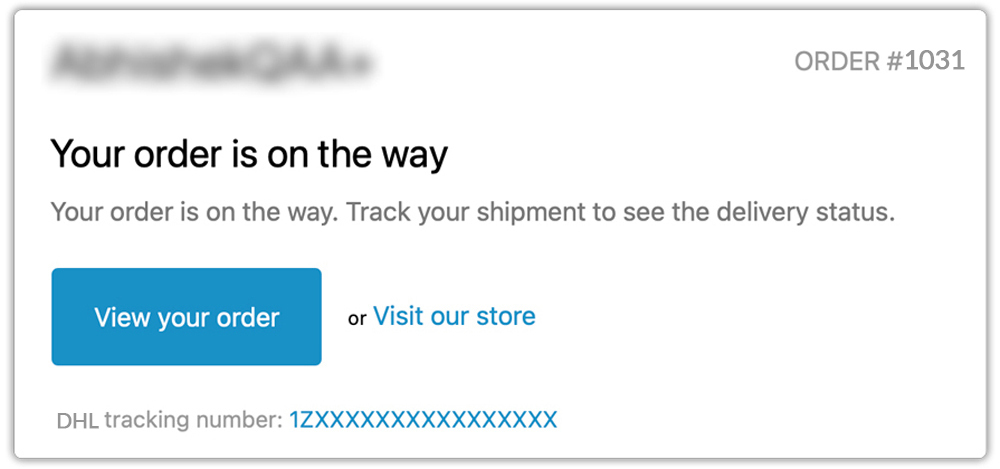
Step 3: Automated email notifications go out to customers. As DHL updates your shipment’s status at each scan point, the app automatically triggers email notifications to customers. These are sent based on real DHL events, not scheduled intervals, so customers only hear from you when there’s something meaningful to report.
Step 4: Customers track on your store, not DHL’s website. The app creates a dedicated tracking page within your Shopify store. Customers enter their order number and email address and see their live DHL order tracking status all within your brand environment, without being redirected to an external carrier page.

The Customer-Facing DHL Tracking Experience in Shopify
From the customer’s perspective, a well-integrated DHL tracking setup works like this:
- They place an order and receive a standard order confirmation
- When the order is fulfilled, and a DHL label is generated, they receive a branded shipping notification email with a link to your store’s tracking page
- At any point during transit, they can visit that page, enter their order number and email, and see the current DHL order tracking status in real time
- When the package is delivered, they receive an automatic delivery confirmation
Proactive shipment tracking transforms the post-purchase phase from a period of uncertainty into a positive, engaging experience for customers, fostering satisfaction and encouraging repeat business.
Customers receive proactive delivery alerts while shipments are in transit, helping reduce failed delivery attempts.
This is the kind of experience that builds loyalty and trust that encourages repeat purchases. Customers who stay informed throughout delivery are more likely to return and less likely to leave negative reviews.
Benefits of Proper DHL Order Tracking for Shopify Merchants
The business case for investing in a proper DHL order tracking setup goes beyond customer satisfaction:
- Fewer “where is my order?” tickets: When customers can self-serve their tracking status and receive automated notifications at every milestone, inbound support queries drop substantially
- Proactive exception handling: The merchant-facing dashboard surfaces delivery exceptions, customs holds, and failed delivery attempts as they happen, so your team can act before customers raise a complaint
- Branded post-purchase experience: Keeping customers on your domain for tracking reinforces your brand rather than directing them to a carrier’s generic interface
- Scalability: Manual tracking lookup doesn’t work at volume. Automated DHL order tracking keeps pace with order growth without adding headcount or manual processes
- Carrier performance data: A centralized shipment view gives you the data you need to identify patterns in delivery delays by route, service level, or destination over time
This becomes especially valuable if you’re shipping internationally with DHL.
Conclusion
DHL is a powerful carrier for Shopify merchants, but its tracking data stays entirely on DHL’s infrastructure unless you actively bring it into your store. By setting up PluginHive Shipment Tracking & Notify, you can turn every DHL tracking number into an automated, branded experience with real-time status syncing, customer notifications triggered by live DHL scan events, and a dedicated tracking page that keeps customers on your domain.
The result is a post-purchase experience that reduces support load, builds customer confidence, and scales cleanly as your order volume grows.
FAQ
Q. Does DHL provide proof of delivery?
Yes. DHL Express’s electronic proof of delivery provides delivery details and an image of the receiver’s signature when captured digitally, usually within an hour of delivery.
Q. How do I add DHL tracking numbers to Shopify orders?
When fulfilling an order in Shopify, enter the DHL tracking number in the fulfillment section. Shopify associates the tracking number with the order and makes it available to customers.
Q. Why is DHL order tracking important for Shopify stores?
Proper DHL order tracking improves the customer experience, reduces “Where is my order?” support requests, provides proactive visibility into delivery exceptions, and helps build customer trust through transparent communication.
