



When a WooCommerce store offers multiple Canada Post shipping services at checkout, customers may have to compare different rates to find the most affordable option. If you want to keep checkout simple while offering the cheapest Canada Post shipping option, you can choose to display only the lowest available rate.
The Canada Post Shipping Plugin for WooCommerce with Print Label by PluginHive lets you display only the cheapest eligible Canada Post shipping rate at checkout. In this guide, we’ll show you how to configure this option, compare it with displaying all available rates, and share tips for offering the cheapest Canada Post shipping rate in WooCommerce.
On This Page
- Why Offer the Cheapest Canada Post Shipping Rate in WooCommerce?
- How to Display the Cheapest Canada Post Shipping Rate in WooCommerce
- Cheapest Canada Post Rate vs. All Shipping Options
- Example Scenario
- Tips for Displaying the Cheapest Canada Post Rate in WooCommerce
- Conclusion
- FAQs
Why Offer the Cheapest Canada Post Shipping Rate in WooCommerce?
Most customers don’t compare shipping services line by line. They look at the price, and if it feels high, they leave. Showing only the cheapest available Canada Post rate removes that friction entirely.
- Fewer decisions at checkout: Customers see one shipping price instead of comparing multiple services and delivery times.
- Lower perceived shipping cost: Displaying the lowest rate by default keeps the checkout price closer to what customers expect.
- Less cart abandonment: A confusing shipping step is a common reason customers leave without paying.
- Good fit for simple, single-carrier stores: If you only ship domestically or don’t need to offer express options, one clear rate simplifies the whole experience.
This approach isn’t right for every store. If your customers regularly choose faster, pricier delivery, showing only the cheapest option may hide services they’d actually pay for. That trade-off is covered later in this article. Here’s how to set it up in your store.
How to Display the Cheapest Canada Post Shipping Rate in WooCommerce
The Canada Post Shipping Plugin for WooCommerce with Print Label includes a built-in setting that displays only the cheapest Canada Post shipping rate at checkout. This means you don’t need custom code or additional shipping rules to hide the more expensive options.
To set this up, go to WooCommerce → Settings → Shipping → Canada Post and open the Rates & Services tab. First, enable Real-Time Rates so the plugin can fetch live rates for the eligible Canada Post services based on the order and shipping details.
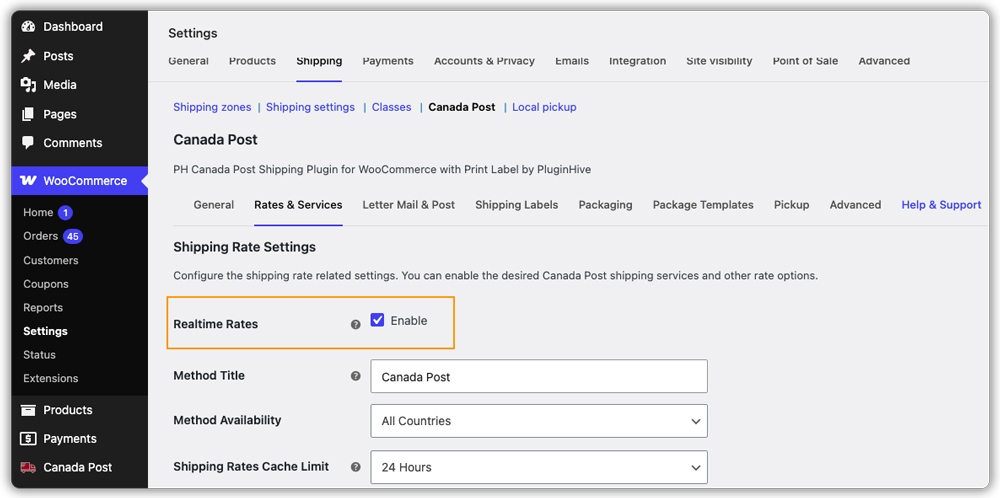
Next, find the Offer Rates option and select “Offer the customer the cheapest rate only, anonymously.” The plugin will compare the available Canada Post service rates and display only the lowest one to the customer.

You can also use the Method Title field to give the shipping option a simple name that customers can understand, such as “Standard Shipping.” This lets you avoid displaying the raw Canada Post service name at checkout.
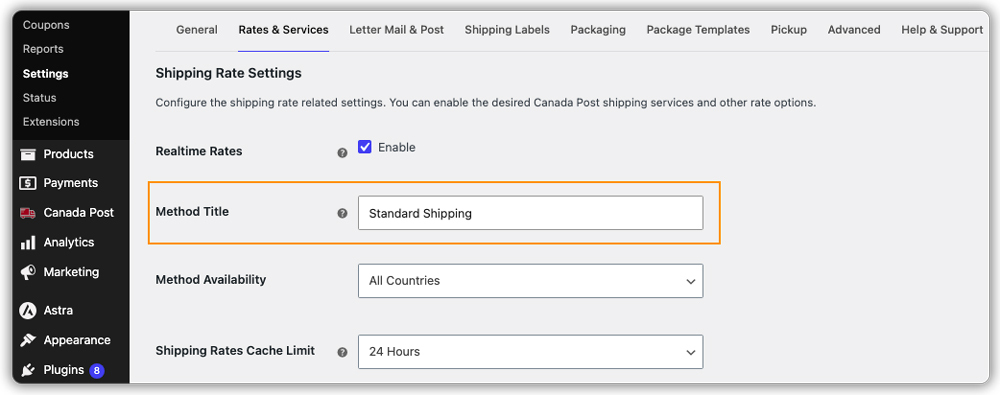
Once you have configured these settings, save your changes. The plugin will then display only the cheapest eligible Canada Post shipping option at WooCommerce checkout for each order.

For detailed configuration steps, see the Canada Post Shipping Plugin setup guide.
Cheapest Canada Post Rate vs. All Shipping Options
Choosing between showing all rates or only the cheapest one comes down to what your customers actually need.
- Show the cheapest rate only when your store ships mostly standard, non-urgent orders and you want a fast, low-friction checkout.
- Show all shipping rates when customers regularly need faster delivery and are willing to pay more for it, such as gift orders or time-sensitive purchases.
There’s no universal right answer here. It depends on whether your customers value low shipping cost or delivery speed more.
If neither “all” nor “cheapest only” fits, PH Hide Shipping Methods & Rate Adjustment for WooCommerce works alongside the Canada Post plugin to hide or show specific services based on conditions like cart total, weight, shipping class, or destination. This isn’t a setting within the Canada Post plugin itself; it’s a separate tool for stores that need more precise control than a simple all-or-cheapest toggle allows.
Example Scenario: Displaying the Cheapest Canada Post Rate in a WooCommerce Store
Let’s say you run a small WooCommerce store shipping mostly lightweight products across Canada, and you’re finding that customers hesitate at checkout when they see multiple Canada Post shipping prices. Here’s what you’re likely dealing with.
Challenges you’re probably facing:
- Your checkout page lists several Canada Post services, and customers aren’t sure which one to pick.
- Some customers abandon their cart specifically at the shipping selection step.
- You don’t need express shipping for most orders, but it’s still showing up as an option.
- Manually hiding services for every shipping zone isn’t practical as your store grows.
How the Canada Post Shipping Plugin solves this:
The Canada Post Shipping Plugin for WooCommerce with Print Label handles this without custom code.
- Automatically compares rates across all eligible Canada Post services for each order.
- Displays only the cheapest option at checkout, hiding the rest.
- Lets you rename the displayed service with a custom method title.
- Recalculates the rate instantly if the customer’s shipping address changes.
Results:
- Checkout shows a single, clear shipping price instead of a list of services.
- Customers spend less time comparing shipping options.
- The store owner doesn’t need to manually manage which services are visible.
- Shipping costs stay predictable since rates are based on published Canada Post pricing.
Once the cheapest rate setting is configured, simplifying checkout is no longer something you manage order by order. It becomes part of how your WooCommerce store operates.
Tips for Displaying the Cheapest Canada Post Rate in WooCommerce
Getting the most out of this setting comes down to a few configuration choices that are easy to overlook.
- Double-check product weight and dimensions: Inaccurate product data leads to inaccurate rate comparisons, which means the “cheapest” rate shown may not be correct.
- Review the Method Title regularly: A generic name like “Shipping” tells customers less than something like “Standard Delivery.”
- Watch for services with limited availability: Some Canada Post services aren’t available for every destination, so the cheapest visible option can vary by region. Refer to the available Canada Post shipping services for WooCommerce to understand what’s typically offered.
- Combine with rate adjustments carefully: If you add handling charges on top of the cheapest rate, make sure the final price still looks competitive to customers.
- Test with different addresses: Rates and available services can differ across provinces, so testing a few sample checkouts helps confirm everything displays correctly.
These small adjustments can make a noticeable difference in how customers experience your checkout page.
Conclusion
Displaying only the cheapest Canada Post shipping option keeps checkout simple and can reduce the hesitation that leads to cart abandonment. The Canada Post Shipping Plugin for WooCommerce with Print Label makes this a one-time settings change rather than something you manage manually for every order. If you’d like help setting this up on your store, reach out to PluginHive Support.
FAQs
Q: What is the cheapest way to ship a parcel in Canada?
The cheapest way to ship a parcel in Canada depends on its weight, size, destination, and delivery speed. Comparing Canada Post shipping rates can help you find the lowest-cost option.
Q: What are the cheapest Canada Post shipping options?
The cheapest Canada Post shipping option depends on the package and destination. In WooCommerce, you can display only the lowest available Canada Post rate at checkout using the Canada Post Shipping Plugin.
Q: Does WooCommerce automatically choose the cheapest Canada Post service?
No. WooCommerce does not automatically choose the cheapest Canada Post service. The Canada Post Shipping Plugin can be configured to display only the cheapest available rate at checkout.
