


Running a WooCommerce store means dealing with shipping questions every day. Customers want options. Some prefer USPS for lower cost, others trust UPS for reliable delivery, and many choose FedEx when speed matters. But WooCommerce doesn’t make it easy to show all these carriers together at checkout, so store owners often rely on flat rates or estimates.
In this guide, you’ll learn how to display real-time USPS, UPS, and FedEx rates side by side at checkout. This gives customers clear choices and helps them pick what works best for them. When shipping is transparent and flexible, customers are more likely to complete their purchases, and you avoid losing money due to inaccurate shipping rates.
Table of Contents
- Why Display Multiple Carrier Rates in WooCommerce?
- The Challenge: WooCommerce’s Default Shipping Limitations
- Solution: Multiple Carrier Shipping Plugin for WooCommerce
- Real-World Use Cases: When Multi-Carrier Shipping Works Best
- Conclusion
- FAQs
Why Display Multiple Carrier Rates in WooCommerce?
Shipping is a key decision at checkout. Customers want to see clear delivery options and choose what fits their budget or urgency. Showing multiple carrier rates makes that choice simple.
Key reasons to display multiple carrier rates
- Customers expect shipping choices: Some prefer lower-cost shipping, others need faster delivery. Showing USPS, UPS, and FedEx rates together allows customers to make an informed decision.
- Different orders need different carriers: Lightweight items often ship more cheaply with USPS, heavier packages may cost less with UPS, and urgent orders usually suit FedEx. Multiple carrier rates ensure the best option appears for each order.
Pro Tip: If you aren’t sure which carrier is right for your specific products, check out this guide on UPS vs. FedEx vs. USPS: Which shipping carrier is best for your WooCommerce store?
- Fewer abandoned carts: High or unclear shipping costs are a common reason for cart abandonment. When customers can compare rates, they are more likely to find an option they are comfortable with.
- Accurate shipping costs: Flat rates can lead to overcharging or losses. Live carrier rates adjust based on weight, size, and destination, keeping pricing accurate.
- More professional checkout experience: Offering multiple shipping options makes your store feel more reliable and well-prepared, especially when competing with larger online retailers.
Displaying multiple carrier rates in WooCommerce reduces confusion at checkout and improves customer confidence. Clear, real-time options help customers choose faster and help store owners avoid shipping guesswork.
The Challenge: WooCommerce’s Default Shipping Limitations
WooCommerce offers basic shipping tools, but they are designed for simple setups. When store owners want accurate, real-time rates from multiple carriers, these limitations quickly become noticeable.
Key limitations of the default WooCommerce shipping
- No real-time carrier rates: WooCommerce does not natively support real-time shipping rates from USPS, UPS, or FedEx.
- Shipping zones are too basic: WooCommerce shipping zones rely on fixed rates and cannot adjust automatically based on weight, size, or destination.
- Manual rates require guesswork: Flat or estimated rates often lead to overcharging customers or absorbing extra shipping costs.
- No carrier comparison at checkout: Customers usually see a single generic shipping option instead of clear, carrier-based choices.
- High maintenance: Carrier pricing changes require manual updates, which are easy to miss and hard to manage over time.
WooCommerce’s default shipping features work for simple stores, but they are not built for real-time, multi-carrier shipping. These limitations create checkout friction and make it difficult to offer accurate, flexible shipping options as a store grows.
Solution: Multi-Carrier Shipping Plugin for WooCommerce
The most practical way to handle shipping from multiple carriers is to manage them through a single system instead of separate tools or manual rules.
The Multi-Carrier Shipping Plugin for WooCommerce connects your WooCommerce store with USPS, UPS, and FedEx at the same time. It fetches live shipping rates from each carrier and displays them together at checkout, based on the actual order details.
What makes this approach different
- One checkout, multiple carriers: USPS, UPS, and FedEx rates appear together in a single list, making comparison easy for customers.
- Live carrier pricing: Shipping rates are pulled directly from carriers using product weight, dimensions, and destination. There’s no need to update prices when carrier rates change.

- Accurate order-based calculations: Shipping costs adjust automatically for small, large, light, or heavy orders instead of relying on averages.
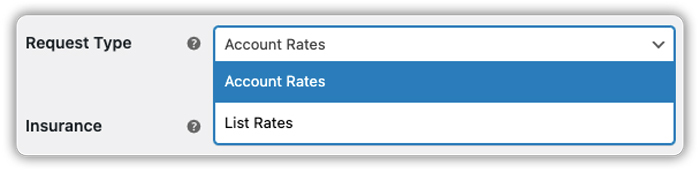
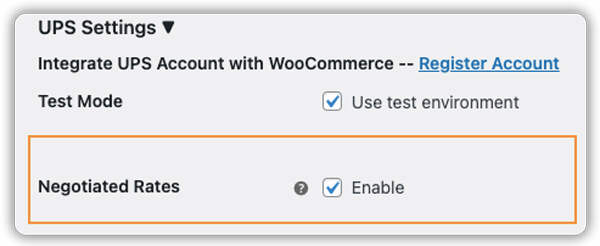
- Support for business pricing: If you have negotiated rates with UPS or FedEx, those rates can be shown instead of standard retail prices.
For FedEx:
For UPS :
- Simple cost adjustments: Optional handling fees can be added to cover packaging or processing costs without changing the underlying carrier rates.

Everything is managed from your WooCommerce dashboard, so there’s no need to juggle multiple plugins or dashboards.
Note: If you’d like step-by-step instructions on configuring this, you can refer to this detailed setup guide.
Real-World Use Cases: When Multi-Carrier Shipping Works Best
Multi-carrier shipping is especially useful for WooCommerce stores that deal with different shipping needs daily.
- Selling different product types: WooCommerce stores that sell both lightweight and heavy products benefit from multiple carriers, since USPS is often cheaper for small items, while UPS or FedEx may be better for heavier packages.
- WooCommerce stores with urgent and non-urgent orders: Some customers want the lowest shipping cost, while others need fast delivery. Showing multiple carrier rates lets customers choose based on their urgency.
- Stores shipping internationally: International shipping costs vary by destination, and one carrier may offer better rates or delivery times than another. Multiple carriers give customers more realistic options.
- Stores serving both B2C and B2B customers: Retail customers often look for affordable shipping, while business customers may prefer reliable or faster services. Multi-carrier shipping supports both without extra rules.
- Growing WooCommerce stores: As order volume increases, managing flat or manual shipping rates becomes difficult. Multi-carrier shipping adjusts automatically for each order.
All these use cases have one thing in common: customers want clear choices. Multi-carrier shipping simply shows the real – time shipping options, without adding complexity. It matches how customers think, comparing cost and delivery speed while helping WooCommerce store owners offer a smoother and more reliable checkout experience.
Conclusion
Displaying USPS, UPS, and FedEx rates together in WooCommerce creates a better checkout experience for both customers and store owners. Customers get clear, real-time shipping choices, and store owners avoid the guesswork of flat or estimated rates.
Moving to a multi-carrier shipping setup is easier than it sounds. If you’d like help configuring it or need guidance along the way, the PluginHive support team can help you get started.
FAQs
Q. Does WooCommerce show live USPS, UPS, and FedEx rates by default?
No. WooCommerce only supports basic shipping methods like flat rate, free shipping, and local pickup. To display live rates from USPS, UPS, and FedEx at checkout, you need a multi-carrier shipping setup that connects WooCommerce to the carriers’ official APIs.
Q. Do I need separate accounts for USPS, UPS, and FedEx?
Yes. To fetch real-time carrier rates in WooCommerce, you need API access or accounts with each carrier you want to use. These accounts allow WooCommerce to calculate accurate shipping costs based on the order’s weight, size, and destination.
Q. What happens after a customer selects a shipping rate? Can I print shipping labels?
While the Multi-Carrier plugin handles the rates at checkout, you can streamline your entire warehouse process by using the PluginHive Shipping Label Solution. It works alongside your rates to generate and print shipping labels for USPS, UPS, and FedEx in bulk, saving you hours of manual data entry.
Q. Can I send order tracking updates to customers after they choose a carrier?
Yes. After shipping the order, tracking details can be shared automatically with customers. For this, you can use Shipment Tracking Pro for WooCommerce, which sends tracking information to customers via email.
