


Running an escape room means creating a thrilling, immersive experience. But managing bookings behind the scenes can become a puzzle of its own. If you’re still relying on phone calls, spreadsheets, or back-and-forth messages to schedule games, you may end up dealing with double bookings, confused customers, and missed revenue. Taking your escape room bookings online makes it easier to accept reservations around the clock, giving your team more time to focus on running the actual game.
If your website runs on WooCommerce, you already have the foundation to manage bookings directly from your store. With the Bookings and Appointments for WooCommerce plugin, you can turn your store into a complete escape room booking system. No separate booking platform needed. This guide walks you through how to set it up and start accepting escape room bookings online.
Table of Contents
- Why Take Escape Room Bookings Online with WooCommerce?
- What You Need to Set Up an Escape Room Booking System
- How to Take Escape Room Bookings Online with WooCommerce
- Best Practices for Managing Escape Room Bookings on WooCommerce
- Conclusion
- FAQs
Why Take Escape Room Bookings Online with WooCommerce?
Many escape room owners default to third-party SaaS platforms, but these often eat into profits with high monthly fees and ticket commissions. Building your reservation system on WooCommerce keeps you in complete control while protecting your bottom line.
- Zero Commission Fees: You retain 100% of your ticket revenue. No hidden per-booking charges or percentage cuts to worry about.
- Complete Customization: You completely own your customer data and website, allowing you to tailor the entire booking flow to match your brand’s unique theme.
- Seamless Upsell Opportunities: WooCommerce lets you effortlessly sell physical merchandise, gift cards, or extra in-game clues within the same checkout cart as your bookings.
- Flexible Payment Options: You can easily integrate popular payment gateways like Stripe, PayPal, or Square to secure partial deposits or full upfront payments before players arrive.
Ultimately, choosing WooCommerce means investing in a highly customizable, cost-effective platform that scales alongside your business instead of penalizing your success with extra fees.
What You Need to Set Up an Escape Room Booking System
Setting up an automated escape room reservation system is straightforward. You need just three essential components to get started.
- WordPress & WooCommerce: This powerful, open-source combination serves as the free, highly customizable foundation for your website and online store.
- Bookings and Appointments for WooCommerce Plugin: This plugin acts as your scheduling engine. It transforms standard WooCommerce product pages into bookable time slots while handling team capacities and calendar syncs.
- Secure Payment Gateway: Integrating a processor like Stripe, PayPal, or Square enables you to safely accept credit card payments and upfront deposits directly on your site.
Once these three foundational pieces are connected, you have a complete, professional infrastructure ready to capture reservations around the clock.
How to Take Escape Room Bookings Online with WooCommerce
Once your WooCommerce store is ready, setting up escape room bookings comes down to a handful of settings inside the Bookings and Appointments plugin.
If you’re configuring the plugin for the first time, this complete setup walkthrough covers installation and the basics before you get into room-specific settings.
Create Bookable Escape Rooms and Set Your Session Schedule
- Create a Bookable Product for Each Room: Every room you offer needs its own bookable product, so each one gets an independent calendar and a booking for one room never blocks another.

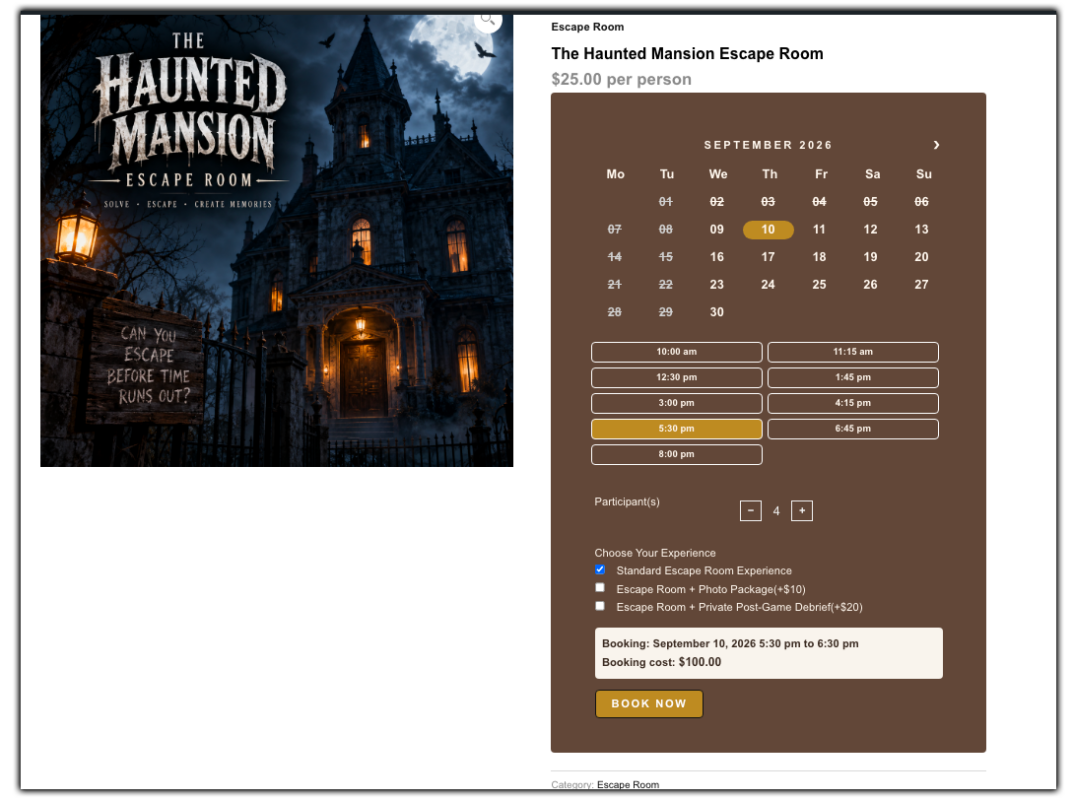
- Session Length, Buffer Time, and Opening Hours: You can define how long each session runs, say 60 minutes, decide your daily opening and closing hours, and add a short buffer between sessions so props and clues can be reset before the next group walks in.

- Blocking Out Unavailable Dates: Holidays, maintenance days, or hours you don’t want a room bookable can be blocked out in advance, so customers only ever see genuinely open slots. Here’s how to manage booking availability.

Set Escape Room Pricing and Group Booking Rules
- Pricing Your Sessions: You can price each room flat or per person, and layer in rules for weekend rates, peak-hour pricing, or group discounts. Here’s how to configure booking costs.
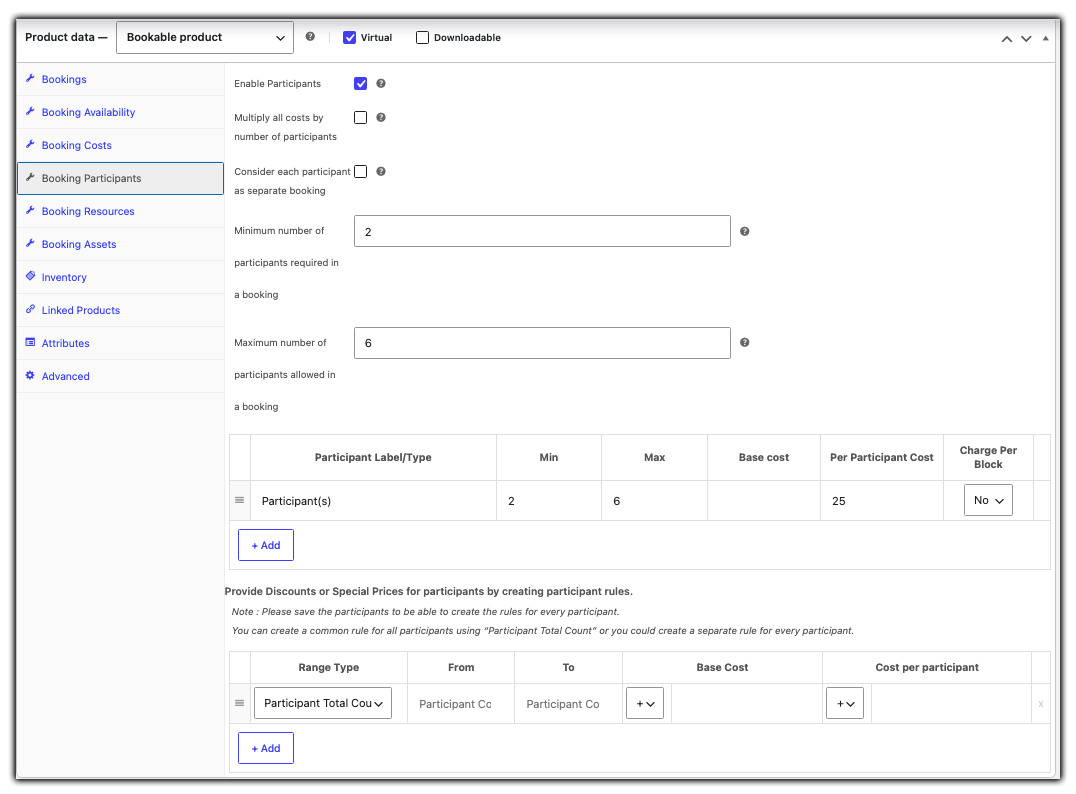
- Control Group Size: For private hire, cap bookings at 1 per slot so only one group plays at a time. For shared sessions, allow bookings up to your room’s total capacity and charge per person using Participants. More on this in how booking participants work.
- Offer Optional Add-Ons: Booking Resources let you offer extras like a photo package, a harder difficulty mode, or a private post-game debrief, priced separately from the room itself. Here’s how to set up booking resources.

Automate Booking Confirmations and Calendar Sync
- Automated Confirmations and Reminders: Customers get an instant booking confirmation, and reminders can go out automatically ahead of their session, no manual follow-up needed. Here’s how to set up email notifications.

- Calendar Sync with Google or Outlook: Two-way sync keeps your team’s schedule current automatically, whether they work off Google Calendar or Microsoft Outlook.

Once these are in place, your booking system can handle reservations automatically. Customers can book and pay online while your calendar and inbox stay updated.
Best Practices for Managing Escape Room Bookings on WooCommerce
Once your booking system is live, a few operational habits can help you get more out of it and keep the experience smooth for both your team and your customers.
- Track Your Busiest Slots: Keep an eye on which time slots and rooms fill up fastest, especially on weekends, so you can adjust pricing or open extra sessions during peak hours.
- Set a Clear Cancellation Window: Define how far in advance a booking can be cancelled or rescheduled, and display this clearly on the room’s product page to avoid last-minute disputes.
- Review No-Show Patterns: If certain slots see frequent no-shows, consider requiring a deposit for those specific time bookings rather than applying it across every session.
- Implement Tiered Group Discounts: Configure pricing rules that automatically reduce the per-person ticket cost when a group books the highest number of available slots, encouraging maximum capacity bookings.
- Trigger Post-Game Review Requests: Set up automated follow-up emails to go out exactly two hours after a booking ends, capitalizing on the post-game adrenaline to quickly build up your Google or TripAdvisor reviews.
Building these habits into how you manage bookings helps you get more value from the system you’ve set up, without adding extra manual work.
Conclusion
Running a successful escape room requires your full attention on the player experience. You shouldn’t have to spend that time managing spreadsheets, phone calls, and booking requests. Transitioning your escape room bookings online using WooCommerce and the Bookings and Appointments for WooCommerce plugin builds an automated, reliable reservation engine that works tirelessly in the background, giving you complete ownership over your schedule while keeping your revenue safe from high third-party commission fees.
Whether you manage a single haunted room or a massive multi-scenario complex, this setup scales alongside your business to handle complex team sizes, buffer times, and secure payments with ease. If you run into any questions while setting this up, the PluginHive support team is happy to help.
FAQs
Q: How much does an escape room make a year?
Earnings vary widely based on location, room count, and pricing, but many single-location escape rooms report annual revenue between $100,000 and $250,000, depending on footfall and average group size.
Q: How much does it cost to start an escape room business?
Setting up an escape room typically costs anywhere from $50,000 to $200,000, covering space rental, room design, props, and technology, with props and theming usually taking up the largest share of the budget.
Q: How do I create my own booking system?
If your website runs on WooCommerce, you can build a complete booking system using the Bookings and Appointments for WooCommerce plugin, letting customers book time slots, choose group sizes, and pay online without any separate booking software.
Q: What’s the best strategy for escape rooms?
Beyond a great room design, keeping bookings simple and available 24/7 online, pricing sessions based on demand, and encouraging reviews right after a game are some of the most effective ways to keep bookings steady and grow word of mouth.
