


Businesses like event space rentals often rely on calls, emails, and manual calendars to manage bookings. This leads to double bookings, missed details, and time-consuming coordination. Today’s customers expect to view availability, book instantly, and pay online, whether it’s for a wedding, workshop, or private event.
With WooCommerce and PluginHive’s Bookings And Appointments for WooCommerce plugin, you can take bookings directly on your website, manage schedules, collect payments, and offer add-ons like seating or decor. In this guide, we’ll cover the key booking challenges event venues face and how you can streamline your rentals and boost revenue with automation.
Table of Contents
- Key Challenges Faced by Event Space Rental Businesses
- Automate Event Space Rentals with WooCommerce Bookings
- Real-World Example
- Final Thoughts
- FAQs
Key Challenges Faced by Event Space Rental Businesses
Running an event space rental business comes with unique operational challenges. From managing availability to handling last-minute changes, the lack of automation can quickly lead to inefficiencies and lost revenue. Here are the most common issues faced by venue owners:
- Manual Booking Processes Waste Time: Most venues rely on emails, calls, or contact forms. This slows down response times and increases the chances of errors and missed bookings.
- Double Bookings and Scheduling Conflicts: Without a live calendar, it’s easy to confirm multiple bookings for the same time slot accidentally. This not only hurts your credibility but also costs you business.
- Inflexible Availability and Timing Control: You may want to offer bookings only on weekends or only in full-day blocks, but contact forms can’t enforce these rules.
- No Buffer Time Between Bookings: Without built-in buffer times, back-to-back events leave no room for setup, cleanup, or reset, resulting in rushed turnovers and poor service.
- No Upfront Payment or Deposit Collection: Allowing bookings without payment increases the risk of no-shows or late cancellations. A reliable system should let you collect full or partial payments upfront.
- Missed Opportunities for Add-Ons and Upsells: If you offer extras like seating, lighting, catering, or security but don’t present them at the time of booking, you’re leaving money on the table.
- Limited Calendar Visibility: Without a centralized calendar, it’s tough to plan, manage staff, or track availability across multiple bookings.
Without an automated system in place, these challenges pile up fast, causing lost time, lost bookings, and lost profit. In the next section, we’ll explore how you can solve all of this using WooCommerce and PluginHive’s Bookings plugin.
Automate Event Space Rentals with WooCommerce Bookings
Managing event bookings manually is time-consuming and error-prone. The Bookings And Appointments for WooCommerce plugin by PluginHive simplifies your entire booking process from slot selection to payment collection right on your WooCommerce store.
Note: Make sure the PluginHive Bookings plugin is installed, activated, and configured. Follow this quick setup guide
Here’s how the plugin helps automate key areas of your event rental business:
- Offer Flexible Rental Durations with Buffer Time
Set up rental durations that match the nature of your bookings, hourly slots for photo shoots, half-day rentals for corporate meetings, or full-day rentals for weddings and private events. This flexibility helps attract a wider range of clients.
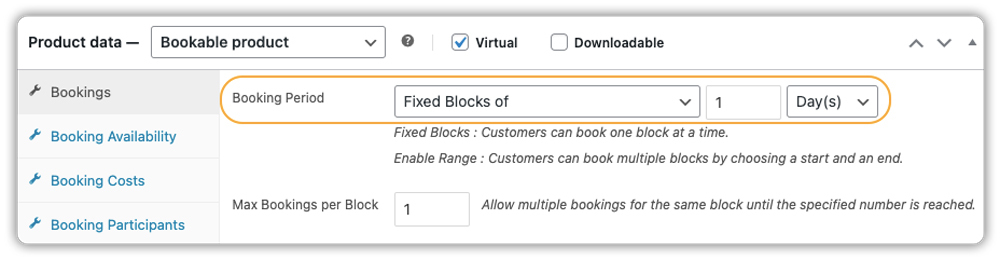
You can also insert automatic buffer time before or after each booking. This gives your team enough time to clean, reset, or rearrange the space before the next event.

Example: Allow full-day bookings for weddings and add a 1-day buffer after each booking to clean and prepare the space.
Need help setting buffer time between bookings? Follow this step-by-step guide
- Define Availability & Blackout Dates
Control which days and time slots are bookable. Block out specific dates for maintenance, holidays, or private events.
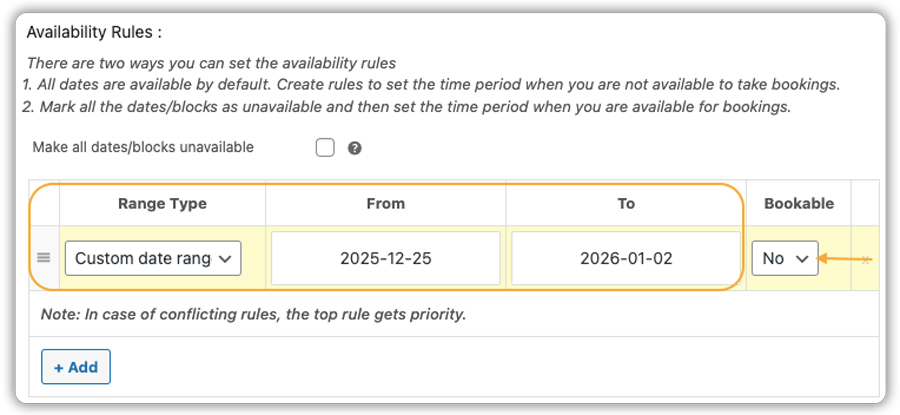
Full instructions here: How to set availability and restrictions
- Set Booking Costs and Pricing Rules
Charge by the hour, day, or booking type. Add pricing rules for weekends, longer durations, or early bookings. Customers see live price updates at the product page.

Example: Bookings from Monday to Thursday get a 10% discount, while Friday and Saturday bookings include a $200 extra charge. Pricing adjusts automatically as dates are selected.
Detailed walkthrough: How to set flexible booking costs
- Limit Attendees & Offer Group Pricing
Set minimum and maximum guests per slot to avoid overcrowding. You can also define tiered pricing based on group size.
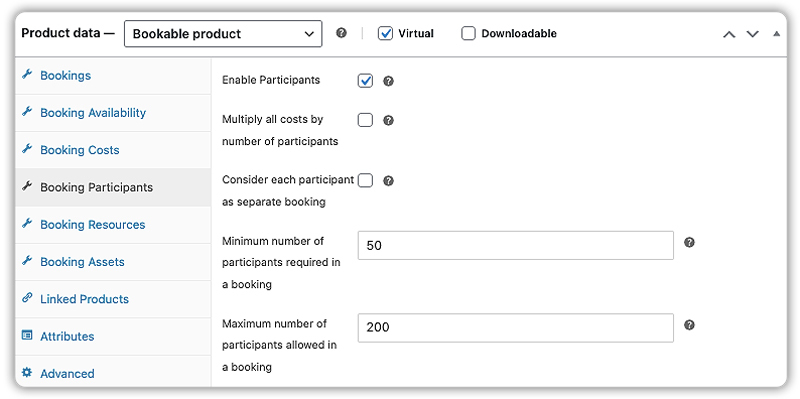
Need help setting attendee limits or managing group size? Here’s the step-by-step guide
- Offer Add-Ons Like Decor, Lighting, and Catering
Upsell services like decor, sound, catering, or extra seating directly on the booking page. You can offer these extras using either Booking Resources or the PH WooCommerce Product Add-Ons.

Need help adding extras to your venue bookings? Check out the Booking Resources setup guide.
This is exactly how the event booking experience will appear on your website’s frontend :

- Accept Full Payments or Partial Deposits Online
You can accept full payments upfront or collect a partial deposit, perfect for high-value venue bookings. WooCommerce supports multiple payment gateways like Stripe, PayPal, and Razorpay out of the box.

For example, you can charge a 50% non-refundable deposit at the time of booking and collect the balance later.
Want to offer deposit-based bookings? Set it up easily with the PH WooCommerce Deposits Plugin
- Send Automated Confirmations & Reminders
Ensure your clients never miss a booking. Automatically send email confirmations, reminders, and follow-up messages.
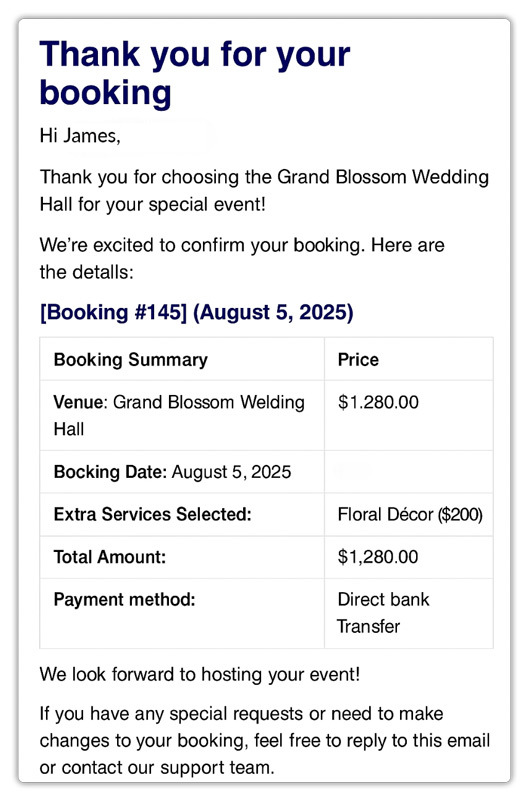
Here’s how to set it up: Automate booking confirmations and notifications.
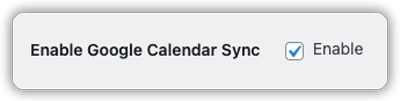
- Sync Bookings with Calendar
All confirmed bookings can sync to your Calendar. Customers also get a calendar link in their email to add the booking to their calendar.
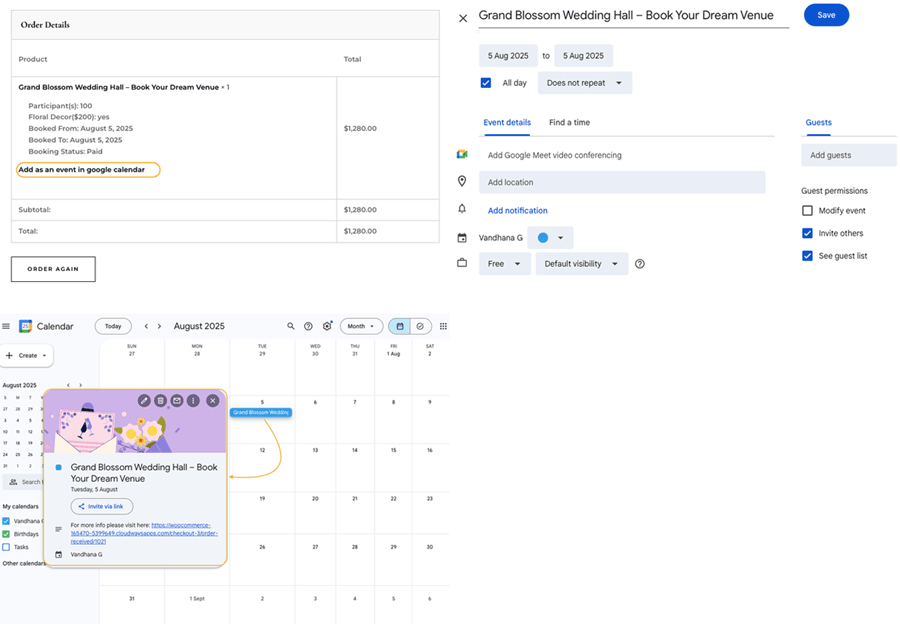
Sync bookings with Google Calendar
Sync bookings with Microsoft Outlook


Automating your event space bookings not only saves time but also enhances the client experience. With WooCommerce Bookings by PluginHive, you can manage rentals, reduce no-shows, and increase revenue all from one dashboard.
Real-World Example: Running a Busy Event Venue Without Losing Your Mind
Let’s say you manage a WooCommerce-based venue rental business that hosts everything from birthday parties and workshops to wedding receptions. You offer hourly or full-day rentals, and clients can optionally book add-ons like catering, sound equipment, or security staff.
The Challenges You Face
- You handle most bookings through phone calls or WhatsApp, which often leads to double bookings and time conflicts.
- Clients constantly ask, “Is this date available?” because there’s no online calendar showing live availability.
- Custom requirements like setup time, decor, or special lighting are handled manually, which often leads to errors or missed services.
- Weekend slots get overbooked because you can’t auto-block time before and after events for setup/cleanup.
- Clients want to reserve with a deposit, but tracking partial payments manually becomes chaotic.
How It Can Be Solved
With the Bookings And Appointments for WooCommerce plugin by PluginHive, here’s how your business transforms:
- Your venue slots appear in a live calendar on your site, and clients can check availability and book instantly.
- You can add buffer time for event setup and teardown, ensuring a smooth transition between bookings.
- Upsells like catering, decor, or stage setup can be offered right on the booking page using PH WooCommerce Product Add-Ons or Booking Resources.
- Pricing automatically adjusts based on day, duration, or extras selected; no more back-and-forth quotes.
- You can accept deposits upfront using PH WooCommerce Deposits, making it easy to secure bookings without chasing payments.
- All bookings, customer details, and extras are tracked in one dashboard, no spreadsheets, no surprises.
By automating your venue rental process, you gain back hours of admin time, avoid overbookings, and give clients a premium, hassle-free experience they’ll rave about.
Final Thoughts
Automating your venue bookings is the fastest way to save time, avoid overbookings, and offer a premium experience to your clients. With WooCommerce and the Bookings And Appointments for WooCommerce plugin, you can display real-time availability, accept bookings 24/7, and manage extras like decor, catering, or staff all in one place.
Whether you rent out studios, halls, outdoor spaces, or event packages, this setup reduces manual work, keeps your schedule organised, and helps you grow without stress.
Need help getting started? Our support team is here to help.
Frequently Asked Questions
1. What if I need to approve bookings before payment?
Enable “Requires Confirmation” in the Bookings and Appointments for WooCommerce plugin. Bookings stay pending until you approve them; then the customer gets a payment link.
2. Can I offer hourly, half-day, or weekend-only bookings?
Yes. Bookings And Appointments for WooCommerce plugin supports hourly, daily, half-day, or weekend blocks fully customizable to your venue’s needs.
3. Can I control cancellations for event bookings?
Absolutely. Set flexible cancellation windows in the Bookings And Appointments for WooCommerce plugin (e.g., cancel 24 hours in advance).
4. How are cancellations refunded?
Refunds aren’t automatic. Use the built-in WooCommerce Order Refund feature to process them manually.
5. Can I show different pricing for weekends or long bookings?
Yes. With Bookings And Appointments for WooCommerce, set dynamic pricing for weekends, multi-day bookings, or seasonal events.
6. How do customers submit special requests (like theme decoration)?
Use PH Product Add-Ons to collect requests, such as theme décor, or offer paid add-ons (e.g., extra cleaning).
