



Growing a WooCommerce store into international markets is a logical next step once your domestic operations are running smoothly. But cross-border selling is a different game entirely. Between customs paperwork, fluctuating duties, and the pressure of meeting delivery expectations for customers thousands of miles away, the operational demands can slow down even the most motivated store owner.
FedEx takes a lot of that weight off. Pair it with the right WooCommerce plugin, and you can handle global WooCommerce export business with the same confidence as domestic ones. Here is how to make that happen.
On This Page
- Why WooCommerce Export Business is Challenging
- FedEx for Export Business in WooCommerce
- Key FedEx International Shipping Services for Exporters
- Set Up WooCommerce International Shipping with FedEx for Global Export
- Improving Customer Experience for International Buyers
- Conclusion
- FAQs
Why WooCommerce Export Business is Challenging
Expanding your WooCommerce store to international markets sounds straightforward until you start processing your first cross-border orders. The reality is that exporting involves a layer of complexity that domestic shipping simply does not. Here is what most WooCommerce store owners run into when they start shipping globally:
- Customs compliance is one of the biggest hurdles. Every country has its own import regulations and documentation requirements.
- Duties and taxes create uncertainty at checkout. Customers who are not informed about import charges upfront often abandon carts or raise disputes on delivery.
- Generating shipping documentation manually does not scale. Commercial invoices, export declarations, and compliance certificates need to be accurate for every single shipment. Handling this by hand across a growing order volume introduces errors and eats into fulfillment time.
- Carrier reliability becomes more critical when shipping internationally. Inconsistent delivery timelines and limited tracking visibility have a much bigger impact on customer trust when the buyer is overseas and has fewer ways to follow up.
These are all solvable problems, and the FedEx Shipping Plugin for WooCommerce with Print Label by PluginHive is built to solve them.
FedEx for Export Business in WooCommerce
FedEx is one of the strongest carriers for WooCommerce exporters. Its network reaches over 220 countries and territories, and its customs brokerage operations are among the most established in the industry. For WooCommerce store owners, this translates to fewer shipments held up at borders and more consistent delivery timelines for international customers. What makes FedEx particularly valuable for export businesses is the depth of its compliance support.
Key FedEx International Shipping Services for Exporters
FedEx offers a range of international services suited to different delivery timelines, destinations, and budget requirements:
- FedEx International Priority delivers to major international destinations typically within one to three business days. It is the right choice for time-sensitive shipments.
- FedEx International Economy is a cost-effective option for shipments where delivery urgency is lower, with transit times of two to five business days depending on the destination.
- FedEx International Connect Plus (FICP) is designed specifically for cross-border residential deliveries, offering reliable tracking and competitive transit times for direct-to-consumer international shipments.
- FedEx International First offers the fastest guaranteed delivery windows to select international destinations, with early morning arrival options for shipments where timing is critical.
- FedEx International Ground covers cross-border ground shipping between the US and Canada, providing a cost-efficient option for North American stores that do not require air freight speeds for every order.
Set Up WooCommerce International Shipping with FedEx for Global Export
To start shipping internationally with FedEx from your WooCommerce store, you need to install and activate the FedEx Shipping Plugin for WooCommerce with Print Label. This plugin connects your store to FedEx and handles rate calculation, label printing, customs documentation, and compliance, all from your WooCommerce dashboard.
For a detailed setup walkthrough, refer to the WooCommerce FedEx Shipping Guide .
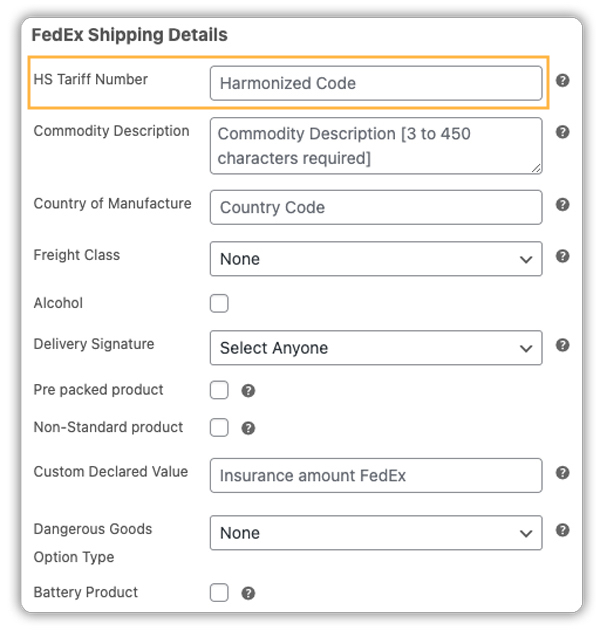
Before configuring the plugin settings, make sure each product in your WooCommerce store has an accurate HS code assigned. Customs authorities use these internationally standardized classification numbers to determine applicable duties and assess whether goods are permitted for import.
In the plugin settings, you can enable the Commercial Invoice directly from the plugin settings. This document is mandatory for all FedEx international shipments and is generated automatically using the order and product data already in your WooCommerce store, no manual preparation required.
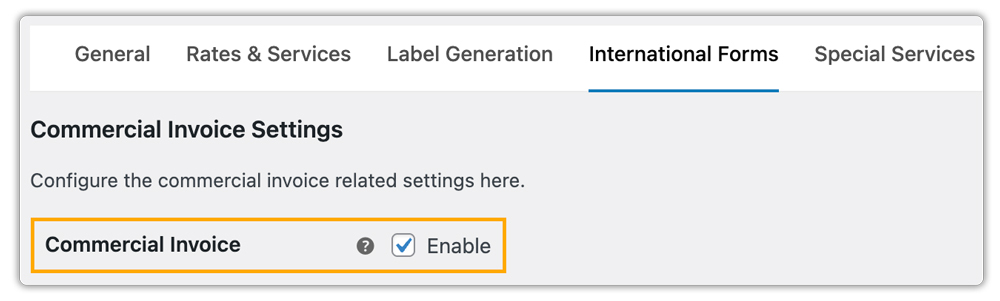
Depending on your business needs, you can enable additional options, such as Electronic Trade Documents (ETD) for faster customs clearance, Pro Forma Invoices, and USMCA Certificates for U.S.-Mexico-Canada shipments.
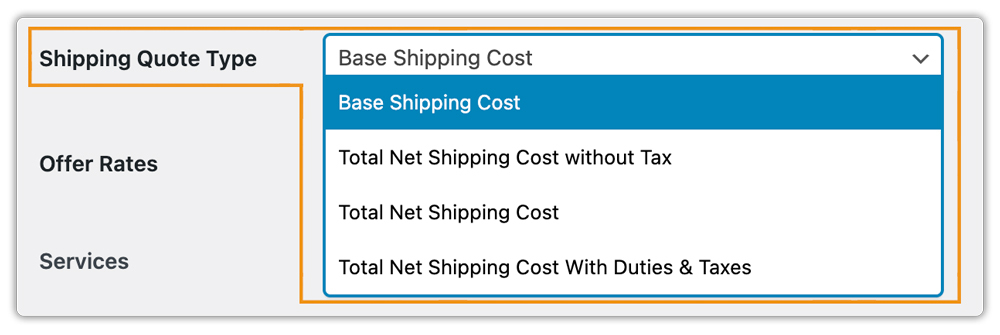
The Shipping Quote Type setting gives you control over how shipping costs are presented at checkout. You can choose to show the base shipping cost only, or display the total cost inclusive of duties and taxes.
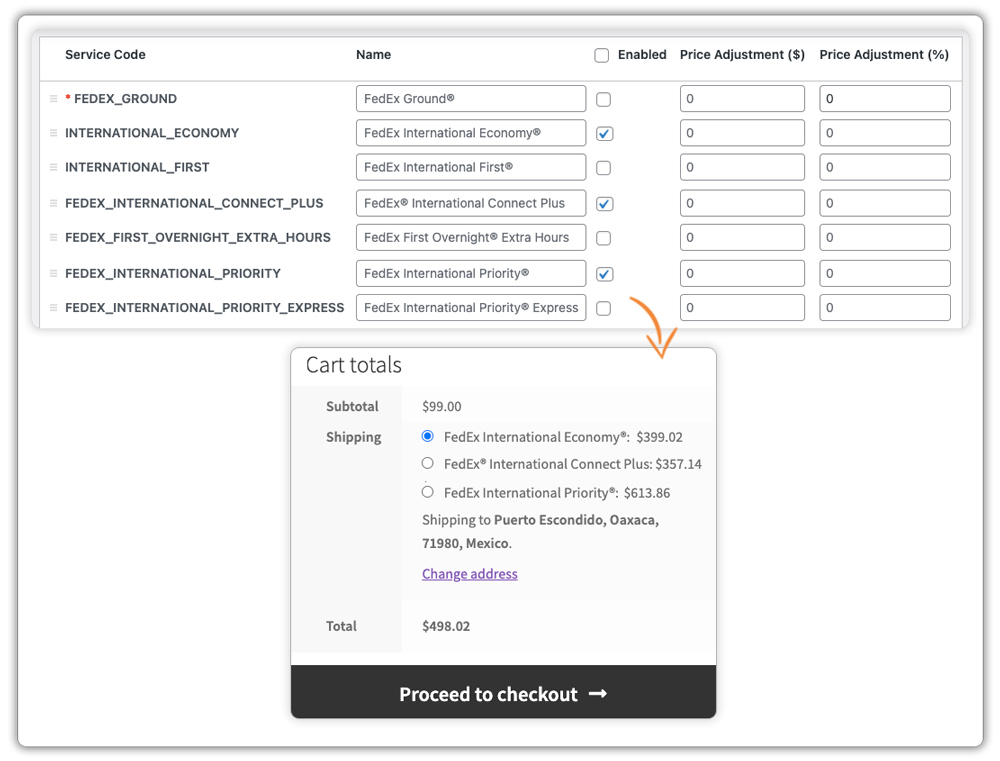
Within the plugin settings, you can also select the FedEx international services you want to offer at checkout. Once configured, FedEx rates for those services appear automatically based on the customer’s location.
Labels, commercial invoices, and any other required shipping documents can then be generated. You can even print them directly from the WooCommerce Orders page.

Improving Customer Experience for International Buyers
To deliver a smooth and reliable experience for your international customers, follow these practical tips:
- Combine FedEx with Free or Flat Rates: Alongside FedEx live international rates, you can offer free shipping or flat-rate options based on conditions like cart value or location using the WooCommerce Table Rate Shipping Pro Plugin.
- Show Estimated Delivery Dates: While delivery estimates are available in the FedEx plugin, for better flexibility and customization, you can use the Estimated Delivery Date Plugin for WooCommerce.
- Control FedEx Shipping Methods Display: Hide or adjust unwanted FedEx services at checkout using the PH Hide WooCommerce Shipping Methods & Rate Adjustment Plugin to keep the checkout experience clean for customers.
- Use Multi-Carrier Shipping When Needed: If you ship with multiple carriers, the WooCommerce Shipping Services plugin helps you display rates from different carriers and compare them effectively.
- Regularly Test Your Checkout: Test your checkout with different locations and order scenarios to ensure FedEx rates are displayed correctly at all times.
Implementing these strategies will help you enhance the overall shopping experience and encourage repeat purchases from your international buyers.
Conclusion
Scaling your WooCommerce export business with FedEx international shipping becomes far more manageable when the right tools are in place. From auto-generating customs documents to displaying all-in shipping costs at checkout and keeping international customers updated with tracking, the FedEx Shipping Plugin for WooCommerce handles the operational complexity so you can focus on growing your store globally.
If you need help setting up FedEx international shipping, feel free to reach out to PluginHive Support.
FAQs
Q. Does the FedEx Shipping Plugin for WooCommerce support FedEx international returns?
Yes. The plugin allows you to generate FedEx return shipping labels to simplify handling returns globally. Check this guide for more info — how to manage FedEx return shipments.
Q. Can multi-vendor WooCommerce stores use FedEx for international shipping?
Yes. With the PH Multi-Vendor Shipping Addon for WooCommerce, each vendor in your store can manage FedEx international shipments independently.
Q. Does the FedEx Shipping Plugin support FedEx negotiated rates for international shipments?
Yes. If your FedEx account includes negotiated rates, the plugin will automatically fetch and display your discounted rates at checkout.
Q. What if a FedEx international shipment is held at customs?
Missing or incorrect documentation, an invalid HS code, or failure to comply with the destination country’s import regulations usually cause this. Double-check the commercial invoice and HS codes assigned to the products in your WooCommerce store.
