



Scaling a WooCommerce store beyond domestic borders is one of the most rewarding steps a store owner can take. But it comes with its share of complexities. Managing international orders, customs documentation, duties, and carrier reliability all become critical once you start shipping globally. UPS, with its worldwide network and deep customs expertise, is one of the strongest carriers you can rely on for global export.
This article walks you through how to scale your WooCommerce export business with UPS international shipping. This article will guide you from understanding the right services to setting up your store for a seamless global fulfillment experience.
On This Page
- Why WooCommerce Export Business is Challenging
- UPS for Export Business in WooCommerce
- Key UPS International Shipping Services for Exporters
- Set Up WooCommerce International Shipping with UPS for Global Export
- Improving Customer Experience for International Buyers
- Conclusion
- FAQs
Why WooCommerce Export Business is Challenging
Expanding your WooCommerce store to international markets sounds straightforward until you start processing your first cross-border orders. The reality is that exporting involves a layer of complexity that domestic shipping simply does not. Here is what most WooCommerce store owners run into when they start shipping globally:
- Customs compliance is one of the biggest hurdles. Every country has its own import regulations and documentation requirements. A missing commercial invoice or an incorrect HS code can hold up a shipment at customs for days.
- Duties and taxes add another layer of uncertainty. Customers who are not informed about import charges upfront often abandon carts or dispute charges on delivery.
- Managing shipping documentation manually is time-consuming and error-prone. Commercial invoices, export declarations, and customs forms need to be accurate for every shipment.
- Carrier reliability varies significantly across regions. Not every carrier delivers consistently to all countries, and gaps in tracking visibility or unreliable delivery timelines can damage customer trust quickly.
These challenges are not reasons to avoid international shipping; they are problems that the right carrier integration with the right solution can solve. That is exactly where UPS and the WooCommerce UPS Shipping Plugin with Print Label come in.
Why UPS is Ideal for Export Business in WooCommerce
UPS is one of the most capable carriers for WooCommerce exporters, and for good reason. Its global network covers over 220 countries and territories, making it a practical choice for stores shipping to virtually any destination worldwide.
UPS has dedicated customs brokerage services and deep knowledge of import and export regulations across markets, which significantly reduces the risk of clearance delays. For WooCommerce store owners, this means fewer shipments held up at borders and more predictable delivery timelines for international customers.
Key UPS International Shipping Services for Exporters
UPS offers a range of international services suited to different delivery timelines, destinations, and budget requirements:
- UPS Worldwide Express delivers to major international destinations typically within 1–3 business days. It is the right choice for time-sensitive shipments where speed is the priority.
- UPS Worldwide Expedited is a cost-effective option for less urgent international shipments, with delivery typically within 2–5 business days, depending on the destination.
- UPS Worldwide Saver offers guaranteed end-of-day delivery to select international destinations, making it a strong choice for shipments where reliable timing matters but same-day delivery is not required.
- UPS Standard is available for shipments between the US, Canada, and Mexico. It is a reliable ground service for cross-border e-commerce within North America, with competitive rates for regular export volumes.
Set Up WooCommerce International Shipping with UPS for Global Export
To start shipping internationally with UPS from your WooCommerce store, you need to install and activate the WooCommerce UPS Shipping Plugin with Print Label. This plugin connects your store to UPS and handles rate calculation, label printing, customs documentation, and compliance, all from your WooCommerce dashboard.
For a detailed setup walkthrough, refer to the PluginHive UPS Shipping Guide for WooCommerce .
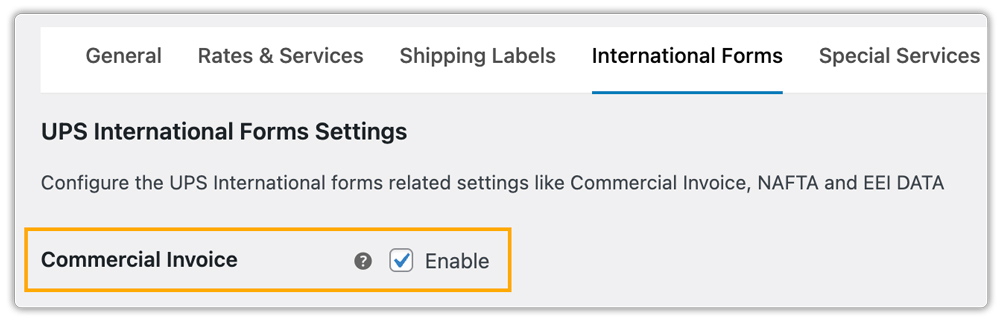
Once the plugin is installed, you can enable the Commercial Invoice directly from the plugin settings. This document is required for all UPS international shipments and is generated automatically using the order and product data already in your WooCommerce store — no manual entry needed.
Additional Compliance Options
Depending on your export destinations and business requirements, you can also enable additional compliance options from the plugin settings:
- EDI on Shipping Labels — Automates electronic data sharing with customs authorities for faster clearance at the destination.
- NAFTA Certificate — Generates origin certificates for shipments between the US, Canada, and Mexico, which can reduce or eliminate applicable duties.
- EEI Data — Adds required Electronic Export Information for high-value US shipments or those requiring special export licenses.
- Vendor Info — Allows the use of VCIDs (VAT Customer Identification Numbers) to verify VAT at the point of sale, particularly useful for shipments to the EU and UK.

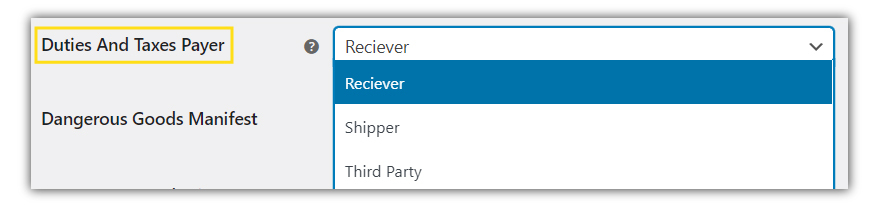
You can also configure who pays duties and taxes for each shipment directly within the plugin settings.
Within the plugin settings, you can also select the UPS international services you want to offer. UPS shipping rates for the selected services will automatically appear at checkout, giving customers transparent shipping costs.

You can generate and print UPS labels, commercial invoices, and any other required shipping documents directly from WooCommerce.

Improving Customer Experience for International Buyers
To deliver a smooth and reliable experience for your international customers, follow these practical tips:
- Combine UPS with Free or Flat Rates: Alongside UPS live international rates, you can offer free shipping or flat-rate options based on conditions like cart value or location using the WooCommerce Table Rate Shipping Pro Plugin.
- Show Estimated Delivery Dates: While delivery estimates are available in the UPS plugin, for better flexibility and customization, you can use the Estimated Delivery Date Plugin for WooCommerce.
- Control UPS Shipping Methods Display: Hide or adjust unwanted UPS services at checkout using the PH Hide WooCommerce Shipping Methods & Rate Adjustment Plugin to keep the checkout experience clean for customers.
- Use Multi-Carrier Shipping When Needed: If you ship with multiple carriers, the WooCommerce Shipping Services plugin helps you display rates from different carriers and compare them effectively.
- Regularly Test Your Checkout: Test your checkout with different locations and order scenarios to ensure UPS rates are displayed correctly at all times.
These strategies improve the shopping experience, build trust, and encourage repeat purchases from international customers.
Conclusion
Scaling your WooCommerce export business with UPS international shipping becomes far more manageable when the right tools are in place. Automate customs documentation and tracking updates with the WooCommerce UPS Shipping Plugin. Focus on growing your store globally.
Need help setting up UPS international shipping? Reach out to PluginHive Support.
FAQs
Q. Does the WooCommerce UPS Shipping Plugin support UPS international returns?
Yes, this plugin allows you to generate UPS return shipping labels to simplify handling returns globally. Check this guide for more info on how to manage UPS return shipments.
Q. Can multi-vendor WooCommerce stores use UPS for international shipping?
Yes. With the WooCommerce Multi-Vendor Shipping Addon, each vendor in your store can manage UPS international shipments independently, with labels and tracking automatically assigned per order.
Q. Does the WooCommerce UPS Shipping Plugin support UPS negotiated rates for international shipments?
Yes. If your UPS account includes negotiated rates, the plugin will automatically fetch and display your discounted rates at checkout, helping you offer competitive international shipping costs.
Q. What if a UPS international shipment is held at customs?
This is usually caused by missing or incorrect documentation, an invalid HS code, or non-compliance with the destination country’s import regulations. Double-check the commercial invoice and HS codes assigned to the products in your WooCommerce store
