


Shipping costs play a major role in WooCommerce’s profitability and customer conversions. Relying on standard FedEx published rates can increase checkout prices and reduce competitiveness. FedEx negotiated rates offer discounted shipping prices based on your shipping volume and account agreement with FedEx.
This guide explains how FedEx negotiated rates work in WooCommerce and how you can use them to save money on shipping.
On This Page
- What Are FedEx Negotiated Rates?
- Why WooCommerce Stores Should Use FedEx Negotiated Rates
- How to Display FedEx Negotiated Rates in WooCommerce
- Real-World Example
- Conclusion
- FAQs
What Are FedEx Negotiated Rates?
FedEx negotiated rates (discounted rates/ account rates) offered by FedEx to businesses based on their shipping volume, frequency, service usage, and contractual agreement with FedEx. These rates are lower than FedEx’s standard published rates and apply only to the specific FedEx account for which they are negotiated.
The discounts can vary depending on factors such as:
- Monthly or annual shipping volume
- Domestic vs international shipments
- Express, Ground, or Freight services
- Business type and shipping consistency
Negotiated rates often include reduced base shipping charges and, in some cases, discounts on fuel surcharges or additional services.
Why WooCommerce Stores Should Use FedEx Negotiated Rates
Using FedEx discounted rates helps merchants control shipping costs while offering accurate pricing at checkout.
Here’s why FedEx negotiated rates are important for WooCommerce stores:
- Lower Shipping Costs: Negotiated FedEx rates are discounted compared to published rates. Using these rates reduces per-order shipping expenses and helps stores save significantly as order volume increases.
- Better Margin Protection: When WooCommerce displays standard FedEx rates, store owners may absorb extra costs if negotiated discounts aren’t reflected at checkout. Showing negotiated rates ensures you charge what FedEx actually bills, protecting profit margins.
- Reduced Cart Abandonment: High or inflated shipping costs are a common reason for cart abandonment. Displaying lower, negotiated FedEx rates encourages customers to complete purchases.
- Competitive Shipping Options: Lower FedEx shipping rates allow WooCommerce stores to compete with larger retailers by offering more affordable delivery options without sacrificing reliability.
- Scales with Business Growth: As your shipping volume grows, FedEx may offer better negotiated discounts. WooCommerce automatically reflects these updated rates, making it easier to scale without manual rate adjustments.
Using FedEx negotiated rates helps WooCommerce stores maintain healthy margins and deliver a conversion-friendly checkout experience.
How to Display FedEx Negotiated Rates in WooCommerce
Displaying FedEx negotiated rates in WooCommerce is easy using the WooCommerce FedEx Shipping Plugin with Print Label. This plugin connects your store directly with FedEx and automatically displays discounted, account-based shipping rates at checkout instead of standard retail prices.
To configure the plugin in your WooCommerce store, refer to this guide: FedEx Shipping Guide for WooCommerce.
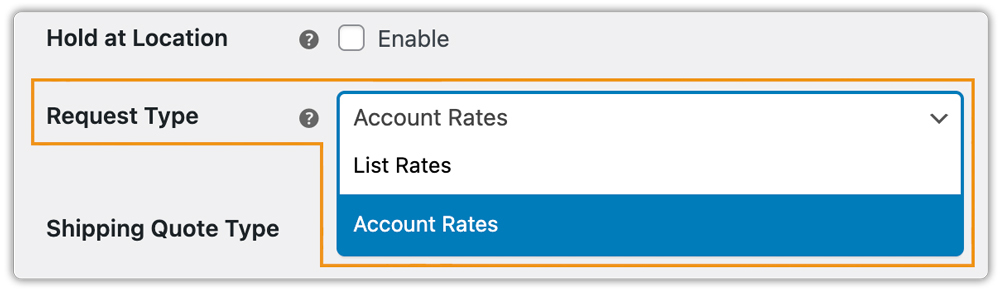
Simply set the Rate Request Type to Account Rates in the plugin settings. This allows WooCommerce to fetch your FedEx negotiated (account) rates rather than published retail rates.
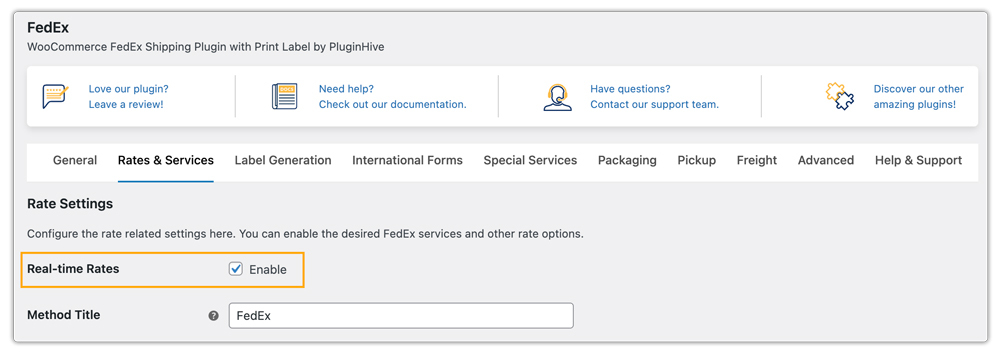
Next, enable Real-Time Rates Calculation. With this option turned on, the plugin requests live FedEx rates based on the order’s package weight, dimensions, destination, and selected FedEx services.
After completing the configuration, your WooCommerce store will automatically display FedEx negotiated shipping rates on the cart and checkout pages, ensuring customers always see accurate and discounted FedEx pricing before placing an order.

You can also print FedEx shipping labels directly from your WooCommerce dashboard using the same plugin. To learn more, refer to this guide: FedEx Label Printing in WooCommerce Made Easy.
Real-World Example: WooCommerce Store Reducing Costs with FedEx Negotiated Rates
Consider a WooCommerce furniture store based in Canada, shipping bulky items across Canada and to the US. The store processes 200-250 orders per month and primarily uses FedEx Home Delivery and FedEx International Economy. Initially, the store displayed FedEx list rates at checkout, while FedEx billed them lower negotiated account rates.
Before Using FedEx Negotiated Rates:
- Average FedEx Home Delivery cost: $26.80
- Average FedEx International Economy cost: $74.50
- Monthly FedEx shipping spend: ~$7,200
- High cart abandonment due to expensive freight-style shipping charges
After Enabling FedEx Negotiated Rates in WooCommerce via the WooCommerce FedEx Shipping Plugin:
- Average FedEx Home Delivery cost reduced to $20.90
- The average FedEx International Economy cost reduced to $58.30
- Monthly FedEx shipping spend reduced to ~$5,500
- Check out shipping prices dropped by 18-28%
Results
- Monthly savings: ~$1,700
- Annual shipping savings: ~$20,400
- Better profit margins with accurate shipping recovery
- Fewer customer complaints about “overpriced shipping.”
- Checkout rates aligned with actual FedEx invoices
By displaying FedEx negotiated rates in WooCommerce, the store solved pricing inconsistencies and protected profit margins.
Conclusion
FedEx negotiated rates help WooCommerce stores reduce shipping costs while keeping checkout prices accurate. For businesses that ship regularly with FedEx, enabling negotiated rates in WooCommerce is a simple way to align checkout pricing with actual FedEx invoices and support scalable growth.
Need help with setup or live rates? Reach out to support here: PluginHive Support.
FAQs
Q. Can I hide certain FedEx shipping methods based on package size or weight?
Yes. You can hide slower or unsuitable shipping methods for specific package conditions. The PH Hide WooCommerce Shipping Methods & Rate Adjustment Plugin can help you manage this effectively.
Q. Can I set different FedEx shipping rates based on cart weight, quantity, or product type?
Absolutely. Using the WooCommerce Table Rate Shipping Pro Plugin, you can define flexible FedEx shipping rules based on weight, quantity, destination, or product category.
Q. Can I offer multiple carriers along with FedEx?
Yes. With tools like the Multi-Carrier Shipping Plugin, you can offer FedEx alongside UPS, USPS, and DHL, reducing dependency on a single carrier.
Q. Can I provide advanced shipment tracking and delivery notifications for FedEx orders?
Yes. You can track orders with the FedEx plugin, but for advanced tracking features, you can use the WooCommerce Shipment Tracking Pro Plugin, which helps keep customers informed throughout the delivery process.
