


When you ship WooCommerce orders internationally with FedEx, generating a shipping label alone is not enough. Customs authorities require proper documentation, and the most important one is the commercial invoice. Without it, customs may delay your shipment, hold it for verification, or return it to your warehouse, which directly impacts your customer’s experience and your store’s reputation.
In this guide, you will learn how to generate FedEx commercial invoices directly from your WooCommerce store using the FedEx Shipping Plugin for WooCommerce with Print Label by PluginHive. We will cover the required setup, what information goes into the invoice, and how to verify it before dispatch, so every international shipment clears customs without a hitch.
Table of Contents
- What Is a FedEx Commercial Invoice in WooCommerce Shipping
- Requirements for Generating FedEx Commercial Invoices in WooCommerce
- How to Generate FedEx Commercial Invoices in WooCommerce
- How to Verify Your FedEx Commercial Invoice Before Shipping
- Real-World Example: Generating FedEx Commercial Invoices in WooCommerce
- Conclusion
- FAQs
What Is a FedEx Commercial Invoice in WooCommerce Shipping
A FedEx commercial invoice is a customs document you need when shipping products internationally from your WooCommerce store. It contains key shipment details, product descriptions, declared value, HS tariff codes, country of origin, and shipper and receiver information. Customs authorities use this document to assess duties, taxes, and import compliance before allowing the shipment into the destination country.
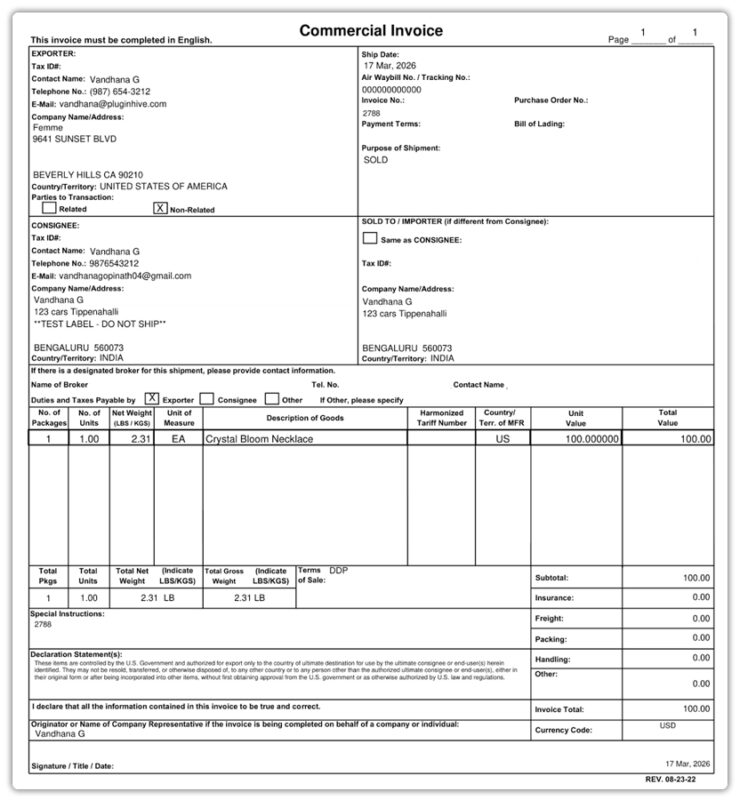
In simple terms, the commercial invoice acts as your shipment’s identity at the border. Providing accurate invoice details helps you avoid customs delays and ensures faster international deliveries.
Requirements for Generating FedEx Commercial Invoices in WooCommerce
Getting your commercial invoice right starts with having the correct information set up in your WooCommerce store. This is a one-time setup that makes every future international shipment smooth and invoice-ready automatically.
- A valid FedEx account with international shipping services enabled – sign up at fedex.com if you do not have one yet
- FedEx Shipping Plugin for WooCommerce with Print Label installed and configured: This connects your WooCommerce store directly to FedEx; follow the FedEx Plugin Setup Guide to get started
- HS Tariff Codes assigned to each product: Missing HS codes cause most commercial invoice failures at customs; learn how to set them up in the guide on HS Tariff Codes for FedEx Commercial Invoices
- Country of origin set on your products: Customs needs to know where you manufactured each product, not just where you’re shipping it from
- Clear, specific product descriptions: vague terms like “goods” or “items” are not acceptable at customs; write exactly what the product is
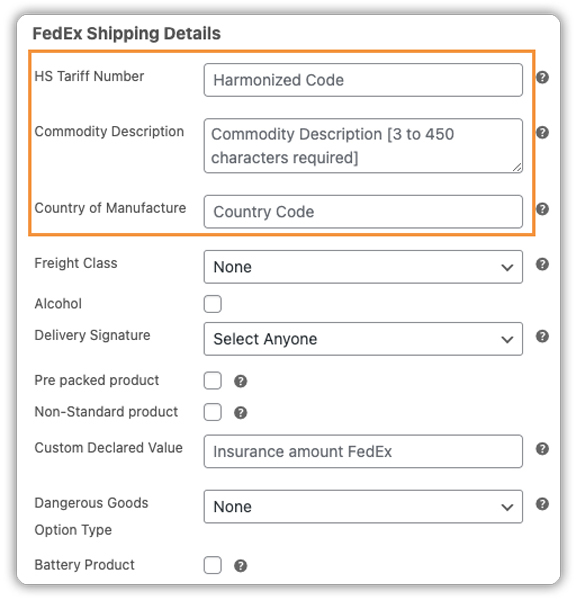
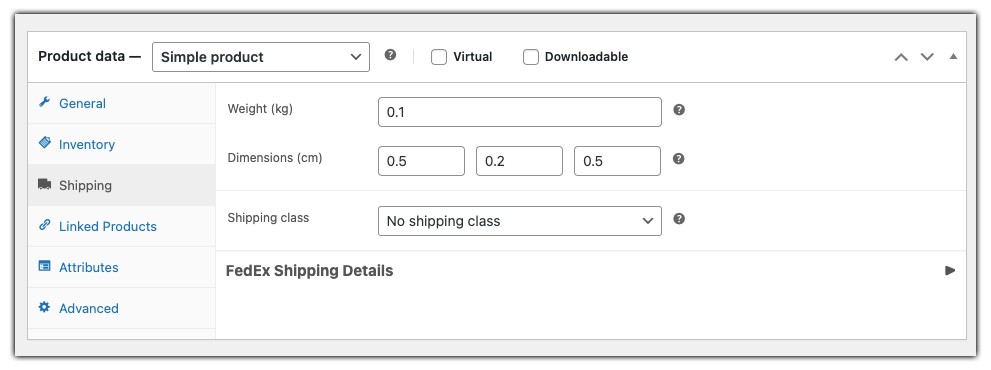
- Accurate product weights and dimensions: FedEx uses these for both shipping rate calculation and the packing details on the invoice
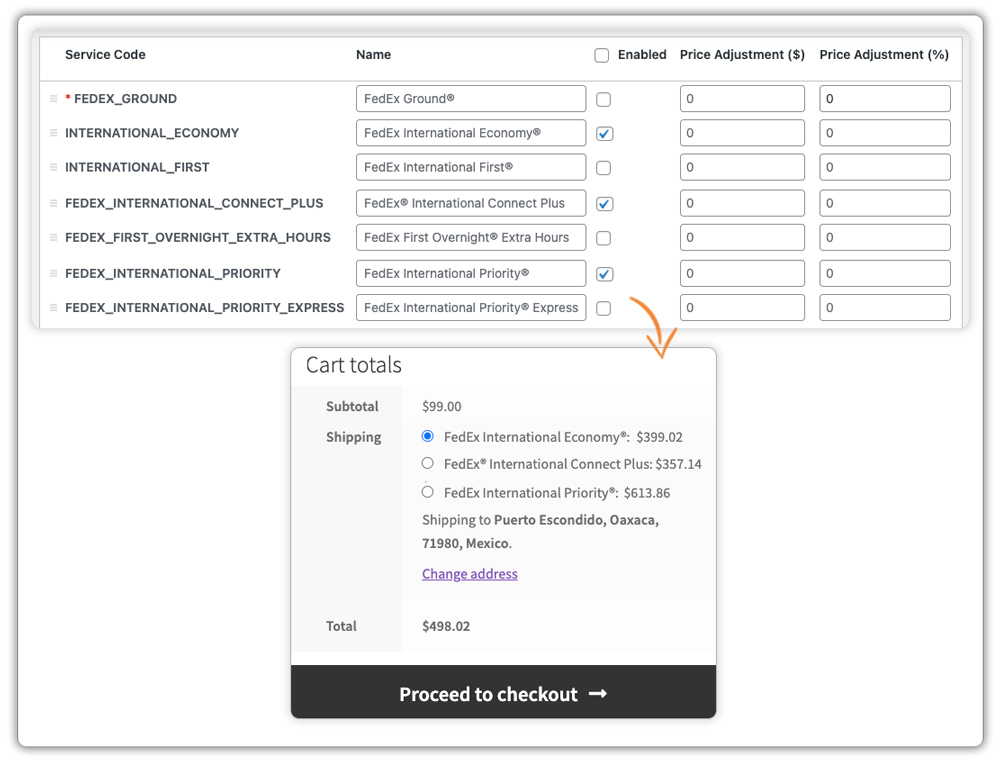
- Enable international FedEx services: Turn on options like International Priority or International Economy in the plugin settings.
Completing this setup ensures invoice generation happens automatically every time you create a shipment. It reduces manual effort and eliminates the most common causes of customs delays.
How to Generate FedEx Commercial Invoices in WooCommerce
After you configure your store, you can generate FedEx commercial invoices in just a few clicks. Here is exactly how to do it.
Enable Commercial Invoice
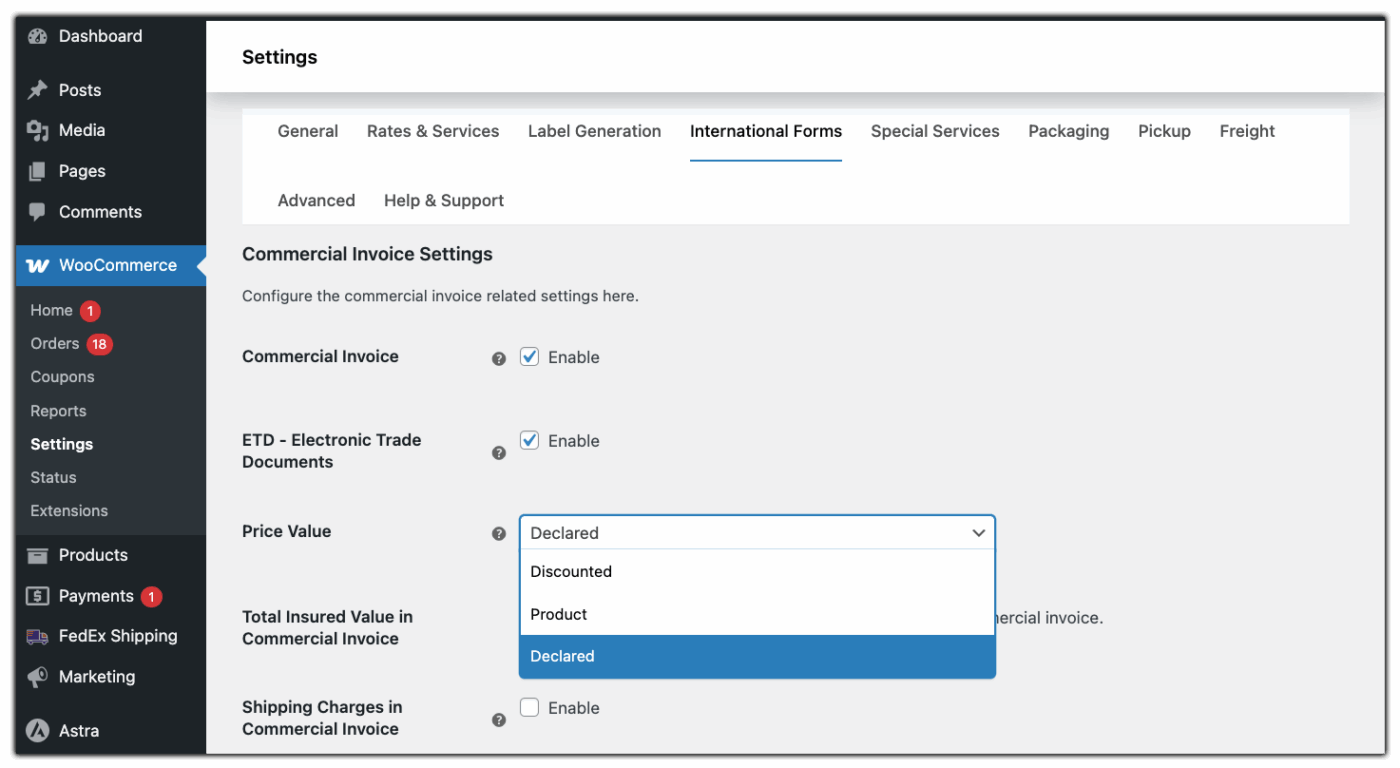
Go to WooCommerce → Settings → Shipping → FedEx and open the International Forms section. Enable the Commercial Invoice option so the plugin generates invoices automatically for international shipments. It is also recommended to enable Electronic Trade Documents (ETD) so customs paperwork is submitted digitally to FedEx. You can also choose how product prices appear on the invoice using the Price Value setting.
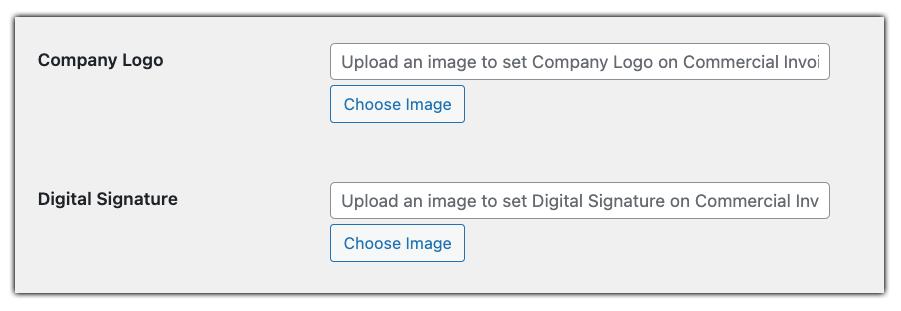
You may optionally upload your company logo or digital signature to make the document look more professional.
Optional Settings to Improve Invoice Details
You can also review a few optional settings to make customs processing smoother:
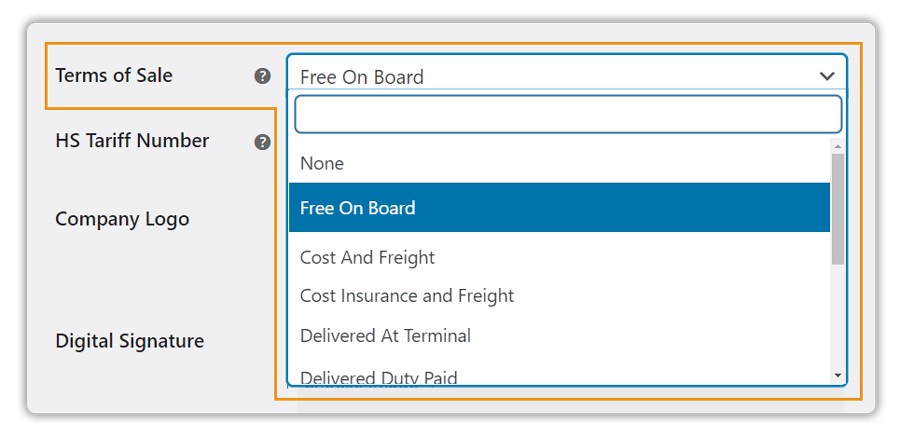
- Choose suitable Terms of Sale (Incoterms) such as DDP, DDU, FOB, CIF, or CFR
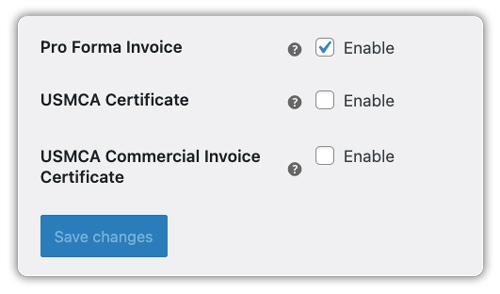
- Enable Pro Forma Invoice when you need estimated documents
- Activate the USMCA option for shipments between the US, Canada, and Mexico
These settings are optional but can help make your international shipping process clearer and more reliable.
Generate the Invoice From the Order
Open the international order from WooCommerce → Orders, click Generate Packages, and then click Calculate Cost & Create Shipment. Once the plugin creates the shipment, you can download both the shipping label and the commercial invoice PDF.
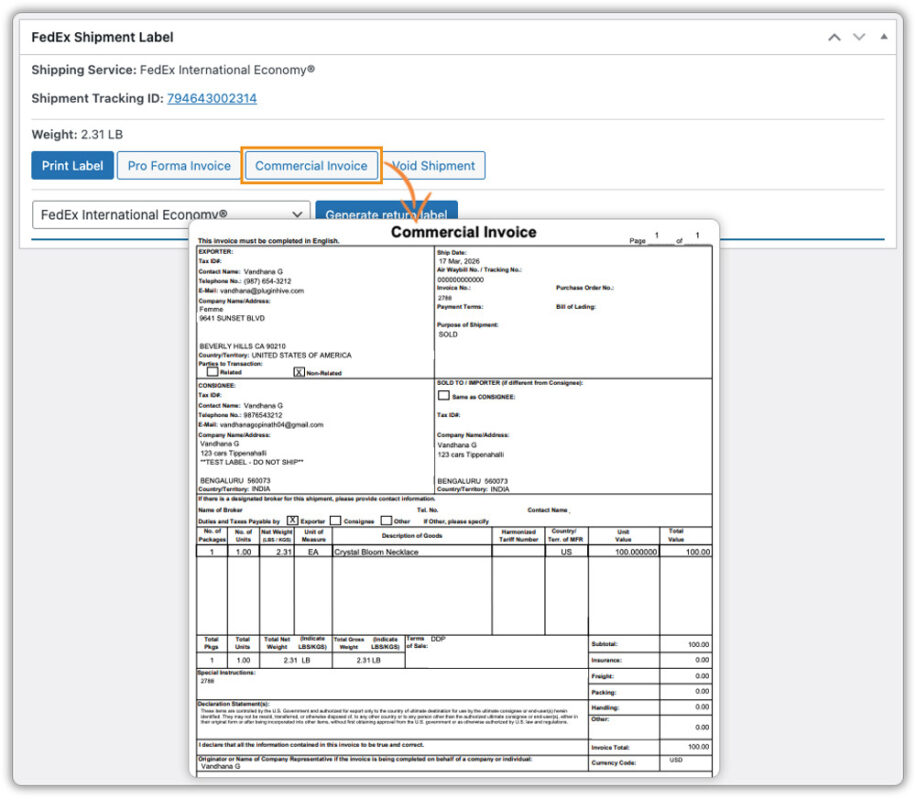
If ETD is enabled, the invoice is sent digitally; otherwise, you can print and attach it to the package.
The plugin pulls all product details, HS codes, declared values, and customer information directly from your WooCommerce order with no manual data entry needed. For stores processing high volumes of international orders, the plugin also supports bulk shipment creation so you can generate labels and invoices for multiple orders at once.
You can learn more in the guide on printing FedEx shipping labels in WooCommerce.
How to Verify Your FedEx Commercial Invoice Before Shipping
Once you generate the commercial invoice, do not attach it to the package and ship right away. Review the invoice before dispatch to prevent customs delays that are hard to fix once the package is in transit.
- Check that the product description is specific – Scan the invoice and flag any vague terms. “Ceramic coffee mug” passes customs. “Kitchenware” does not.
- Confirm the HS code is present for every line item – One missing HS code can put the entire shipment on hold, not just that product.
- Verify the declared value matches the order total – Cross-check the invoice against the WooCommerce order. Make sure it reflects any discounts and uses the correct currency.
- Check that shipper and recipient details are complete – A missing phone number or zip code is a common reason FedEx flags a shipment before it leaves your country.
- Confirm the country of origin is filled in – This field is easy to overlook. Customs officers check it on every international shipment.
- Make sure the terms of sale are correct – If you set DDP for a specific market, verify that it appears correctly on the invoice. An error here means your customer gets an unexpected duty bill on delivery.
- If ETD is not enabled, physically attach the invoice – Place it in a clear pouch on the outside of the package, not inside with the products.
Taking a minute to review your FedEx commercial invoice before dispatch can prevent costly shipment delays and improve international delivery reliability for your WooCommerce store.
Real-World Example: Generating FedEx Commercial Invoices in WooCommerce
Let’s say you run a WooCommerce store that sells handmade leather wallets. Your store is based in India, and you recently started shipping to customers in Germany and Canada. Domestic orders are fine, but the moment an international order comes in, you realize you have no idea how to generate a commercial invoice for it.
The Problem
Your first shipment to Germany gets held at customs. The invoice says “accessories” and the HS code field is blank. FedEx cannot process it. Your customer is waiting, and you are stuck manually filling in paperwork on the FedEx portal, spending 15 minutes on documentation for a single order.
The Solution
You install the FedEx Shipping Plugin for WooCommerce, assign HS codes to your products, update descriptions to something specific like “handstitched leather bifold wallet,” and enable the Commercial Invoice option in the plugin settings. ETD is turned on, so everything is submitted to FedEx digitally.
The Results
The next order to Germany ships without a single customs issue. Invoices generate automatically with every label, HS codes, and product details pull straight from WooCommerce, and what used to take 15 minutes now takes under 2. No portal, no manual entry, no delays. With documentation fully automated, you feel more confident accepting international orders and expanding your WooCommerce store globally.
Conclusion
Generating FedEx commercial invoices does not have to be a complicated or manual process. By using the FedEx Shipping Plugin for WooCommerce with Print Label by PluginHive, you can automate invoice creation and ensure that every international shipment includes accurate customs documentation. This helps reduce delays, improve delivery timelines, and enhance the overall customer experience.
If you are planning to grow your WooCommerce store globally, setting up automated commercial invoice generation is an important operational step. If you need help setting up this in your WooCommerce store, the PluginHive support team is ready to assist you with configuration and guidance.
FAQs
- Which shipment requires a commercial invoice from FedEx?
Any FedEx shipment crossing an international border requires a commercial invoice. So if you are shipping WooCommerce orders to customers in another country, a commercial invoice is mandatory every single time. The FedEx Shipping Plugin for WooCommerce with Print Label handles this automatically, so you never have to create one manually. - Are commercial invoices required for all international shipments?
Yes, without exception. Customs authorities in the destination country need this document to verify what is being shipped and calculate duties. Skip it, and your shipment gets held. There are no workarounds. - How to fill out a commercial invoice for international shipping with FedEx?
It needs to include product description, HS code, country of origin, declared value, shipper and recipient details, and terms of sale. With the FedEx Shipping Plugin for WooCommerce with Print Label, you do not fill this out manually; the plugin pulls everything from your WooCommerce store and generates the invoice automatically. - Do I need to pay a FedEx customs invoice?
It depends on how your shipment is configured. Under DDP, you, as the store owner, cover the duties. Under DDU, the customer pays on delivery. You can set this preference inside the plugin under International Forms settings before the shipment goes out.
