


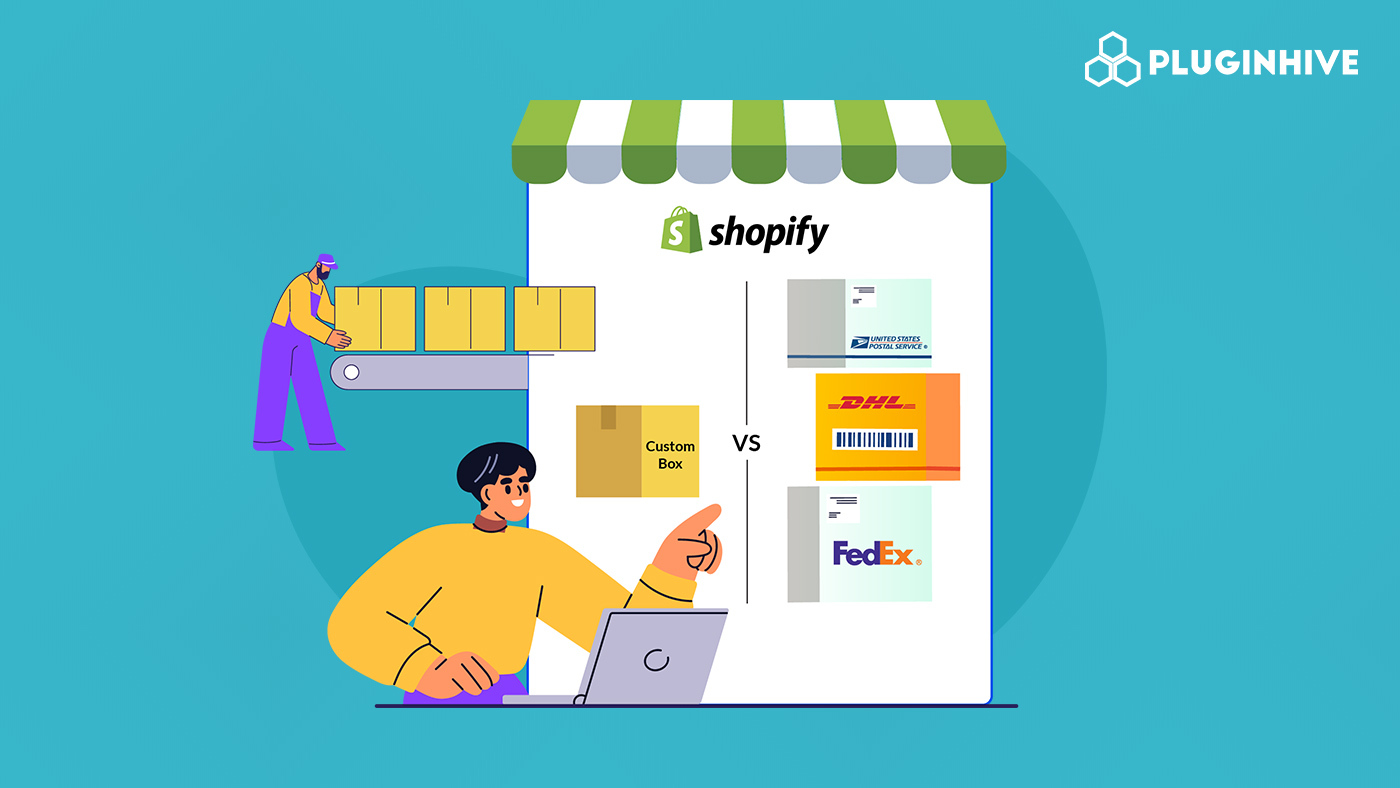
Smart packing isn’t just about putting products in a box; it’s one of the biggest factors that affects your Shopify shipping workflow, your delivery speed, and even your overall profit margins. For Shopify merchants, choosing the right packaging can mean the difference between paying accurate, optimized shipping costs or overspending on every single order.
FedEx gives sellers two main options: custom boxes that you create and configure yourself, and FedEx boxes supplied directly by the carrier. Both options have clear advantages, and both can fit into different parts of your fulfillment strategy depending on what you sell and how you ship.
Your packaging choice influences everything from how FedEx calculates your rates to how quickly your fulfillment team can pack orders and what your customers pay at checkout.
In This Article
- Understanding FedEx Carrier Boxes
- Cost Comparison: Custom Boxes vs FedEx Carrier Boxes
- Packaging Rules You Must Know for FedEx
- Best Use Cases For Boxes in Shopify
- How to Set Up Boxes in Shopify
- Conclusion
- FAQ’s
Understanding FedEx Boxes
FedEx boxes are the official, pre-made packaging options provided directly by FedEx. These are the familiar purple-and-orange-branded boxes you see at drop-off counters and FedEx stores.
You’ll find different types depending on the service you use:
- FedEx Express boxes – lightweight, sturdy, and available in small, medium, and large sizes
- FedEx Ground boxes – thicker options are better suited for heavier or bulkier products
- FedEx One Rate boxes – flat-rate packaging where you pay one predictable price based on box size and distance zones, not weight.
These ready-to-go options make it easy for Shopify merchants to ship quickly without worrying about custom sizing or material quality.
Pros of Using Carrier Boxes
- Predictable sizing: Each box size is standardized, which makes packing faster and reduces guesswork. Your team always knows exactly how much space they’re working with.
- Eligibility for FedEx One Rate: This is a big one. When you use eligible FedEx packaging, you unlock FedEx’s flat-rate pricing. This can significantly simplify your shipping costs, especially for lightweight but fast shipments where traditional dimensional weight pricing might be higher.
- Widely accepted and fulfillment-friendly: Carrier boxes fit perfectly into FedEx’s workflow. They’re instantly recognized, easy to scan, and designed to move smoothly through FedEx sorting facilities.
Cons of Using Carrier Boxes
- Limited flexibility: You’re restricted to the size options FedEx provides. If your products don’t fit neatly into these boxes, you’ll either waste space or struggle trying to make them work.
- Not ideal for custom or irregular products: Bulky shapes, fragile items, or anything requiring specific padding may not sit well in a standard carrier box. That’s where custom packaging wins.
- Not always the cheapest option: Even though FedEx One Rate can be cost-effective, carrier boxes aren’t automatically the lowest-cost choice. If the package is small and lightweight, custom boxes can reduce dimensional weight and end up cheaper.
Cost Comparison: Custom Boxes vs FedEx Boxes
Dimensional Weight (DIM) Impact
When shipping with FedEx, size matters just as much as weight. FedEx uses dimensional weight to calculate rates for many Ground and Express shipments. This means your shipping cost is based on the space your box takes up in the truck or plane, not just what it weighs.
Here’s where packaging choice becomes important:
- Larger boxes = higher DIM weight = higher shipping cost
- Right-sized custom boxes = more accurate DIM weight = lower cost
For many Shopify merchants, custom boxes can significantly reduce DIM weight because you’re not paying for unused space. If your product fits tightly in a custom-sized box, you avoid the inflated costs that come from using oversized packaging.
On the flip side, FedEx boxes are standardized. If your product is smaller than the box, you may end up paying more simply because of the extra air inside.
Custom boxes shine here when:
- Your items are compact or flat
- You ship many lightweight but bulky items
- You want to reduce shipping costs without sacrificing protection
FedEx One Rate Eligibility
FedEx One Rate is a flat-rate shipping program available only when you use specific FedEx carrier boxes or envelopes. This is where carrier packaging becomes a financial advantage.
Carrier boxes can save you money when:
- Your shipment is lightweight, but traveling long distances
- You want predictable pricing regardless of minor weight differences
- Your products naturally fit into FedEx’s One Rate boxes or Paks
In these cases, One Rate can beat the cost of using a custom box, especially for Express 2-day or overnight deliveries.
However, if your product doesn’t fit in a One Rate box, you lose this advantage.
Packaging Rules You Must Know for FedEx
General FedEx Packaging Guidelines
No matter which type of box you choose, custom or Carrier, FedEx expects packages to meet certain standards.
Here are the basics every Shopify merchant should follow:
- Use sturdy, corrugated cardboard boxes that can handle the weight of the item inside
- Avoid packaging that’s too tight or too loose
- Cushion items with bubble wrap, foam, or kraft paper to prevent movement
- Seal all openings with strong packing tape (preferably the H-taping method)
- Remove old labels, barcodes, or addresses to prevent scanning issues
These rules apply to both FedEx Ground and Express shipments and help ensure your packages arrive safely.
Restrictions for Custom Packaging
If you’re using your own custom boxes, FedEx applies a few extra expectations to ensure they meet shipping standards.
- Minimum durability: Your custom box must be strong enough to withstand compression, vibration, and drops during the shipping process.
- Sealing and cushioning requirements: FedEx requires that
- All seams are fully sealed with pressure-sensitive packing tape
- Hollow or fragile items are cushioned on all sides
- Delicate products shipping internationally have enough internal protection to survive rough handling
If a package doesn’t meet these standards, FedEx may repackage it, delay it, or deny claims if damage occurs.
Best Use Cases For Shipping Boxes in Shopify
When to Use FedEx Boxes
FedEx carrier boxes are a great fit when your shipping needs line up with speed, simplicity, and predictable pricing. Here’s when they shine:
- Fast, flat-rate shipments: If you rely on FedEx One Rate, carrier boxes are the clear winner. You get consistent pricing no matter where the package is going.
- Uniform product sizes: If your products fit neatly into standard box shapes like phone accessories, small electronics, cosmetics, or apparel carrier boxes, simplify packing.
- Perfect for small electronics, accessories, and apparel: FedEx’s predefined box sizes are well-suited for lightweight items that don’t need custom protection.
In short, FedEx boxes are best when your shipments are consistent, light to medium in size, and you want fast, predictable shipping options.
When to Use Custom Boxes
Custom boxes give you full control over packaging, making them ideal when you’re selling products that don’t conform to standard box sizes.
- Bulky or irregular products: If you ship items that are oddly shaped, fragile, or larger than standard dimensions, custom boxes let you fit the product snugly and safely.
- Branded unboxing experience: A custom box with your logo or unique design instantly elevates the customer experience.
- Reducing DIM weight on heavier items: Right-sized boxes help keep dimensional weight in check. If you’re shipping heavier or denser items, a compact custom box can significantly reduce what you pay for FedEx Ground or Express.
Custom boxes are the smarter choice when branding, product protection, and cost optimization are top priorities.
How to Set Up FedEx Boxes in Shopify
Before you can use custom boxes or FedEx carrier boxes inside Shopify, you’ll need to use an app that supports advanced FedEx packaging options. The best way to do this is through PH Ship Rate & Track for FedEx.
Custom Boxes
If you use your own packaging, the PH Ship Rate & Track for FedEx app lets you add custom box dimensions easily.
Here’s how to set them up:
- Open the PH Ship Rate & Track for FedEx app
Go to the app dashboard. - Go to “Package Settings”
This section allows you to define your custom box sizes.

- Add your custom box dimensions
Enter:- Length
- Width
- Height
- Empty box weight
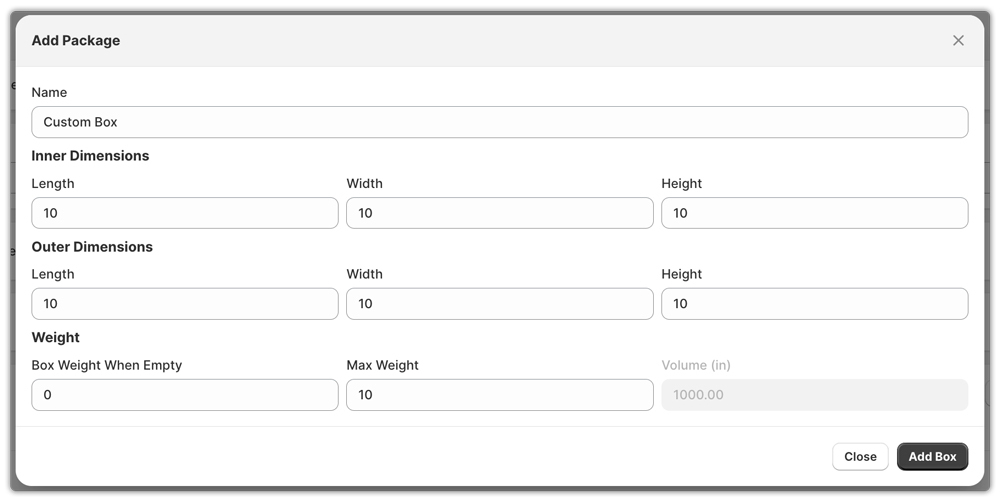
- Add as many unique box types as you need.
- Save your packaging list
The app will now use these boxes automatically when calculating rates and generating shipping labels.
This setup ensures accurate shipping rates, reduces dimensional weight issues, and helps customers see more precise FedEx rates at checkout.
FedEx Carrier Boxes
If you want to use official FedEx packaging, the setup is just as simple using the PH Ship Rate & Track for FedEx app.
- Add your FedEx account to the app
Once your account is connected, the app activates all FedEx services, including Ground, Express.
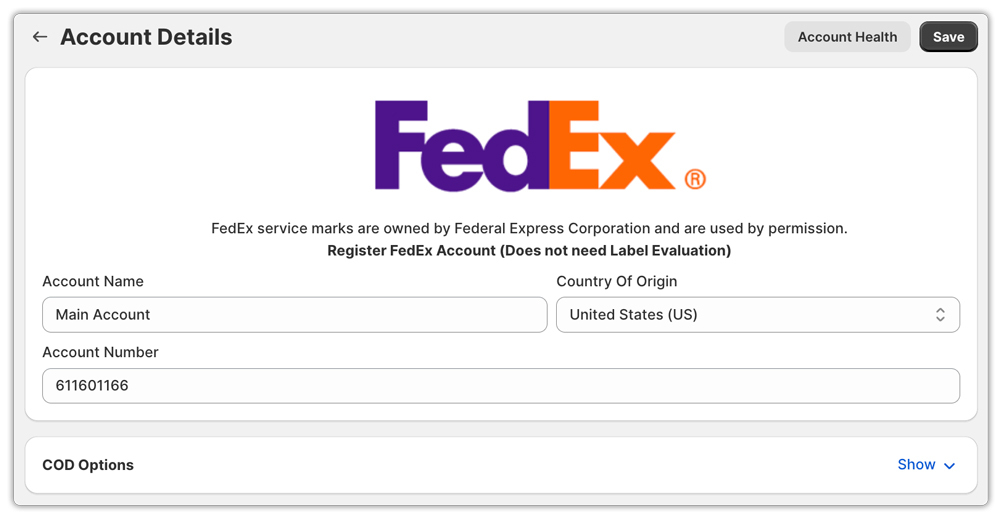
- Enable FedEx-branded carrier boxes
After integration, all eligible FedEx boxes are directly added to the packages.
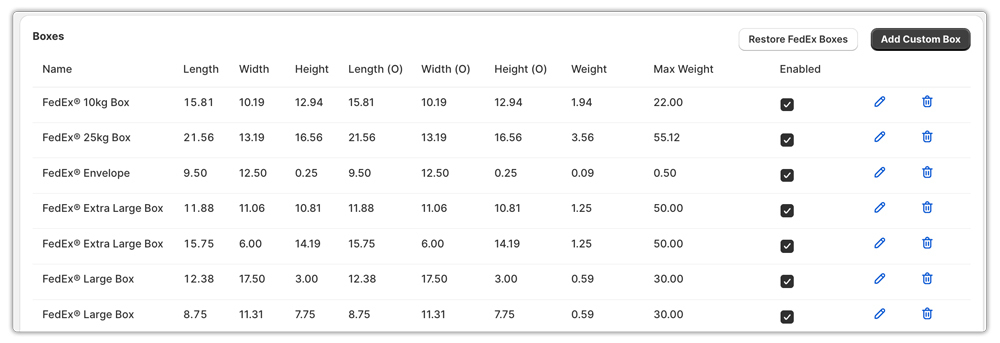
- Let the app choose the best box
The app can automatically select the right FedEx box for each order or let you choose manually when printing labels.
Once boxes are configured and the order is fulfilled, merchants can also automate tracking for packages with FedEx carrier boxes in the same app.
Conclusion
Smart packing isn’t just a behind-the-scenes task; it’s a core part of running a profitable and efficient Shopify business. Whether you choose FedEx boxes or custom packaging, each option plays a different role in controlling your shipping costs, improving delivery speed, and making your fulfillment workflow smoother.
FedEx boxes give you speed, simplicity, and access to FedEx One Rate’s flat-rate pricing, making them ideal for uniform products and fast Express shipments. Custom boxes, on the other hand, offer better sizing accuracy, stronger branding potential, and lower DIM weight, perfect for irregular items or merchants who want a premium customer experience.
The key is knowing when to use each option and setting everything up properly inside Shopify. With the PH Ship Rate & Track for FedEx app, you can easily manage both types of packaging, automate rate calculations, reduce mistakes, and ensure customers always see accurate shipping options at checkout.
FAQ’s
1. Are custom shipping boxes worth it?
Yes, custom shipping boxes are worth it if you have unique or irregular products. They reduce wasted space, improve product protection, and can lower your FedEx shipping costs by minimizing dimensional weight. They also offer better branding for a premium unboxing experience.
2. Can I use any packaging for FedEx?
Yes. You can use any sturdy, undamaged packaging for most FedEx services. You must only use FedEx-branded packaging when shipping with FedEx One Rate. If reusing a box, make sure all old labels and barcodes are completely covered.
3. Does FedEx provide free boxes to ship something with them?
Yes. FedEx offers free FedEx Express envelopes, packs, poly bags, boxes, and tubes. You can pick them up at any FedEx location or order them online, and most supplies arrive within 2–5 business days.
