


Shipping with FedEx offers WooCommerce merchants a reliable and efficient way to deliver products to customers around the world. To further enhance this reliability, features like FedEx Declared Value and liability coverage provide an extra layer of protection for your shipments, especially for high-value items. These tools ensure that packages are handled with care and that your business is safeguarded in case of unforeseen issues.
In this guide, we’ll explain how FedEx Declared Value and liability coverage work, highlight their key differences, and share practical steps for WooCommerce merchants to use them effectively. You’ll also discover tips for managing FedEx shipment claims and maximising the protection of your valuable orders, giving both you and your customers peace of mind.
Table of Contents
- Understanding FedEx Declared Value and Liability Coverage
- Easily Protect Your WooCommerce Shipments with Declared Value
- Tips for WooCommerce Merchants
- Conclusion
- FAQs
Understanding FedEx Declared Value and Liability Coverage
Many WooCommerce merchants confuse declared value with standard liability coverage. You should know that FedEx includes default coverage with every shipment, but it is not a full insurance plan. Relying on it for high-value items can cause significant financial losses if a package is lost or damaged.
Declared Value is the amount you assign to a shipment to indicate its worth. It determines the maximum amount FedEx will reimburse if something happens to your package. This is especially important for high-value shipments, as it ensures your investment is properly recognised and protected.
Liability Coverage refers to FedEx’s responsibility for your shipment. Standard liability provides basic protection, but it may not fully cover expensive items. By using declared value, you increase the coverage and make it easier to recover costs in case of loss or damage.
Declared Value vs. Liability Coverage – Key Differences
To make it easy for WooCommerce merchants, let’s break down the difference between declared value and liability coverage:
| Feature | Declared Value | Liability Coverage |
|---|---|---|
| Purpose | Assigns shipment value for claims | FedEx’s responsibility for loss/damage |
| Coverage Limit | Up to the declared value | Standard limit; may be less than high-value shipments |
| Extra Cost | May increase shipping cost | Usually included with shipment |
| Relation to Insurance | Optional; not full insurance | Provides basic coverage only |
Important Considerations:
- Fees: Declaring a higher value incurs an additional fee, and the cost varies by service. For example, some U.S. ground and express services charge a minimum fee for declared values up to $300.
- Documentation: In the event of a claim, you must be able to provide documentation proving the item’s value, such as a receipt.
- High-Value Items: Be aware that certain items, such as artwork, jewellery, and antiques, have a maximum declared value of only $1,000.
For WooCommerce merchants, understanding this distinction is key. Declared value is like adding extra protection for valuable orders, while liability coverage ensures FedEx takes responsibility for your package up to the declared amount. Together, they help keep both your business and your customers secure.
Easily Protect Your WooCommerce Shipments with Declared Value
Shipping high-value products with WooCommerce can feel risky, especially if FedEx’s default liability coverage of $100 is not enough. Fortunately, the WooCommerce FedEx Shipping Plugin with Print Label makes it easy to protect your shipments using Declared Value and Third-Party Insurance.
Note: Before setting the declared value or insurance, configure your store’s FedEx Shipping Plugin. This connects your WooCommerce store to FedEx, allowing you to manage shipments, print labels, and enable insurance options directly from your dashboard.
Once configured:
- Declare the Value for Each Product
On the individual product page, enter the Declared Value for each high-value item. This value represents the maximum amount FedEx will reimburse if the shipment is lost or damaged. Once entered, the plugin sends the declared value to FedEx, and shipping rates are adjusted accordingly.

- Enable Third-Party Insurance
After declaring product values, you can enable Third-Party Insurance. This optional coverage protects the entire product value, going beyond the standard liability coverage provided by FedEx. For example, FedEx Ground® Economy shipments include a default coverage of $100, but Third-Party Insurance ensures the coverage matches the total product value.

You can also set a minimum order amount so that third-party insurance applies only to orders above this threshold. Once enabled, the declared product amount is sent to FedEx as the insured amount, ensuring that any lost or damaged shipment is processed based on the full coverage.
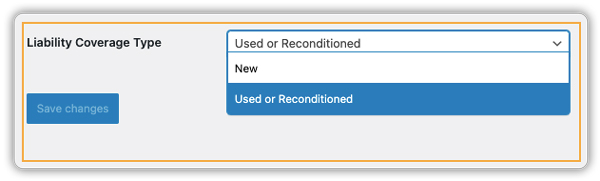
For freight shipments, you can select a Liability Coverage Type under the Freight tab.
- Handling Multiple Products in the Cart
When a customer orders multiple items with declared values, the plugin automatically sums all the values and sends the total insured amount to FedEx. Shipping rates are recalculated based on the combined declared value, ensuring transparency and accurate charges across all items in the cart.

- Generate Shipping Labels and Commercial Invoice
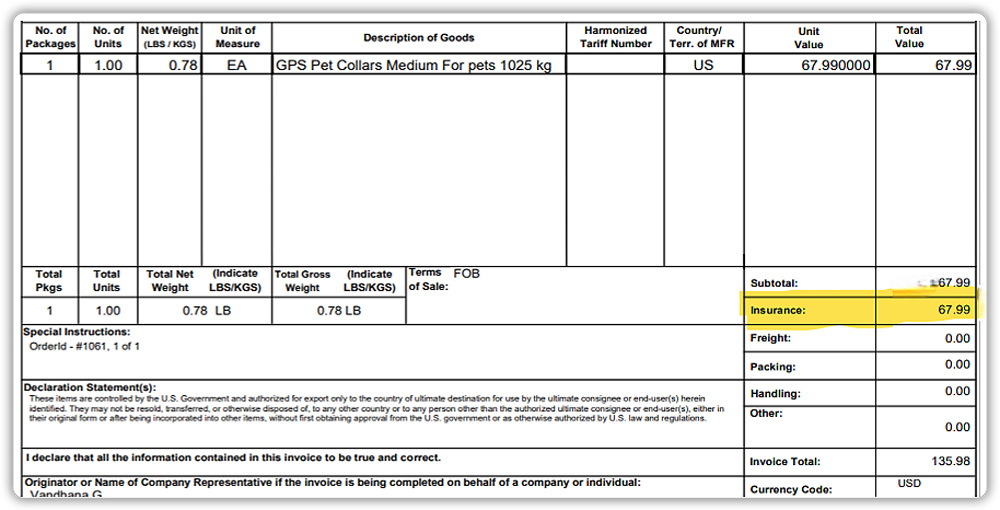
The plugin generates FedEx-compliant shipping labels and includes declared value and insurance details in the Commercial Invoice (CI) for international shipments. This information is essential for claims and customs clearance, making the process faster and more accurate if a package is lost or damaged.
Benefits of Using Declared Value and Third-Party Insurance
- Extra Protection: Covers high-value shipments beyond default FedEx liability.
- Simplified Claims: Faster reimbursement from FedEx.
- Automation: Rules automatically apply the declared value or insurance for qualifying products.
- Customer Confidence: Buyers gain security knowing FedEx protects their orders.
Tips for WooCommerce Merchants
Shipping valuable products requires a little extra care. By using FedEx Declared Value and the options available in the WooCommerce FedEx Shipping Plugin with Print Label, you can make sure your WooCommerce shipments are better protected. Here are some simple tips to follow:
- Declare High-Value Orders: Always declare the correct value for shipments worth more than $100 to avoid losses.
- Use Insurance When Needed: For expensive or fragile products, enable third-party insurance for full protection.
- Keep Proof of Value: Save invoices or receipts since FedEx requires them when processing claims.
- Check Product Restrictions: Some items (like jewellery or artwork) have maximum declared value limits; know these before shipping.
By following these best practices, WooCommerce merchants can reduce risks, simplify claim handling, and give customers a more reliable delivery experience.
Conclusion
Protecting your WooCommerce shipments with FedEx Declared Value and liability coverage is an easy way to minimise risks and safeguard your business. By using the WooCommerce FedEx Shipping Plugin, you can automate declared value, enable insurance when required, and generate shipping labels with all the right details, saving time and reducing manual effort.
If you ever need assistance with setup or have questions about shipment protection, you can always reach out to PluginHive’s support team for expert guidance. This ensures your WooCommerce store runs smoothly while giving your customers confidence in every delivery.
FAQs
Q1: Does WooCommerce FedEx support declared value for high-value shipments?
Yes. WooCommerce merchants can set a declared value for individual products or orders via the WooCommerce FedEx Shipping Plugin with Print Label. This increases FedEx’s liability above the default $100.
Q2: Is declared value the same as full insurance in WooCommerce shipments?
No. Declared value increases FedEx’s liability but doesn’t guarantee full reimbursement. For full protection, you’d need additional insurance beyond what the declared value covers.
Q3: Do WooCommerce merchants need documentation for declared value claims?
Yes. FedEx requires evidence, such as receipts or invoices, to process a declared value claim.
Q4: Is some product protection automatically included when shipping via WooCommerce and FedEx?
FedEx automatically provides standard liability coverage of $100 per shipment at no cost, even if you don’t add a declared value.
