



WooCommerce stores that ship with FedEx often find that large or heavy items exceed standard parcel limits, requiring FedEx Freight services. Freight shipments involve pallets, oversize rules, freight classifications, and additional surcharges, making it important for merchants to understand how it works. For stores selling furniture, equipment, or bulk items, accurate freight rates and proper packaging are essential.
This guide covers FedEx oversize rules, pallet requirements, accessorial and residential surcharges, and how to enable FedEx Freight seamlessly in WooCommerce.
On This Page
- Understanding FedEx Oversized & Freight Shipping for WooCommerce
- FedEx Pallet Requirements for WooCommerce Shipments
- FedEx Freight Classification and Surcharges in WooCommerce
- FedEx Freight Shipping in WooCommerce
- Conclusion
- FAQs
Understanding FedEx Oversized & Freight Shipping for WooCommerce
For WooCommerce stores shipping large or heavy items, understanding FedEx’s “oversized” and “freight” definitions is essential. These guidelines directly impact how shipping rates are calculated, which services can be offered at checkout, and whether unexpected surcharges are applied.
1. FedEx Oversized Package Thresholds
- FedEx applies an oversize charge to parcels when they exceed 96 inches in length or 130 inches in length + girth.
- For oversized parcels, FedEx uses the greater of the actual (rounded) weight or the dimensional weight (“DIM”) to bill.
- There’s a minimum billable weight of 90 lb for oversize packages.
In a WooCommerce context, this means you need to make sure the product dimensions (length, width, height) and weights are correctly entered in your shipping settings. Otherwise, you may undercharge or face surcharge surprises when FedEx recalculates on its side.
2. When FedEx Considers a Shipment as Freight
- A shipment is classified as Freight (LTL or “Less-Than-Truckload”) when either:
- The weight is over 150 lb, or
- The combined length + girth exceeds 165 inches.
- Once the shipment is freight, parcel-level services and parcel-level surcharges (like oversize) may no longer apply. Instead, freight rates are calculated based on freight class (such as NMFC class), the pallet or skid dimensions, weight, and any accessorial services.
For WooCommerce merchants, this distinction is critical; if a product or order item is going to be freight rather than parcel, the store’s shipping logic (or plugin) should detect that and quote the correct freight rate.
3. Dimensional Weight & Billing Calculations
- FedEx uses a dimensional (DIM) weight formula to determine billing weight where volume is high.
- For freight, the greater of the actual weight and the DIM weight is used for billing.
Properly measuring product dimensions in your WooCommerce backend is crucial because incorrect dimensions will lead to underquoting or overbilling. Your customers could see wrong shipping rates, and you could face surcharges when FedEx bills.
FedEx Pallet Requirements for WooCommerce Shipments
When your WooCommerce store’s orders qualify for FedEx Freight, it’s important to prepare pallets or skids according to FedEx’s official freight-shipping packaging guidelines.
Here are the key requirements for pallets, based on FedEx’s service guide:
- Base & Forklift Access:
- Shipments must be placed on a pallet, skid, or other handling base that is accessible by both forklift and pallet jack.
- The base must allow pallet-jack entry from two sides, with at least 3.5 inches of clearance.
- Stackability:
- Pallets must be stackable; otherwise, FedEx applies a non-stackable surcharge.
- You must band individual skids or pieces weighing over 150 lb / 68 kg with metal or unbreakable plastic strapping around all sides to secure them to the pallet.
- If a piece over 150 lb is not banded, you must place it in a hardened container (such as plywood or metal) and secure it with a lock or clamp. You cannot rely on glue, nails, or screws.
- You must obtain prior FedEx approval for skids that weigh more than 2,200 lb or exceed 70 inches in height, 119 inches in length, or 80 inches in width.
- Overall Freight Shipment Limits:
- For LTL freight, shipment weight can go up to 15,000 lb.
- A freight shipment (or pallet) may weigh up to 20,000 lb, and individual pallets may go up to 20 feet in length.
- Avoid overhanging pallets: products should stay within the pallet dimensions. Overhanging products increase the risk of damage and may invalidate claims.
These pallet requirements ensure your freight moves safely through the FedEx network and prevent avoidable accessorial charges that commonly affect oversized or heavy shipments.
FedEx Freight Classification and Surcharges in WooCommerce
FedEx Freight rates are influenced by several factors. For WooCommerce stores shipping large, bulky, or palletised items, understanding these elements is essential
Freight Classifications
FedEx uses NMFC freight classes to categorise shipments. Freight class is generally based on density, stowability, handling, and liability.
For a full explanation of freight classes and how they affect WooCommerce shipping, refer to: FedEx freight shipping in WooCommerce.
Common FedEx Accessorial Surcharges
FedEx applies additional fees when extra handling or restricted conditions apply. The most important surcharges for WooCommerce shipments include:
- Residential Delivery Surcharge – applied when delivering to homes.
- Liftgate Pickup/Delivery – required where no dock or forklift exists.
- Limited Access Surcharge – schools, farms, construction sites, military facilities, etc.
- Inside Delivery Fee – when freight must be moved beyond the threshold.
- Non-Stackable Pallet Fee – for pallets that cannot be safely stacked.
- Appointment Delivery Fee – scheduled or timed delivery windows.
- Address Correction Fee – if the provided delivery address is inaccurate.
Reweigh & Measurement Adjustments
FedEx may reweigh or re-measure freight. If actual dimensions or weight differ from the shipment details entered in WooCommerce, FedEx can add:
- Reweigh fees
- Reclassification adjustments
- Corrected freight charges
These surcharges significantly impact freight costs and should be considered when offering freight options at WooCommerce checkout.
FedEx Freight Shipping in WooCommerce
The WooCommerce FedEx Shipping Plugin makes it simple to ship oversized, palletised, or heavy products using FedEx LTL services.
For step-by-step plugin configuration, refer to the PluginHive FedEx Shipping Guide for WooCommerce.
Once you configure the plugin, enable FedEx Freight in the plugin settings and add your FedEx Freight account details.
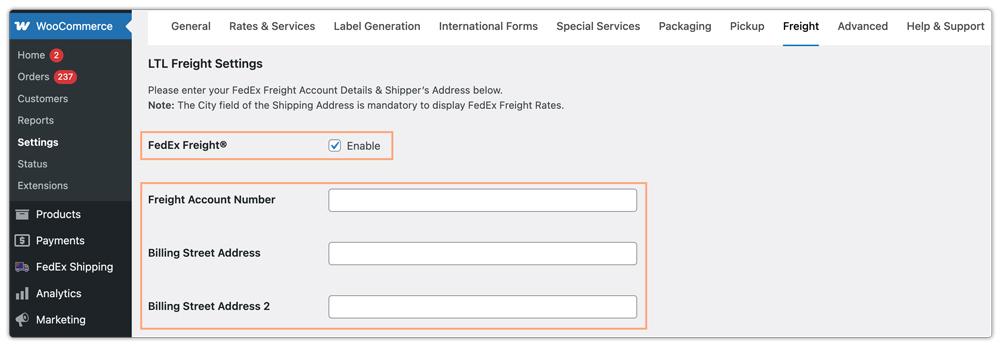
Set a default freight class in the general settings. You can also define it at the product level, which overrides the global value. Enable accessorials like Liftgate Delivery and others, and the system will automatically add the applicable charges at checkout based on the customer’s selection.

You can choose which FedEx Freight services to display at checkout, and the plugin will show them only when the cart contains freight-eligible products.
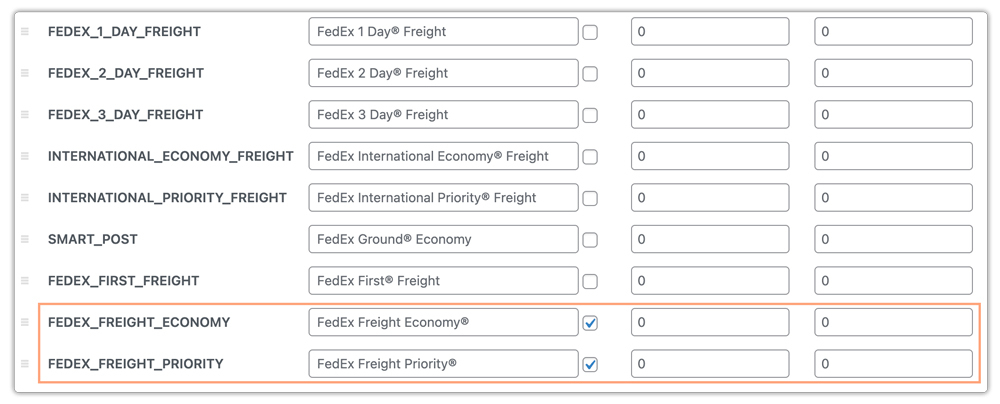
The plugin retrieves live freight rates based on product dimensions, total shipment weight, freight class, and destination ZIP code.

You can also generate and print the FedEx Freight Bill of Lading (BOL) directly from the WooCommerce Orders page without logging into the FedEx portal.

After generating labels, the plugin allows you to schedule FedEx pickups and provides customers with automated tracking details, ensuring a smooth shipping and delivery experience.
Conclusion
Shipping oversized or palletised products with FedEx requires understanding the requirements and accessorial surcharges. By following FedEx’s freight guidelines and preparing shipments correctly, WooCommerce merchants can keep fulfilment smooth, avoid unexpected fees, and deliver a reliable experience to customers.
For help setting up FedEx Freight in WooCommerce, contact PluginHive Support.
FAQs
- Can I show estimated delivery dates for FedEx Freight in WooCommerce?
Yes. FedEx Freight provides transit times that you can display at checkout. For greater flexibility, such as adding cut-off times, holidays, and custom delivery rules, you can use the Estimated Delivery Date Plugin for WooCommerce.
- How can I add signature requirements to my FedEx shipments?
FedEx offers several signature options: Indirect, Direct, and Adult Signature Required. To learn how to enable this, visit: FedEx Signature on Delivery for WooCommerce.
- Does FedEx Freight support residential deliveries?
Yes, but FedEx applies a Residential Delivery Surcharge. In WooCommerce, make sure the system correctly detects the customer’s address type so it includes the appropriate surcharge in the rate.
- Apart from FedEx Freight, what other freight carriers can I use in WooCommerce?
You are not limited to FedEx. WooCommerce merchants can also ship freight using: PH ODFL Freight Shipping Plugin (reliable U.S. LTL service) and TForce Freight Shipping Plugin (ideal for heavy, bulky, and palletised shipments).
- Can I ship both parcel and freight items in the same WooCommerce order?
It’s possible, but FedEx may treat them separately. Most merchants choose to restrict mixing freight-eligible items with normal products to avoid incorrect rate calculations or multiple shipments.
