


Shipping costs play a major role in your WooCommerce store’s profitability. Even small rate changes can affect your margins. That’s why adjusting and controlling your shipping rates is essential, not optional. With smart FedEx rate adjustments, you can fine-tune what customers pay and maintain stable profits.
This guide explains why FedEx rate adjustments matter and how you can easily manage them for your WooCommerce store.
On This Page
- Why WooCommerce Stores Need Rate Adjustments
- What are FedEx Rate Adjustments
- How to Adjust FedEx Rates in WooCommerce
- Real-World Example
- Conclusion
- FAQs
Why WooCommerce Stores Need Rate Adjustments
WooCommerce stores often rely on FedEx live rates for accurate shipping costs, but real-world conditions usually demand more flexibility. FedEx rate adjustments help bridge the gap between carrier-calculated rates and your store’s operational needs. Here’s why they matter:
- Cover Additional Operational Costs: FedEx live rates don’t include packaging material, labor, storage, or handling expenses. Adding a small markup ensures these hidden costs don’t reduce your profit margins.
- Run Discounts or Free Shipping Offers: If you offer free shipping, festival deals, or reduced shipping charges, rate adjustments let you reduce or override FedEx rates without disrupting your standard pricing strategy.
- Avoid Undercharging or Overcharging: FedEx rates change due to fuel surcharges, peak season fees, or location-based variations. Adjustments help stabilize your checkout pricing so customers aren’t charged too little or too much.
- Improve Customer Experience: Predictable and transparent shipping costs reduce customer confusion and cart abandonment. With proper adjustments, you can deliver consistent and customer-friendly pricing.
- Maintain Profitability and Competitiveness: Ultimately, FedEx rate adjustments give WooCommerce stores the control they need to stay profitable, competitive, and operationally efficient, without compromising customer trust.
What Are FedEx Rate Adjustments for WooCommerce Stores
FedEx rate adjustments refer to changes in the final shipping charges beyond the base rate quoted at checkout. For WooCommerce merchants, these adjustments help account for real-world shipping variables, ensuring the shipping cost reflects what’s actually required for each parcel.
Factors Influencing FedEx Rates
Key factors that cause FedEx to adjust shipping charges, and a WooCommerce store should be aware of when calculating shipping costs.
- Dimensional Weight vs. Actual Weight: FedEx calculates charges using either actual weight or dimensional (DIM) weight, whichever is greater. Dimensional weight reflects the space the package takes up, not just how much it weighs. This means even light but bulky packages can incur higher charges. For more information on FedEx packaging, visit: Understand the Packing Methods of WooCommerce FedEx
- Special Handling, Oversize & Additional Handling Fees: If a package is unusually large, heavy, or requires extra handling (e.g., non-standard packaging, oversized dimensions, freight-type items), FedEx applies surcharges such as “Additional Handling” or “Oversize Charge.”
- Fuel Surcharges & Variable Fees: FedEx updates fuel surcharges and other variable fees periodically. These surcharges (fuel, remote-area delivery, holiday, or peak-season demand surcharges) can add to the base shipping cost.
- Date, Demand & Seasonal/Peak-Period Surcharges: During high-demand periods or peak shipping seasons, surcharges, handling fees, or changed pricing criteria may apply, impacting final shipping costs.
Because of these variables, the final FedEx charge can end up higher than the original quote. That’s why rate adjustments are often needed for accurate cost management.
Managing FedEx Rate Adjustments in WooCommerce
You can’t control FedEx’s real-time rates or the surcharges they add, but you can control your profit margin, cover extra handling costs, or offer discounts by adjusting rates within WooCommerce using the right tools.
Use a Reliable FedEx Shipping Plugin
You can use the PluginHive WooCommerce FedEx Shipping Plugin, which fetches accurate live FedEx rates at checkout, factoring in weight, dimensions, surcharges, and accessorial fees automatically.
Adjust Rates Strategically
The plugin allows you to apply rate adjustments directly in WooCommerce. You can add or subtract a fixed amount or a percentage to manage unexpected surcharges, avoid losses, and keep pricing fair for your customers.
Let’s explore in detail how you can adjust FedEx rates effectively within your store.
How to Adjust FedEx Rates in WooCommerce
To adjust FedEx rates in your WooCommerce store, you need to install and activate the WooCommerce FedEx Shipping Plugin with Print Label.
For step-by-step installation and setup, refer to the FedEx Shipping Guide for WooCommerce.
Once the plugin is configured, you can enable the FedEx services you want to offer. The plugin will automatically fetch real-time FedEx rates with all applicable surcharges.

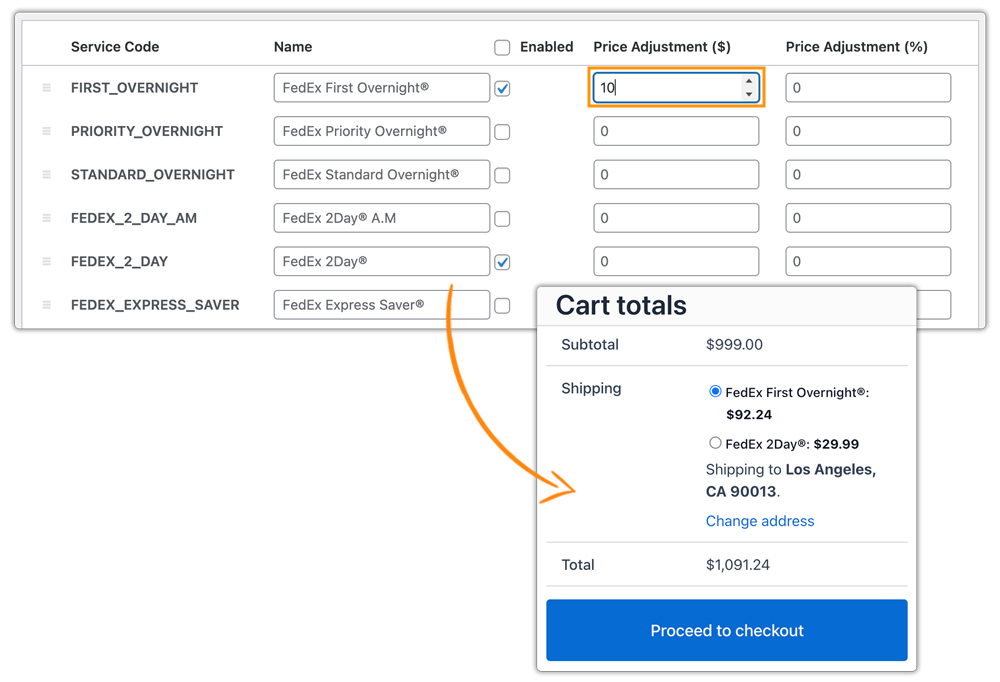
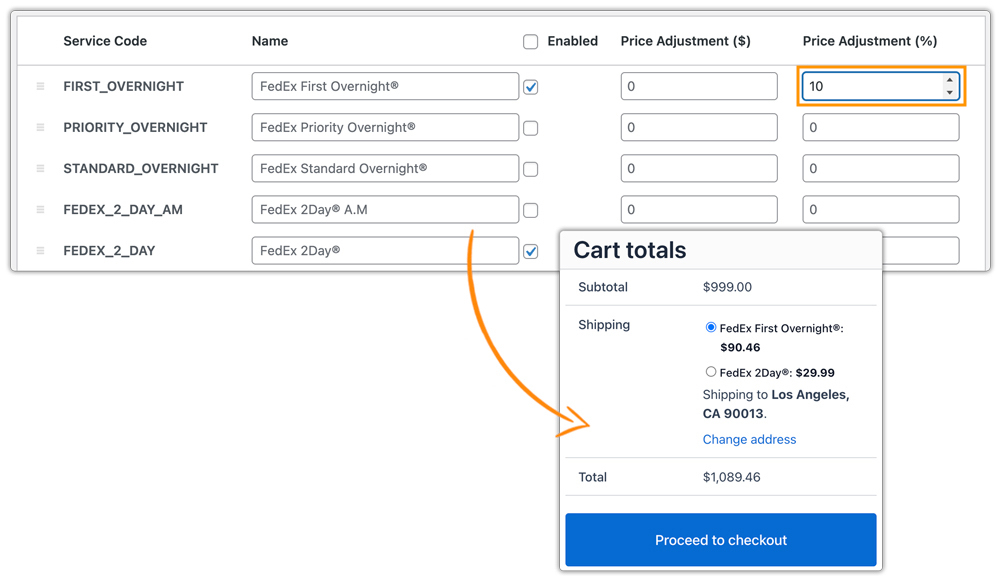
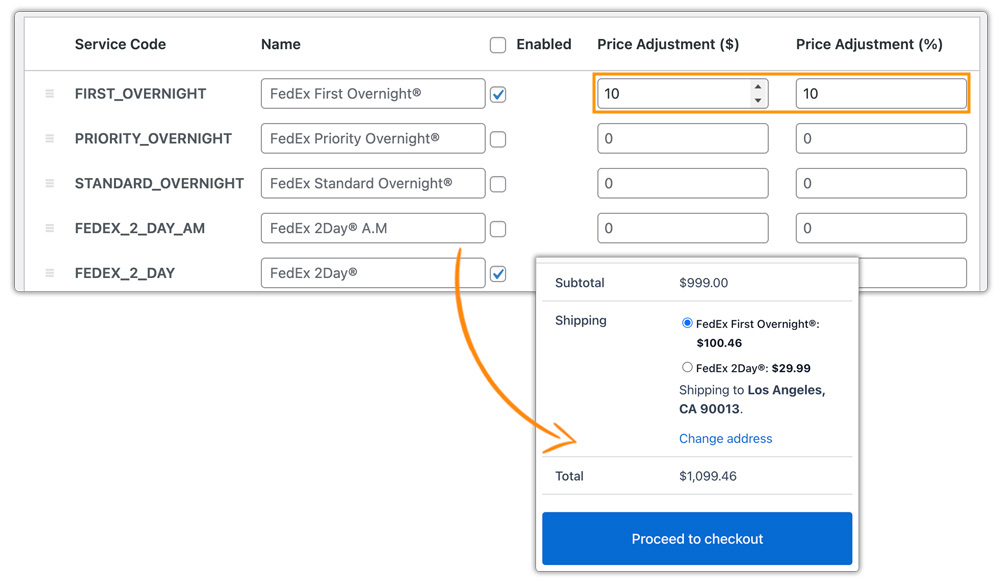
With rate adjustment settings, you can increase or decrease the displayed FedEx shipping cost by applying a fixed amount or percentage. Use the minus sign (–) to reduce the shipping cost. Let’s understand with example scenarios.
Scenario 1: Fixed Price Adjustment
FedEx First Overnight shipping cost: $82.24
Adjustment: +$10
Displayed Cost: $92.24
Scenario 2: Percentage Adjustment
FedEx First Overnight shipping cost: $82.24
Adjustment: +10%
Displayed Cost: $90.46
Scenario 3: Fixed + Percentage Adjustment
FedEx First Overnight shipping cost: $82.24
Adjustment: +$10 and +10%
Displayed Cost: $100.46
For more control, you can create advanced shipping rules or conditionally hide/modify FedEx services using plugins like WooCommerce Table Rate Shipping Pro Plugin and PH Hide WooCommerce Shipping Methods & Rate Adjustment Plugin, ensuring your rate adjustments work exactly the way your store needs.
Real-World Example: WooCommerce Store Managing FedEx Rate
A US-based WooCommerce apparel and accessories store was consistently experiencing unexpected losses whenever they shipped orders via FedEx. Although they displayed live FedEx rates at checkout, the final billed amount from FedEx frequently came in higher than expected. Their key challenges included:
- Unpredictable FedEx Charges: DIM weight pricing, fuel surcharges, and special handling fees often pushed the actual shipping cost above what customers had paid.
- Discount-Heavy Sales Strategy: The store regularly ran free-shipping weekends and seasonal discounts, but because they didn’t adjust FedEx rates within WooCommerce, they unintentionally absorbed additional carrier fees.
- Cash Flow Strain: Staff had to manually correct shipping charges or refund overpayments, slowing down payout cycles and disrupting the store’s cash flow.
Solution:
After enabling FedEx rate adjustments using the WooCommerce FedEx Shipping Plugin, the store transformed its shipping process:
- Accurate Real-Time FedEx Rates: Customers now see precise shipping costs that factor in weight, dimensions, and FedEx surcharges automatically.
- Strategic Rate Adjustments: The store added a small fixed markup to cover packaging and handling, and applied controlled discounts inside the plugin for promotional campaigns.
- Steady Cash Flow: Accurate checkout pricing meant fewer refunds, fewer adjustments, and a more predictable revenue cycle.
- Operational Efficiency: The finance and fulfillment teams drastically reduced time spent correcting shipping-related discrepancies.
This US-based example highlights how smart FedEx rate adjustments can protect profit margins, support sales promotions, and ensure consistent cash flow for WooCommerce stores.
Conclusion
Controlling shipping costs is key to keeping your WooCommerce store profitable. FedEx rate adjustments give you the flexibility to refine prices, prevent margin loss, and stabilize costs. With smart adjustments, you can run promotions confidently and avoid unexpected expenses.
For help setting up your FedEx shipping configuration or rate strategy, reach out to the support team here: Pluginhive Support.
FAQs
Q. Do duties and taxes affect my FedEx shipping cost in WooCommerce?
Yes, duties and taxes definitely affect the shipping cost. Learn more in this guide: FedEx duties and taxes for WooCommerce
Q. Can I edit the estimated delivery date shown to customers at checkout if FedEx already provides one?
Yes, you can. Use the Estimated Delivery Date Plugin for WooCommerce to modify and customise the delivery dates displayed at checkout according to your business needs.
Q. Can I track my FedEx orders in WooCommerce?
Yes! You can track FedEx shipments directly from your WooCommerce store. For more flexibility in WooCommerce order tracking, you can use the WooCommerce Shipment Tracking Pro Plugin.
Q. Can I offer FedEx along with other carriers like UPS or USPS in WooCommerce?
Yes. With the Multi-Carrier Shipping Plugin for WooCommerce, you can display real-time FedEx, UPS, USPS, and DHL rates together and let the customer choose the best option.
