


Shipping is crucial to customer satisfaction for WooCommerce stores, and accurate order tracking updates are key to building trust. FedEx, a leading shipping provider, is commonly used by WooCommerce merchants for its reliability. At times, however, tracking delays or missing updates can frustrate store owners and customers.
This article will cover the common reasons for order tracking issues, how to resolve them, and how the FedEx Shipping Plugin for WooCommerce can streamline FedEx shipments, ensuring better customer experiences.
Article Contains:
- Why Tracking Updates Matter in WooCommerce
- Common Reasons for Tracking Issues with FedEx in WooCommerce
- A Smarter Way to Manage FedEx Shipping in WooCommerce
- How the Plugin Ensures Accurate FedEx Tracking in WooCommerce
- Case Study: WooCommerce Store Shipping Perishable Goods
- Conclusion
- FAQs
Why Order Tracking Updates Matter in WooCommerce
Customers often ask, “Where is my order? (WISMO)” Providing timely, accurate order tracking updates is the best way to answer that question.
Here’s why tracking updates matter for WooCommerce stores:
- Customer Transparency: Real-time shipment tracking updates allow customers to track their shipments and know exactly when to expect their orders, reducing uncertainty.
- Improved Customer Satisfaction: Providing accurate shipment tracking updates helps reduce anxiety, especially for time-sensitive or high-value items.
- Reduced Customer Service Inquiries: With easy access to order tracking information, customers can check the status of their orders themselves, reducing the volume of inquiries to your customer support team.
- Proactive Issue Resolution: Timely shipment tracking updates allow store owners to quickly identify any delays or issues with shipments.
- Increased Customer Loyalty: Stores that offer reliable order tracking are more likely to foster customer trust and loyalty.
Common Reasons for Tracking Issues with FedEx in WooCommerce
Tracking issues with FedEx can arise from various factors that disrupt the flow of information between WooCommerce and the carrier, such as:
1. Entering Tracking Numbers Manually
When store owners manually enter tracking numbers instead of using automated systems, there’s a risk of entering incorrect or incomplete information, leading to tracking issues.
2. Forgetting to Mark Orders as Fulfilled
If store owners forget to mark orders as fulfilled in WooCommerce after dispatching the order with FedEx, shipment tracking updates won’t be triggered, leaving customers without visibility into their shipments.
3. No Direct Integration with FedEx
Without a direct integration between WooCommerce and FedEx, tracking information may not sync automatically, resulting in delayed or missing updates for customers.
4. Using Tools That Don’t Sync Tracking Updates Properly:
Some third-party tools or plugins may not handle tracking updates effectively, causing delays or inaccuracies in how FedEx tracking information is displayed to customers.
5. Label Not Generated Through a Supported Method:
If shipping labels are not generated using FedEx-approved methods, such as through the FedEx Shipping Plugin for WooCommerce, tracking information might not be properly communicated, leading to issues with updates.
Understanding these common issues can help you ensure that tracking information is consistently accurate and up to date. Let’s explore how to tackle these issues effectively.
A Smarter Way to Manage FedEx Shipping in WooCommerce
If you’re wondering how to tackle all these order tracking issues and streamline your FedEx shipping process, don’t worry, there is a solution available for you. The FedEx Shipping Plugin for WooCommerce with Print Label takes the hassle out of managing shipping by automating FedEx shipping rate calculations, label printing, and real-time order tracking updates directly within WooCommerce. This integration ensures store owners can provide accurate, timely updates and a seamless shipping experience without manual errors or delays.
How the Plugin Ensures Accurate FedEx Tracking in WooCommerce
The FedEx Shipping Plugin for WooCommerce simplifies the process of ensuring accurate FedEx tracking by automating key shipping tasks directly from your store.
To get started with integrating the FedEx plugin in your WooCommerce store, refer to the detailed guide: FedEx Shipping Guide for WooCommerce .
Here’s how it works:
1. Generates FedEx Labels and Tracking Numbers:
With every order, the plugin lets you generate FedEx shipping labels directly from your WooCommerce store and automatically assigns the correct tracking number.
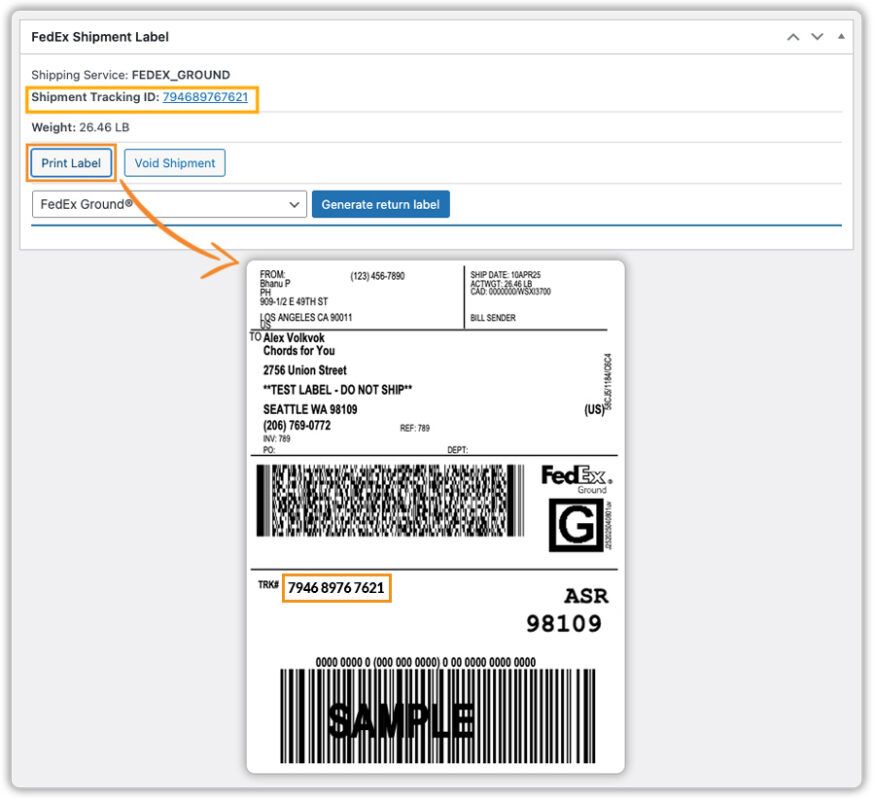
This number is fetched in real-time from FedEx and appears under the tracking section on the order page.

2. Automatic Shipment Confirmation and Tracking Details:
Once the order status is updated to Completed, the plugin automatically sends a shipment confirmation email to the customer. This email includes the FedEx tracking number(s) with clickable links to view the real-time shipment status on the FedEx website.
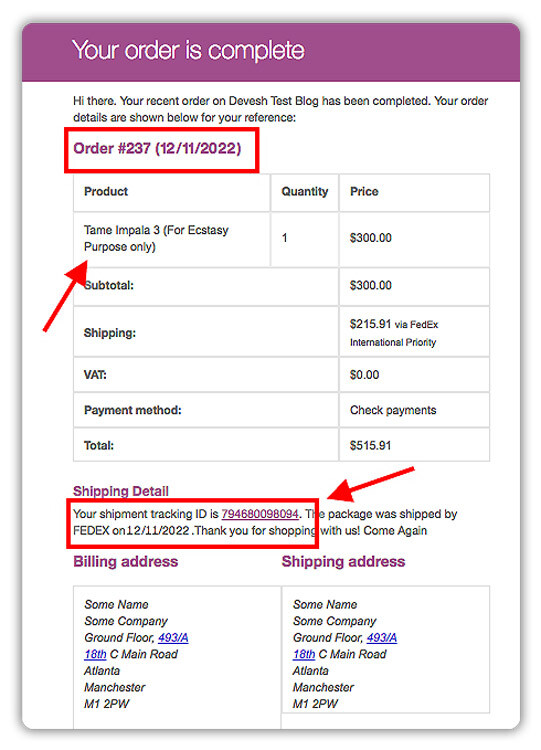
Customers can also track their orders from the My Account page.
3. Instantly Updates Tracking Info in WooCommerce Orders:
As soon as FedEx updates tracking status, the plugin syncs that information back to the WooCommerce order, providing both store owners and customers with the latest status.
This enables customers to track their orders directly, enhancing transparency and communication.
Case Study: WooCommerce Store Shipping Perishable Goods
A WooCommerce-based specialty food retailer regularly ships frozen and perishable items across the U.S. using FedEx. The store faced frequent issues like:
- Manual entry errors when inputting tracking numbers
- Delayed tracking updates leading to customer anxiety
- Customers are not receiving any tracking updates
- Difficulty managing bulk shipments during high-volume seasons
After implementing the FedEx Shipping Plugin for WooCommerce with Print Label:
- Automated label generation and real-time tracking sync eliminated manual tasks and human errors.
- Orders were marked as fulfilled automatically, triggering instant shipment confirmation emails with order tracking links.
- Customers began receiving timely updates and could track their orders directly from both the email and the My Account page.
- The store owner saved several hours each week and reported a 30% drop in customer service inquiries related to “Where is my order?”
The WooCommerce FedEx Shipping Plugin can make a big difference, especially for stores handling time-sensitive or perishable shipments.
Conclusion
Missing or delayed FedEx tracking updates can frustrate customers and lead to unnecessary support requests. With the FedEx Shipping Plugin for WooCommerce, you can automate tracking updates, reduce manual errors, and keep customers informed in real time. It’s a smart way to improve both customer satisfaction and operational efficiency.
Need help getting started? Contact PluginHive Support.
FAQs
- Can customers track their orders from their account?
Yes, customers can access real-time FedEx tracking information from the My Account > Orders page in your WooCommerce store.
- What happens if I cancel an order after generating the shipping label?
If an order is canceled after the label has been created, you can void the label in the plugin settings to prevent charges from FedEx.
- Can I receive notifications when there’s a tracking update for my FedEx shipments?
Yes, the FedEx Shipping Plugin for WooCommerce can automatically send shipment confirmation emails with tracking information to customers. You can also set up notifications for specific tracking status changes, like when a package is delayed or out for delivery.
- Can I manually update FedEx tracking information in WooCommerce?
While the FedEx plugin automatically syncs tracking data, you can manually update or edit the tracking information in WooCommerce if needed by updating the order status or entering tracking numbers directly.
- How often does FedEx update tracking information?
FedEx typically updates tracking information in real-time as the package moves through its system. However, there may be slight delays depending on the shipping method, location, and system processing times.
