


Connecting FedEx to your WooCommerce store starts with one important detail: your FedEx account number. Whether you’re displaying live shipping rates, printing shipping labels, or enabling FedEx tracking inside WooCommerce, you need a valid FedEx account number to authenticate with FedEx services. Without it, the integration will not work. Many WooCommerce store owners are unsure where to locate their FedEx account number, especially if the account was created long ago or managed by another team member.
This guide explains how to find your FedEx account number and connect it properly to WooCommerce.
On This Page
- What Is a FedEx Account Number
- How to Find Your FedEx Account Number for WooCommerce
- How to Connect a FedEx Account to a WooCommerce Store
- Steps to Integrate Your FedEx Account in WooCommerce
- Conclusion
- FAQs
What Is a FedEx Account Number?
A FedEx account number is typically a 9-digit numeric identifier assigned to your FedEx shipping account. FedEx Shipping rates, FedEx labels, tracking, and pickup requests made from WooCommerce are linked to this account number. If your FedEx account has negotiated or discounted shipping rates, those rates are also tied to your account number and automatically apply when shipping through FedEx.
How to Find Your FedEx Account Number for WooCommerce
Method 1: FedEx Online Account (Fastest)
This is the easiest and most reliable method. Log in to your FedEx account at FedEx.com, then:
- Go to My Profile
- Select Account Management
- Your FedEx account number will appear under your shipping account information.
Method 2: FedEx Invoice
Your FedEx account number appears on FedEx invoices, usually in the top-right section under account information. If you have a recent invoice PDF or printed copy, you can quickly find it there.
Method 3: FedEx Welcome Email
When you created your FedEx account, FedEx sent a confirmation email containing your account details. Search your inbox for emails from FedEx with terms like:
- “Welcome to FedEx.”
- “FedEx Account Confirmation”
Method 4: Contact FedEx Support
If you cannot access your FedEx account or invoices, contact FedEx Customer Support. After verifying your business information, FedEx can help retrieve your account number.
How to Connect a FedEx Account to a WooCommerce Store
WooCommerce does not offer built-in FedEx integration. To display live FedEx shipping rates, print labels, schedule pickups, and manage FedEx shipping directly from WooCommerce, you need a shipping plugin.
The connection requires:
- Your FedEx account number
- Your FedEx account validation through the plugin
- Your WooCommerce store address
Once ready, you can connect to FedEx using the FedEx Shipping Plugin for WooCommerce with Print Label, which integrates directly with FedEx REST APIs to provide real-time shipping functionality inside WooCommerce.
Steps to Integrate Your FedEx Account in WooCommerce
After installing the FedEx Shipping Plugin for WooCommerce with Print Label, follow these steps:
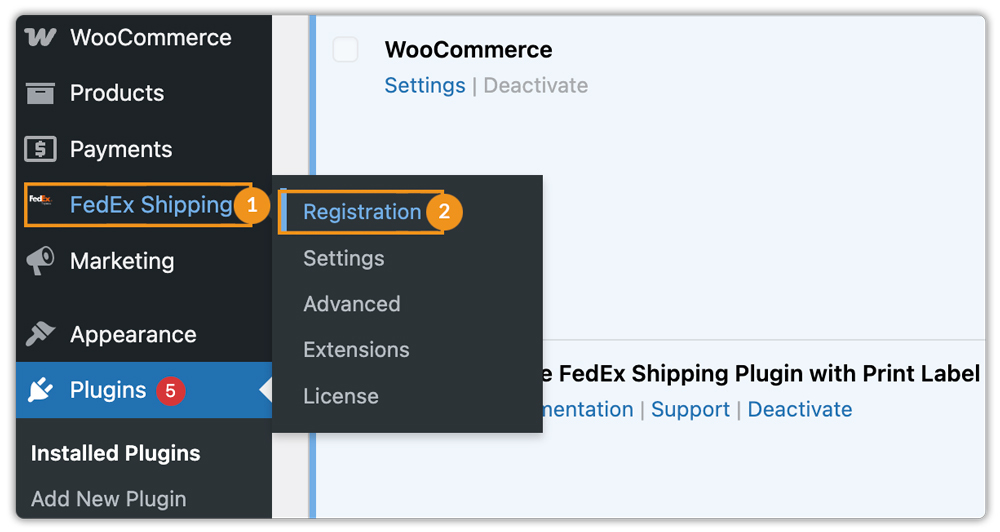
Navigate to FedEx Shipping > Registration in your WooCommerce dashboard.
Accept the integration consent notice and the FedEx End User License Agreement (EULA).

Enter your FedEx account details, including account number, contact information, and business address.

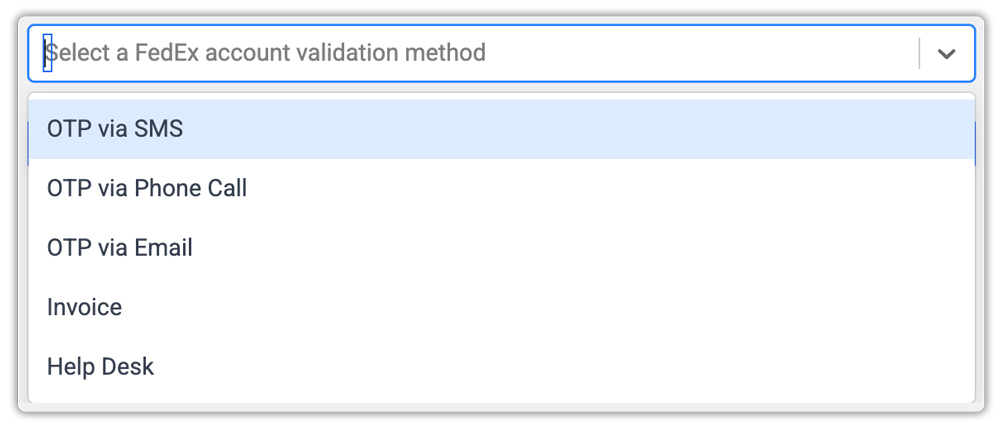
Choose a FedEx account validation method and then complete the verification process to connect your FedEx account.
After successful registration, your WooCommerce store will be able to fetch live FedEx shipping rates, generate shipping labels, enable tracking, and access FedEx shipping services directly from the WooCommerce dashboard.

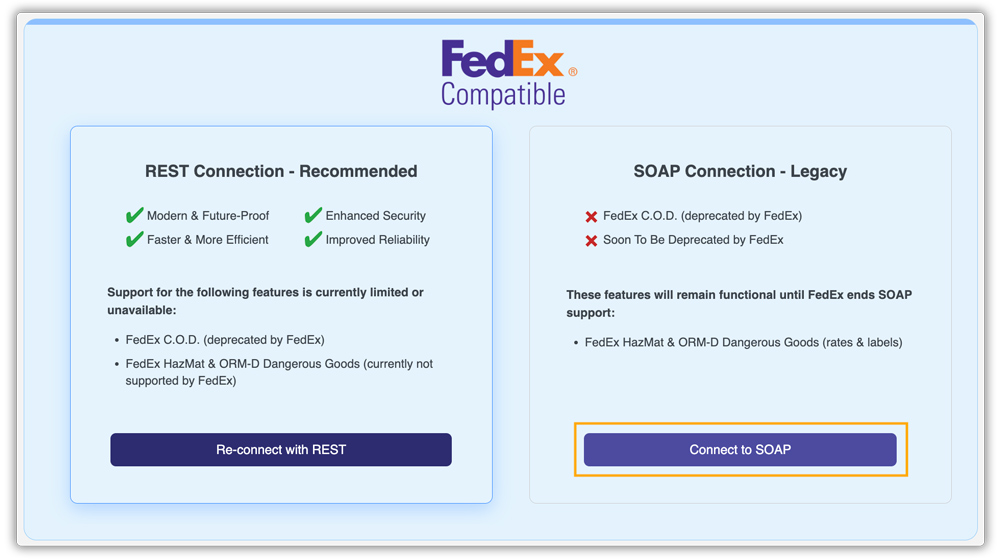
If you need to update your FedEx account later, use the Re-connect option inside the plugin settings and repeat the same process. You can also Connect to SOAP if needed.
For a complete walkthrough, refer to the FedEx Shipping Plugin Setup Guide .
Conclusion
Your FedEx account number is essential for enabling FedEx shipping inside WooCommerce. Once connected through the FedEx Shipping Plugin for WooCommerce with Print Label, your store can automate shipping rates, label generation, tracking, and order fulfillment directly from the WooCommerce dashboard.
If you need help with setup or account registration, you can contact PluginHive Support.
FAQs
Q. Can I use the WooCommerce FedEx plugin without a FedEx account number?
No. The FedEx Shipping Plugin for WooCommerce with Print Label requires a valid FedEx account number to authenticate with FedEx REST APIs. Without it, the plugin cannot fetch shipping rates, generate labels, or access FedEx shipping services.
Q. Do I need FedEx REST API registration for WooCommerce?
Yes. FedEx shipping integrations now use REST APIs. Your FedEx account must complete the required account validation and registration process before the plugin can connect successfully.
Q. Can I use negotiated FedEx shipping rates in WooCommerce?
Yes. Any negotiated or discounted shipping rates linked to your FedEx account are automatically fetched and displayed through the plugin during checkout.
Q. What happens if my FedEx account verification fails?
If verification fails, the plugin will not connect to FedEx services. Double-check your account details, invoice information, or contact FedEx Support to complete the validation successfully.
Q. Can I change my FedEx account later in WooCommerce?
Yes. You can disconnect the existing FedEx account and reconnect a different account anytime through the plugin registration settings.
