



Some products take more effort to get out the door than others, whether it’s wrapping fragile ceramics in bubble wrap, packing frozen goods with dry ice, or assembling heavy equipment for transport. WooCommerce lets you set flat shipping rates or carrier markups at the cart level, but it has no built-in way to add a handling fee per product in WooCommerce. A blanket markup across your store isn’t the answer either, since it can put off customers who are only buying standard, lightweight items.
Charging a handling fee on individual products solves this. Delicate or labour-intensive items cover their own packaging costs, while the rest of your catalog stays competitively priced. In this guide, we’ll show you how to set up and assign a handling fee per product in WooCommerce using PH Product Add-ons for WooCommerce.
On This Page
- Understanding Handling Fees in WooCommerce
- Why Charge a Handling Fee for Individual WooCommerce Products?
- Examples of Product-Specific Handling Fees in WooCommerce
- How to Add a Handling Fee Per Product in WooCommerce
- Tips for Setting Handling Fees in WooCommerce
- Conclusion
- FAQs
Understanding Handling Fees in WooCommerce
A handling fee is a charge that covers the work involved in preparing a WooCommerce order for dispatch, such as picking items, packing them, and adding any special packaging. It is separate from the shipping fee, which only pays the carrier to deliver the parcel.
Handling fees are usually added in one of two ways:
- Per order: One fee is added to the cart, no matter what’s inside it. This suits costs that apply to every order, such as a small-order surcharge.
- Per product: A fee applies to specific products that require extra handling. For example, a furniture store can charge an additional fee for each large item that requires special preparation before shipping.
Knowing which of the two matches your costs makes it easy to decide where the fee belongs.
Why Charge a Handling Fee for Individual WooCommerce Products?
Not every product in your WooCommerce store costs the same to prepare. Charging per product lets the fee follow the effort. Here’s why that works well:
- You recover costs where they actually occur: Fragile or bulky items no longer eat into your profit because their handling cost is covered at the point of sale.
- Customers can see what they’re paying for: The fee sits next to the product it relates to, so customers know what it covers before they add the item to the cart.
- Your margins hold up on low-priced items: Packaging costs can take a big share of the profit on a small product, and a fee protects it.
- It scales with your store: Once the fee is set up, you can assign it to as many products as you like. The PH Product Add-Ons for WooCommerce plugin lets you create add-on groups and assign them to selected products or categories.
Overall, a per-product fee keeps pricing fair for your customers while making sure your handling costs are covered.
Examples of Product-Specific Handling Fees in WooCommerce
Handling fees fit best where a WooCommerce product needs more than a standard pick-and-pack. Here are some common cases:
- Fragile items: Glassware, ceramics, and artwork that need extra padding and reinforced boxes.
- Bulky or heavy products: Furniture and appliances that need more packing material and more hands to prepare.
- Personalized products: Engraved or custom-printed items that need added time and effort. If you sell these, see how to offer product engraving in WooCommerce.
- Perishable goods: Food, flowers, or chocolates that need insulated or temperature-friendly packaging.
- Items that need assembly or checks: Products that must be put together or inspected before dispatch.
These examples share one thing: the cost belongs to the product, so the fee belongs there too.
How to Add a Handling Fee Per Product in WooCommerce
With the PH Product Add-ons for WooCommerce plugin, , customers see the handling fee on the product page before they add the item to their cart. Follow these steps to set it up.
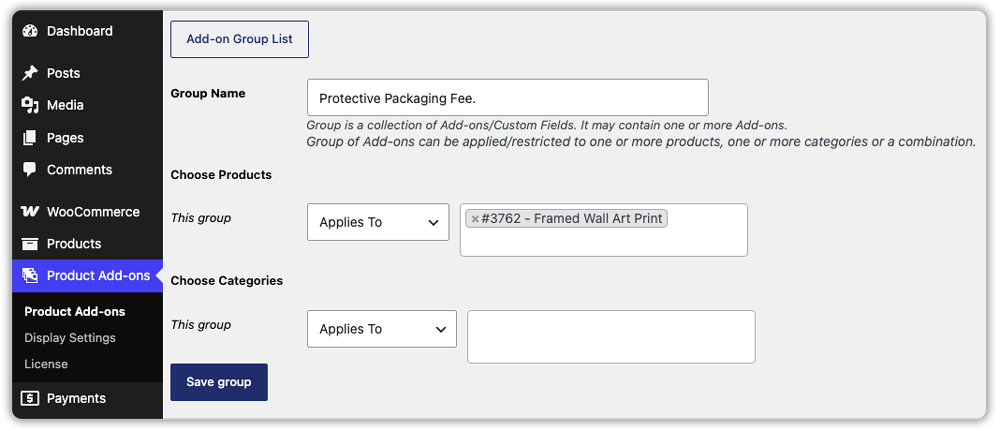
Create a New Add-on Group: Go to WordPress Dashboard → PH Product Add-ons for WooCommerce → Settings and click Add New. Give your group a clear name, such as “Protective Packaging Fee”.

Choose the Products for the Fee: Under Applies To, select the products that need the handling fee. To charge it on everything except a few products, use Does Not Apply To instead. For variable products, you can apply the fee to a single variation, such as only the “Framed” version of a wall art print.
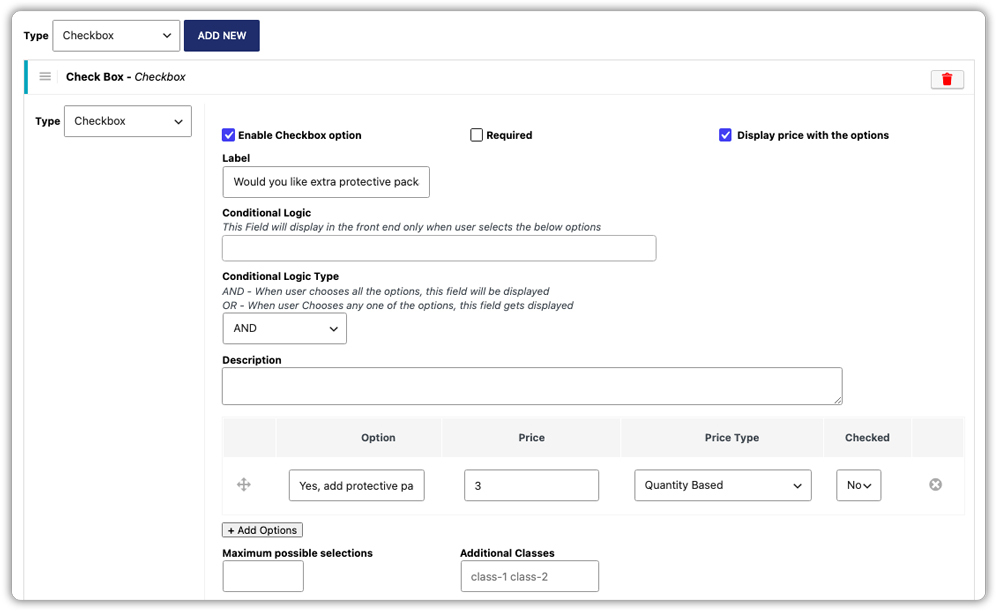
Add the Handling Fee Option: Add a new add-on and choose Checkbox. Label it “Handling Fee” and add a short description like “Includes protective packaging for safe delivery”. Enable Required to apply the fee every time, or leave it off to let customers opt in.
If you’d like to offer handling levels instead, such as standard and priority, choose Radio Button and add one option for each level.
Choose the Price: Decide how the fee is calculated:
- Flat Fee: A fixed amount added to the product price.
- Quantity Based: The fee multiplied by the number of units.
- % of Product Price: A percentage of the product’s base price.

Save and Preview: Save your changes and open one of the selected products. The handling fee shows on the product page and carries through to the cart and checkout.
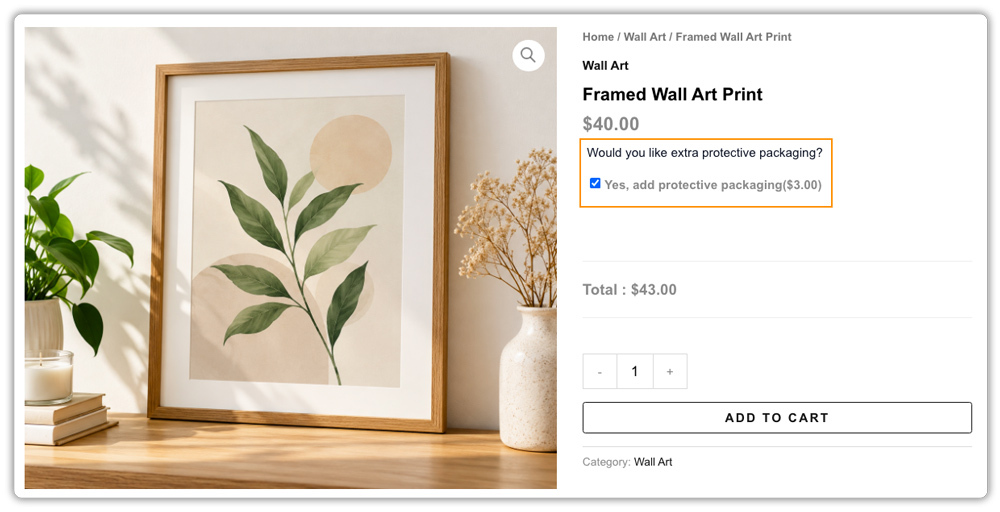
The fee is now added automatically for the products you choose, with no manual charges needed.
Tips for Setting Handling Fees in WooCommerce
A few setup choices make handling fees easier for customers to accept and easier for you to manage. If you’re also looking at other ways to earn more from each order, see how product add-ons can increase your average order value.
- Group products by handling need. If many products need the same fee, assign the add-on group to a product category instead of picking items one by one.
- Keep the fee in proportion. A handling fee that is large next to the product’s price can put customers off, so aim for a fee that feels reasonable for what’s being sold.
- Explain it on your FAQ or shipping policy page. A short note on why you charge handling fees answers questions before customers ask them.
- Reuse your groups. The Copy icon on the Manage Groups screen duplicates a group with all its settings, so you can create a similar fee for another product type in a few clicks.
- Review your fees now and then. Packaging costs change, so revisit your fees every few months and update the group in one place.
These small adjustments can make a noticeable difference in how smoothly your WooCommerce store handles product-specific fees.
Conclusion
Adding a handling fee per product in WooCommerce lets you charge for extra effort only where it applies, without raising prices or overcharging every customer. With the PH Product Add-ons for WooCommerce plugin, you set the fee up once and assign it to exactly the products that need it. If you need help adding this to your store, the PluginHive Support team is ready to help.
FAQs
Q: What does “handling fee” mean?
A handling fee is a charge that covers the cost of preparing an order before it ships, including packing materials and the time your team spends on it. It appears as its own charge, separate from shipping.
Q: How much should I charge for a handling fee?
The handling fee depends on your product type and the extra costs involved in preparing an order. Consider the cost of packaging materials, labor, and any special handling requirements. Set a reasonable fee that covers these expenses without making your products less attractive to customers.
Q: Is a handling fee the same as a delivery fee?
No. A handling fee covers the preparation work before dispatch, while a delivery (shipping) fee covers the cost of moving the parcel to your customer.
Q: Can I add a handling fee per product in WooCommerce without coding?
Yes. With the PH Product Add-ons plugin, you add the fee as a checkbox option on the product page and choose which products it applies to, with no code involved. You can also see how optional extra fees work on the product page.
