


The shipping options displayed at checkout should match the products a customer is purchasing. If your store sells both small and oversized products, displaying the same shipping methods for every category can result in irrelevant options. For instance, offering a standard flat rate for bulky furniture may not be practical, while showing freight shipping for a small accessory can make the checkout unnecessarily complicated.
A better approach is to hide shipping methods in WooCommerce based on product category. This lets you control which shipping options customers see for different types of products. In this guide, we’ll cover the benefits of category-based shipping rules and show you how to configure them using the PH Hide Shipping Methods & Rate Adjustment for WooCommerce plugin.
On this page
- Why Hide Shipping Methods by Product Category in WooCommerce?
- Can WooCommerce Hide Shipping Methods by Product Category?
- How to Hide Shipping Methods for WooCommerce Based on Product Category
- Use Cases for Hiding WooCommerce Shipping Methods by Category
- Other Ways to Hide Shipping Methods in WooCommerce
- Conclusion
- FAQs
Why Hide Shipping Methods by Product Category in WooCommerce?
When every shipping method appears for every product category, customers are left to guess which one actually applies to their order. This leads to a few recurring problems:
- Mismatched shipping costs: A customer might select a cheap flat rate that doesn’t actually cover the cost of shipping a heavy or oversized item from a specific category.
- Confusing checkout experience: Seeing five shipping options when only one makes sense for the cart contents slows customers down and increases the chance they abandon checkout.
- Free shipping misuse: If free shipping is meant only for certain categories, like accessories or small items, showing it for every category can eat into your margins on costly-to-ship products like furniture or electronics.
- Carrier restrictions: Some categories, such as hazardous materials or oversized goods, may only be shippable through specific carriers or services.
Hiding shipping methods by category keeps checkout relevant to what’s actually in the cart, which is a big part of reducing cart abandonment for WooCommerce stores.
Can WooCommerce Hide Shipping Methods by Product Category?
Not on its own. WooCommerce’s built-in shipping settings let you create shipping zones and shipping classes, but there’s no native option to hide or show a shipping method based on product category specifically. The default settings work at the zone or class level, not the category level.
To get category-based control, you need a plugin like PH Hide Shipping Methods & Rate Adjustment for WooCommerce. It adds a rules-based system where product category is one of the available parameters, letting you display or hide any shipping method, including Free Shipping, Flat Rate, Local Pickup, or third-party carrier services, based on what category the cart items belong to.
How to Hide Shipping Methods for WooCommerce Based on Product Category
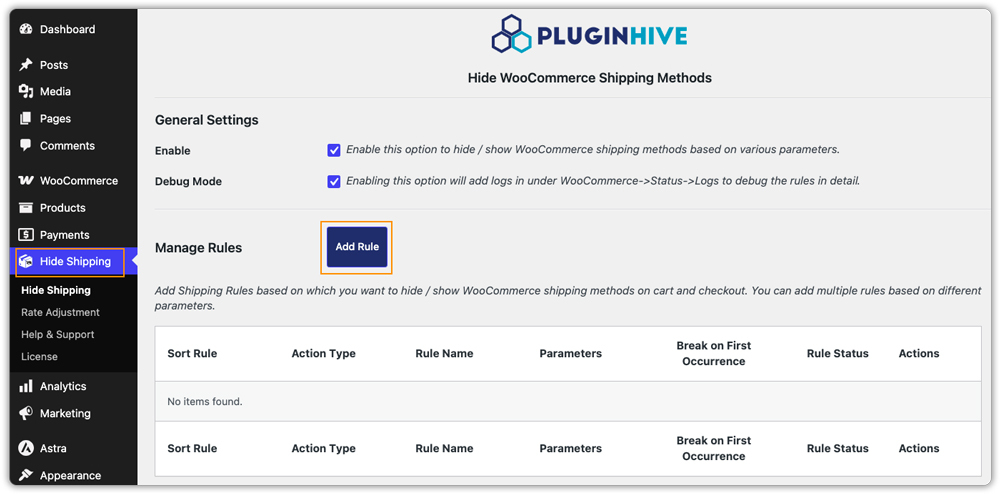
Once PH Hide Shipping Methods & Rate Adjustment for WooCommerce is installed and activated, a Hide Shipping tab appears in your WordPress sidebar. Refer to the setup guide for the full plugin setup if you’re starting from scratch. To hide a shipping method for a specific product category:
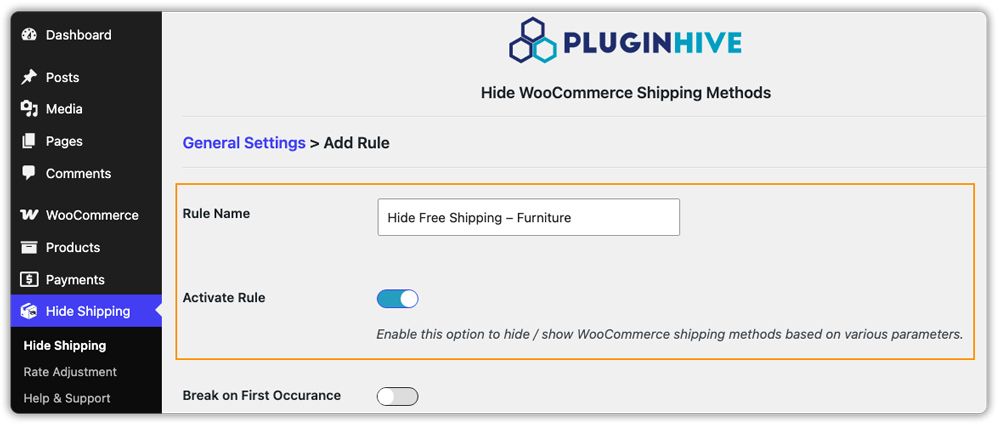
- Add a rule: Go to Hide Shipping → Add Rule, name it (e.g., “Hide Free Shipping – Furniture”), and enable Activate rule. Turn on Break on First Occurrence if you don’t want other rules checked once this one matches.
- Select the category: Under Parameters, enable Products and choose the product category the rule should apply to.

- Add extra conditions (optional): Combine the category with Locations, Cart value, or User roles if the rule should only apply when those also match.
- Choose what to hide: Under Action, set Action Type to Hide Method and select the Shipping service or Shipping Method you want hidden for that category.

- Save the rule: It takes effect immediately on the cart and checkout pages.
Example: Hide Free Shipping for a Specific Product Category
Say your store sells both small accessories and large furniture pieces, and you want Free Shipping to apply only to accessories, since shipping furniture for free isn’t cost-effective. Following the steps above, create a rule with Furniture as the category and Free Shipping as the method to hide.
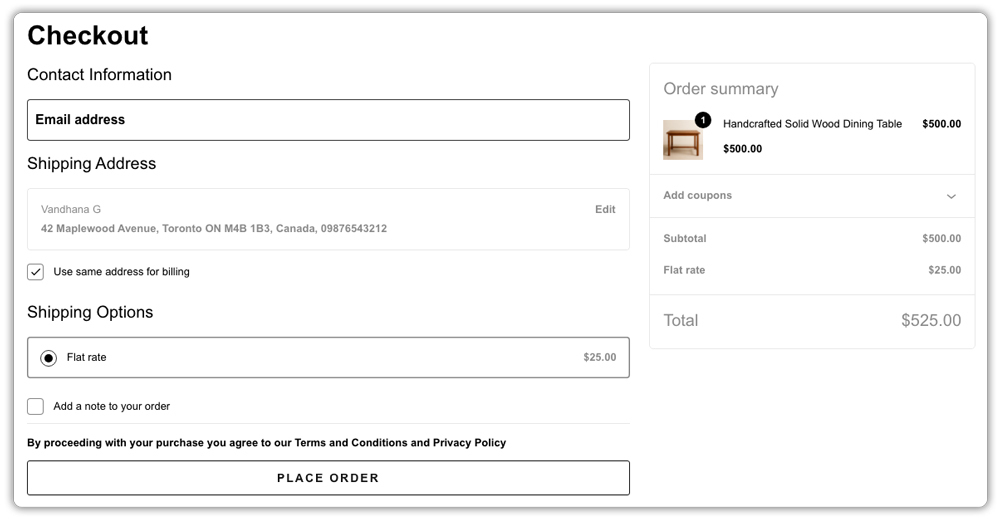

Once saved, Free Shipping no longer appears for carts containing furniture, while accessory-only carts continue to see it as usual.
Use Cases for Hiding WooCommerce Shipping Methods by Category
Category-based shipping visibility works well for a range of real store setups:
- Fragile or hazardous products: Restrict certain categories, like glassware or chemicals, to specific carrier services designed to handle them safely.
- Perishable items: If you sell a category like “Fresh Food” or “Baked Goods,” you need to hide 5-7 day standard shipping so the goods don’t spoil in transit. Only Next-Day or 2-Day Air should stay visible.
- Wholesale or bulk categories: Show only freight or LTL shipping options for categories meant for bulk or business orders.
- Promotional categories: Offer Free Shipping only on categories you’re actively promoting, while keeping standard rates for everything else.
Whatever your product mix, the goal stays the same: show customers only the shipping options that actually apply to what’s in their cart.
Other Ways to Hide Shipping Methods in WooCommerce
Product category is just one of several parameters the plugin supports. Depending on your store’s needs, you might combine category rules with:
- Shipping class, which groups products by shipping characteristics (weight, fragility, size) rather than by category.
- Shipping zones, to hide methods based on customer location, country, state, or zip code.
- Cart value, to hide or show shipping methods based on subtotal, quantity, or total weight.
- User roles, useful if you want certain shipping methods visible only to specific customer types.
- Coupons, to display or hide methods only when a specific coupon code is applied.
Conclusion
Hiding shipping methods by product category keeps checkout clean and prevents customers from choosing options that don’t fit what’s in their cart. With PH Hide Shipping Methods & Rate Adjustment for WooCommerce, setting up these rules takes just a few minutes and doesn’t require any coding. If you run into any issues while setting up your rules, PluginHive’s support team is available to help.
FAQs
Q: Can I hide shipping methods based on multiple product categories at once? Yes. When setting up your rule in the PH Hide Shipping Methods & Rate Adjustment for WooCommerce plugin, you can select multiple categories from the dropdown. If a product belongs to any of the selected categories, the designated shipping methods will be hidden.
Q: Can I hide multiple shipping methods for the same category?
Yes, you can create separate rules for each shipping method you want hidden, or list multiple shipping methods within the same rule’s action settings.
Q: Will hiding a shipping method for one category affect other categories?
No. Rules created with the Products parameter only apply to the category or categories you select in that specific rule. All other categories continue to show their usual shipping options.
