



Hold fulfillment in Shopify allows merchants to temporarily pause the fulfillment of selected items within an order, without canceling or modifying the entire order. It’s beneficial when dealing with backorders, pre-orders, and delayed inventory.
Instead of rushing incomplete shipments or disappointing customers with unexpected delays, hold fulfillment gives you the flexibility to ship what’s ready now and delay the rest until it’s available. This helps maintain transparency with customers and better manage your operations.
In this article, we’ll explore the pros and cons of using hold fulfillment in Shopify and share best practices to ensure you use this feature effectively.
In This Article:
- Hold Fulfillment on Shopify
- Pros of Using Hold Fulfillment
- Cons of Using Hold Fulfillment
- Best Practices for Managing Hold Fulfillment
- Hold Fulfillment with PH Multi Carrier Shipping Label App
- Conclusion
- FAQ’s
Hold Fulfillment on Shopify
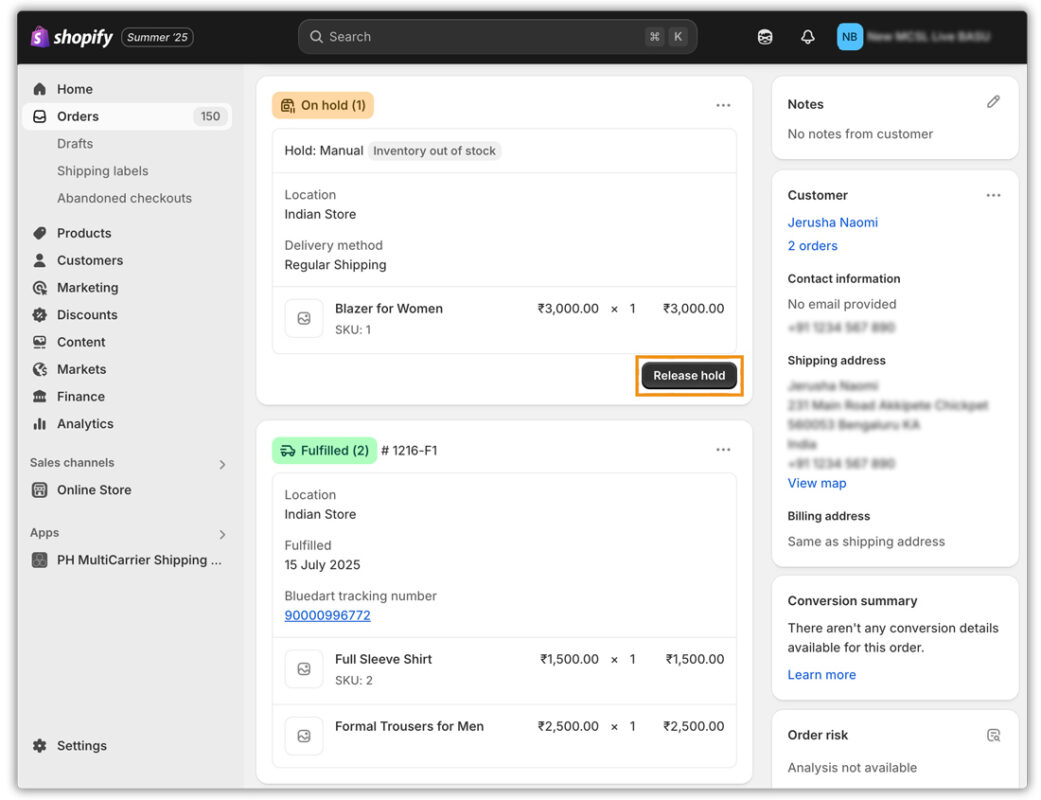
With this feature, you can select which items to put “on hold,” and Shopify will exclude them from the current fulfillment process. The remaining items can then be fulfilled and shipped as normal, while the held items remain pending within the same order.
How it works:
- Go to Orders in your Shopify admin.
- Click into the unfulfilled order.
- In the Unfulfilled section, click the three-dot menu and choose “Hold fulfillment.”
- Select the items to place on hold and specify a reason (e.g., Inventory out of stock, Address Incorrect, etc.).
- These items will stay pending until you’re ready to “Release hold” and fulfill them later.
This approach gives merchants better control over multi-item or multi-stage shipments without needing to split the order or create separate invoices.
Pros of Using Hold Fulfillment
Shopify’s hold fulfillment feature offers several advantages, especially for merchants managing complex or high-volume orders. Here are some of the key benefits:
- Faster Delivery for Available Items
By holding only the delayed items, you can immediately ship the in-stock products, ensuring customers receive part of their order quickly. This helps meet delivery expectations, particularly when fast shipping is a key part of your customer promise.
- Better Inventory Flexibility
Hold fulfillment allows you to process orders with mixed availability, such as pre-orders or backordered items, without delaying the entire process. This is ideal for stores with multiple suppliers, staggered inventory arrivals, or seasonal fluctuations in stock.
- Fewer Refunds and Cancellations
Customers are less likely to cancel their orders when they see progress. Shipping what’s available right away shows transparency and commitment, reducing frustration and minimizing refund requests due to delays.
- Improved Customer Communication
With a clear fulfillment timeline, it becomes easier to send stage-by-stage updates. This enhances trust, especially when customers receive tracking information and proactive communication for each phase of the shipment.
Cons of Using Hold Fulfillment
While holding fulfillment on Shopify offers flexibility, it also introduces certain challenges, especially for smaller teams or stores without. Here are the main drawbacks to consider:
- Increased Shipping and Packaging Costs
Holding an order and fulfilling it into multiple shipments means you’ll pay for extra shipping labels, packaging materials, and courier fees. This can cut into your margins, especially for low-value or free-shipping orders.
- Manual Fulfillment Management
Managing hold fulfillment involves several manual steps: placing items on hold, releasing them later, generating labels, and tracking each stage. It can be time-consuming and error-prone.
- Risk of Customer Confusion
If you don’t communicate that an order is shipping in multiple parts, customers may think items are missing. This can lead to increased support requests, complaints, or negative reviews, even if the order was fulfilled correctly.
- Complexity for Small Teams
For small businesses or solo merchants, handling multi-stage shipments can become overwhelming. Each order may require multiple fulfillment actions, tracking updates, and customer communications.
Best Practices for Managing Hold Fulfillment
To get the most out of Shopify’s hold fulfillment feature and minimize potential drawbacks, it’s essential to follow best practices that keep both your workflow and your customers in sync.
- Communicate Clearly with Customers
Transparency is key. Use messages to explain what items are being shipped now and which are still on hold. Set expectations early to reduce confusion and improve customer satisfaction.
Tip: Mention held shipments in the order confirmation email and link to your shipping policy.
- Track Each Shipment Transparently
Every shipment should have its own tracking number, visible in the Shopify order timeline and in customer emails. This ensures customers can follow the progress of each delivery and know when to expect each part of their order.
Tip: Enable real-time tracking updates through the PH Multi Carrier Shipping Label app so customers can monitor progress without contacting support.
- Keep Internal Workflows Organized
Managing held items across multiple orders can get messy without proper systems. Use tags, or internal notes, to mark which orders have items on hold and when they’re expected to ship. This helps your team stay on top of follow-ups and avoid fulfillment delays.
Tip: Create a daily or weekly routine to review held orders, check stock status, and release fulfillment as soon as items become available.
Hold Fulfillment with PH Multi Carrier Shipping Label App
Managing multi-stage order shipments manually can be tedious and error-prone. The PH Multi Carrier Shipping Label app is built to simplify this process by offering full support for holding fulfillment directly within the app.
To learn everything about hold fulfillment through the PH Multi Carrier Shipping Label, check out: how to split and partially fulfill Shopify orders .
1. Fulfill in Stages
- With the PH Multi Carrier Shipping Label app, you can easily hold items, generate shipping labels only for ready-to-ship items, and mark those as fulfilled, all from a single dashboard.

- When the remaining items are back in stock, simply reopen the same order within Shopify, release the held products, and generate a second set of labels and tracking numbers for the next shipment.
2. Key Features That Make Partial Fulfillment Easy in MCSL:
- Live Rates and Ready-to-Ship Label Generation
Shows live rates at checkout, and only in-stock items appear in the label creation flow. Items on hold are automatically excluded.

- Multiple Fulfillment Support
Return to the same order anytime to fulfill remaining items with new labels and tracking details. - Live Tracking Updates
Automatically send real-time tracking information to your customers for every partial shipment for both domestic and international orders.

3. Centralized Partial Fulfillment and Shipping Management
With the MCSL app, you don’t need to juggle spreadsheets. Everything from label generation, tracking, to pickup scheduling happens in one unified interface, ensuring accurate, timely, and professional shipping for every fulfillment stage.
To Learn more about partial fulfillment through PH Multi Carrier Shipping Label, check out: How to Partially Fulfill Orders on Shopify. .
Conclusion
Hold fulfillment on Shopify is ideal for handling backorders and pre-orders without delaying the entire order. It works especially well for businesses in fashion, electronics, or custom products, where not all items are always ready to ship at once.
By shipping available items first, you improve delivery speed and reduce cancellations. Pairing this feature with the PH Multi Carrier Shipping Label App adds automation, real-time tracking, and easier fulfillment management, making hold fulfillment a smart strategy for better customer experience and operational efficiency.
FAQ’s
- What is hold fulfillment on Shopify?
Hold fulfillment on Shopify allows you to pause the shipping of specific items in an order without canceling or splitting the order. This feature is ideal for managing pre-orders, backorders, or temporarily unavailable inventory.
- Does hold fulfillment affect my shipping costs?
Yes. Fulfilling an order in multiple shipments means you’ll likely pay for additional shipping labels, packaging, and courier fees. Consider using the PH multi-carrier shipping label app to manage these costs efficiently.
- What’s the difference between hold fulfillment and split orders in Shopify?
Hold fulfillment keeps the order intact while pausing specific items. Split orders, on the other hand, separate the order into different shipments. Hold fulfillment is cleaner and keeps everything within the original order record, which is better for tracking and reporting.
- Can I set an automatic release date for held items?
No, Shopify does not currently support automatic release of held fulfillment. You need to manually release the hold when you’re ready to fulfill the remaining items. Apps like PH Multi Carrier Shipping Label help streamline this process.
